
การแนะนำ
Thank you for choosing the Vention Open Ear Openbeat O12 Wireless Sport Headphones. These headphones are designed to provide a comfortable and secure audio experience during physical activities, allowing you to stay aware of your surroundings. This manual provides essential information for setting up, operating, maintaining, and troubleshooting your device.
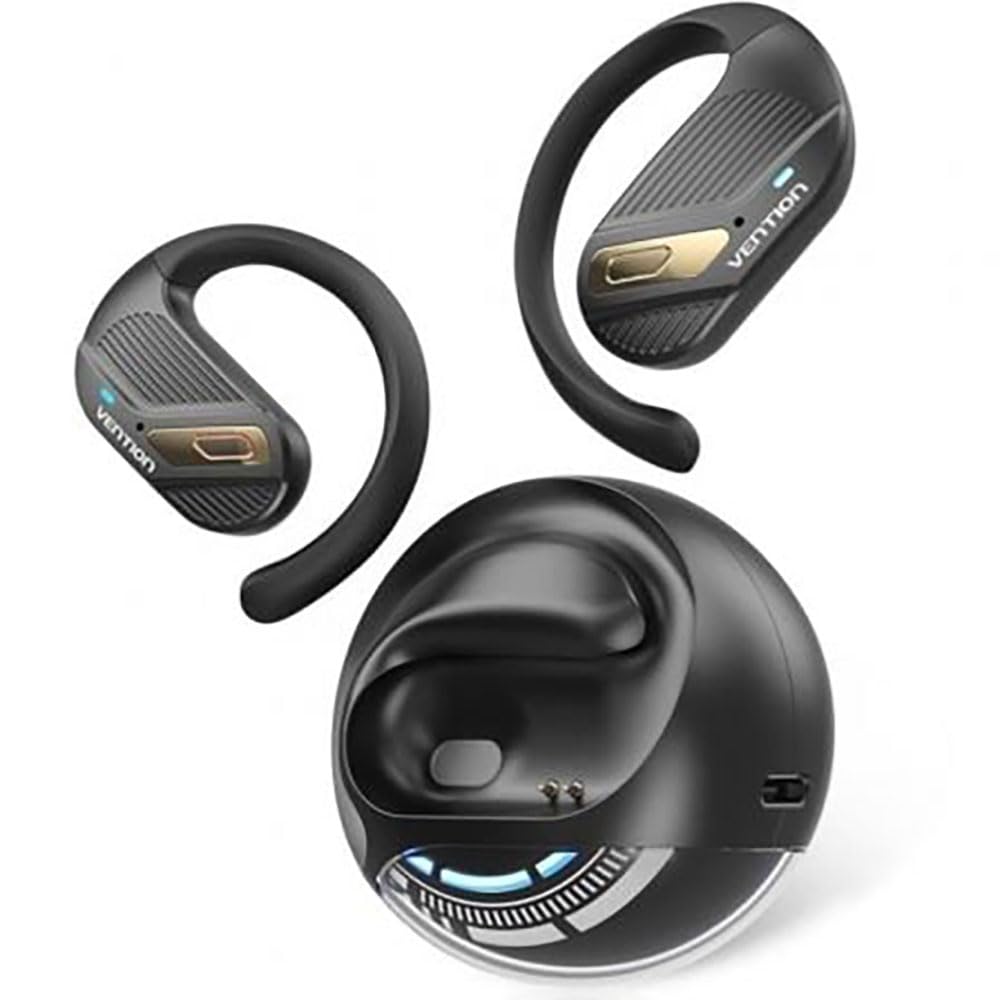
Image: Vention Open Ear Openbeat O12 Wireless Sport Headphones, showcasing the open-ear design and ergonomic fit.
การตั้งค่า
1. เนื้อหาบรรจุภัณฑ์
กรุณาตรวจสอบแพ็คเกจสำหรับรายการต่อไปนี้:
- Vention Open Ear Openbeat O12 Wireless Sport Headphones
- สายชาร์จ USB-C
- คู่มือการใช้งาน
2. การชาร์จหูฟัง
- เสียบสายชาร์จ USB-C เข้ากับพอร์ตชาร์จบนหูฟัง
- ต่อปลายอีกด้านของสายเคเบิลเข้ากับอะแดปเตอร์แปลงไฟ USB (แนะนำ 5V/1A) หรือพอร์ต USB ของคอมพิวเตอร์
- The LED indicator will glow red during charging and turn blue or off when fully charged.
- โดยทั่วไปการชาร์จเต็มจะใช้เวลาประมาณ 1.5 ถึง 2 ชั่วโมง
3. การจับคู่บลูทู ธ
- ตรวจสอบให้แน่ใจว่าหูฟังชาร์จเต็มแล้วก่อนใช้งานครั้งแรก
- เปิดเครื่อง: Press and hold the Multi-function Button (MFB) for 3-5 seconds until the LED indicator flashes blue and red alternately, indicating pairing mode.
- เปิดใช้งานบลูทูธ: เปิดใช้งาน Bluetooth บนสมาร์ทโฟนหรืออุปกรณ์เสียงของคุณ
- เลือกอุปกรณ์: ค้นหา "Vention Openbeat O12" in the list of available Bluetooth devices and select it.
- การยืนยัน: Once successfully paired, the LED indicator will flash blue slowly, and you will hear an audible confirmation.
- หูฟังจะเชื่อมต่อกับอุปกรณ์ที่จับคู่ล่าสุดโดยอัตโนมัติเมื่อเปิดเครื่อง หากบลูทูธของอุปกรณ์นั้นเปิดใช้งานอยู่และอยู่ในระยะทำการ
คำแนะนำการใช้งาน
1. เปิด/ปิดเครื่อง
- เปิดเครื่อง: กดปุ่ม MFB ค้างไว้ 3 วินาที
- หมดแรง: กดปุ่ม MFB ค้างไว้ 5 วินาที
2. การเล่นเพลง
- เล่น/หยุดชั่วคราว: กด MFB หนึ่งครั้ง
- เพลงถัดไป: กดปุ่มเพิ่มระดับเสียงค้างไว้ 2 วินาที
- แทร็กก่อนหน้า: กดปุ่มลดระดับเสียงค้างไว้ 2 วินาที
- ปรับระดับเสียงขึ้น: กดปุ่มเพิ่มระดับเสียง (Volume +) หนึ่งครั้ง
- ลดเสียงลง: กดปุ่มลดเสียงหนึ่งครั้ง
3. การจัดการการโทร
- รับ/วางสาย: กด MFB หนึ่งครั้ง
- ปฏิเสธสาย: กดปุ่ม MFB ค้างไว้ 2 วินาที
- ผู้ช่วยเสียง: Triple-press the MFB to activate your device's voice assistant (e.g., Siri, Google Assistant).
4. การสวมหูฟัง
Position the headphones so that the ear hooks rest comfortably over your ears and the transducers sit just outside your ear canal. Adjust the band for a secure and stable fit during activity. The open-ear design ensures ambient sound awareness.
การซ่อมบำรุง
1. การทำความสะอาด
- Wipe the headphones with a soft, dry, or slightly damp ผ้า.
- ห้ามใช้สารทำความสะอาดที่มีฤทธิ์กัดกร่อน แอลกอฮอล์ หรือตัวทำละลายเคมี
- ตรวจสอบให้แน่ใจว่าพอร์ตชาร์จแห้งก่อนทำการชาร์จ
2. การจัดเก็บ
- ควรเก็บหูฟังไว้ในที่แห้งและเย็น หลีกเลี่ยงแสงแดดโดยตรงและอุณหภูมิที่สูงหรือต่ำเกินไป
- หลีกเลี่ยงการวางวัตถุหนักบนหูฟัง
3. การดูแลแบตเตอรี่
- ควรชาร์จหูฟังเป็นประจำ แม้ว่าจะไม่ได้ใช้งาน เพื่อรักษาอายุการใช้งานของแบตเตอรี่
- หลีกเลี่ยงการปล่อยแบตเตอรี่จนหมดบ่อยครั้ง
การแก้ไขปัญหา
| ปัญหา | สารละลาย |
|---|---|
| หูฟังไม่สามารถเปิดเครื่องได้ |
|
| ไม่สามารถจับคู่กับอุปกรณ์ได้ |
|
| ไม่มีเสียงหรือเสียงเบา |
|
| การเชื่อมต่อไม่ต่อเนื่อง |
|
ข้อมูลจำเพาะ
- แบบอย่าง: Openbeat O12
- เวอร์ชันบลูทูธ: 5.3
- ระยะสัญญาณไร้สาย: สูงถึง 10 เมตร (33 ฟุต)
- ความจุแบตเตอรี่: 150mAh
- เวลาเล่น: สูงสุด 8 ชั่วโมง (ที่ระดับเสียง 60%)
- เวลาในการชาร์จ: ประมาณ 1.5 - 2 ชั่วโมง
- พอร์ตชาร์จ: ยูเอสบี-ซี
- การตอบสนองความถี่: 20เฮิรตซ์ - 20กิโลเฮิรตซ์
- ความต้านทานน้ำ: มาตรฐาน IPX4 (กันเหงื่อและละอองน้ำ)
- น้ำหนัก: ประมาณ 25กรัม
การรับประกันและการสนับสนุน
Vention products are designed and manufactured to the highest quality standards. For detailed warranty information and customer support, please refer to the warranty card included in your product packaging or visit the official Vention webไซต์ โปรดเก็บหลักฐานการซื้อไว้เพื่อใช้ในการเรียกร้องการรับประกัน
For technical assistance or inquiries, please contact Vention customer support through the channels provided on our official webเว็บไซต์.