
1. บทนำ
ขอบคุณสำหรับการซื้อasing the ThermoPro TP210B Wireless Refrigerator/Freezer Thermometer. This device is designed to help you monitor the temperature of your refrigerator and freezer wirelessly, ensuring your food is stored at optimal temperatures. With a strong 500ft/150m wireless range and customizable alarms, you can easily keep track of temperature fluctuations.
2. เนื้อหาบรรจุภัณฑ์
- 1 x ตัวรับ หน่วย
- 1 x หน่วยส่งสัญญาณ
- แบตเตอรี่ AAA 2 ก้อน (สำหรับเครื่องรับ)
- 1 x USB Charging Cable (for Transmitter)
- 1 x คู่มือผู้ใช้
3. คุณสมบัติหลัก
- ระยะไร้สายขยาย: Up to 500ft/150m using advanced RF technology for stable connection.
- จับคู่ไว้แล้ว พร้อมใช้งานได้ทันที: No complex setup required; units are pre-paired from the factory.
- ช่วงการวัดกว้าง: Accurate readings within ±0.9°F across -40°F to 158°F (-40°C to 70°C).
- ระบบแจ้งเตือนอุณหภูมิอัจฉริยะ: Customizable high/low temperature limits with audio-visual alarms.
- จอแสดงผลเรืองแสงอ่านง่าย: Shows fridge and freezer readings, Max/Min records, and low-battery status.
- Considerate Power Design: Receiver uses AAA batteries, transmitter features a rechargeable lithium battery.
- ตัวเลือกตำแหน่งที่ยืดหยุ่น: Receiver has hook, stand, or magnet; transmitter has clip or stand.
4. การตั้งค่า
4.1. การติดตั้งแบตเตอรี่เครื่องรับสัญญาณ
- Open the battery compartment on the back of the receiver unit.
- ใส่แบตเตอรี่ AAA จำนวน 2 ก้อน โดยตรวจสอบให้แน่ใจว่าขั้วถูกต้อง (+/-)
- ปิดช่องใส่แบตเตอรี่ให้แน่น
Note: The receiver requires 2 AAA batteries, which are included in the package.
4.2. Transmitter Charging
- Locate the charging port on the transmitter unit.
- Connect the provided USB charging cable to the transmitter and a standard USB power source (e.g., wall adapter, computer USB port).
- Allow the transmitter to charge fully before first use. The charging indicator will change when fully charged.
Note: The transmitter uses a rechargeable lithium battery designed for low-temperature environments.
4.3. Initial Pairing (Pre-Paired)
The ThermoPro TP210B units are pre-paired at the factory. Simply power on both the receiver and transmitter, and they should automatically connect. If connection issues occur, refer to the Troubleshooting section.
4.4 การวาง
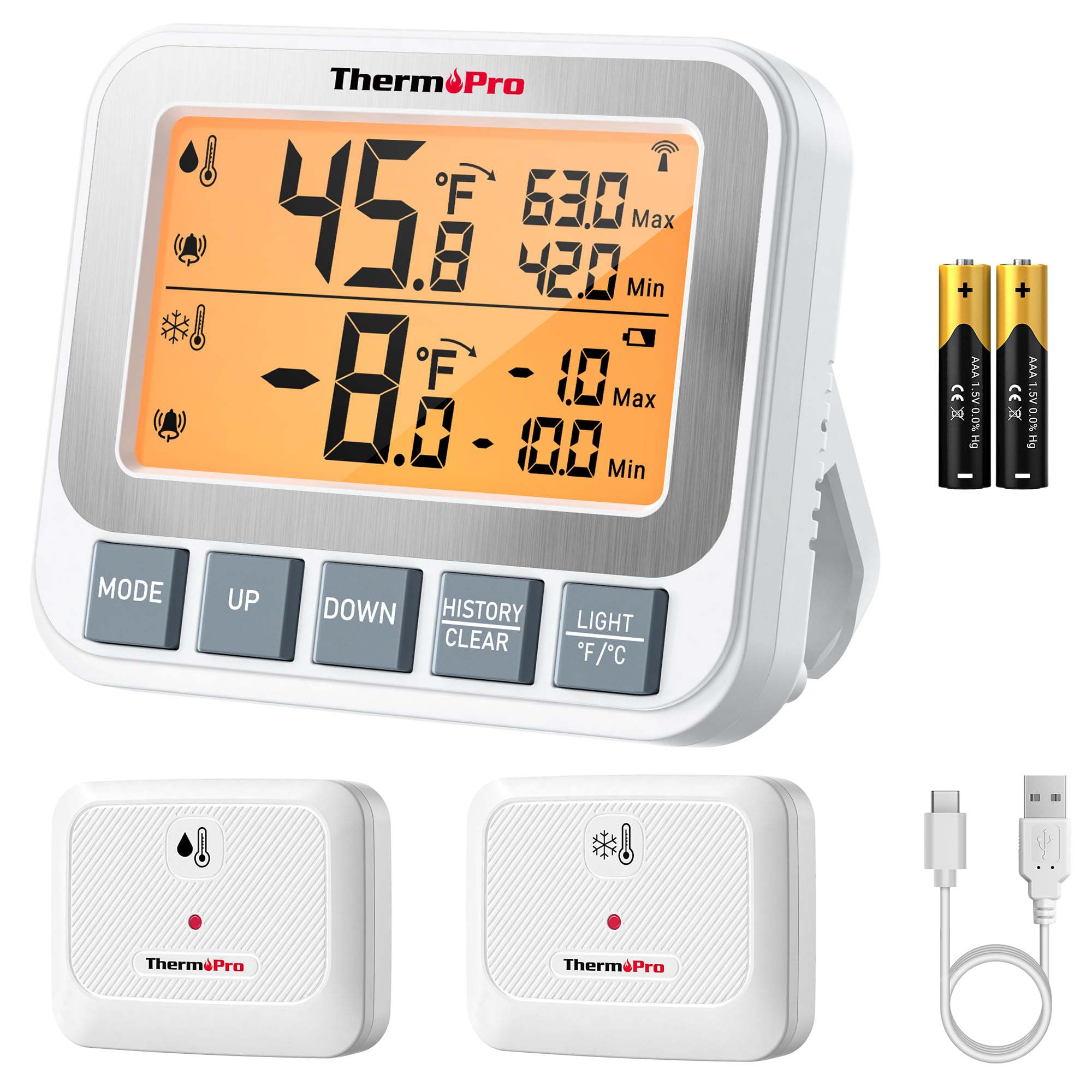
Image: ThermoPro TP210B Receiver and Transmitter. The receiver displays temperatures, while the transmitter sends data from inside the appliance.
ตำแหน่งเครื่องรับ:
- Use the integrated stand to place it on a countertop.
- Utilize the magnetic back to attach it to a metallic surface.
- Hang it using the hook on the back.
- Place the receiver in a location where you can easily view the display and hear alarms, within the 500ft/150m range of the transmitter.
ตำแหน่งการติดตั้งเครื่องส่งสัญญาณ:
- Place the transmitter inside your refrigerator or freezer.
- Use the integrated clip to attach it to a shelf or rack.
- Ensure the transmitter is not obstructed by large items that could block the wireless signal.
5. คู่มือการใช้งาน
5.1. เปิด/ปิดเครื่อง
- กดปุ่ม พลัง button on both the receiver and transmitter to turn them on or off.
5.2. การอ่านค่าอุณหภูมิ
- The receiver's backlit LCD display will show the current temperature from the transmitter.
- The display typically shows both the current temperature and the all-time Max/Min records.
5.3. Setting Temperature Alarms
The TP210B allows you to set custom high and low temperature limits for alerts.
- กดปุ่ม เตือน button on the receiver. The high limit will flash.
- ใช้ UP or ลง buttons to adjust the high temperature limit.
- กด เตือน again to confirm the high limit and move to the low limit setting.
- ใช้ UP or ลง buttons to adjust the low temperature limit.
- กด เตือน a third time to confirm the low limit and exit alarm setting mode.
When the temperature exceeds the set range, the receiver will emit an audio-visual alarm.
5.4. Max/Min Temperature Records
- The receiver automatically records the maximum and minimum temperatures detected since the last reset.
- กดปุ่ม สูงสุด/ต่ำสุด button to cycle through current, maximum, and minimum temperature readings.
- To reset the Max/Min records, press and hold the สูงสุด/ต่ำสุด ปุ่มเป็นเวลา 3 วินาทีในขณะที่ viewing the Max/Min display.
5.5. ไฟแบ็คไลท์
- The receiver features a bright backlit display for easy reading in low-light conditions.
- The backlight will activate automatically when a button is pressed and will turn off after a short period of inactivity to conserve battery.
6. การบำรุงรักษา
6.1. การทำความสะอาด
- เช็ดทำความสะอาดอุปกรณ์ด้วยโฆษณาamp ผ้า ห้ามจุ่มน้ำ
- ห้ามใช้น้ำยาทำความสะอาดที่มีฤทธิ์กัดกร่อนหรือตัวทำละลาย
6.2. Battery Replacement (Receiver)
- When the low battery indicator appears on the receiver display, replace the 2 AAA batteries.
- ตรวจสอบให้แน่ใจว่าใส่แบตเตอรี่ตรงขั้วทุกครั้ง
6.3. Transmitter Charging
- Recharge the transmitter's lithium battery when the low battery indicator appears.
- ใช้สายชาร์จ USB ที่ให้มา
6.4. การจัดเก็บ
- If storing the device for an extended period, remove the AAA batteries from the receiver.
- เก็บในที่แห้งห่างจากอุณหภูมิที่สูงเกินไป
7 การแก้ไขปัญหา
| ปัญหา | สาเหตุที่เป็นไปได้ | สารละลาย |
|---|---|---|
| No temperature reading / "--" displayed | Transmitter not powered on, out of range, or low battery. |
|
| การอ่านอุณหภูมิไม่ถูกต้อง | Sensor obstruction, extreme environmental conditions, or sensor malfunction. |
|
| เสียงสัญญาณเตือนไม่ดัง | Alarm limits not set correctly or alarm function disabled. |
|
| Transmitter battery drains quickly | Operating in extremely low temperatures or frequent signal transmission. |
|
8. ข้อมูลจำเพาะ
- ช่วงอุณหภูมิ: -40°F ถึง 158°F (-40°C ถึง 70°C)
- ความแม่นยำของอุณหภูมิ: ± 0.9 ° F (± 0.5 ° C)
- ระยะสัญญาณไร้สาย: สูงถึง 500 ฟุต (150 เมตร) ในที่โล่ง
- ความถี่ในการส่งสัญญาณ: 433 เมกะเฮิรตซ์
- กำลังรับ: แบตเตอรี่ 2 x AAA (มาพร้อมกับเครื่อง)
- กำลังส่งสัญญาณ: Rechargeable Lithium battery (included, with USB charging cable)
- แสดง: จอ LCD พร้อมไฟแบ็คไลท์
- ขนาด (ตัวรับ): ความยาวประมาณ 4.33 นิ้ว
- น้ำหนัก (ต่อชิ้น): ประมาณ 11.2 ออนซ์
9. การรับประกันและการสนับสนุน
ThermoPro ให้การรับประกันสินค้าชิ้นนี้ในกรณีที่สินค้ามีข้อบกพร่องด้านวัสดุและฝีมือการผลิต สำหรับข้อมูลการรับประกันโดยละเอียด การลงทะเบียนผลิตภัณฑ์ หรือการสนับสนุนทางเทคนิค โปรดเยี่ยมชมเว็บไซต์อย่างเป็นทางการของ ThermoPro webหรือติดต่อฝ่ายบริการลูกค้าโดยตรง
เป็นทางการ Webเว็บไซต์: www.thermopro.com
การสนับสนุนลูกค้า: Refer to the contact information provided on the ThermoPro webบรรจุภัณฑ์ไซต์หรือผลิตภัณฑ์