
1. บทนำ
Thank you for choosing the JeeBer VB619 1080P No WiFi Video Baby Monitor. This manual provides detailed instructions for the safe and effective use of your new baby monitor. Please read this manual thoroughly before operation and retain it for future reference. This monitor is designed to provide clear video and audio surveillance of your baby, ensuring peace of mind with its secure, non-Wi-Fi connection.
2. เนื้อหาบรรจุภัณฑ์
Ensure all items are present in the package. If any items are missing or damaged, please contact customer support.
- Baby Monitor Unit (Parent Unit)
- Baby Camera Unit (Baby Unit)
- Charging Cable (x2, one for each unit)
- คู่มือการใช้งาน (เอกสารนี้)
3. สินค้าหมดview
The JeeBer VB619 baby monitor system consists of a parent unit with a 5-inch 1080P IPS display and a baby unit (camera). It features a secure FHSS wireless connection, eliminating the need for Wi-Fi.

ภาพที่ 3.1: เกินview of the JeeBer VB619 Baby Monitor system, showing the parent unit (monitor) and the baby unit (camera) with a baby in the background. Key features like 5-inch IPS screen, VOX mode, 1080P HD clarity, FHSS encrypted transmission, no WiFi, 4 camera support, two-way audio, 3x zoom, fixed view with digital pan, 8-meter HD night vision, temperature monitoring, feeding reminder, and lullabies are highlighted.

ภาพที่ 3.2: The JeeBer baby monitor highlighting its "No WiFi Required" feature, emphasizing privacy protection through FHSS technology.
3.1 Parent Unit (Monitor) Features:
- 5-inch 1080P IPS Display: Provides a clear, wide-angle view ของลูกน้อยของคุณ
- การพูดคุยแบบสองทาง: สื่อสารกับลูกน้อยของคุณจากระยะไกล
- โหมด VOX: Voice-activated screen for power saving.
- การตรวจติดตามอุณหภูมิ: Displays real-time room temperature.
- เพลงกล่อมเด็ก: Built-in soothing melodies.
- ซูมดิจิตอล 3 เท่า: Magnify the view for closer inspection.
- ขยายได้: Supports up to four cameras (sold separately).
- แบตเตอรี่ 3050mAh: Long-lasting power for continuous monitoring.
3.2 Baby Unit (Camera) Features:
- วิดีโอ HD 1080P: การบันทึกวิดีโอความละเอียดสูง
- การมองเห็นในเวลากลางคืนที่คมชัด: 10 invisible infrared LEDs for clear images in darkness.
- เซ็นเซอร์อุณหภูมิ: Detects room temperature.
- ไมโครโฟนและลำโพง: สำหรับการสื่อสารด้วยเสียงสองทาง
4. การตั้งค่า
Follow these steps for initial setup of your baby monitor system.
- คิดค่าบริการสำหรับอุปกรณ์หลัก: Connect the charging cable to the parent unit and a power outlet. Charge fully before first use.
- เปิดใช้งานชุดอุปกรณ์สำหรับทารก: Connect the charging cable to the baby unit and a power outlet. The camera requires continuous power to operate.
- จัดวางตำแหน่งเครื่องให้นมบุตร: Place the baby unit (camera) in a secure location in your baby's room, ensuring a clear view of the crib. Keep it at least 3 feet (1 meter) away from the crib to prevent entanglement hazards.
- เปิดเครื่อง: Turn on both the parent unit and the baby unit. The units are pre-paired at the factory and should automatically connect.
- ทดสอบการเชื่อมต่อ: Verify that you can see and hear your baby through the parent unit. Adjust the camera angle as needed.

ภาพที่ 4.1: A woman in a kitchen observing her baby on the 5-inch 1080P IPS Eye-Care Display of the JeeBer baby monitor. The image emphasizes the clear view จากมุมใดก็ได้
5. คู่มือการใช้งาน
5.1 การทำงานพื้นฐาน
- เปิด/ปิดเครื่อง: Press and hold the power button on the parent unit.
- การควบคุมระดับเสียง: Use the dedicated volume buttons on the parent unit to adjust audio levels.
- การควบคุมความสว่าง: Adjust screen brightness via the menu settings.
5.2 VOX Mode (Voice-Activated Screen)
VOX mode conserves battery life by turning off the screen when no sound is detected from the baby unit. The screen automatically reactivates when sound is detected.
- Activate/Deactivate VOX: Access the menu on the parent unit and select the VOX option to turn it on or off.
- ความไวของ VOX: Adjust the sensitivity level in the menu to determine how loud a sound needs to be to activate the screen.

ภาพที่ 5.1: A visual comparison demonstrating the enhanced clarity of JeeBer's night vision, powered by 10 infrared LED bulbs, compared to another brand's night vision.

ภาพที่ 5.2: An image depicting a baby sleeping peacefully, with musical notes floating around, symbolizing the 8 soothing lullabies feature designed to aid healthy sleep habits.
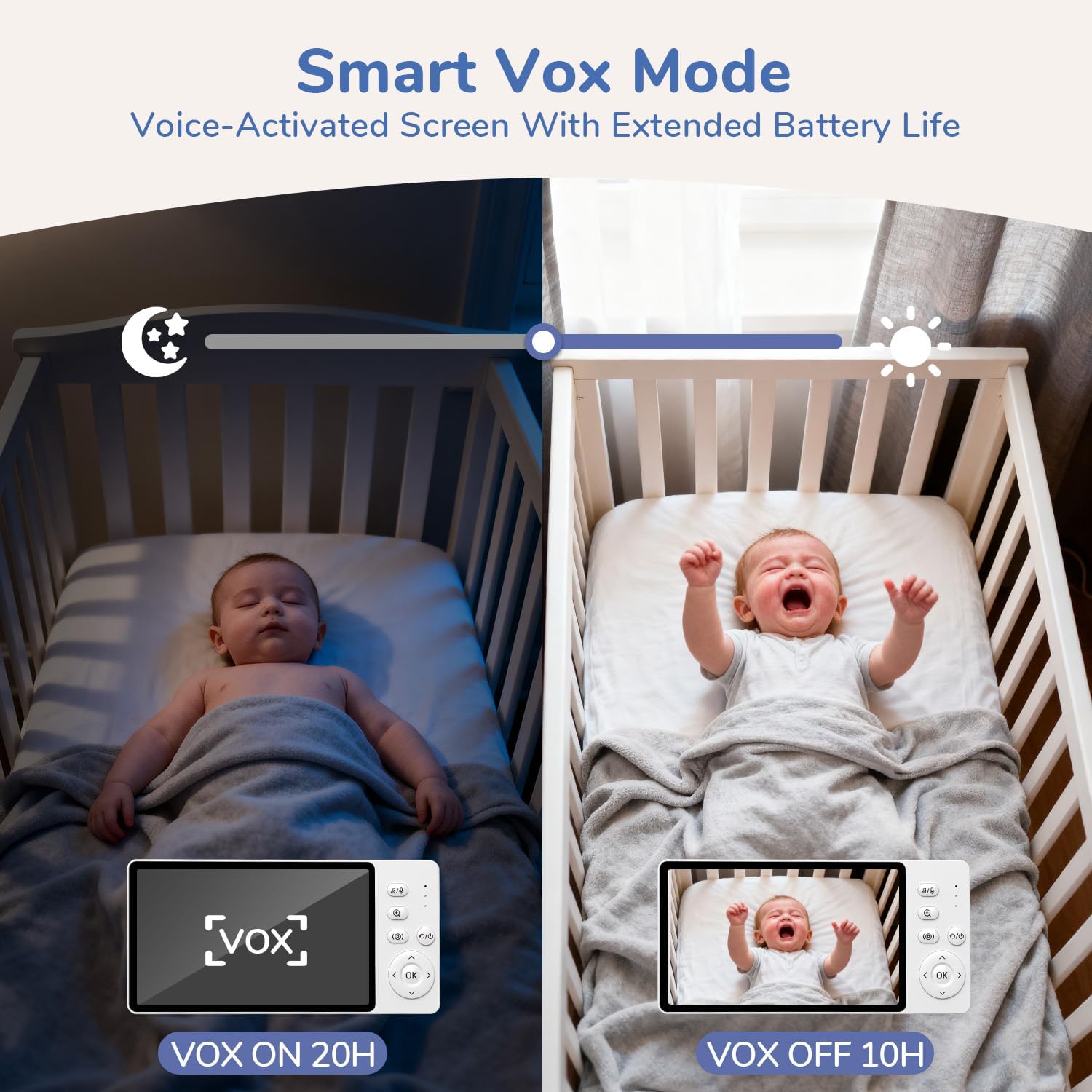
ภาพที่ 5.3: This image illustrates the Smart VOX Mode, showing the monitor screen off when the baby is sleeping (VOX ON, 20H battery life) and the screen on when the baby is crying (VOX OFF, 10H battery life), highlighting its voice-activated screen and extended battery life.
5.3 การสนทนาสองทาง
To speak to your baby, press and hold the "Talk" button on the parent unit. Release the button to hear your baby.

ภาพที่ 5.4: A woman in a kitchen using the two-way noise-canceling call feature of the JeeBer baby monitor to communicate with her baby in the crib, with speech bubbles indicating "I hear you, my love." and "Ah-goo... ba-ba...".
5.4 เพลงกล่อมเด็ก
Access the lullaby menu on the parent unit to select and play soothing melodies for your baby. You can choose from 8 built-in lullabies.
5.5 ซูมดิจิตอล
Press the zoom button on the parent unit to digitally zoom in on the video feed (up to 3X). Press again to zoom out.
5.6 การมองเห็นตอนกลางคืน
The baby unit automatically activates its infrared night vision in low-light conditions, providing a clear black and white image of your baby without disturbing red lights.
5.7 การตรวจติดตามอุณหภูมิ
The parent unit displays the real-time temperature of your baby's room, detected by the baby unit's sensor.

ภาพที่ 5.5: An image showing the precise temperature monitoring feature of the JeeBer baby monitor, displaying "28.8°C" on the screen while a parent interacts with a baby. This highlights scientific care powered by accurate temperature readings.
5.8 Adding/Managing Cameras (Optional)
Your monitor supports up to four cameras. To add additional cameras, refer to the "Camera Pairing" section in the menu settings on your parent unit.
6. การบำรุงรักษา
- การทำความสะอาด: Use a soft, dry cloth to clean the surfaces of both units. Do not use abrasive cleaners or solvents.
- การดูแลเลนส์: Gently wipe the camera lens with a lens cleaning cloth if it becomes dirty.
- พื้นที่จัดเก็บ: If storing the monitor for an extended period, ensure both units are fully charged and then powered off. Store in a cool, dry place.
7 การแก้ไขปัญหา
| ปัญหา | วิธีแก้ปัญหาที่เป็นไปได้ |
|---|---|
| ไม่มีภาพ/เสียงบนเครื่องรับสัญญาณหลัก |
|
| คุณภาพของภาพไม่ดี |
|
| แบตเตอรี่มีอายุสั้น |
|
| Interference/Static. |
|
8. ข้อมูลจำเพาะ
| คุณสมบัติ | รายละเอียด |
|---|---|
| ชื่อรุ่น | VB619 |
| การใช้งานภายใน/ภายนอกอาคาร | ในร่ม |
| แหล่งพลังงาน | ใช้พลังงานจากแบตเตอรี่ (สำหรับผู้ปกครอง) ใช้พลังงานจากไฟบ้าน (สำหรับทารก) |
| เทคโนโลยีการเชื่อมต่อ | ไร้สาย (FHSS) |
| ความละเอียดในการจับภาพวิดีโอ | 1080p |
| จอแสดงผลหน่วยหลัก | จอ IPS ขนาด 5 นิ้ว |
| คุณสมบัติพิเศษ | 2-Way Audio, Cry Detection (VOX), HD Resolution, Night Vision, Temperature Monitoring, Lullabies, 3X Zoom |
| ขนาดรายการ (ยาว x กว้าง x สูง) | 2.6 x 4.33 x 5.91 นิ้ว |
| น้ำหนักสินค้า | 1.23 ปอนด์ |
| แบตเตอรี่ | 1 C battery required (included for parent unit) |
9. การรับประกันและการสนับสนุน
JeeBer offers a นโยบายการคืนสินค้าฟรีภายใน 90 วัน และก รับประกัน 2 ปี for this product. For any questions, technical assistance, or warranty claims, please contact JeeBer customer service.
Our dedicated customer service team is available to provide one-on-one support. Please refer to the contact information provided with your purchase or visit the official JeeBer webเว็บไซต์สำหรับรายละเอียดการสนับสนุน