
การแนะนำ
This manual provides essential information for setting up, operating, maintaining, and troubleshooting your HP 15.6-inch FHD IPS Touchscreen Laptop. Please read this guide thoroughly to ensure optimal performance and longevity of your device. This laptop features an AMD Ryzen 7 7730U processor, 64GB DDR4 RAM, 2.28TB storage (2TB SSD + 288GB Docking Station Set), AMD Radeon Graphics, and runs on Windows 11 Pro.
การตั้งค่า
การแกะกล่องและการเปิดเครื่องครั้งแรก
Carefully remove all components from the packaging. Connect the power adapter to the laptop and a power outlet. Press the power button to turn on the laptop. Follow the on-screen instructions to complete the initial Windows 11 Pro setup.
อุปกรณ์เสริมที่รวมอยู่ด้วย
Your laptop package includes the following accessories:
- 1x 7-in-1 Docking Station with 256GB Storage
- การ์ด MicroSD 1x 32GB พร้อมอะแดปเตอร์
- สายเคเบิลข้อมูล Type-C 1 เส้น
- สายชาร์จ 3-in-1 1 เส้น
- ผ้าทำความสะอาดหนังกลับ 1 ชิ้น
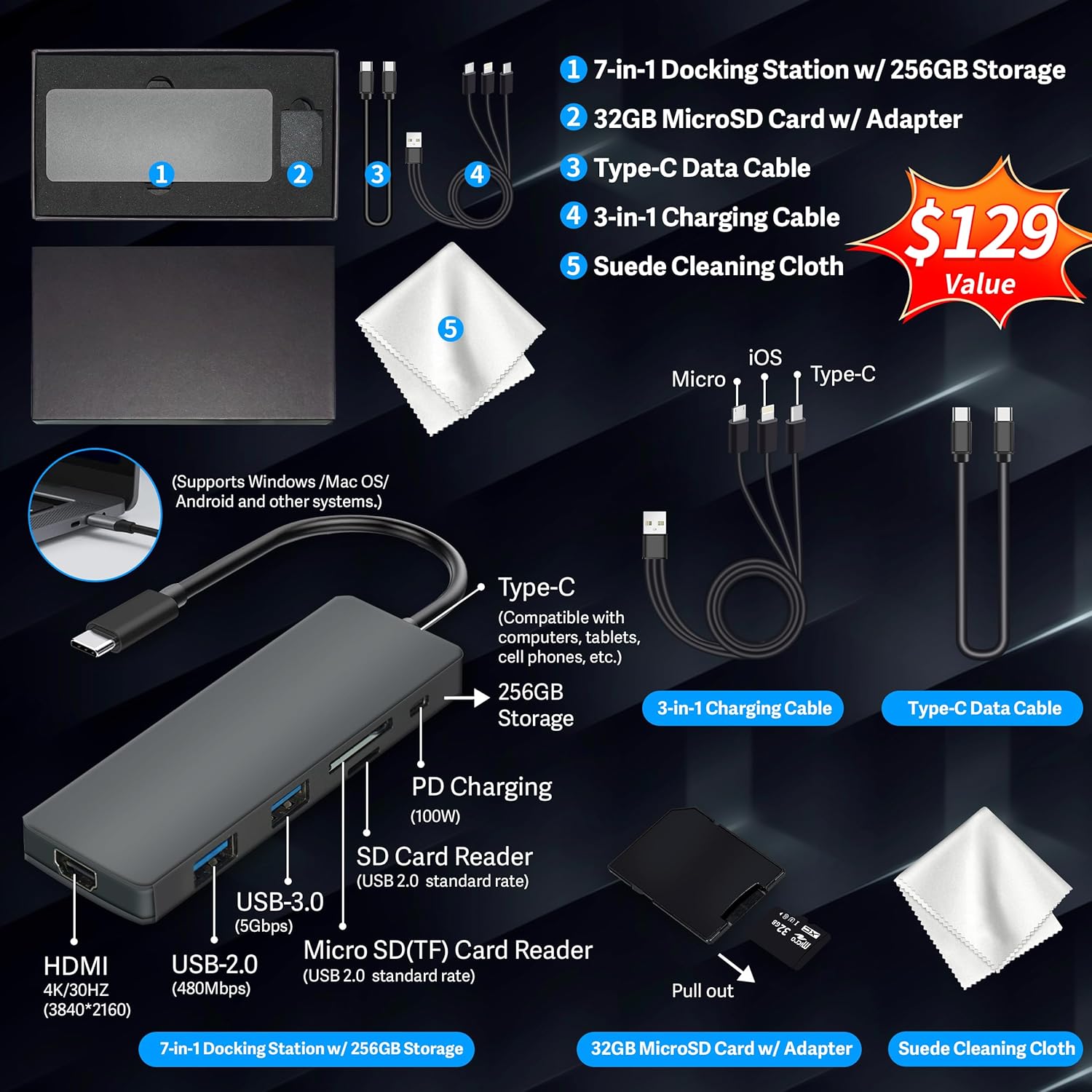
Figure 1: Included accessories, including the 7-in-1 docking station, various cables, and a cleaning cloth.
การใช้งานแล็ปท็อปของคุณ
คุณสมบัติการแสดงผล
The HP 15.6-inch laptop features an FHD IPS touchscreen display with a resolution of 1920 x 1080 pixels and an anti-glare coating. This display provides clear and vibrant visuals from various viewมุมการเอียง

Figure 2: The 15.6-inch FHD IPS display offers crisp and vivid details.
Connectivity and Peripherals
Your laptop is equipped with various connectivity options and integrated features to enhance your user experience.
- กล้อง HD 720p: For video calls and online meetings.
- ไวไฟ 6: For high-speed wireless internet connectivity.
- บลูทูธ: สำหรับเชื่อมต่ออุปกรณ์ต่อพ่วงไร้สาย เช่น เมาส์ คีย์บอร์ด และหูฟัง
- ปุ่มกดตัวเลข: A full numeric keypad is integrated for efficient data entry and calculations.

Figure 3: Key features for staying connected and productive, including the numeric keypad.
The laptop includes multiple ports for connecting external devices:
- 2x USB Type-A ports
- 1x USB Type-C port
- พอร์ต HDMI 1x
- 1x Headphone/Microphone Combo jack

Figure 4: Multi-port configuration on the laptop for various connections.
ประสิทธิภาพการทำงานและการทำงานหลายอย่างพร้อมกัน
Equipped with an AMD Ryzen 7 7730U processor, 64GB DDR4 RAM, and AMD Radeon Graphics, this laptop is designed for efficient multitasking and demanding applications. The 2.28TB storage (2TB SSD + 288GB Docking Station Set) provides ample space and fast access to your files.

Figure 5: Core specifications for performance and storage.

Figure 6: Laptop demonstrating effortless multitasking with several applications running simultaneously.
The laptop is designed for extended use, offering reliable battery life to support your daily tasks.

Figure 7: The laptop supports continuous work throughout the day with its battery performance.
การซ่อมบำรุง
To ensure the longevity and optimal performance of your HP laptop, follow these maintenance guidelines:
- การทำความสะอาด: Use the provided suede cleaning cloth or a soft, lint-free cloth to clean the screen and exterior. Avoid harsh chemicals.
- การอัปเดตซอฟต์แวร์: Regularly update your Windows 11 Pro operating system and drivers to ensure security and performance.
- การดูแลแบตเตอรี่ ควรหลีกเลี่ยงการปล่อยประจุแบตเตอรี่จนหมดบ่อยๆ สำหรับการเก็บรักษาในระยะยาว ควรชาร์จแบตเตอรี่ไว้ที่ประมาณ 50-70%
- การระบายอากาศ : ตรวจสอบให้แน่ใจว่าช่องระบายอากาศของแล็ปท็อปไม่ถูกปิดกั้นเพื่อป้องกันความร้อนสูงเกินไป ควรวางแล็ปท็อปบนพื้นผิวที่แข็งและเรียบ
- พื้นที่จัดเก็บ: เก็บแล็ปท็อปไว้ในที่แห้งและเย็น หลีกเลี่ยงแสงแดดโดยตรงและอุณหภูมิที่สูงหรือต่ำเกินไป
การแก้ไขปัญหา
หัวข้อนี้จะกล่าวถึงปัญหาทั่วไปที่คุณอาจพบกับแล็ปท็อปของคุณ
แล็ปท็อปเปิดไม่ติด
- ตรวจสอบให้แน่ใจว่าอะแดปเตอร์ไฟฟ้าเชื่อมต่อกับแล็ปท็อปและเต้ารับไฟฟ้าที่ใช้งานได้แน่นหนา
- ตรวจสอบว่าเต้ารับไฟฟ้าใช้งานได้โดยเสียบอุปกรณ์อื่น
- หากแบตเตอรี่หมด ให้ชาร์จอย่างน้อย 15-30 นาที ก่อนที่จะลองเปิดเครื่อง
Screen Remains Blank
- ตรวจสอบว่าแล็ปท็อปเปิดอยู่หรือไม่ (ไฟแสดงสถานะเปิด/ปิดเครื่อง)
- Try connecting an external monitor to see if display output is available.
- ปรับความสว่างหน้าจอโดยใช้ปุ่มฟังก์ชัน
ปัญหาการเชื่อมต่อ Wi-Fi
- ตรวจสอบให้แน่ใจว่าได้เปิดใช้งาน Wi-Fi ในการตั้งค่า Windows
- รีสตาร์ทเราเตอร์และโมเด็มของคุณ
- Update your Wi-Fi drivers through Device Manager.
- Check for any physical obstructions or interference.
ประสิทธิภาพการทำงานช้า
- ปิดแอปพลิเคชันที่ไม่จำเป็นซึ่งทำงานอยู่เบื้องหลัง
- ตรวจสอบ Task Manager เพื่อดูว่ามีกระบวนการใดใช้ CPU หรือ RAM สูงเป็นพิเศษ
- ตรวจสอบให้แน่ใจว่าระบบปฏิบัติการและไดรเวอร์ของคุณเป็นเวอร์ชันล่าสุด
- เรียกใช้โปรแกรมล้างข้อมูลและจัดเรียงข้อมูลในดิสก์ (สำหรับ HDD ไม่จำเป็นสำหรับ SSD)
- สแกนหามัลแวร์หรือไวรัส
ข้อมูลจำเพาะ
Below are the detailed technical specifications for your HP 15.6-inch FHD IPS Touchscreen Laptop.

Figure 8: Laptop dimensions and weight for portability.
| คุณสมบัติ | รายละเอียด |
|---|---|
| ยี่ห้อ | HP |
| ชื่อรุ่น | HP 15.6" FHD IPS Touchscreen Laptop |
| ขนาดหน้าจอ | 15.6 นิ้ว |
| ความละเอียดการแสดงผล | 1920 x 1080 พิกเซล (FHD) |
| ประเภทจอภาพ | LED IPS Touchscreen |
| โปรเซสเซอร์ | AMD Ryzen 7 7730U (8 Cores, 2 GHz base) |
| โคโปรเซสเซอร์กราฟิก | กราฟิก AMD Radeon (รวม) |
| หน่วยความจำแรม | 64GB DDR4 (3200 เมกะเฮิรตซ์) |
| พื้นที่จัดเก็บ | 2 TB SSD + 288 GB Docking Station Set (Total 2.28 TB) |
| ระบบปฏิบัติการ | วินโดวส์ 11 โปร |
| การเชื่อมต่อ | Wi-Fi 6 (802.11ax), Bluetooth, HDMI, USB |
| พอร์ต | 2x USB Type-A, 1x USB Type-C, 1x HDMI, 1x Headphone/Microphone Combo |
| Webลูกเบี้ยว | กล้อง HD 720p |
| แป้นพิมพ์ | ขนาดมาตรฐานพร้อมแป้นพิมพ์ตัวเลข |
| ขนาด (ยาว x กว้าง x หนา) | 14.17" x 9.29" x 0.73" |
| น้ำหนักสินค้า | 3.52 ปอนด์ (ประมาณ 1.6 กิโลกรัม) |
| สี | เงิน |
| ยูพีซี | 196188514924 |
| ASIN | B0FX2NR2WN |
ข้อมูลการรับประกัน
Your HP laptop comes with a manufacturer's warranty. For upgraded components (RAM/SSD), a 1-year warranty is provided by SnowBell. The original 1-year manufacturer warranty applies to all other components of the laptop. Please retain your proof of purchase for warranty claims. For detailed terms and conditions, refer to the warranty documentation included with your product or visit the official HP support webเว็บไซต์.
สนับสนุน
หากต้องการความช่วยเหลือเพิ่มเติม การสนับสนุนด้านเทคนิค หรือการสอบถามบริการ โปรดดูแหล่งข้อมูลต่อไปนี้:
- ฝ่ายสนับสนุนอย่างเป็นทางการของ HP Webเว็บไซต์: เยี่ยม สนับสนุน hp.com สำหรับไดรเวอร์ คู่มือ และคำแนะนำการแก้ไขปัญหา
- ความช่วยเหลือออนไลน์: Utilize the built-in Windows 11 Pro help features for software-related questions.
- Contact Retailer: For issues related to upgraded components or purchase, contact SnowBell or your point of purchase.