
ROCAM CR1030DAB
ROCAM CR1030DAB Solar DAB+/FM Emergency Radio User Manual
รุ่น: CR1030DAB
การแนะนำ
ขอบคุณสำหรับการซื้อasing the ROCAM CR1030DAB Solar DAB+/FM Emergency Radio. This portable radio is designed for reliable communication and power in various situations, from daily use to outdoor adventures and emergencies. It features DAB+/FM radio reception, Bluetooth connectivity, multiple charging options including solar and hand crank, a powerful 12000 mAh battery, and integrated lighting functions. Please read this manual thoroughly before use to ensure proper operation and to maximize the product's lifespan.
คำแนะนำเพื่อความปลอดภัย
- อย่าวางอุปกรณ์ไว้ในที่ที่มีอุณหภูมิสูงหรือต่ำเกินไป แสงแดดส่องโดยตรงเป็นเวลานาน (นอกเหนือจากเวลาชาร์จ) หรือความชื้นสูง
- ควรหลีกเลี่ยงการทำวิทยุตกหรือกระแทกอย่างแรง
- ห้ามถอดประกอบหรือพยายามซ่อมแซมเครื่องด้วยตนเอง แนะนำให้ช่างผู้ชำนาญการเป็นผู้ดำเนินการซ่อมบำรุงทั้งหมด
- Keep the device away from water and other liquids, except for its IPX6 water resistance which protects against strong jets of water. Do not submerge.
- Ensure the USB-C port cover is securely closed when not in use, especially in wet conditions.
- When using the hand crank, turn it at a steady, moderate pace. Excessive force or speed can damage the mechanism.
- The SOS alarm is very loud. Avoid activating it unnecessarily or near sensitive ears.
- ทิ้งแบตเตอรี่ตามระเบียบข้อบังคับในท้องถิ่น
เนื้อหาแพ็คเกจ
ตรวจสอบว่ามีรายการทั้งหมดอยู่ในแพ็คเกจ:
- 1 × ROCAM CR1030DAB Radio
- 1 × สายชาร์จ USB-C
- 1 × Portable Strap
- 1 × คู่มือผู้ใช้
สินค้าเกินview
ทำความคุ้นเคยกับส่วนประกอบและปุ่มควบคุมของวิทยุให้ดี

ภาพ: ด้านหน้า view of the ROCAM CR1030DAB radio, highlighting its display, control buttons, and extended antenna. The radio is shown in an outdoor setting, emphasizing its portable and robust design.
ส่วนประกอบหลัก:
- จอแสดงผลสีขนาด 2.4 นิ้ว: Shows station information, battery level, time, and menu options.
- ปุ่มควบคุม: Power, Mode, Menu, Scan, Volume, Navigation (Up/Down/Left/Right/OK), SOS.
- เสาอากาศยืดไสลด์: For optimal DAB+/FM signal reception.
- แผงโซล่าเซลล์: ติดตั้งอยู่ด้านบนเพื่อชาร์จพลังงานแสงอาทิตย์
- มือหมุน: On the side for manual power generation.
- ไฟฉาย: Integrated LED light on one end.
- อ่านลamp: Foldable panel with 12 LEDs.
- พอร์ตอินพุต/เอาต์พุต USB-C: For charging the radio and charging external devices.
- แจ็คหูฟัง (3.5 มม.): สำหรับการฟังส่วนตัว
- ช่องใส่แบตเตอรี่: For AAA backup batteries.

ภาพ: รายละเอียด view of the radio's 2.4-inch color display, illustrating its clarity and the information presented, such as station name and signal strength.
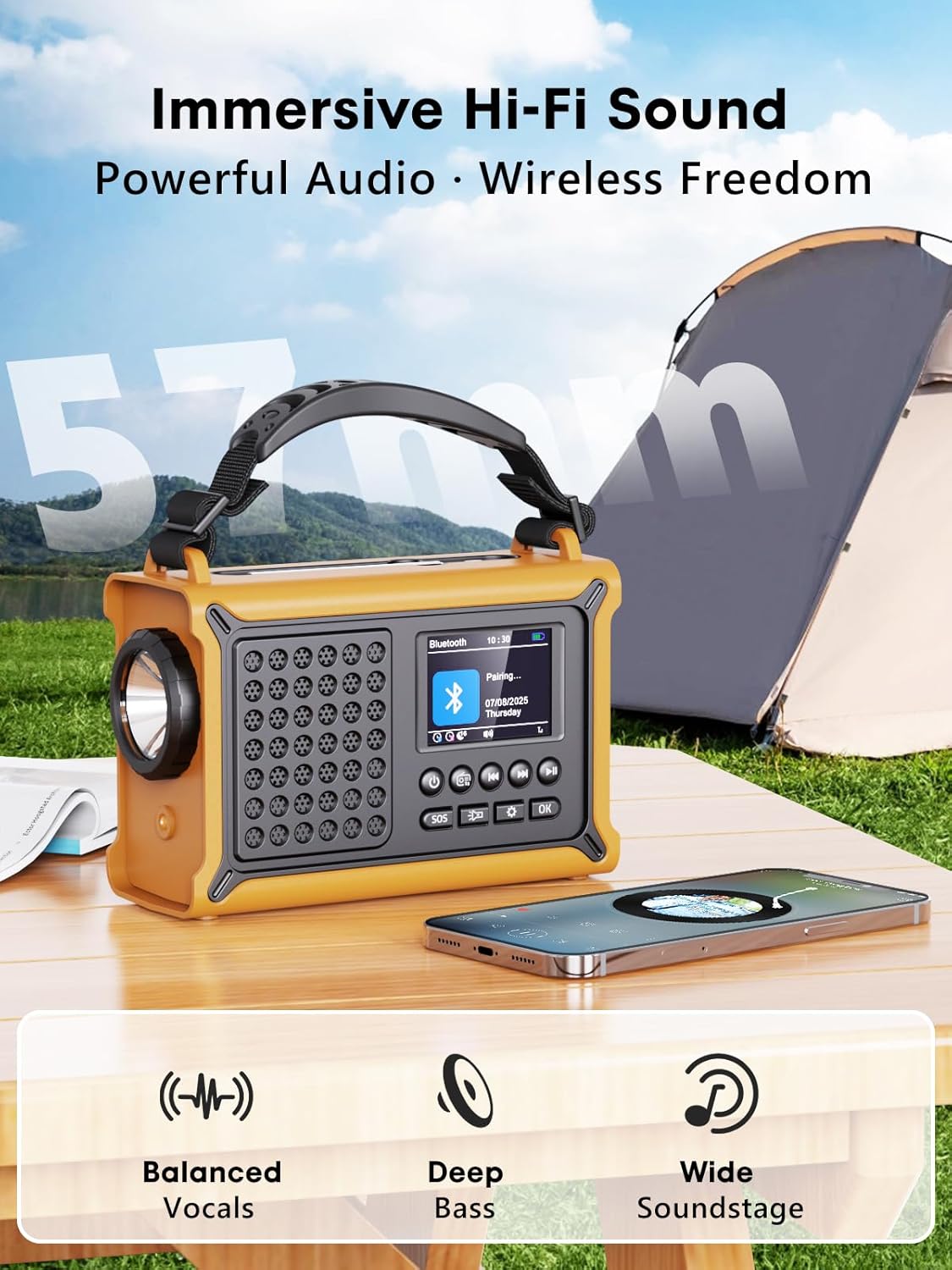
ภาพ: The radio highlighting its audio capabilities, featuring 57mm speakers designed for clear, powerful sound with balanced vocals and deep bass.

ภาพ: The radio held in hand, illustrating its ultra-portable design and compact dimensions (17.3 cm length, 12.1 cm height, 7.4 cm width), along with its IPX6 water resistance.
การตั้งค่า
1. การชาร์จครั้งแรก
Before first use, it is recommended to fully charge the radio's internal 12000 mAh battery using the supplied USB-C cable. Connect the USB-C cable to the radio's USB-C input port and the other end to a standard USB power adapter (not included) or a computer USB port. The charging indicator on the display will show the charging status. A full charge ensures maximum battery life and optimal performance.
2. Inserting AAA Batteries (Optional Backup)
For an additional power backup, you can insert 3 AAA batteries (not included) into the battery compartment. This provides an alternative power source if the internal rechargeable battery is depleted and other charging methods are unavailable.
3. เปิดเครื่องและเลือกภาษา
กดปุ่มค้างไว้ พลัง button to turn on the radio. Upon first power-on, you may be prompted to select your preferred language from the 12 available options. Use the navigation buttons to select and the OK ปุ่มเพื่อยืนยัน
คำแนะนำการใช้งาน
การเปิด/ปิดเครื่อง
- การเปิดเครื่อง: กดค้างไว้ พลัง ปุ่ม.
- วิธีปิด: กดค้างไว้ พลัง ปุ่มอีกครั้ง
การใช้งานวิทยุ DAB+/FM
- เลือกโหมด: กดปุ่ม โหมด ปุ่มสำหรับสลับระหว่างโหมดวิทยุ DAB+ และ FM
- ขยายเสาอากาศ: Fully extend the telescopic antenna for best reception.
- สแกนอัตโนมัติ: ในโหมด DAB+ หรือ FM ให้กดปุ่ม สแกน button to automatically search for available stations. The radio will store up to 40 DAB+ and 40 FM stations.
- การปรับจูน/เลือกสถานีด้วยตนเอง: ใช้ ขึ้น/ลง navigation buttons to browse through scanned stations or manually tune frequencies.
- การควบคุมระดับเสียง: ใช้ ปริมาณ +/- ปุ่มปรับระดับเสียง
- ค่าที่ตั้งล่วงหน้า: หากต้องการบันทึกสถานี ให้ปรับไปยังสถานีที่ต้องการ จากนั้นกดปุ่มค้างไว้ OK button. Use navigation buttons to select a preset number and press OK to save. To recall a preset, briefly press the OK button, then use navigation to select the preset.
การเชื่อมต่อบลูทูธ
- เข้าสู่โหมดบลูทูธ: กดปุ่ม โหมด button until "Bluetooth" appears on the display. The radio will enter pairing mode, indicated by a blinking Bluetooth icon.
- การจับคู่: On your smartphone or other Bluetooth device, enable Bluetooth and search for available devices. Select "ROCAM CR1030DAB" from the list.
- เชื่อมต่อ: Once paired, the radio will emit a confirmation sound, and the Bluetooth icon will stop blinking. You can now play audio from your device through the radio.
กำลังชาร์จวิทยุ
The radio offers multiple charging methods for its internal 12000 mAh battery:

ภาพ: The radio demonstrating its versatile charging capabilities, including the solar panel, USB-C input, hand crank, and the option for AAA batteries.
- การชาร์จ USB-C: Connect the supplied USB-C cable to a 5V/2A (or higher) USB power source. This is the fastest charging method.
- การชาร์จพลังงานแสงอาทิตย์: Place the radio with the solar panel facing direct sunlight. The solar charging indicator will illuminate. This method is ideal for maintaining charge or slow charging in emergencies. The 8500 mm² panel provides 350 mA.
- การชาร์จมือหมุน: Rotate the hand crank clockwise or counter-clockwise at a steady pace (approx. 120-150 RPM). Cranking for 1 minute can provide several minutes of radio playback. The hand crank generates 650 mA.
- แบตเตอรี่ AAA: If the internal battery is depleted, the radio can operate using 3 AAA batteries (not included) inserted into the battery compartment.
External Device Charging (Power Bank Function)
The radio can act as a power bank to charge external devices like smartphones. Connect your device's charging cable to the radio's USB-C output port. The radio's 12000 mAh battery provides a 5V/1A output.
ฟังก์ชั่นแสงสว่าง

ภาพ: A composite image illustrating the radio's versatile lighting options: a powerful 5W flashlight, the SOS red flashing light, and a soft 12-LED reading lamp.
- ไฟฉาย: กดปุ่ม ไฟฉาย button once to turn on the 5W LED flashlight. Press again to cycle through brightness levels (if available) or turn off.
- อ่านลamp: Lift the reading lamp panel. Press the อ่านลamp button (often combined with flashlight button or a separate one) to activate the 12-LED reading lamp. Press again to cycle through brightness levels or turn off.
ฟังก์ชันสัญญาณเตือน SOS
ในกรณีฉุกเฉิน ให้กดปุ่มค้างไว้ สัญญาณขอความช่วยเหลือ button. The radio will emit a loud 120 dB siren and flash a red light to attract attention. Press the สัญญาณขอความช่วยเหลือ กดปุ่มอีกครั้งเพื่อปิดการทำงานของนาฬิกาปลุก
การซ่อมบำรุง
- การทำความสะอาด: เช็ดวิทยุด้วยผ้านุ่มdamp ผ้า ห้ามใช้สารทำความสะอาดที่มีฤทธิ์กัดกร่อนหรือตัวทำละลาย
- พื้นที่จัดเก็บ: When not in use for extended periods, store the radio in a cool, dry place. It is recommended to fully charge the internal battery every 3-6 months to maintain its health.
- การดูแลแบตเตอรี่ Avoid completely draining the internal battery frequently. Recharge it as soon as possible when the low battery indicator appears.
การแก้ไขปัญหา
| ปัญหา | สาเหตุที่เป็นไปได้ | สารละลาย |
|---|---|---|
| วิทยุไม่เปิด | แบตเตอรี่หมด | Charge the radio via USB-C, solar, or hand crank. Ensure AAA batteries are inserted correctly if using them. |
| การรับสัญญาณวิทยุไม่ดี | เสาอากาศไม่ได้ยืดออก พื้นที่สัญญาณอ่อน มีสัญญาณรบกวน | Fully extend the telescopic antenna. Reposition the radio to a location with better signal. Perform an auto scan again. |
| อุปกรณ์บลูทูธไม่สามารถเชื่อมต่อได้ | Radio not in pairing mode, device too far, already connected to another device. | Ensure the radio is in Bluetooth pairing mode. Move the device closer to the radio. Disconnect from other Bluetooth devices. |
| อุปกรณ์ภายนอกไม่ชาร์จไฟ | Radio battery too low, incorrect cable, device not compatible. | Ensure the radio has sufficient charge. Use a compatible USB-C cable. Some devices may draw too much power. |
| ที่หมุนมือฝืดหรือไม่ชาร์จไฟ | Mechanism obstruction, incorrect cranking speed. | Check for any obstructions. Rotate the crank at a steady, moderate pace. Do not force it. |
ข้อมูลจำเพาะ
| แบบอย่าง | ซีอาร์1030DAB |
| แบนด์วิทยุ | ตบเบา ๆ +, เอฟเอ็ม |
| เวอร์ชันบลูทูธ | 5.0 |
| ความจุของแบตเตอรี่ | 12000 mAh (ลิเธียม) |
| วิธีการชาร์จ | USB-C, Solar, Hand Crank, 3x AAA Batteries (backup) |
| ขนาดแผงโซล่าเซลล์ | 8500 mm² (350 mA output) |
| เอาต์พุตมือหมุน | 650มิลลิแอมป์ |
| เอาท์พุต USB | 5V/1A |
| แสดง | จอ LCD สีขนาด 2.4 นิ้ว |
| พรีเซ็ต | 80 (40 บอด+, 40 เอฟเอ็ม) |
| ความต้านทานต่อน้ำ | IPX6 |
| สัญญาณเตือนภัย SOS | 120 เดซิเบล |
| ไฟฉาย | แอลอีดี 5W |
| อ่านลamp | 12-LED |
| ขนาด | 12L x 17.2W x 7.3H cm (approx.) |
| น้ำหนัก | น้ำหนักประมาณ 820 กรัม |

ภาพ: A comparison chart detailing the specifications of the ROCAM CR1030DAB against generic alternatives, emphasizing its advanced features like a larger color display, higher battery capacity, and more efficient charging.
การรับประกันและการสนับสนุน
ROCAM products are designed for reliability and performance. This product comes with a standard manufacturer's warranty. For specific warranty details, please refer to the documentation provided with your purchase or contact ROCAM customer support.
If you encounter any issues or have questions regarding the operation or maintenance of your ROCAM CR1030DAB radio, please contact our customer support team.
- การสนับสนุนลูกค้า: Refer to your product packaging or the ROCAM official webเว็บไซต์สำหรับข้อมูลการติดต่อ
- แหล่งข้อมูลออนไลน์: Visit the ROCAM webเว็บไซต์นี้รวบรวมคำถามที่พบบ่อย การลงทะเบียนผลิตภัณฑ์ และเอกสารสนับสนุนเพิ่มเติม
Ask a question about this manual
Ask about setup, troubleshooting, compatibility, parts, safety, or missing instructions. Manuals+ will review the question and use this page’s manual context to help answer it.