
1. บทนำ
Thank you for choosing the LEDLUX 52" Ceiling Fan with Light. This manual provides detailed instructions for the safe installation, operation, and maintenance of your new ceiling fan. Please read this manual thoroughly before installation and keep it for future reference.
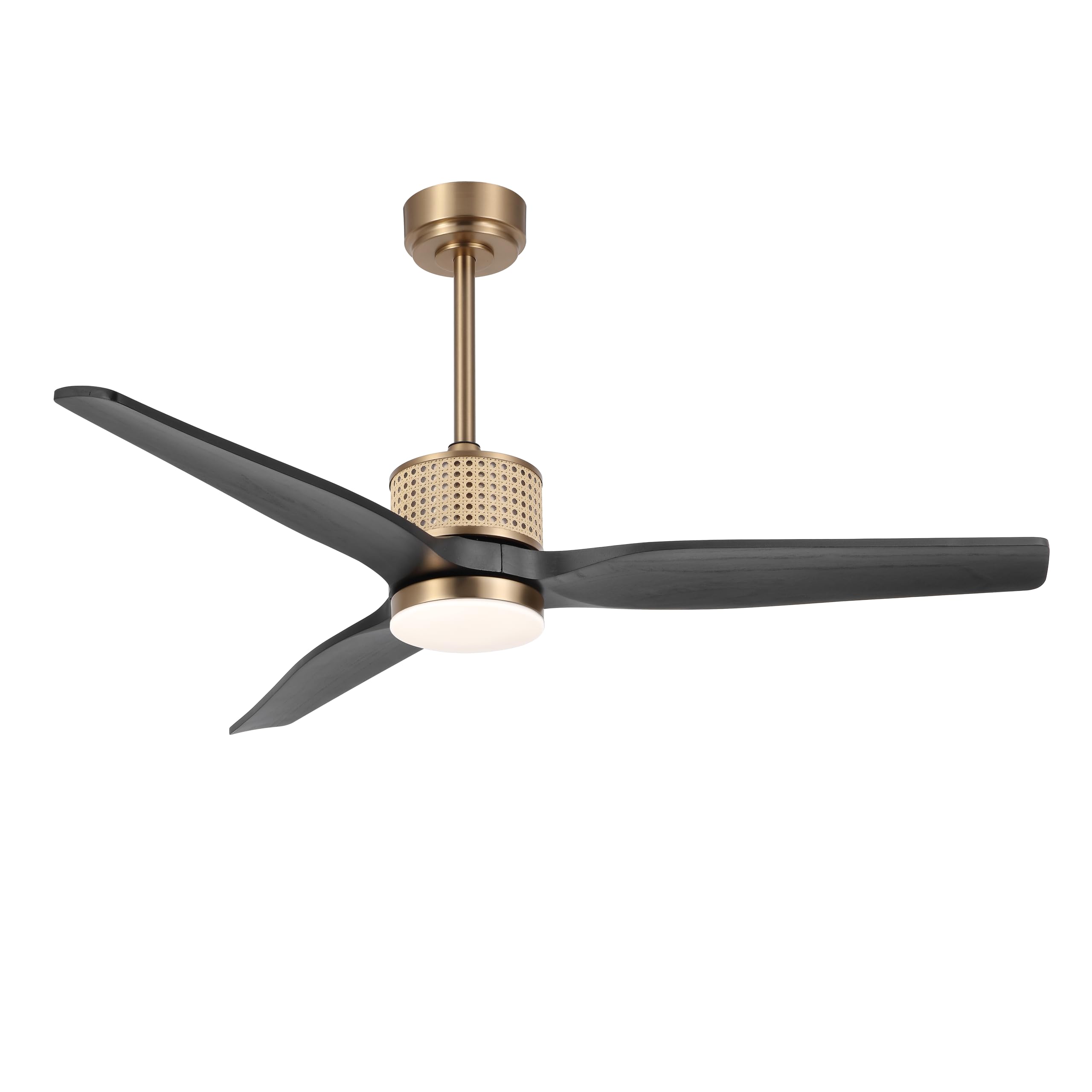
Image 1.1: The LEDLUX 52" Ceiling Fan with Light installed in a bedroom setting.
This ceiling fan features a unique rattan design, solid wood blades, a quiet reversible DC motor, and an integrated LED light with three color temperature options. It is designed for both indoor and covered outdoor use, providing comfort and style to your living space.
2. ข้อมูลด้านความปลอดภัย
เพื่อลดความเสี่ยงจากไฟฟ้าช็อต ไฟไหม้ หรือการบาดเจ็บ ควรปฏิบัติตามข้อควรระวังด้านความปลอดภัยขั้นพื้นฐานเหล่านี้เสมอ:
- อ่านคำแนะนำทั้งหมดก่อนติดตั้งพัดลม
- Ensure the installation site is structurally sound and can support the fan's weight (at least 35 lbs).
- การเดินสายไฟทั้งหมดต้องเป็นไปตามมาตรฐานไฟฟ้าแห่งชาติและท้องถิ่น หากไม่แน่ใจให้ปรึกษาช่างไฟฟ้าผู้เชี่ยวชาญ
- Turn off power at the circuit breaker before beginning installation or performing any maintenance.
- Do not operate the fan with damaged blades or any other damaged parts.
- เก็บมือ เสื้อผ้า และวัตถุอื่นๆ ให้ห่างจากใบพัดลมขณะที่พัดลมทำงาน
3. เนื้อหาบรรจุภัณฑ์
ตรวจสอบให้แน่ใจว่ามีส่วนประกอบครบถ้วนก่อนเริ่มการติดตั้ง หากมีชิ้นส่วนใดขาดหายหรือเสียหาย โปรดติดต่อฝ่ายบริการลูกค้า
- การประกอบตัวเรือนมอเตอร์
- Fan Blades (Solid Wood)
- Downrods (4.5" and 12")
- ตัวยึด
- กันสาด
- รีโมทคอนโทรลพร้อมขาติดผนัง
- ชุดไฟ LED
- ชุดอุปกรณ์ฮาร์ดแวร์ (สกรู แหวนรอง ตัวเชื่อมสายไฟ)
- คู่มือการใช้งาน
4. การตั้งค่าและการติดตั้ง
โปรดทำตามขั้นตอนเหล่านี้อย่างระมัดระวังเพื่อการติดตั้งที่ถูกต้อง แนะนำให้ติดตั้งโดยช่างผู้เชี่ยวชาญหากคุณไม่คุ้นเคยกับการเดินสายไฟ
4.1 ก่อนการติดตั้ง
- ปิดไฟที่เบรกเกอร์หลัก
- ตรวจสอบให้แน่ใจว่ากล่องไฟฟ้าติดตั้งอย่างแน่นหนาและมีคุณสมบัติเหมาะสมสำหรับการรองรับพัดลมเพดาน
- แกะชิ้นส่วนทั้งหมดออกจากบรรจุภัณฑ์และวางเรียงไว้บนพื้นผิวที่อ่อนนุ่มเพื่อป้องกันรอยขีดข่วน
4.2 ตัวเลือกการติดตั้ง
The fan supports both flat and sloped ceiling installations (up to 15 degrees).

Image 4.1: Product dimensions and available mounting options for flat and sloped ceilings.
4.3 Downrod and Wiring Installation
Choose the appropriate downrod (4.5" or 12") for your ceiling height. Securely attach the downrod to the motor housing and feed the electrical wires through it. Mount the hanging bracket to the electrical box, then lift the fan assembly and hang it from the bracket.
4.4 การเชื่อมต่อทางไฟฟ้า
Connect the fan's electrical wires to the household wiring according to the wiring diagram provided in the full manual. Ensure all connections are secure with wire nuts.
4.5 Blade and Light Kit Attachment
Attach the solid wood fan blades to the motor housing using the provided screws. Install the LED light kit by connecting the wires and securing the light cover.
4.6 วิดีโอแนะนำการติดตั้ง
สำหรับคำแนะนำแบบภาพประกอบเกี่ยวกับขั้นตอนการติดตั้ง โปรดดูวิดีโออย่างเป็นทางการด้านล่าง:
Video 4.2: Official LEDLUX guide on how to install the ceiling fan.
5. คู่มือการใช้งาน
Your LEDLUX ceiling fan is operated using the included remote control.

Image 5.1: The remote control for the LEDLUX ceiling fan, highlighting its various functions.
5.1 ฟังก์ชั่นการควบคุมระยะไกล
- เปิด/ปิดเครื่อง: Press to turn the fan and light on or off.
- ความเร็วพัดลม: สามารถปรับความเร็วพัดลมได้ 6 ระดับ
- การควบคุมแสง: Turns the light on/off and cycles through color temperatures.
- ตัวจับเวลา: Sets the fan to turn off automatically after a specified duration (e.g., 1 hour, 4 hours).
- ฟังก์ชั่นย้อนกลับ: เปลี่ยนทิศทางการหมุนของใบพัดสำหรับโหมดฤดูร้อนหรือฤดูหนาว
5.2 Light Color Temperature Adjustment
The integrated LED light offers three fixed color temperatures:
- 3000K: Warm light, ideal for a cozy atmosphere.
- 4000K: Natural light, suitable for general illumination.
- 6000K: White light, bright and clear for task lighting.

Image 5.2: The three adjustable color temperatures of the LED light.
5.3 ฟังก์ชันมอเตอร์แบบกลับทิศทาง
มอเตอร์ DC แบบกลับทิศทางได้ ช่วยให้ใช้งานได้ตลอดทั้งปี:
- โหมดฤดูร้อน (หมุนทวนเข็มนาฬิกา): สร้างกระแสลมพัดลงด้านล่าง ทำให้เกิดความรู้สึกเย็นสบาย
- โหมดฤดูหนาว (ตามเข็มนาฬิกา): สร้างกระแสลมขึ้นด้านบน ช่วยหมุนเวียนอากาศอุ่นที่ติดอยู่บริเวณเพดาน

Image 5.3: Illustration of summer (counterclockwise) and winter (clockwise) fan modes.
5.4 การทำงานที่เงียบ
The DC motor ensures whisper-quiet performance, making it suitable for bedrooms and other quiet spaces.

Image 5.4: The fan's quiet operation, ideal for undisturbed sleep.
6. การบำรุงรักษา
การบำรุงรักษาอย่างสม่ำเสมอจะช่วยให้พัดลมเพดานของคุณมีอายุการใช้งานยาวนานและทำงานได้อย่างมีประสิทธิภาพสูงสุด
- การทำความสะอาด: ควรทำความสะอาดใบพัดและตัวมอเตอร์เป็นระยะด้วยผ้าเนื้อนุ่มและแห้งamp ผ้า ห้ามใช้สารทำความสะอาดที่มีฤทธิ์กัดกร่อนหรือตัวทำละลาย
- การตรวจสอบใบมีด: ตรวจสอบใบพัดพัดลมว่ามีรอยแตกหรือเสียหายหรือไม่ หากพบใบพัดที่เสียหาย ให้เปลี่ยนทันที
- การตรวจสอบความแน่น: Annually check all screws and fasteners for tightness.
- ชุดไฟ: The LED light source is designed for long life and is not user-serviceable.
7 การแก้ไขปัญหา
หากคุณพบปัญหาเกี่ยวกับพัดลม โปรดลองทำตามขั้นตอนการแก้ไขปัญหาทั่วไปต่อไปนี้:
| ปัญหา | สาเหตุที่เป็นไปได้ | สารละลาย |
|---|---|---|
| พัดลมไม่เริ่มทำงาน | No power to fan; Loose wire connections; Remote control battery low. | ตรวจสอบเบรกเกอร์วงจร; ตรวจสอบว่าการเชื่อมต่อสายไฟทั้งหมดแน่นหนาดีแล้ว; เปลี่ยนแบตเตอรี่รีโมทคอนโทรล |
| ไฟไม่ทำงาน | การเชื่อมต่อสายไฟหลวม; ปัญหาที่ไดร์เวอร์ LED | ตรวจสอบการเดินสายไฟของชุดไฟ หากปัญหายังคงอยู่ โปรดติดต่อฝ่ายบริการลูกค้า |
| พัดลมสั่น | ใบพัดหรืออุปกรณ์ยึดหลวม; ใบพัดไม่สมดุล | ตรวจสอบให้แน่ใจว่าสกรูใบพัดและสกรูยึดทั้งหมดแน่นดีแล้ว หากจำเป็น ให้ใช้ชุดปรับสมดุล (ไม่ได้รวมอยู่ในชุด) |
| การทำงานมีเสียงดัง | น็อตหลวม; ปัญหาที่มอเตอร์ | ตรวจสอบความแน่นของสกรูทุกตัว หากยังมีเสียงดังอยู่ โปรดติดต่อฝ่ายบริการลูกค้า |
If these steps do not resolve the issue, please contact LEDLUX customer support for further assistance.
8. ข้อมูลจำเพาะ
| คุณสมบัติ | รายละเอียด |
|---|---|
| ยี่ห้อ | แอลอีดีลักซ์ |
| หมายเลขรุ่น | SYCF5201 |
| ขนาด | 52 นิ้ว |
| สี | สีทอง/สีดำ |
| วัสดุ | Wood (Blades) |
| ประเภทมอเตอร์ | มอเตอร์ DC |
| แหล่งพลังงาน | DC |
| วิธีการควบคุม | รีโมทคอนโทรล |
| จำนวนระดับพลังงาน | ความเร็วพัดลม 6 ระดับ |
| คุณสมบัติแสง | Integrated LED Light (3000K/4000K/6000K) |
| การใช้งานภายใน/ภายนอกอาคาร | ภายในอาคาร, ภายนอกอาคารที่มีหลังคาคลุม |
| ขนาดสินค้า | ลึก 52 นิ้ว x กว้าง 20 นิ้ว x สูง 52 นิ้ว |
9. ข้อมูลการรับประกัน
LEDLUX stands behind the quality of its products with a comprehensive warranty:
- รับประกันมอเตอร์ 10 ปี: The fan's DC motor is covered by a 10-year free replacement warranty.
- 3-Year Full Warranty: All other parts of the ceiling fan are covered by a full 3-year warranty.
This warranty covers defects in materials and workmanship under normal use. For warranty claims or further details, please contact LEDLUX customer support.
10. การสนับสนุนลูกค้า
If you have any questions, require assistance with installation, or need to report a problem, please contact LEDLUX customer support. Our team is dedicated to providing prompt and helpful service.
- Refer to the contact information provided with your purchase or visit the official LEDLUX webเว็บไซต์สำหรับตัวเลือกการสนับสนุน