
1. บทนำ
Thank you for choosing the Angrox Backlit Universal Remote Control for LG Smart TVs. This remote is designed to provide a seamless and enhanced television viewing experience, especially in low-light conditions. It serves as a direct replacement for your original LG TV remote, offering broad compatibility and ease of use without requiring complex setup procedures. This manual provides detailed instructions for setting up, operating, maintaining, and troubleshooting your new remote control.
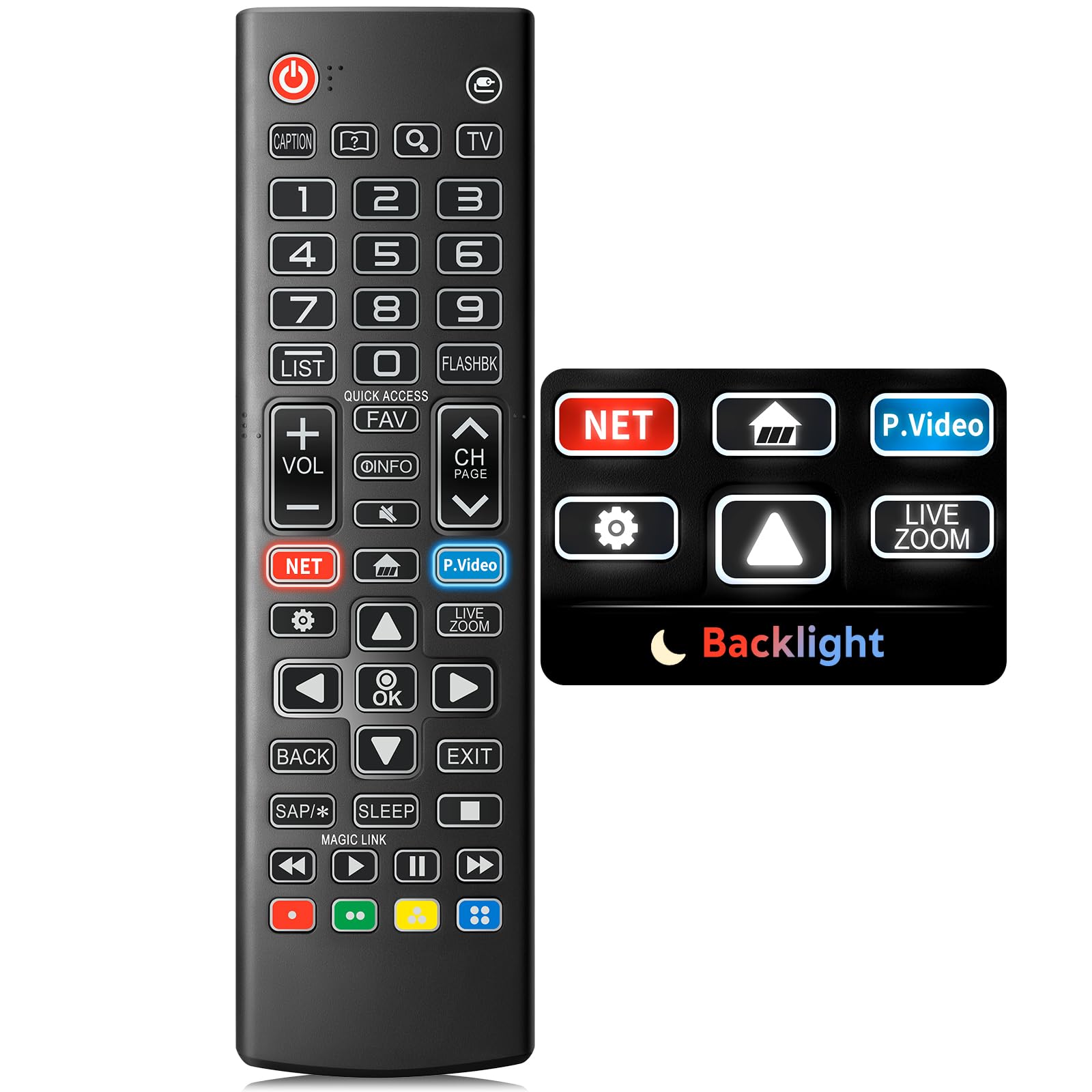
Image: The Angrox Backlit Universal Remote Control, a sleek black remote with clearly labeled buttons.
2. คุณสมบัติหลัก
- Easy Nighttime Operation: Features soft glow buttons that illuminate, allowing for clear visibility and use in dark environments without causing glare. The backlight activates with any button press and automatically turns off after 10 seconds of inactivity.
- เข้ากันได้สากล: Designed as a direct replacement for LG TV remotes, compatible with all LG TV models. No programming or complex pairing is required; it works immediately out of the box.
- High-Quality Performance: Equipped with sensitive buttons and stable signal transmission for smooth and responsive operation.
- การออกแบบตามหลักสรีรศาสตร์: Shaped to fit comfortably in the hand, reducing fatigue during extended use. The button layout is intuitive for users of all ages.
- ทนทานและเชื่อถือได้: Constructed from high-quality, sturdy materials to withstand daily use and accidental drops, ensuring a long lifespan.

Image: A comparison showing the remote control with its backlight off and then with its buttons illuminated, highlighting the easy nighttime operation feature.

Image: The remote control displayed alongside various LG TV models (OLED, UHD, QNED, NanoCell), illustrating its broad compatibility.
3. คำแนะนำในการตั้งค่า
3.1 การติดตั้งแบตเตอรี่
- ค้นหาฝาปิดช่องใส่แบตเตอรี่ที่ด้านหลังของรีโมทคอนโทรล
- เลื่อนฝาลงด้านล่างหรือกดสลักเพื่อเปิดช่องเก็บของ
- ใส่แบตเตอรี่ AAA สอง (2) ก้อน โดยตรวจสอบให้แน่ใจว่าขั้วบวก (+) และขั้วลบ (-) ตรงกับตัวบ่งชี้ภายในช่องใส่แบตเตอรี่อย่างถูกต้อง
- ปิดฝาช่องใส่แบตเตอรี่กลับเข้าที่โดยเลื่อนกลับเข้าที่จนกระทั่งล็อคเข้าที่อย่างแน่นหนา
บันทึก: รีโมทคอนโทรลนี้ไม่ได้รวมแบตเตอรี่มาให้ โปรดใช้แบตเตอรี่อัลคาไลน์ AAA ใหม่ เพื่อประสิทธิภาพการใช้งานที่ดีที่สุด

Image: A visual guide demonstrating the correct insertion of two AAA batteries into the remote control's battery compartment.
3.2 Initial Use (No Pairing Required)
The Angrox Backlit Universal Remote Control is designed for immediate use with LG Smart TVs. No pairing or programming steps are necessary. Once batteries are installed, the remote is ready to control your LG television.
4. คู่มือการใช้งาน
This section details the functions of the buttons on your Angrox remote control.

Image: A comprehensive layout of the remote control, with labels pointing to each button and describing its primary function.
4.1 ฟังก์ชั่นพื้นฐาน
- พลัง (
 ): เปิดหรือปิดทีวี
 - ป้อนข้อมูล (): Changes the input source (e.g., HDMI 1, HDMI 2).
- เพิ่ม/ลดระดับเสียง (VOL +/-): ปรับระดับเสียง
- ช่องขึ้น/ลง (CH Page): เปลี่ยนช่องโทรทัศน์
- ปิดเสียง (): ปิดหรือเปิดเสียงทีวี
- ปุ่มตัวเลข (0-9): ป้อนหมายเลขช่องหรือข้อมูลตัวเลขอื่นๆ โดยตรง
- ปุ่มนำทาง (ขึ้น/ลง/ซ้าย/ขวา): ใช้สำหรับเลื่อนดูเมนูและตัวเลือกต่างๆ
- ปุ่มตกลง: Selects menu items or confirms your input.
4.2 Special Function Buttons
- ปุ่ม Netflix: เปิดแอปพลิเคชัน Netflix โดยตรง
- Amazon Prime Video Button: เปิดแอปพลิเคชัน Amazon Prime Video โดยตรง
- การเข้าถึงด่วน: A feature that allows you to enter a specified app or Live TV directly by pressing and holding the number buttons.
- รายการ: เข้าถึงรายการโปรแกรมที่บันทึกไว้
- Flashback: ย้อนกลับไปที่ก่อนหน้านี้ viewed channel or input.
- ข้อมูล: Displays information on the current program.
- ชอบ: เข้าถึงรายการช่องที่คุณชื่นชอบ
- การตั้งค่า (): Accesses the Quick Settings menu.
- กลับ: ล้างการแสดงผลบนหน้าจอและกลับสู่ทีวี viewการไอเอ็นจี
- ทางออก: ออกจากเมนูปัจจุบัน
- นอน: Accesses the sleep timer.
- ปุ่มควบคุมสื่อ (เล่น, หยุดชั่วคราว, หยุด, กรอไปข้างหน้า, กรอถอยหลัง): ควบคุมการเล่นเนื้อหาสื่อ
4.3 ฟังก์ชันไฟแบ็คไลท์
The remote control features a soft backlight for easy use in the dark. Simply press any button, and the backlight will turn on. It will automatically turn off after 10 seconds of inactivity to conserve battery life.
Video: A demonstration of the Angrox Backlit Remote for LG Smart TV, showcasing its easy nighttime use and responsive buttons. This video highlights the convenience of the backlit feature in dark environments.
5. ข้อมูลจำเพาะ
| ยี่ห้อ | โกรธ |
| ชื่อรุ่น | AKB75095307 |
| หมายเลขรุ่น | AKB75095307 |
| คุณสมบัติพิเศษ | Backlit, Ergonomic, Lightweight, No Programming Required, Universal |
| อุปกรณ์ที่รองรับ | โทรทัศน์ (ทุกรุ่นของ LG) |
| จำนวนอุปกรณ์ที่รองรับสูงสุด | 1 |
| เทคโนโลยีการเชื่อมต่อ | อินฟราเรด |
| จำนวนปุ่ม | 30 |
| ประเภทตัวควบคุม | ปุ่มควบคุม |
| ระยะสูงสุด | 10 เมตร (ประมาณ 33 ฟุต) |
| จำนวนแบตเตอรี่ที่ต้องการ | ถ่าน AAA จำนวน 2 ก้อน |
| ประเภทแบตเตอรี่ | ด่าง |
| ขนาดรายการ (ยาว x กว้าง x สูง) | ยาว 9.25 นิ้ว x กว้าง 1.89 นิ้ว x สูง 0.73 นิ้ว |
6 การแก้ไขปัญหา
หากคุณพบปัญหาเกี่ยวกับรีโมทคอนโทรล โปรดดูวิธีแก้ไขปัญหาทั่วไปต่อไปนี้:
- รีโมตไม่ตอบสนอง:
- ตรวจสอบให้แน่ใจว่าได้ใส่แบตเตอรี่อย่างถูกต้อง โดยให้ขั้ว (+/-) ถูกต้อง
- เปลี่ยนแบตเตอรี่เก่าด้วยแบตเตอรี่อัลคาไลน์ AAA ใหม่
- ตรวจสอบสิ่งกีดขวางระหว่างรีโมทคอนโทรลและเครื่องรับอินฟราเรดของทีวี
- Ensure you are within the maximum operating range (10 meters) of the TV.
- ไฟแบ็คไลท์ไม่ทำงาน:
- Verify battery power. Low batteries may affect backlight functionality.
- The backlight is designed to turn off after 10 seconds of inactivity. Press any button to reactivate it.
- Specific buttons not working (e.g., Netflix, Amazon Prime):
- Ensure your LG Smart TV is connected to the internet and the respective applications are installed and updated.
- Some smart TV features or app shortcuts may vary slightly depending on your TV's model and region.
- Remote feels sluggish or unresponsive:
- เปลี่ยนแบตเตอรี่ด้วยแบตเตอรี่ใหม่
- Clean the remote's infrared emitter (at the top) and the TV's IR receiver with a soft, dry cloth to ensure a clear signal path.
7. การบำรุงรักษา
To ensure the longevity and optimal performance of your Angrox remote control, follow these maintenance guidelines:
- การทำความสะอาด: Use a soft, dry cloth to clean the remote's surface. Avoid using liquid cleaners, aerosols, or harsh chemicals, as they may damage the remote.
- การเปลี่ยนแบตเตอรี่: Replace batteries promptly when the remote's performance declines or if the backlight becomes dim. Remove batteries if the remote will not be used for an extended period to prevent leakage.
- พื้นที่จัดเก็บ: เก็บรีโมทไว้ในที่แห้งและเย็น หลีกเลี่ยงแสงแดดโดยตรง อุณหภูมิที่สูงหรือต่ำเกินไป และความชื้นสูง
- หลีกเลี่ยงการหยด: แม้ว่ารีโมทจะทนทาน แต่การทำตกซ้ำๆ อาจทำให้ชิ้นส่วนภายในเสียหายได้ โปรดใช้งานรีโมทอย่างระมัดระวัง
8. การรับประกันและการสนับสนุน
8.1 ข้อมูลการรับประกัน
The Angrox Backlit Universal Remote Control (Model AKB75095307) is covered by a รับประกัน 90 วัน from the date of purchase. This warranty covers manufacturing defects and ensures the product functions as described under normal use. It does not cover damage caused by misuse, accidents, unauthorized modifications, or normal wear and tear.
8.2 การสนับสนุนลูกค้า
For any questions, technical assistance, or warranty claims, please contact Angrox customer support through the retailer where you purchased the product or visit the official Angrox store online. Please have your purchase receipt and product model number available when contacting support.