
1. บทนำ
This manual provides instructions for the Adesso WKB-7010 Bluetooth Keyboard Case, designed for use with iPad Pro 11-inch and iPad Air 10.9-inch models. This product combines a protective case with a detachable wireless keyboard and integrated touchpad, transforming your tablet into a portable workstation.

Image 1.1: The Adesso WKB-7010 Bluetooth Keyboard Case with an iPad in use.
2. เนื้อหาบรรจุภัณฑ์
โปรดตรวจสอบว่าสินค้าทั้งหมดมีอยู่ในแพ็คเกจของคุณ:
- Adesso WKB-7010 Bluetooth Keyboard Case
- สายชาร์จ USB-C
- คู่มือการใช้งาน (เอกสารนี้)
3. ความเข้ากันได้
The Adesso WKB-7010 Bluetooth Keyboard Case is compatible with the following Apple iPad models:
- iPad Pro 11-inch: 1st generation (2018), 2nd generation (2020), 3rd generation (2021), 4th generation (2022)
- iPad Air 10.9-inch: 4th generation (2020), 5th generation (2022), 6th generation (2024 M2 models)
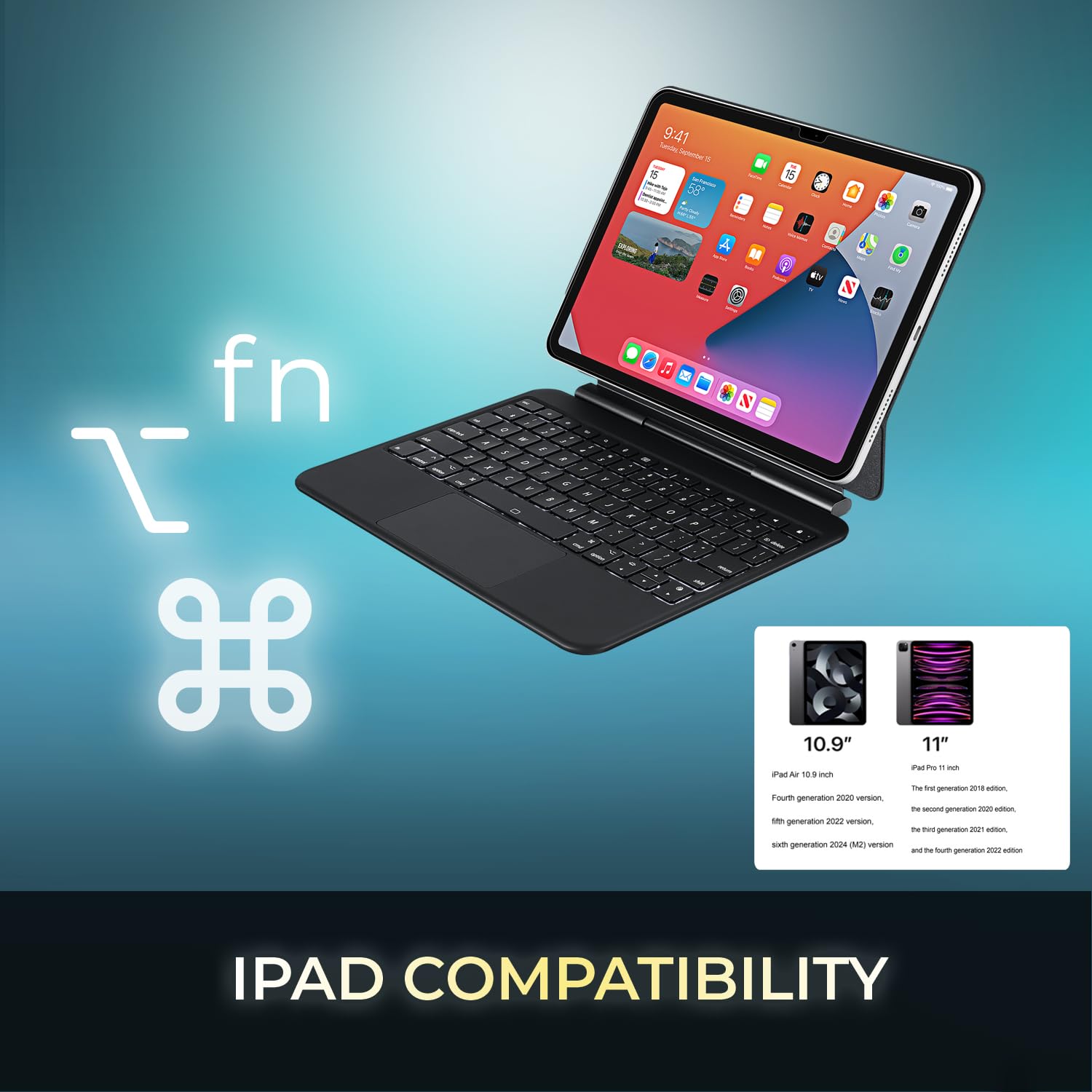
Image 3.1: Visual representation of compatible iPad models (10.9" and 11").
4. คุณสมบัติ
- การออกแบบที่ถอดออกได้: แป้นพิมพ์สามารถถอดแยกออกจากเคสได้เพื่อความยืดหยุ่นในการใช้งาน
- ขาตั้งปรับได้: The case converts into a stand with multiple viewมุมการเอียง
- ทัชแพดแบบบูรณาการ: ให้การนำทางที่แม่นยำและรองรับการใช้งานท่าทางสัมผัสหลายจุด
- การเชื่อมต่อบลูทูธ 5.1: Offers stable wireless connection up to 30 feet with low power consumption.
- แบตเตอรี่แบบชาร์จไฟได้: Built-in 450 mAh lithium polymer battery for extended use.
- ปุ่มกดแบบกรรไกร: โปรต่ำfile keys designed for comfortable and responsive typing.
- โครงสร้างทนทาน: Ultra-slim aluminum design for portability and protection.

Image 4.1: The case allows for various adjustable viewing angles for the iPad.

Image 4.2: The keyboard case features an ultra-slim and compact design, as shown with a ruler for scale.
5. การตั้งค่า
5.1. การชาร์จคีย์บอร์ด
Before initial use, fully charge the keyboard. Connect the included USB-C cable to the keyboard's charging port and the other end to a USB power source (e.g., computer, wall adapter). The charging indicator light will illuminate during charging and turn off when fully charged.

Image 5.1: The keyboard features a built-in rechargeable battery and charges via USB-C.
5.2. การใส่ iPad ของคุณ
Carefully place your iPad into the protective case, ensuring it is securely seated. The magnetic closure will help secure the tablet and keyboard when closed.
5.3. การจับคู่บลูทู ธ
- โปรดตรวจสอบให้แน่ใจว่าแป้นพิมพ์เปิดอยู่และชาร์จแบตเตอรี่เต็มแล้ว
- เปิดใช้งานแป้นพิมพ์โดยเลื่อนสวิตช์เปิด/ปิดไปที่ตำแหน่ง "เปิด"
- กดปุ่ม เอฟเอ็น + ซี keys simultaneously to activate Bluetooth pairing mode. The Bluetooth indicator light will flash.
- บน iPad ของคุณไปที่ การตั้งค่า > บลูทูธ.
- เปิดบลูทูธ
- Locate "Adesso WKB-7010" (or similar) in the list of available devices and tap to connect.
- เมื่อเชื่อมต่อแล้ว ไฟแสดงสถานะบลูทูธบนแป้นพิมพ์จะหยุดกะพริบ

Image 5.2: The keyboard utilizes Bluetooth 5.1 wireless technology for connection.
6. คู่มือการใช้งาน
6.1. ฟังก์ชันแป้นพิมพ์
The keyboard features standard QWERTY layout keys and dedicated function keys for iPad control. Use the Fn key in combination with other keys for special functions (e.g., media control, volume, screen brightness).
6.2. การใช้งานทัชแพด
The integrated touchpad supports various gestures for navigation and interaction with your iPad. Ensure that "AssistiveTouch" or "Trackpad & Mouse" settings are configured on your iPad for optimal performance.
- แตะนิ้วเดียว: คลิกซ้าย.
- แตะด้วยสองนิ้ว: คลิกขวา (เมนูบริบท)
- การเลื่อนด้วยสองนิ้ว: เลื่อนขึ้น/ลง หรือ ซ้าย/ขวา
- บีบเพื่อซูม: ใช้สองนิ้วเพื่อซูมเข้าหรือออก
- ปัดนิ้วสามนิ้วขึ้น: ไปที่หน้าจอหลัก
- ปัดนิ้วสามนิ้วไปทางซ้าย/ขวา: สลับไปมาระหว่างแอปที่เปิดอยู่
7. การชาร์จคีย์บอร์ด
The keyboard is equipped with a 450 mAh rechargeable lithium polymer battery. A full charge takes approximately 3 hours using the provided USB-C cable.
- Continuous Use (backlight off): นานถึง 150 ชั่วโมง
- Continuous Use (backlight on): นานถึง 2.5 ชั่วโมง
- เวลาสแตนด์บาย: นานถึง 90 วัน
When the battery is low, the power indicator light may flash or turn red. Connect the keyboard to a power source to recharge.
8. การบำรุงรักษา
- Keep the keyboard and case clean by wiping with a soft, dry cloth.
- หลีกเลี่ยงการให้อุปกรณ์สัมผัสกับอุณหภูมิ ความชื้น หรือแสงแดดโดยตรง
- อย่าใช้สารเคมีรุนแรงหรือน้ำยาทำความสะอาดที่มีฤทธิ์กัดกร่อน
- เก็บอุปกรณ์ไว้ในที่แห้งและเย็นเมื่อไม่ได้ใช้งานเป็นเวลานาน
9 การแก้ไขปัญหา
9.1. แป้นพิมพ์ไม่เชื่อมต่อ
- โปรดตรวจสอบให้แน่ใจว่าแป้นพิมพ์เปิดอยู่และชาร์จแบตเตอรี่เต็มแล้ว
- ตรวจสอบให้แน่ใจว่าได้เปิดใช้งานบลูทูธบน iPad ของคุณแล้ว
- Put the keyboard into pairing mode (Fn + C).
- ลบอุปกรณ์ออกจากเมนูบลูทูธใน iPad ของคุณ แล้วลองเชื่อมต่อใหม่อีกครั้ง
- รีสตาร์ททั้ง iPad และคีย์บอร์ดของคุณ
9.2. Touchpad Not Responding
- ตรวจสอบให้แน่ใจว่าได้เชื่อมต่อแป้นพิมพ์ผ่านบลูทูธแล้ว
- Check iPad settings for "Trackpad & Mouse" or "AssistiveTouch" to ensure external input devices are enabled.
- รีสตาร์ทคีย์บอร์ดและ iPad
9.3. ปุ่มกดใช้งานไม่ได้
- ตรวจสอบให้แน่ใจว่าแป้นพิมพ์มีประจุไฟเต็มแล้ว
- Verify a stable Bluetooth connection.
- ทำความสะอาดรอบๆ คีย์ที่ได้รับผลกระทบเพื่อกำจัดเศษสิ่งสกปรกออก
10. ข้อมูลจำเพาะ
| หมายเลขรุ่น | WKB-7010 |
| เทคโนโลยีการเชื่อมต่อ | บลูทูธ 5.1 |
| อุปกรณ์ที่รองรับ | iPad Pro 11-inch, iPad Air 10.9-inch |
| ประเภทแบตเตอรี่ | ลิเธียมโพลิเมอร์แบบชาร์จไฟได้ |
| ความจุของแบตเตอรี่ | 450 มิลลิแอมป์ |
| พอร์ตชาร์จ | ยูเอสบี-ซี |
| ระยะการทำงาน | สูงถึง 30 ฟุต (10 เมตร) |
| ประเภทสวิตช์กุญแจ | สวิตช์กรรไกร |
| วัสดุ | Aluminum, Leather (case exterior) |
| ขนาด (กว้าง x ยาว x สูง) | 10 x 7.8 x 0.55 นิ้ว |
| น้ำหนัก | 1.2 ปอนด์ |
11. การรับประกันและการสนับสนุน
This Adesso product comes with a การรับประกันแบบจำกัดของผู้ผลิต 1 ปี. For warranty claims or technical support, please contact Adesso customer service. You can find contact information on the official Adesso webเว็บไซต์: www.adesso.com
โปรดเก็บหลักฐานการซื้อไว้เพื่อรับบริการตามการรับประกัน


