
การแนะนำ
Thank you for choosing the Blukar K9187 Rechargeable Flashlight. This manual provides detailed instructions for the safe and efficient operation, maintenance, and troubleshooting of your new flashlight. Please read this manual thoroughly before use and retain it for future reference.
เนื้อหาแพ็คเกจ
ตรวจสอบว่ารายการทั้งหมดที่ระบุไว้ด้านล่างนี้รวมอยู่ในแพ็คเกจของคุณ:
- 1 x Blukar K9187 Rechargeable Flashlight
- แบตเตอรี่แบบชาร์จไฟได้ 5000mAh จำนวน 1 ก้อน (ติดตั้งมาแล้วหรือซื้อแยกต่างหาก)
- 1 x 395nm UV Mini Flashlight
- แบตเตอรี่ AAA 3 ก้อน
- สายชาร์จ USB-C 2 เส้น
- 4 x Waterproof Sealing Rings (spare)
- 1 x Dry Battery Rack (for AAA batteries)
- 1 x Dry Battery Sleeve
- 1 x กล่องเก็บของ
- สายคล้องคอ 2 เส้น
- 1 x Flashlight Case/Holster

ภาพ: ระเบิด view of the Blukar K9187 flashlight, detailing its various components and included accessories.
คุณสมบัติผลิตภัณฑ์
- แหล่งกำเนิดแสงคู่: Main beam for long-range illumination and COB side light for close-range lighting.
- ปรับโฟกัสได้: Seamlessly switch between floodlight and spotlight modes.
- Multiple Modes & Color Temperatures: 7 lighting modes including white, warm, red, and SOS, with stepless dimming for main light.
- แบตเตอรี่ใช้งานได้ยาวนาน: Built-in 5000mAh rechargeable battery providing 6-24 hours of continuous use.
- ฟังก์ชั่นธนาคารพลังงาน: USB-A output port to charge other devices.
- จอแสดงผลแบตเตอรี่แบบดิจิตอล: Real-time monitoring of remaining power.
- ทนทานและกันน้ำ: Crafted from impact-resistant aluminum alloy with IP67 waterproof rating.
- ฟังก์ชั่นหน่วยความจำอัจฉริยะ: Remembers the last used mode and brightness settings.
การตั้งค่า
การติดตั้งแบตเตอรี่
The Blukar K9187 flashlight operates with either the included 5000mAh rechargeable battery or three AAA batteries using the provided dry battery rack and sleeve.
- คลายเกลียวฝาท้ายของไฟฉาย
- สำหรับแบตเตอรี่แบบชาร์จไฟได้: Insert the 5000mAh battery with the positive (+) end facing towards the flashlight head.
- สำหรับแบตเตอรี่ AAA: Place three AAA batteries into the dry battery rack, ensuring correct polarity. Insert the rack into the flashlight with the positive (+) end facing towards the flashlight head.
- ขันฝาท้ายกลับเข้าที่อย่างแน่นหนา
การชาร์จเบื้องต้น
Before first use, fully charge the rechargeable battery.
- Locate the Type-C input port on the side of the flashlight, protected by a rubber cover.
- Connect one end of the USB-C charging cable to the flashlight's Type-C port and the other end to a compatible USB power adapter (not included) or a computer's USB port.
- The digital display will show the charging progress. A full charge typically takes several hours.
- Once fully charged, disconnect the cable and ensure the rubber cover is securely closed to maintain waterproofing.

ภาพ: The Blukar K9187 flashlight connected for USB-C charging, displaying battery level.
คำแนะนำการใช้งาน
เปิด/ปิดเครื่อง
- เปิด: Press the ON/OFF button once. The flashlight will activate in the last used mode due to its memory function.
- วิธีปิด: Press and hold the ON/OFF button for 3 seconds. Alternatively, if the flashlight has been active for more than 8 seconds in any mode, a single press of the ON/OFF button will turn it off.
Main Light Operation (White & Warm Light)
- Switch Color Temperature: With the main light on, short press the dedicated Color Temperature button (located next to the ON/OFF button) to switch between white and warm light.
- การหรี่แสงแบบไม่ต่อเนื่อง: With the main light on, long press the Color Temperature button to adjust brightness from 100% down to 30% and vice versa. Release the button at your desired brightness level.
- Main Light SOS Mode: Double-click the ON/OFF button quickly to activate the main light's SOS flashing mode (available for both white and warm light).

ภาพ: Illustration of the Blukar K9187's white and warm light modes and stepless dimming function.
COB Side Light Operation
After cycling through the main light modes, further presses of the ON/OFF button will activate the COB side light modes:
- COB White High Brightness
- COB Red High Brightness
- COB Red SOS (flashing)
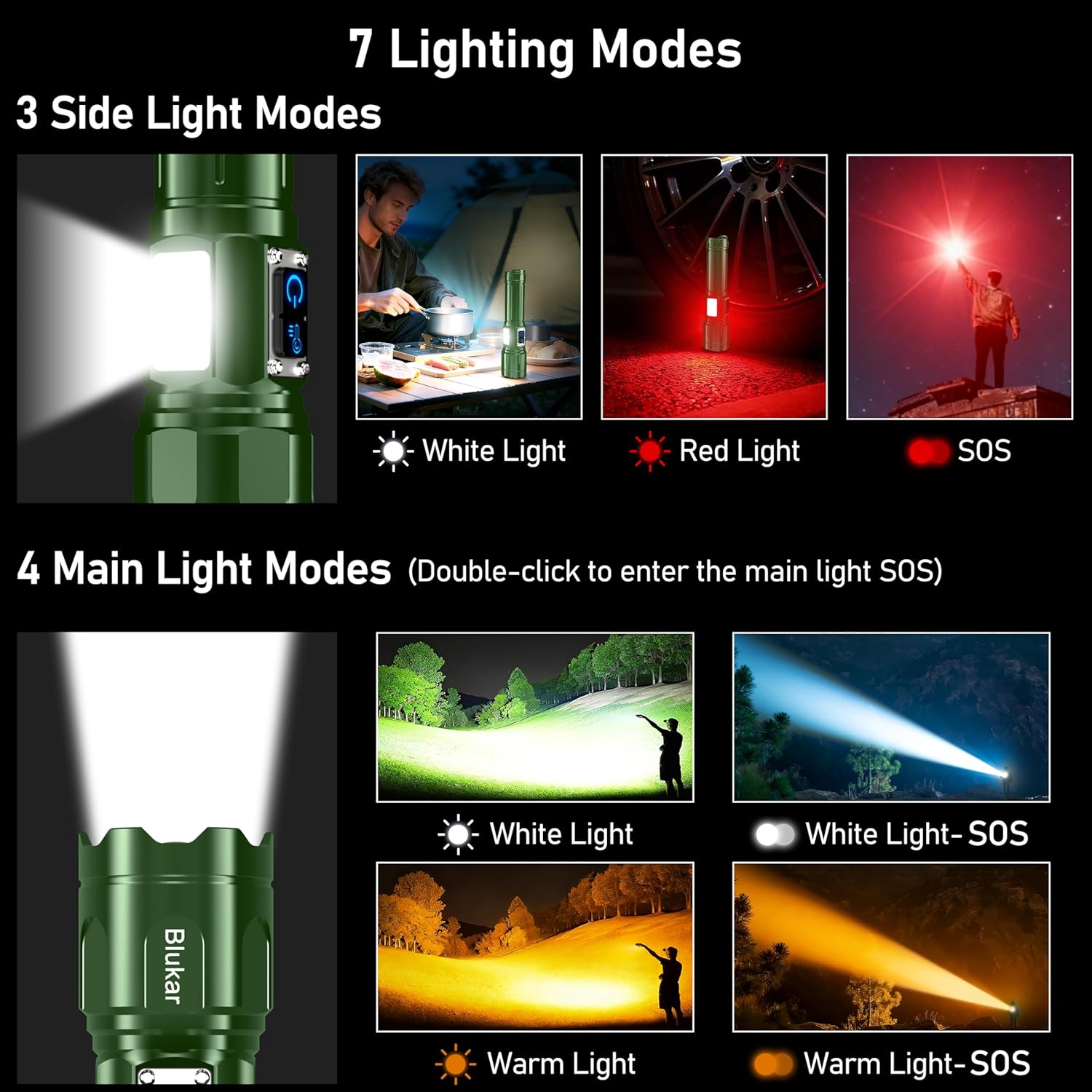
ภาพ: Visual guide to the 7 lighting modes, including main beam and COB side light options.
ปรับโฟกัสได้
To adjust the beam focus, gently slide the head of the flashlight forward or backward. Sliding forward narrows the beam for a focused spotlight, while sliding backward widens it for a broad floodlight.

ภาพ: Demonstration of the adjustable focus, transitioning between spotlight and floodlight beams.
ฟังก์ชั่นพาวเวอร์แบงค์
The flashlight can serve as an emergency power bank. Locate the USB-A output port next to the Type-C input port. Connect your device's charging cable to the USB-A port to begin charging.
จอแสดงผลแบตเตอรี่
จอแสดงผลดิจิทัล LED ในตัวจะแสดงเปอร์เซ็นต์แบตเตอรี่ที่เหลืออยู่tage in real-time, allowing you to monitor power levels accurately.
การชาร์จไฟ
The Blukar K9187 flashlight is equipped with a Type-C input for convenient charging. A full charge provides approximately 6-24 hours of continuous use, depending on the selected lighting mode and brightness level.
- Use the provided USB-C cable to connect the flashlight to a 5V/2A power source.
- หน้าจอแสดงผลดิจิทัลจะแสดงสถานะการชาร์จ
- Avoid overcharging by disconnecting once the battery is full.
ภาพ: The Blukar K9187 flashlight connected for USB-C charging, displaying battery level.
การซ่อมบำรุง
- การทำความสะอาด: เช็ดตัวไฟฉายด้วยผ้านุ่มๆamp ใช้ผ้าเช็ดทำความสะอาด ห้ามใช้สารทำความสะอาดที่มีฤทธิ์กัดกร่อนหรือตัวทำละลาย รักษาเลนส์ให้สะอาดเพื่อให้ได้แสงส่องสว่างที่ดีที่สุด
- ซีลกันน้ำ: Periodically inspect the waterproof sealing rings (O-rings) for wear or damage. Replace them with the provided spare rings if necessary to maintain the IP67 waterproof rating.
- พื้นที่จัดเก็บ: Store the flashlight in a cool, dry place away from direct sunlight when not in use. If storing for extended periods, charge the battery every 3-6 months to prolong its lifespan.
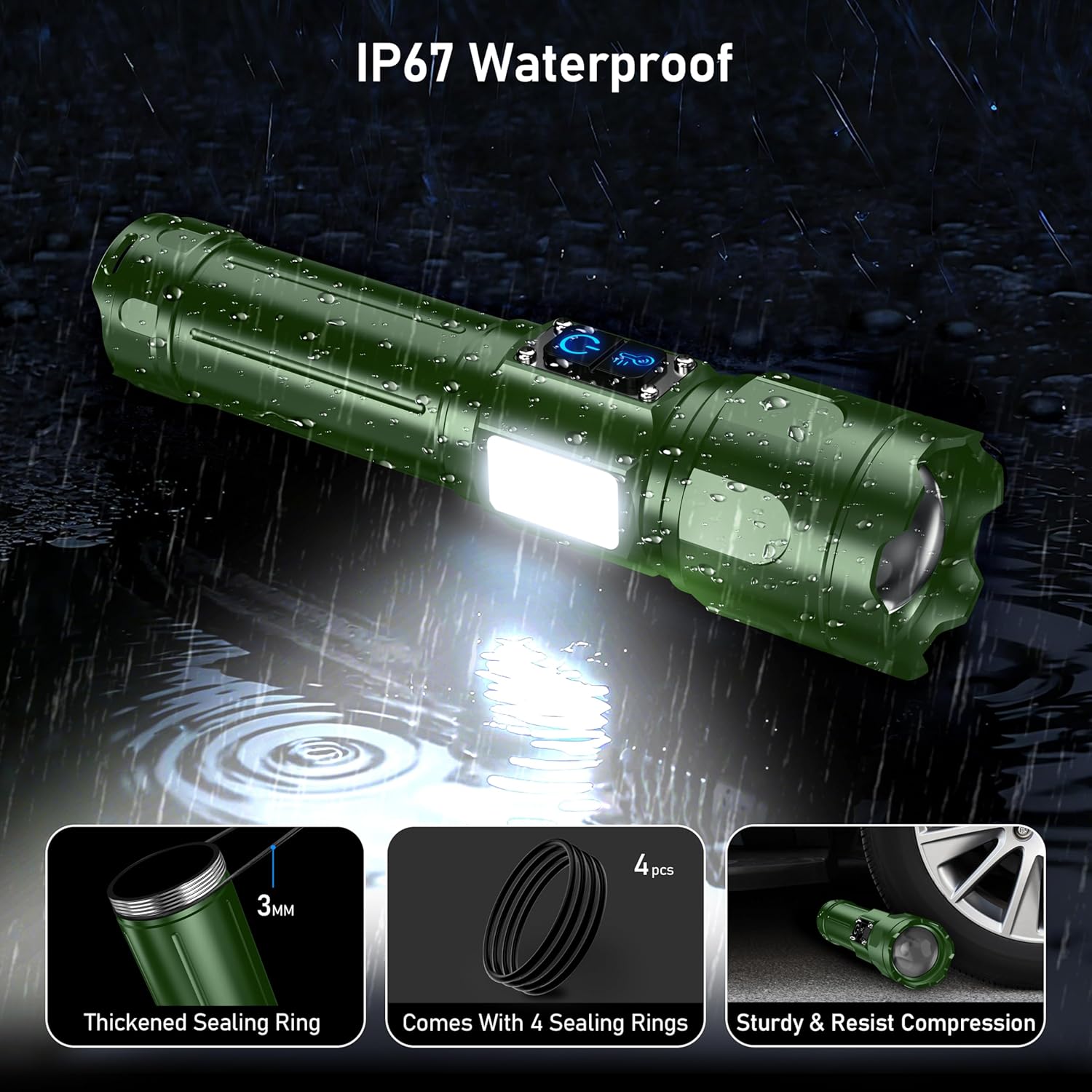
ภาพ: The Blukar K9187 flashlight demonstrating its IP67 waterproof capability and durable construction.
การแก้ไขปัญหา
| ปัญหา | สาเหตุที่เป็นไปได้ | สารละลาย |
|---|---|---|
| ไฟฉายไม่ติด | แบตเตอรี่หมดหรือติดตั้งไม่ถูกต้อง | ชาร์จแบตเตอรี่หรือตรวจสอบให้แน่ใจว่าติดตั้งด้วยขั้วที่ถูกต้อง |
| แสงสลัวหรือกระพริบ | แบตเตอรี่อ่อนหรือการเชื่อมต่อหลวม | Recharge the battery. Ensure the tail cap is tightly screwed on. |
| ไฟฉายไม่ชาร์จ | Charging cable or adapter issue; port obstruction. | Try a different USB-C cable or power adapter. Check the charging port for debris. |
| การรั่วซึมของน้ำ | Damaged or improperly seated sealing rings. | Inspect and replace sealing rings if damaged. Ensure all caps and covers are securely closed. |
ข้อมูลจำเพาะ
| คุณสมบัติ | รายละเอียด |
|---|---|
| หมายเลขรุ่น | เค9187 |
| ยี่ห้อ | บลูการ์ |
| สี | สีเขียวเข้ม |
| วัสดุ | โลหะผสมอลูมิเนียม |
| ขนาดสินค้า | ลึก 6.69 นิ้ว x กว้าง 1.64 นิ้ว x สูง 1.32 นิ้ว (17 ซม. x 4.19 ซม. x 3.36 ซม.) |
| น้ำหนักสินค้า | 9.7 ออนซ์ (274 กรัม) |
| ประเภทแบตเตอรี่ | 5000mAh Lithium Ion (Rechargeable) / 3 x AAA (Alternative) |
| พอร์ตชาร์จ | USB Type-C อินพุต |
| พอร์ตเอาท์พุท | USB Type-A Output (Power Bank Function) |
| ระดับการกันน้ำ | IP67 |
ข้อมูลด้านความปลอดภัย
- Do not look directly into the flashlight beam or the UV light. High intensity light can cause eye damage.
- เก็บให้พ้นจากมือเด็ก
- ห้ามถอดชิ้นส่วนหรือดัดแปลงไฟฉาย การกระทำดังกล่าวอาจทำให้เกิดความเสียหายและทำให้การรับประกันเป็นโมฆะ
- Use only the specified battery types and charging cables.
- ควรหลีกเลี่ยงการนำไฟฉายไปวางในที่ที่มีอุณหภูมิสูงหรือต่ำเกินไป หรือใกล้เปลวไฟ
- Ensure the charging port cover is securely closed when not charging to maintain waterproofing.
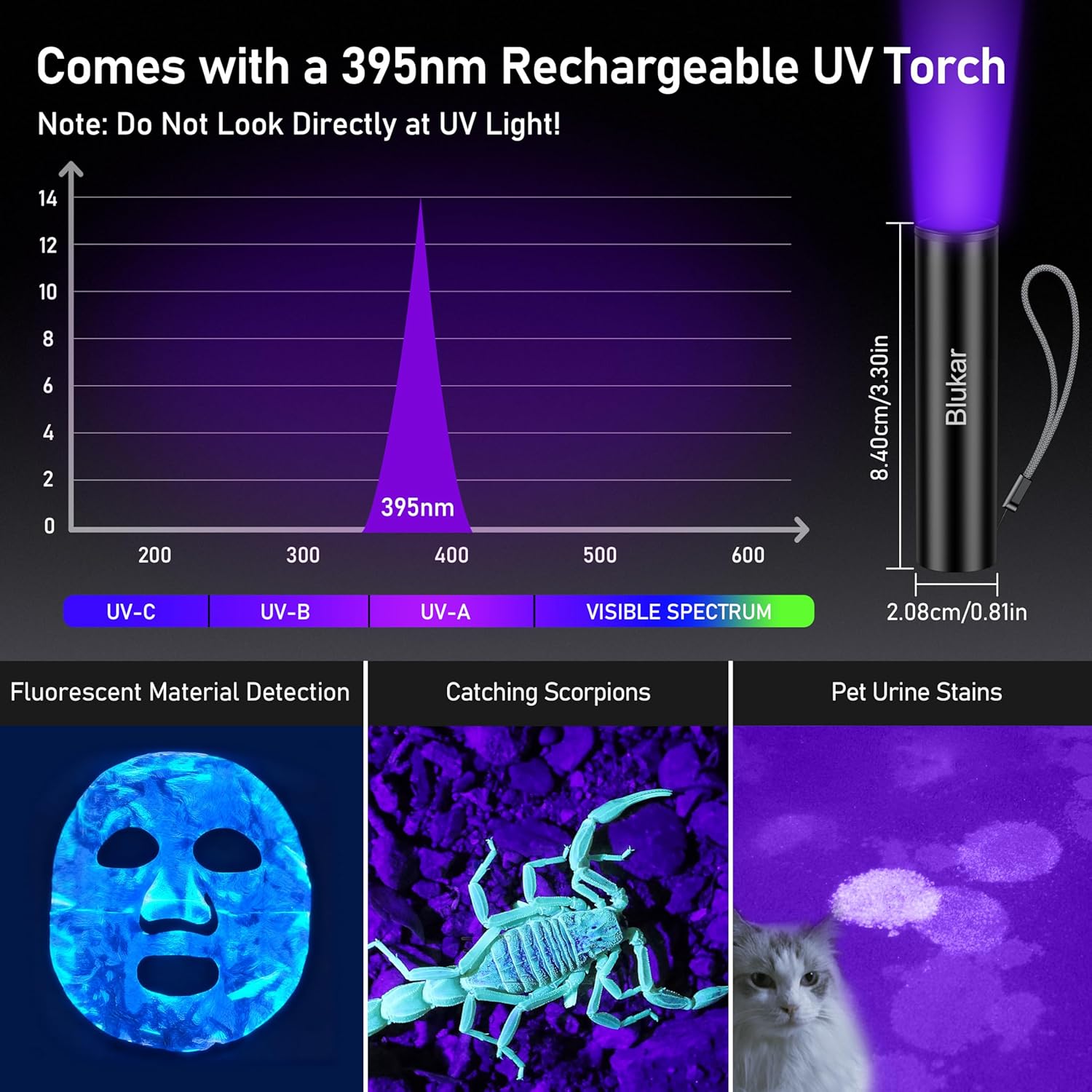
ภาพ: The 395nm UV mini flashlight and its applications, with a warning not to look directly at UV light.
วิดีโอสินค้า
วีดีโอ: Demonstration of the Blukar K9187 flashlight's features, including its solid build, various lighting modes, adjustable beam, and power bank functionality.
การรับประกันและการสนับสนุน
Blukar products are designed for reliability and performance. For warranty information, technical support, or any inquiries regarding your Blukar K9187 flashlight, please refer to the contact information provided with your purchase or visit the official Blukar website. Please have your model number (K9187) and purchase details ready when contacting support.