
1. บทนำ
The Bemkia Wireless CarPlay and Android Auto Adapter is designed to convert your vehicle's existing wired CarPlay or Android Auto system into a wireless connection. This device allows for seamless integration of your smartphone's features, including navigation, music, and calls, directly onto your car's infotainment screen without the need for physical cables.

Image 1.1: The Bemkia Wireless CarPlay and Android Auto Adapter, showcasing its compact design and included USB-A and USB-C cables.
2. เนื้อหาบรรจุภัณฑ์
โปรดตรวจสอบว่าสินค้าทั้งหมดมีอยู่ในแพ็คเกจ:
- 1x Bemkia Wireless CarPlay and Android Auto Adapter
- สาย USB-A ถึง USB-C 1 เส้น
- สาย USB-C ถึง USB-A 1 เส้น
- 1x คู่มือผู้ใช้
Video 2.1: Unboxing the Bemkia Wireless CarPlay and Android Auto Adapter, showing the adapter, cables, and user manual.
3. ความเข้ากันได้
This adapter is compatible with vehicles equipped with factory-wired CarPlay (model year 2016 and newer). It supports iPhone devices running iOS 12 or later (iPhone 5S and newer) and Android phones compatible with Android Auto (Android 11 and newer).
To check if your car model is compatible with CarPlay, please visit the official Apple webเว็บไซต์: รุ่นรถที่รองรับ Apple CarPlay.

Image 3.1: Visual representation of device and vehicle compatibility for the adapter, including various iPhone models and car brands.
4. คำแนะนำในการตั้งค่า
Follow these steps to set up your Bemkia Wireless CarPlay and Android Auto Adapter:
- ขั้นตอนที่ 1: เตรียมโทรศัพท์ของคุณ
Ensure that both Bluetooth and Wi-Fi functions are enabled on your smartphone. It is recommended to temporarily disconnect from any other Wi-Fi networks or turn off mobile hotspots before pairing to avoid conflicts. - ขั้นตอนที่ 2: เชื่อมต่ออะแดปเตอร์
Plug the wireless adapter into your car's USB port. Use the appropriate USB-A or USB-C cable provided, depending on your car's port type. The adapter's LED light will illuminate blue upon successful connection. - Step 3: Pair with Your Phone
On your car's infotainment screen, a guide will appear displaying the Bluetooth name (e.g., 'Smartbox-8950') and firmware version. On your phone, navigate to Bluetooth settings, find the adapter's Bluetooth name, and tap to connect. Accept any pairing requests. Once paired, CarPlay or Android Auto will launch automatically.

Image 4.1: Illustration of plugging the wireless adapter into the car's USB port using either a USB-A or USB-C cable.

Image 4.2: Screenshots demonstrating how to enable Bluetooth and Wi-Fi on a smartphone and the Bluetooth pairing request.
Video 4.1: A step-by-step guide on connecting the K8 Wireless CarPlay adapter, including unboxing, plugging in, and Bluetooth pairing.
5. คู่มือการใช้งาน
Once successfully paired, the adapter will automatically connect to your phone each time you start your car. The system maintains all original car controls, including the touchscreen, steering wheel buttons, and voice assistant functionality (e.g., Siri).
- การเชื่อมต่อใหม่อัตโนมัติ: After initial setup, the adapter will automatically establish a wireless connection with your paired smartphone when the car is started.
- การบูรณาการแบบไร้รอยต่อ: Enjoy navigation, music streaming, hands-free calling, and messaging directly from your car's display.
- ปุ่มควบคุมดั้งเดิม: Continue to use your car's native controls, such as rotary knobs, steering wheel buttons, and the touchscreen, to interact with CarPlay or Android Auto. Voice commands are also fully supported.
- ประสิทธิภาพสูง: Equipped with a dual-core chip and 1GB RAM, the adapter ensures fast boot-up times (8-12 seconds) and smooth, lag-free operation for streaming and navigation.
- การเชื่อมต่อที่เสถียร: Bluetooth 5.3 and Wi-Fi 5.8GHz technologies provide a robust and stable connection, minimizing interruptions even in areas with weak signal.

Image 5.1: The CarPlay interface displayed on a car's screen, highlighting the use of original car controls like rotary knobs, touchscreen, and steering wheel buttons.
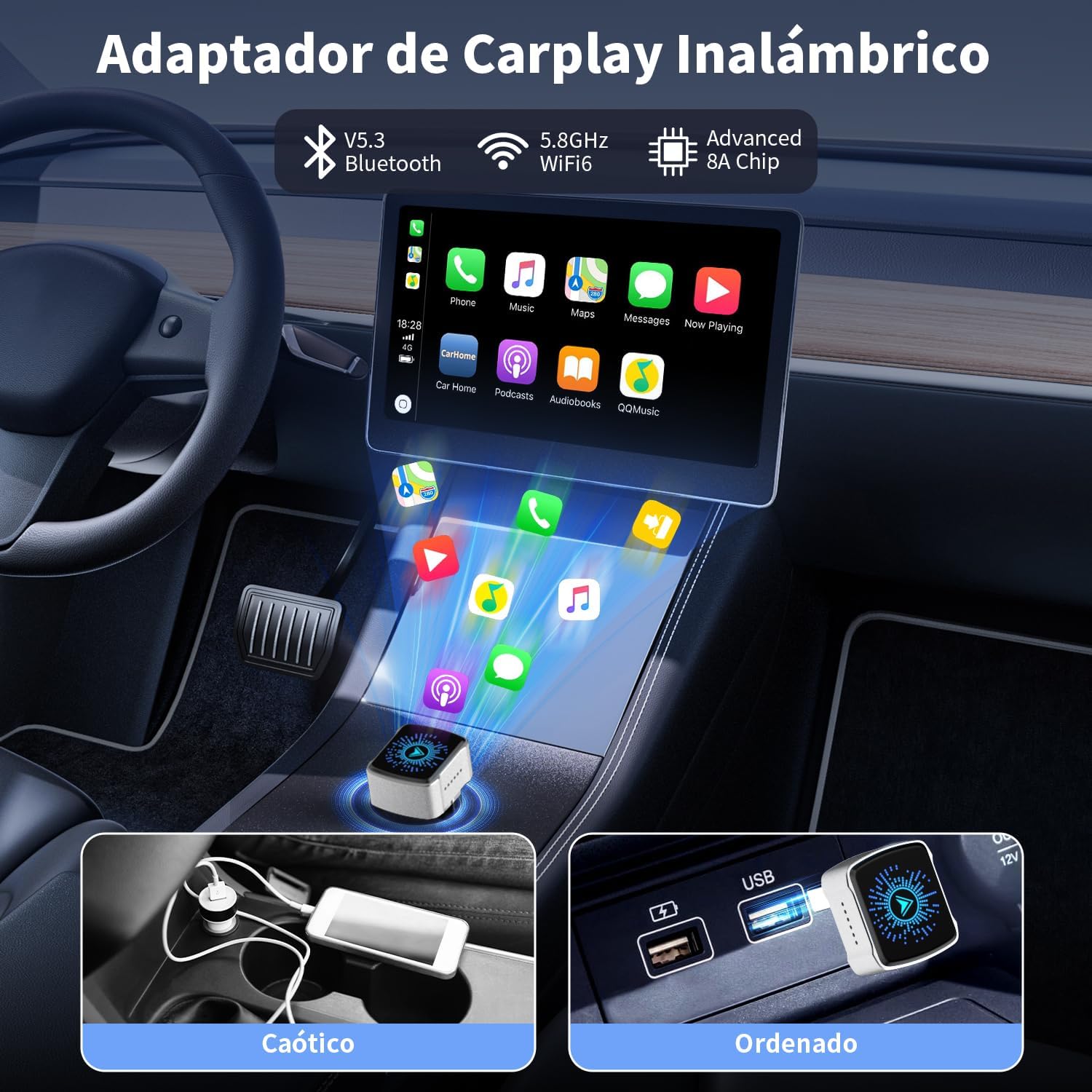
Image 5.2: A visual comparison illustrating the difference between a cluttered wired connection and an organized, wireless setup using the adapter.
6. คุณสมบัติและการออกแบบผลิตภัณฑ์
The Bemkia adapter features a premium, ultra-compact design for discreet integration into your vehicle.
- Premium & Compact Design: สร้างขึ้นด้วยอลูมิเนียมasing and 2.5D curved glass, the adapter is mini-sized (2.5 x 2.15 x 1.5 cm) and resistant to heat and vibrations.
- ความเข้ากันได้ของ USB สากล: Includes both USB-A and USB-C cables to ensure compatibility with various car models.
- การกระจายความร้อนที่มีประสิทธิภาพ: Designed with heat dissipation holes to maintain optimal performance and longevity.

ภาพที่ 6.1: ภาพระยะใกล้ view of the adapter's exquisite craftsmanship, highlighting its 2.5D curved glass, aluminum casing, heat dissipation holes, and ultra-compact dimensions.
7 การแก้ไขปัญหา
หากคุณพบปัญหา โปรดพิจารณาสิ่งต่อไปนี้:
- ไม่มีการเชื่อมต่อ: Ensure your car's wired CarPlay/Android Auto is functional before connecting the adapter. Verify that Bluetooth and Wi-Fi are active on your phone and that you have selected the correct Bluetooth device name for the adapter.
- การเชื่อมต่อไม่ต่อเนื่อง: Check for potential interference from other wireless devices. Ensure the adapter is securely plugged into the car's USB port.
- ปัญหาความล่าช้าหรือประสิทธิภาพการทำงาน: Restart your phone and the car's infotainment system. Ensure your phone's operating system is up to date.
- อัพเดตเฟิร์มแวร์: The manufacturer provides free firmware updates. Refer to the official Bemkia support channels for instructions on how to update the adapter's firmware, which can resolve compatibility or performance issues.
8. ข้อมูลจำเพาะ
| คุณสมบัติ | รายละเอียด |
|---|---|
| ยี่ห้อ | เบมเกีย |
| แบบอย่าง | K8 |
| ขนาดสินค้า | 2.15 x 1.5 x 2.5 ซม. |
| น้ำหนักผลิตภัณฑ์ | 50 กรัม |
| อุปกรณ์ที่รองรับ | Cars with factory-wired CarPlay (2016+), iPhone (iOS 12+), Android phones (Android Auto compatible) |
| การเชื่อมต่อ | Bluetooth 5.3, Wi-Fi 5.8GHz |
| ประเภทขั้วต่อ | USB Type-A, USB Type-C |
| แรม | 1GB |
| ชิป | ดูอัลคอร์ |
9. การรับประกันและการสนับสนุน
Bemkia offers lifetime support and free firmware updates for this product. For technical assistance, warranty claims, or to access the latest firmware, please refer to the contact information provided in your product packaging or visit the official Bemkia webเว็บไซต์.