
การแนะนำ
This manual provides essential instructions for the safe and efficient operation of your Generic Portable Bluetooth Speaker with Solar Charging, Model B0FVMB2F8H. Please read this manual thoroughly before using the product and retain it for future reference.
ข้อมูลด้านความปลอดภัย
- Do not expose the speaker to extreme temperatures or direct sunlight for prolonged periods when not in use, especially the solar panel.
- หลีกเลี่ยงการทำตกหรือให้ลำโพงได้รับแรงกระแทกรุนแรง
- ห้ามถอดประกอบ ซ่อมแซม หรือดัดแปลงลำโพงด้วยตนเอง โปรดติดต่อช่างผู้ชำนาญการเพื่อทำการซ่อมแซม
- Keep the speaker away from water and liquids, despite its waterproof design, to prevent damage to internal components.
- โปรดใช้เฉพาะสายชาร์จและอะแดปเตอร์แปลงไฟที่ระบุไว้เท่านั้น
- เก็บให้พ้นจากมือเด็ก
เนื้อหาแพ็คเกจ
กรุณาตรวจสอบแพ็คเกจสำหรับรายการต่อไปนี้:
- Portable Bluetooth Speaker (Model B0FVMB2F8H)
- สายชาร์จ USB
- คู่มือเริ่มต้นอย่างรวดเร็ว
สินค้าเกินview
Familiarize yourself with the components of your speaker:
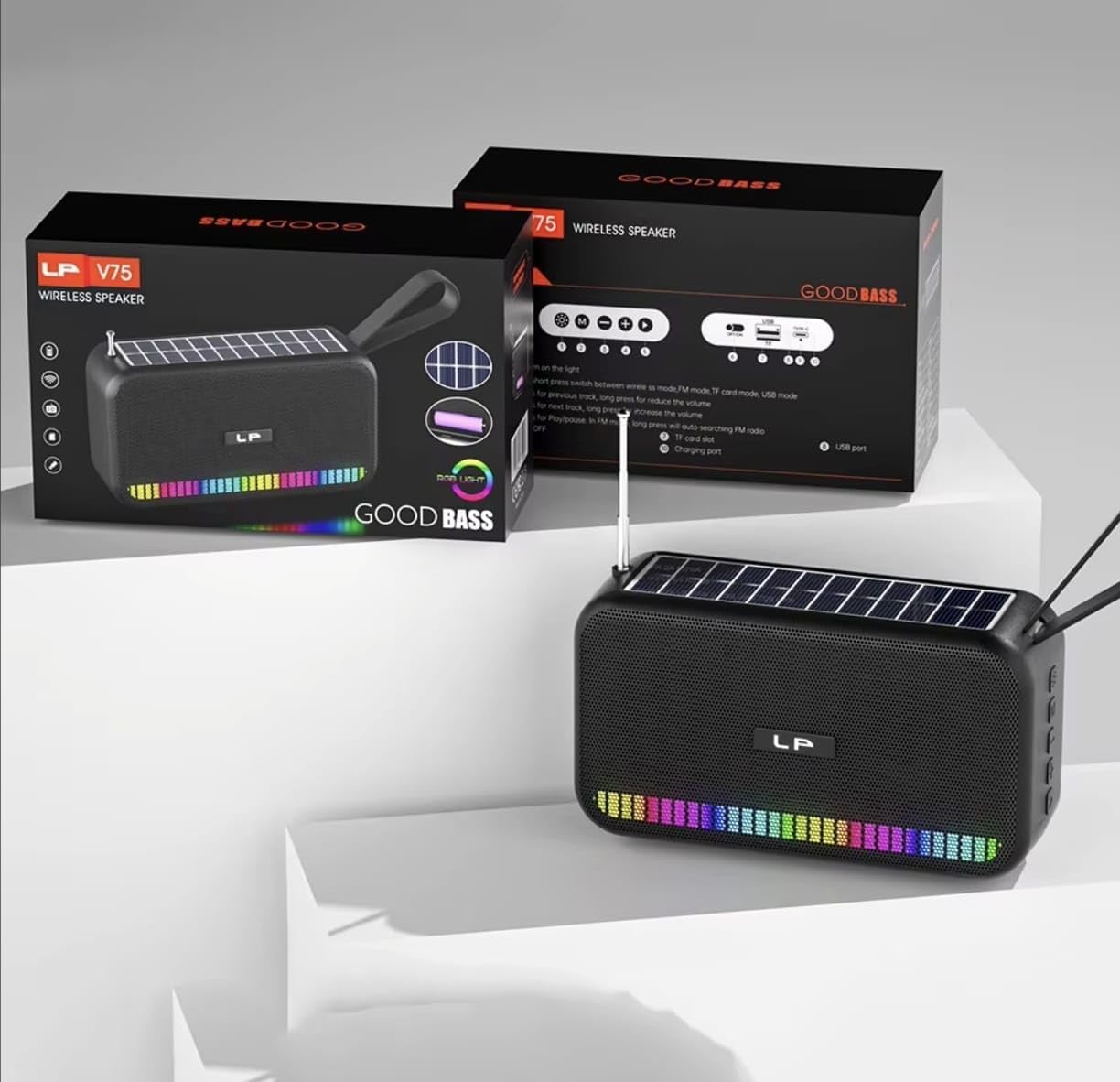
ภาพ: ด้านหน้า view of the portable Bluetooth speaker, highlighting its solar panel, LED light display, and overall dimensions (approximately 170.5mm length, 95mm height, 60mm width).
- แผงโซล่าเซลล์: Located on the top surface for solar charging.
- ไฟ LED แสดง: Front-facing lights that synchronize with music.
- ปุ่มควบคุม: (Details not provided, assuming standard buttons for power, volume, mode, play/pause).
- พอร์ต USB: For charging and USB drive playback.
- ช่องเสียบการ์ด TF: สำหรับการเล่นไฟล์จากการ์ด TF
- พอร์ตชาร์จ: For USB cable charging.
- เสาอากาศ: สามารถเพิ่มกำลังรับสัญญาณวิทยุ FM ได้
- สายสะพาย: เพื่อความสะดวกในการพกพา

ภาพ: หลัง view of the portable Bluetooth speaker, showing the battery compartment open with a rechargeable battery inserted. Also visible are the USB and charging ports.
การตั้งค่า
1. ชาร์จลำโพง
Your speaker offers two charging methods:
- การชาร์จพลังงานแสงอาทิตย์: Place the speaker with the solar panel facing direct sunlight. The charging indicator light will illuminate. Solar charging is ideal for maintaining battery life outdoors but may be slower than USB charging.
- การชาร์จ USB: Connect the provided USB charging cable to the speaker's charging port and the other end to a USB power adapter (not included) or a computer's USB port. The charging indicator light will show charging status. A full charge typically takes several hours.
เพื่อให้แน่ใจว่าลำโพงชาร์จเต็มก่อนใช้งานครั้งแรก จะช่วยให้แบตเตอรี่ทำงานได้อย่างมีประสิทธิภาพสูงสุด
2. การเปิด/ปิดเครื่อง
- การเปิดเครื่อง: Press and hold the Power button (usually marked with ⏻ or เปิด/ปิด) for approximately 3 seconds until you hear an audible prompt or see the LED lights activate.
- วิธีปิดเครื่อง: Press and hold the Power button again for approximately 3 seconds until the speaker powers down.
คำแนะนำการใช้งาน
1. โหมดบลูทู ธ
- เข้าสู่โหมดบลูทูธ: Upon powering on, the speaker typically defaults to Bluetooth mode. If not, press the "M" (Mode) button until you hear the "Bluetooth Mode" prompt. The LED indicator will flash, indicating it's ready for pairing.
- การจับคู่:
- เปิดใช้งานบลูทูธบนอุปกรณ์ของคุณ (สมาร์ทโฟน แท็บเล็ต ฯลฯ)
- ค้นหา available Bluetooth devices. The speaker will appear as "B0FVMB2F8H" or a similar name.
- Select the speaker from the list to connect. Once paired, you will hear a confirmation sound, and the LED indicator will stop flashing.
- การควบคุมการเล่น:
- เล่น/หยุดชั่วคราว: กดปุ่มเล่น / หยุดชั่วคราว (⏸).
- เพลงถัดไป: Press the "Next" button (⏭).
- แทร็กก่อนหน้า: Press the "Previous" button (⏮).
- ปรับระดับเสียงขึ้น: Long press the "Next" button or use a dedicated Volume Up button.
- ลดเสียงลง: Long press the "Previous" button or use a dedicated Volume Down button.
2. โหมดวิทยุ FM
- เข้าสู่โหมด FM: Press the "M" (Mode) button repeatedly until you hear the "FM Radio" prompt.
- ขยายเสาอากาศ: ยืดเสาอากาศแบบยืดหดได้เต็มที่เพื่อการรับสัญญาณที่ดีขึ้น
- สแกนอัตโนมัติ: กดปุ่มเล่น/หยุดชั่วคราวค้างไว้ (⏸) to automatically scan and save available FM stations. The speaker will cycle through frequencies and store them.
- สถานีสวิตช์: Use the "Next" (⏭) and "Previous" (⏮) buttons to navigate through the saved stations.
3. USB / TF Card Playback
- แทรกสื่อ: Insert a USB flash drive into the USB port or a TF (MicroSD) card into the TF card slot. The speaker will automatically detect the media and switch to the corresponding playback mode.
- การควบคุมการเล่น: Use the Play/Pause, Next, and Previous buttons for controlling playback, similar to Bluetooth mode.
4. LED Light Display
The speaker features dynamic RGB LED lights that can synchronize with your music. Specific controls for the LED lights (e.g., changing patterns, turning off) are not detailed in the product information, but they typically activate automatically with audio playback. If there is a dedicated light button, press it to cycle through modes or turn off the lights.
5. การโทรแบบแฮนด์ฟรี
เมื่อเชื่อมต่อกับสมาร์ทโฟนผ่านบลูทูธ ลำโพงนี้สามารถใช้สำหรับการโทรแบบแฮนด์ฟรีได้
- รับสาย: กดปุ่มเล่น / หยุดชั่วคราว (⏸) once to answer an incoming call.
- วางสาย: กดปุ่มเล่น / หยุดชั่วคราว (⏸) once to end an ongoing call.
- ปฏิเสธสาย: กดปุ่มเล่น/หยุดชั่วคราวค้างไว้ (⏸) to reject an incoming call.
การซ่อมบำรุง
- การทำความสะอาด: ใช้ผ้าแห้งนุ่มเช็ดทำความสะอาดพื้นผิวลำโพง ห้ามใช้สารทำความสะอาดที่มีฤทธิ์กัดกร่อน แอลกอฮอล์ หรือสารเคมีใดๆ
- แผงโซล่าเซลล์: Keep the solar panel clean and free of dust or debris to ensure efficient charging.
- พื้นที่จัดเก็บ: When not in use for extended periods, store the speaker in a cool, dry place. It is recommended to fully charge the battery every 3 months to prolong its lifespan.
การแก้ไขปัญหา
| ปัญหา | สาเหตุที่เป็นไปได้ | สารละลาย |
|---|---|---|
| ลำโพงไม่เปิดเครื่อง | แบตเตอรี่อ่อน | Charge the speaker using the USB cable or place it in direct sunlight. |
| ไม่สามารถจับคู่ผ่านบลูทูธได้ | ไม่ได้เปิดใช้งานบลูทูธบนอุปกรณ์ ลำโพงไม่ได้อยู่ในโหมดจับคู่ อยู่ไกลจากอุปกรณ์เกินไป | Ensure Bluetooth is on and the speaker is in pairing mode. Move device closer to speaker (within 10 meters). Forget previous pairings on your device and try again. |
| ไม่มีเสียงหรือเสียงเบา | Volume too low on speaker or connected device; incorrect mode selected. | Increase volume on both the speaker and your connected device. Ensure the correct mode (Bluetooth, FM, USB, TF) is selected. |
| การรับสัญญาณวิทยุ FM ไม่ดี | เสาอากาศไม่ได้ยืดออก สัญญาณอ่อน | Fully extend the telescopic antenna. Try repositioning the speaker for better signal reception. |
| การ์ด USB/TF ไม่สามารถเล่นได้ | ไม่ถูกต้อง file format; card/drive not inserted correctly; corrupted media. | รับรองเสียง files are in a compatible format (e.g., MP3). Reinsert the USB drive or TF card. Try a different USB drive or TF card. |
ข้อมูลจำเพาะ
| หมายเลขรุ่น: | B0FVMB2F8H |
| เทคโนโลยีการเชื่อมต่อ: | บลูทูธ |
| แหล่งพลังงาน: | Solar, USB |
| รองรับแบนด์วิทยุ: | เอฟเอ็ม (87.5-108 เมกะเฮิรตซ์) |
| คุณสมบัติพิเศษ: | Solar charging, LED light display, Multi-playback options (Bluetooth, FM Radio, USB, TF card) |
| อุปกรณ์ที่รองรับ: | Bluetooth devices, USB devices, TF cards, FM radio signals |
| ประเภทจอภาพ: | นำ |
| สี: | สีดำ |
| ผู้ผลิต: | จีน |
การรับประกันและการสนับสนุน
ผลิตภัณฑ์นี้มาพร้อมกับ รับประกัน 15 วัน นับจากวันที่ซื้อ การรับประกันนี้ครอบคลุมข้อบกพร่องจากการผลิต แต่ไม่ครอบคลุมความเสียหายที่เกิดจากการใช้งานผิดวิธี อุบัติเหตุ การดัดแปลงโดยไม่ได้รับอนุญาต หรือการสึกหรอตามปกติ
For warranty claims or technical support, please refer to the contact information provided by your retailer or the seller "CLASSYSA" on Amazon. Please retain your proof of purchase for warranty validation.