
H24-2201-B
Generic H24-2201-B 39.4" Drawer Computer Desk with USB Charger User Manual
Model: H24-2201-B
การแนะนำ
This manual provides essential information for the assembly, operation, and maintenance of your Generic H24-2201-B 39.4" Drawer Computer Desk with USB Charger. Please read these instructions carefully before assembly and use to ensure safe and efficient operation.
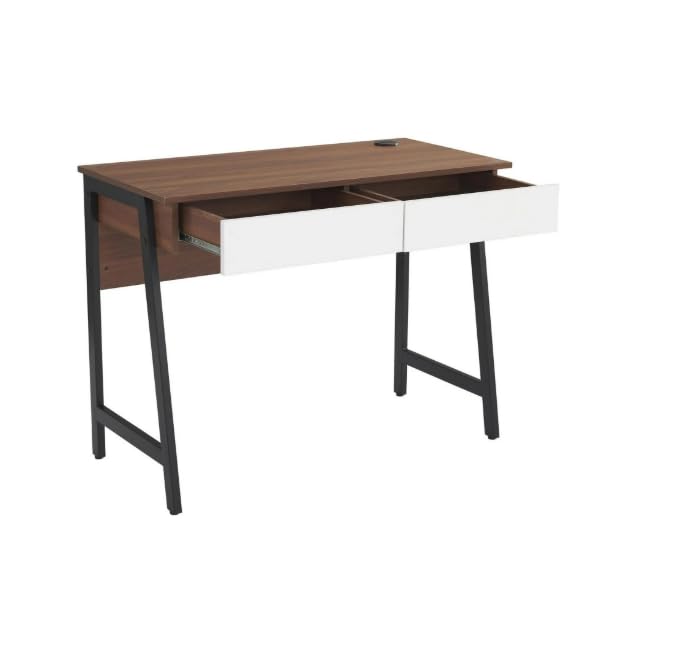
Image: The Generic H24-2201-B computer desk in walnut finish, featuring two white drawers and sturdy black metal legs. This image provides an overall view of the desk's design and dimensions.
ข้อมูลด้านความปลอดภัย
It is crucial to follow all safety guidelines to prevent injury or damage to the product. Please observe the following:
- ควรประกอบโต๊ะตามคำแนะนำที่ให้ไว้เสมอ
- ห้ามเกินขีดจำกัดน้ำหนักของ 88 ปอนด์ (40 กก.). Overloading can compromise the desk's stability and structural integrity.
- ตรวจสอบให้แน่ใจว่าโต๊ะวางอยู่บนพื้นผิวที่มั่นคงและเรียบเสมอกัน เพื่อป้องกันการล้ม
- ควรวางโต๊ะทำงานให้ห่างจากแหล่งความร้อนโดยตรง เปลวไฟ และความชื้นมากเกินไป
- Avoid placing heavy objects on the edges of the desk to prevent damage or instability.
- ตรวจสอบตัวยึดทั้งหมดเป็นระยะเพื่อให้แน่ใจว่ายังคงแน่นสนิทอยู่
เนื้อหาแพ็คเกจ
ก่อนเริ่มประกอบ โปรดตรวจสอบให้แน่ใจว่าชิ้นส่วนทั้งหมดที่ระบุไว้ด้านล่างครบถ้วนและไม่เสียหาย หากมีชิ้นส่วนใดขาดหายหรือเสียหาย โปรดติดต่อฝ่ายบริการลูกค้า
- 1 x Desk Top (with integrated USB charger)
- 2 x Drawer Units
- 2 x Metal Leg Frames
- แผงด้านหลัง 1 ชิ้น
- อุปกรณ์ประกอบ (สกรู น็อต ประแจหกเหลี่ยม ฯลฯ)
- คู่มือการใช้งาน
Note: All necessary assembly tools are included.
การติดตั้งและการประกอบ
Assembly is required for this desk. It is recommended that สองคน assemble the desk to ensure stability and ease of construction. Please follow the steps below carefully.
- แกะส่วนประกอบ: นำชิ้นส่วนทั้งหมดออกจากบรรจุภัณฑ์อย่างระมัดระวัง และวางเรียงบนพื้นผิวที่สะอาดและนุ่ม (เช่น ผ้าห่มหรือพรม) เพื่อป้องกันรอยขีดข่วน
- ติดโครงขา: Secure the metal leg frames to the underside of the desk top using the provided screws and Allen wrench. Ensure all connections are tight.
- ติดตั้งลิ้นชัก: Assemble the two drawer units according to their individual instructions. Once assembled, slide them into the designated slots under the desk top. Ensure the smooth sliding rails are properly aligned.
- ติดแผงด้านหลัง: Secure the back panel to the rear of the desk structure. This adds stability and finishes the desk's appearance.
- การตรวจสอบขั้นสุดท้าย: Once assembled, gently lift and move the desk to its desired location. Verify that all screws are tightened and the desk is stable.
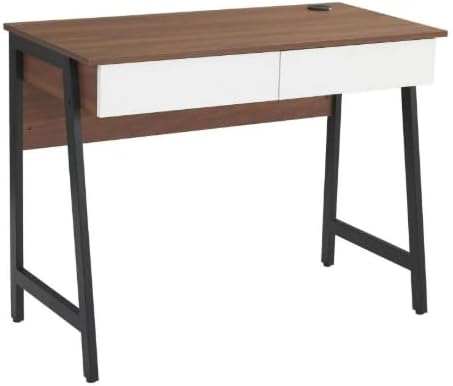
ภาพ: การประกอบชิ้นส่วน view of the computer desk, highlighting the integration of the desk top, drawers, and metal leg structure. This image can serve as a visual reference during assembly.
คำแนะนำการใช้งาน
การใช้พอร์ตชาร์จ USB
Your desk is equipped with a built-in USB charging port for convenient device charging.
- เชื่อมต่อพลังงาน: Ensure the desk's power cord (if applicable, usually from the USB hub) is securely plugged into a functional wall outlet.
- Plug in Devices: Connect your USB-compatible devices (e.g., smartphones, tablets, smartwatches) to the USB ports located on the desk surface.
- ตัวบ่งชี้การชาร์จ: Your device should indicate that it is charging. If not, check the power connection and the USB cable.

ภาพ: รายละเอียด view of the circular USB charging hub embedded in the desk's surface. It features three USB ports, allowing multiple devices to be charged simultaneously.
การใช้งานลิ้นชักเก็บของ
The two integrated drawers provide convenient storage for your office supplies and personal items.
- เปิด/ปิด: Gently pull the drawer handle to open and push to close. The smooth sliding rails ensure easy operation.
- น้ำหนักจำกัด: ควรหลีกเลี่ยงการบรรจุสิ่งของในลิ้นชักมากเกินไป เพื่อให้การใช้งานราบรื่นและป้องกันความเสียหายต่อรางเลื่อนลิ้นชัก
การซ่อมบำรุง
การดูแลอย่างเหมาะสมจะช่วยยืดอายุการใช้งานและรักษารูปลักษณ์ของโต๊ะทำงานของคุณ
- การทำความสะอาด: เช็ดทำความสะอาดด้วยโฆษณาamp ใช้ผ้าเช็ดทำความสะอาด สำหรับคราบฝังแน่น ให้ใช้สบู่เหลวอ่อนๆ เช็ด แล้วเช็ดให้แห้งทันทีด้วยผ้าสะอาด
- หลีกเลี่ยงสารเคมีที่รุนแรง: Do not use abrasive cleaners, strong detergents, or solvents, as these can damage the wood grain laminate finish.
- การรั่วไหล: Promptly wipe up any spills to prevent water damage or staining. The scratch-resistant and waterproof finish offers protection, but immediate cleaning is recommended.
- ตัวล็อค: Periodically check and tighten all screws and bolts to ensure the desk remains stable.
การแก้ไขปัญหา
หากคุณพบปัญหาใดๆ เกี่ยวกับโต๊ะทำงาน โปรดดูปัญหาและวิธีแก้ไขทั่วไปต่อไปนี้:
- โต๊ะโยกเยก:
- ตรวจสอบให้แน่ใจว่าสกรูและน็อตประกอบทั้งหมดขันแน่นดีแล้ว
- Verify the desk is placed on a level surface. Adjust floor glides if present, or use shims if necessary.
- ลิ้นชักไม่เลื่อนอย่างราบรื่น:
- ตรวจสอบดูว่ามีสิ่งกีดขวางในรางเลื่อนลิ้นชักหรือไม่
- Ensure the drawers are not overloaded.
- Verify that the drawer slides were installed correctly during assembly.
- พอร์ต USB ไม่ชาร์จ:
- Confirm the desk's power cord (for the USB hub) is firmly plugged into a working electrical outlet.
- ลองใช้สาย USB หรืออุปกรณ์อื่นเพื่อตรวจสอบว่าปัญหาไม่ได้อยู่ที่สายหรืออุปกรณ์
- Ensure the USB hub connection within the desk is secure (if accessible).
ข้อมูลจำเพาะ
| หมายเลขรุ่น | H24-2201-B |
| ยี่ห้อ | ทั่วไป |
| ขนาด (D x W x H) | ขนาด 48D x 100W x 76H เซนติเมตร (18.9"D x 39.4"W x 29.9"H) |
| น้ำหนัก | 37.4 ปอนด์ (17 กก.) |
| วัสดุ | MDF, PB, Metal |
| ประเภทการเสร็จสิ้น | Wood Grain Laminate |
| สี | Walnut (with white drawers) |
| ความจุน้ำหนักสูงสุด | 88 ปอนด์ (40 กก.) |
| จำนวนลิ้นชัก | 2 |
| คุณสมบัติพิเศษ | Built-in USB Charging Port, Scratch-Resistant & Waterproof Surface, Smooth Drawer Operation, Space-Saving Design |
| จำเป็นต้องประกอบ | ใช่ (แนะนำ 2 คน) |
| รวมเครื่องมือประกอบ | ใช่ |
การรับประกันและการสนับสนุน
ข้อมูลการรับประกัน: Warranty is not included with this product. Please contact the seller directly for any warranty-related inquiries or support.
การสนับสนุนลูกค้า: For any questions, missing parts, or assistance with assembly or operation, please contact the seller directly via Amazon messaging. Provide your order number and a detailed description of the issue for prompt assistance.
Manufacturer Contact Information: Not applicable. Please contact the seller directly via Amazon messaging.
Ask a question about this manual
Ask about setup, troubleshooting, compatibility, parts, safety, or missing instructions. Manuals+ will review the question and use this page’s manual context to help answer it.