
1. บทนำ
This manual provides essential information for the safe and effective installation, operation, and maintenance of the Walfront NLQ1H-63/4P Dual Power Automatic Transfer Switch (ATS). Please read this manual thoroughly before attempting to install or operate the device. Keep this manual for future reference.
The Walfront NLQ1H-63/4P ATS is designed to automatically switch between two power sources, ensuring a continuous and uninterrupted power supply for critical loads. It features both automatic and manual operation modes and is suitable for various applications including households, machinery production, and high-rise buildings.
2. ข้อมูลด้านความปลอดภัย
คำเตือน: อันตรายจากไฟฟ้าช็อต การติดตั้งและการซ่อมบำรุงควรดำเนินการโดยบุคลากรที่มีคุณสมบัติเท่านั้น
- Always disconnect all power sources before installing or servicing the ATS.
- ตรวจสอบให้แน่ใจว่ามีการต่อสายดินของอุปกรณ์อย่างเหมาะสม
- ตรวจสอบให้แน่ใจว่าการเชื่อมต่อสายไฟทั้งหมดแน่นหนาและถูกต้องตามแผนผังการเดินสายไฟ
- Do not operate the ATS if it appears damaged.
- ควรสวมอุปกรณ์ป้องกันส่วนบุคคล (PPE) ที่เหมาะสมเมื่อทำงานกับระบบไฟฟ้า
- The device housing is made of PC fire retardant material to prevent fire spread.
3. สินค้าหมดview
The Walfront NLQ1H-63/4P is a robust dual power automatic transfer switch designed for reliable power management.
คุณสมบัติหลัก:
- Automatic Power Transfer: Ensures seamless power switching between supplies for uninterrupted operation.
- การทำงานระยะไกล: Equipped with a fire power interface for noiseless, energy-saving operation.
- Fireproof Housing: Constructed from PC fire retardant material to prevent fire spread and damage, ensuring safety.
- การทำงานที่หลากหลาย: Features both automatic and manual modes for easy use and reliable performance.
- แอปพลิเคชั่นหลากหลาย: Suitable for various settings including households, machinery production, and high-rise buildings.
Components and Dimensions:
The following images illustrate the Walfront NLQ1H-63/4P ATS, highlighting its overall design and key dimensions.
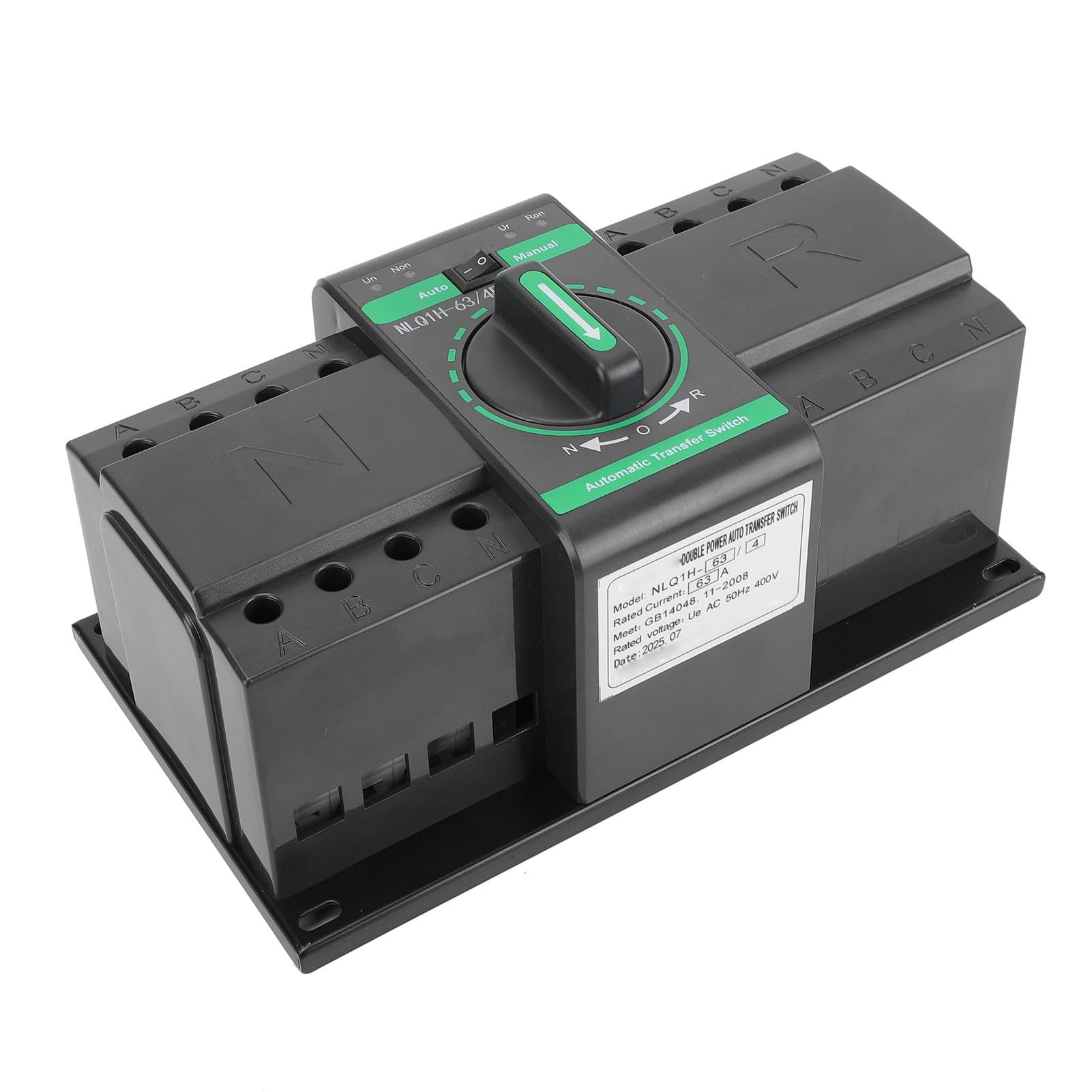
รูปที่ 1 : ด้านหน้า view of the Walfront NLQ1H-63/4P Automatic Transfer Switch.

Figure 2: Dimensions of the Walfront NLQ1H-63/4P Automatic Transfer Switch. The device measures approximately 235mm (9.25in) in length, 138mm (5.43in) in width, and 110mm (4.33in) in height.
For detailed component identification and wiring terminals, refer to the setup section.
4. ข้อมูลจำเพาะ
| ข้อมูลจำเพาะ | ค่า |
|---|---|
| แบบอย่าง | NLQ1H-63/4P |
| จัดอันดับVoltage | ไฟฟ้ากระแสสลับ 400 โวลต์ |
| กระแสไฟฟ้าที่ได้รับการจัดอันดับ | 63เอ |
| ความถี่ที่กำหนด | 50เฮิรตซ์ |
| Rated Short Circuit Current | 3kA |
| Mechanical Life (Automatic) | 3000 ครั้ง |
| Mechanical Life (Manual) | 1500 ครั้ง |
| วัสดุ | PC Fire Retardant, Silver |
| ขนาดรายการ (ยาว x กว้าง x สูง) | 9.44 x 5.9 x 4.72 นิ้ว (235 x 138 x 110 มม.) |
| ประเภทการติดตั้ง | ติดผนัง |
| การให้คะแนนการคุ้มครองระหว่างประเทศ | IP20 |
| ตรงตามข้อกำหนด | มาตราฐาน ISO 9001 |
5. การตั้งค่าและการติดตั้ง
Proper installation is crucial for the safe and reliable operation of the ATS. This device is designed for wall mounting.
Wiring Diagram and Terminal Identification:
The ATS requires connection to two separate power sources (e.g., utility grid and generator) and the load. Carefully follow the wiring diagram provided on the device and illustrated below.

รูปที่ 3: รายละเอียด view of the Walfront NLQ1H-63/4P ATS showing common incoming wiring terminals (N, A, B, C), backup incoming wiring terminals (N, A, B, C), common closing power indicator (Un), backup outgoing power indicator (Ur), manually switching handle, and fixed installation holes.
- การติดตั้ง: Securely mount the ATS to a wall using appropriate fasteners through the fixed installation holes. Ensure the mounting surface is stable and can support the weight of the device.
- Power Source 1 (Common Incoming): Connect the main power source (e.g., utility grid) to the terminals labeled 'N', 'A', 'B', 'C' on the left side of the switch (Common Incoming Wiring Terminal).
- Power Source 2 (Backup Incoming): Connect the backup power source (e.g., generator) to the terminals labeled 'N', 'A', 'B', 'C' on the right side of the switch (Backup Incoming Wiring Terminal).
- โหลดการเชื่อมต่อ: Connect the electrical load to the output terminals of the ATS.
- สายไฟควบคุม: Connect any necessary control wiring, such as for the fire power interface, to the designated terminals.
- การตรวจสอบ: After all connections are made, double-check all wiring for correctness and tightness. Ensure no loose wires are present.
IMPORTANT: Always consult a qualified electrician for installation to ensure compliance with local electrical codes and safety standards.
6. คู่มือการใช้งาน
The Walfront NLQ1H-63/4P ATS offers both automatic and manual operation modes.
โหมดการทำงาน:
- โหมดอัตโนมัติ (Auto): In this mode, the ATS will automatically detect the availability of power from both sources and switch to the preferred source. If the primary source fails, it will automatically transfer to the backup source. When the primary source is restored, it will switch back. To select automatic mode, turn the central rotary handle to the 'Auto' position. The 'Un' indicator (Common closing power indicator) and 'Ur' indicator (Backup outgoing power indicator) will illuminate to show the active power source.
- Manual Mode (Manual): This mode allows for manual switching between power sources. To select manual mode, turn the central rotary handle to the 'Manual' position. You can then manually switch between the 'N' (Normal/Common) and 'R' (Reserve/Backup) positions using the handle. This mode is useful for maintenance or specific operational requirements.
The central rotary handle on the front of the device (see Figure 3) is used to select between 'Auto' and 'Manual' modes, and for manual switching between 'N' and 'R' positions when in manual mode.
7. การบำรุงรักษา
การบำรุงรักษาตามปกติจะช่วยให้ ATS ของคุณมีอายุการใช้งานยาวนานและทำงานได้อย่างน่าเชื่อถือ
- การตรวจสอบภาพ: Periodically inspect the ATS for any signs of physical damage, loose connections, or overheating.
- การทำความสะอาด: รักษาอุปกรณ์ให้สะอาด ปราศจากฝุ่นและสิ่งสกปรก ใช้ผ้าแห้งนุ่มๆ ในการทำความสะอาด ห้ามใช้น้ำยาทำความสะอาด
- ความแน่นที่ปลายสาย: Annually, or as needed, check the tightness of all terminal connections to prevent arcing and overheating.
- การทดสอบฟังก์ชัน: Periodically test the automatic transfer function by simulating a primary power failure (if safe to do so) to ensure it switches correctly to the backup source.
ข้อควรระวัง: โปรดถอดปลั๊กไฟก่อนทำการบำรุงรักษาหรือทำความสะอาดทุกครั้ง
8 การแก้ไขปัญหา
If you encounter issues with your Walfront NLQ1H-63/4P ATS, refer to the following common troubleshooting steps:
| ปัญหา | สาเหตุที่เป็นไปได้ | สารละลาย |
|---|---|---|
| ATS does not transfer power automatically. | ATS is in manual mode. No power detected from primary or backup source. Faulty control wiring. | Switch to 'Auto' mode. Check power supply to both sources. Inspect control wiring for damage or incorrect connections. |
| No power to load. | Both power sources are off. Loose load connections. ความผิดพลาดภายใน | Verify both power sources are active. Check and tighten load wiring connections. ติดต่อเจ้าหน้าที่บริการที่มีคุณสมบัติเหมาะสม |
| Indicators not illuminating. | No power to the ATS. ไฟแสดงสถานะเสีย | Check power supply to the ATS. If power is present, the indicator may need replacement (contact support). |
If the problem persists after attempting these solutions, contact Walfront customer support or a qualified electrician.
9. การรับประกันและการสนับสนุน
For warranty information, technical support, or service inquiries regarding your Walfront NLQ1H-63/4P Dual Power Automatic Transfer Switch, please contact Walfront customer service through their official channels. Refer to your purchase documentation or the Walfront webดูรายละเอียดเงื่อนไขการรับประกันและข้อมูลติดต่อได้ที่เว็บไซต์นี้
Walfront Customer Support:
- เยี่ยมชม Walfront Store on Amazon สำหรับข้อมูลเพิ่มเติม
- โปรดดูข้อมูลการติดต่อโดยตรงได้จากบรรจุภัณฑ์ของผลิตภัณฑ์