
1. สินค้าหมดview
The Cecotec Bolero CoolMarket 4D 474 is a 4-door Total No Frost refrigerator designed for optimal food preservation and energy efficiency. It features a spacious 474-liter capacity, an ultra-silent operation at 35 dB, and advanced cooling technologies to maintain ideal conditions for your food.

รูปที่ 1 : ด้านหน้า view of the Cecotec Bolero CoolMarket 4D 474 refrigerator.
2. ข้อมูลด้านความปลอดภัย
ก่อนใช้งานเครื่องใช้ไฟฟ้า โปรดอ่านคู่มือนี้อย่างละเอียดเพื่อให้มั่นใจถึงการใช้งานที่ปลอดภัยและถูกต้อง เก็บรักษาคู่มือนี้ไว้เพื่อใช้อ้างอิงในอนาคต
- ตรวจสอบให้แน่ใจว่าตู้เย็นวางอยู่บนพื้นผิวที่มั่นคงและระดับ
- ห้ามปิดกั้นช่องระบายอากาศภายในตู้เครื่องใช้ไฟฟ้าหรือในโครงสร้างแบบติดตั้งภายใน
- ห้ามใช้เครื่องมือกลหรือวิธีการอื่นใดเพื่อเร่งกระบวนการละลายน้ำแข็ง นอกเหนือจากที่ผู้ผลิตแนะนำ
- อย่าทำให้วงจรสารทำความเย็นเสียหาย
- ห้ามใช้เครื่องใช้ไฟฟ้าภายในช่องเก็บอาหารของเครื่องใช้ไฟฟ้า เว้นแต่จะเป็นประเภทที่ผู้ผลิตแนะนำ
- เครื่องใช้ไฟฟ้าตัวนี้ไม่ได้มีวัตถุประสงค์เพื่อให้บุคคล (รวมทั้งเด็ก) ที่มีความบกพร่องทางร่างกาย ทางประสาทสัมผัส หรือทางจิตใจ หรือขาดประสบการณ์และความรู้ ใช้งาน เว้นแต่จะมีการดูแลหรือคำแนะนำเกี่ยวกับการใช้เครื่องใช้ไฟฟ้าโดยบุคคลที่รับผิดชอบด้านความปลอดภัยของบุคคลดังกล่าว
- ควรมีผู้ดูแลเด็กเพื่อให้แน่ใจว่าไม่ได้เล่นกับเครื่องใช้ไฟฟ้าดังกล่าว
- หากสายไฟชำรุดเสียหาย จะต้องเปลี่ยนโดยผู้ผลิต ตัวแทนบริการ หรือบุคลากรที่มีคุณสมบัติเหมาะสม เพื่อหลีกเลี่ยงอันตราย
3. การตั้งค่าและการติดตั้ง
3.1 การแกะกล่อง
Carefully remove all packaging materials. Inspect the appliance for any damage. Keep packaging materials out of reach of children.
3.2 การจัดวาง
Place the refrigerator in a well-ventilated area, away from direct sunlight and heat sources. Ensure sufficient space around the appliance for proper air circulation. The appliance dimensions are 83.3 cm (width) x 65.3 cm (depth) x 177.5 cm (height).

Figure 2: Refrigerator dimensions for installation planning.
3.3 การปรับระดับ
ปรับขาปรับระดับเพื่อให้แน่ใจว่าตู้เย็นมีความมั่นคงและได้ระดับ วิธีนี้ช่วยป้องกันการสั่นสะเทือนและช่วยให้ประตูปิดสนิท
3.4 การเชื่อมต่อสายไฟ
Connect the appliance to a grounded power outlet (220 Volts, Type E/F: 2 pins). Allow the refrigerator to stand for at least 2-4 hours before plugging it in to allow refrigerants to settle.
4. คู่มือการใช้งาน
4.1 แผงควบคุม
The refrigerator features an external digital display for easy and intuitive adjustment of settings. You can customize temperature and other functions as needed.
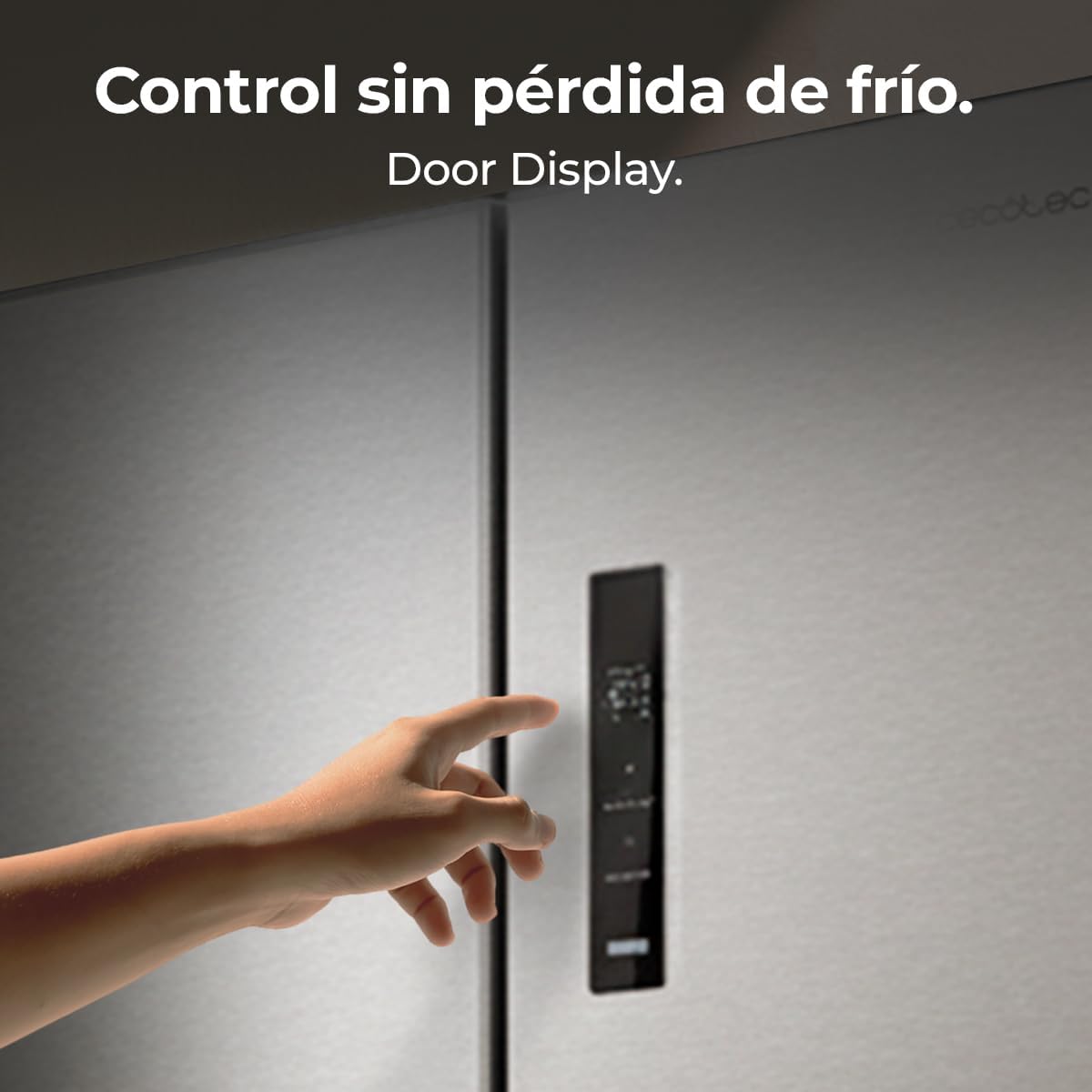
Figure 3: External digital control panel.
4.2 การตั้งค่าอุณหภูมิ
Use the control panel to set the desired temperature for the refrigerator and freezer compartments. The intelligent sensors automatically optimize performance by controlling the internal temperature at all times.

รูปที่ 4 : ภายใน view showing cooling distribution.
4.3 Fresh Flex Variable Temperature Drawer
The exclusive Fresh Flex variable temperature drawer extends the freshness of your food with 3 adjustable temperatures specific for fruits and vegetables, beverages, or meats and fish. This allows you to maintain each product at its optimal temperature.

Figure 5: Fresh Flex variable temperature drawer.
4.4 Special Functions: Fast Cooling and Fast Freezing
- การแช่แข็งอย่างรวดเร็ว: Quickly freezes food to preserve freshness and nutrients, ideal for large purchases and perishable items.
- ระบายความร้อนอย่างรวดเร็ว: Rapidly cools food and beverages, perfect for cooling items after shopping or before an event.

Figure 6: Fast Cooling and Fast Freezing in action.
4.5 ระบบกระจายลมหลายทิศทาง
The Multi Air Flow system uses internal ventilation to distribute cold air correctly, ensuring homogeneous conditions throughout all compartments for optimal food preservation.

Figure 7: Multi Air Flow system for even cooling.
4.6 90° Door Opening
The refrigerator doors open at a 90-degree angle, improving accessibility to all corners and facilitating organization and access to your food without obstruction.

Figure 8: 90-degree door opening for full access.
5. การบำรุงรักษา
5.1 Total NoFrost System
The Total NoFrost system prevents ice accumulation, eliminating the need for manual defrosting and ensuring optimal and efficient performance of the refrigerator at all times.

Figure 9: Total NoFrost system prevents ice buildup.
5.2 การทำความสะอาด
Regularly clean the interior and exterior of the refrigerator with a soft cloth and mild detergent. Avoid abrasive cleaners or solvents. Ensure the appliance is unplugged before cleaning.
6 การแก้ไขปัญหา
If you experience any issues with your refrigerator, please refer to the following common troubleshooting tips before contacting customer support.
- เครื่องใช้ไฟฟ้าไม่เย็น: Check if the power cord is securely plugged in. Ensure the temperature settings are correct. Verify that the door is closed properly.
- เสียงผิดปกติ: Ensure the appliance is level. Check for any objects touching the back or sides of the refrigerator.
- น้ำรั่ว: Check if the drain hole is blocked. Ensure the water dispenser tray is correctly positioned (if applicable).
- Excessive frost (despite NoFrost): Ensure the door seals are intact and the doors are closing completely. Avoid frequently opening the doors for extended periods.
7. ข้อมูลจำเพาะ
| คุณสมบัติ | รายละเอียด |
|---|---|
| ยี่ห้อ | เซโคเทค |
| ชื่อรุ่น | Bolero CoolMarket 4D 474 |
| หมายเลขรุ่น | A01_EU01_113774 |
| การกำหนดค่า | 4-Door, Bottom Freezer |
| ความจุรวม | 474 ลิตร |
| ความจุของตู้เย็น | 305 ลิตร |
| ความจุของช่องแช่แข็ง | 169 ลิตร |
| ขนาด (กว้าง x ลึก x สูง) | 83.3 ซม. x 65.3 ซม. x 177.5 ซม. |
| น้ำหนัก | 84 กก. |
| ระดับประสิทธิภาพการใช้พลังงาน | E |
| การบริโภคพลังงานรายปี | 295 กิโลวัตต์ชั่วโมง/ปี |
| ระดับเสียง | 35 เดซิเบล |
| ระบบละลายน้ำแข็ง | รวม NoFrost |
| ประเภทคอมเพรสเซอร์ | Inverter Plus |
| เล่มที่tage | 220 โวลต์ |
| ประเภทปลั๊ก | Type E/F: 2 pins (hybrid for EU) |
| สารทำความเย็น | R-600A |
| คุณสมบัติพิเศษ | Fresh Flex variable temperature drawer, Multi Air Flow, Smart Sensors, External Digital Display, LED lighting, Fast Freezing, Fast Cooling, 90° door opening. |

รูปที่ 10: ฉลากประสิทธิภาพพลังงาน สำหรับรายละเอียดเพิ่มเติม โปรดไปที่ ฐานข้อมูล EPREL.

Figure 11: Detailed product data sheet.
8. การรับประกันและการสนับสนุน
This Cecotec refrigerator comes with a 3-year warranty. For technical assistance, spare parts, or any inquiries, please contact Cecotec customer support. The availability of spare parts in the EU is guaranteed for 10 years.
For more information, visit the official Cecotec website or refer to the contact details provided in the included manual.
9. ส่วนประกอบที่รวมอยู่
แพ็คเกจผลิตภัณฑ์ประกอบด้วย:
- Cecotec Bolero CoolMarket 4D 474 Refrigerator
- คู่มือการใช้งาน
10. วิดีโอผลิตภัณฑ์
10.1 Cecotec Bolero CoolMarket American Refrigerators Range
This video showcases the features and design of the Cecotec Bolero CoolMarket range of American refrigerators, highlighting key functionalities and aesthetic aspects.