
1. บทนำ
This manual provides essential information for the safe and efficient operation of your PECRON Portable Power Station F3000LFP. Please read this manual thoroughly before using the device to ensure proper handling, optimal performance, and to prevent damage or injury. Keep this manual for future reference.
2. คำแนะนำด้านความปลอดภัย
ปฏิบัติตามข้อควรระวังด้านความปลอดภัยต่อไปนี้เพื่อป้องกันไฟฟ้าช็อต ไฟไหม้ หรือความเสียหายต่อเครื่อง:
- ห้ามถอดประกอบ ซ่อมแซม หรือดัดแปลงตัวเครื่อง การประกอบใหม่ที่ไม่ถูกต้องอาจทำให้เกิดไฟไหม้หรือไฟฟ้าช็อตได้
- อย่าวางเครื่องไว้ใกล้แหล่งความร้อนหรือในที่ที่มีแสงแดดส่องโดยตรง
- Do not operate the unit in wet conditions or immerse it in water.
- ใช้เฉพาะอุปกรณ์เสริมที่เป็นของแท้หรือได้รับการรับรองเท่านั้น
- เก็บเครื่องให้ห่างจากเด็กและสัตว์เลี้ยง
- ตรวจสอบให้แน่ใจว่ามีการระบายอากาศที่เหมาะสมขณะใช้งานและชาร์จไฟ อย่าปิดกั้นช่องระบายอากาศ
- ในกรณีเกิดเพลิงไหม้ ให้ใช้เครื่องดับเพลิงชนิดผงแห้ง น้ำอาจทำให้เกิดไฟฟ้าช็อตได้
- หลีกเลี่ยงการทำตกหรือให้เครื่องได้รับแรงกระแทกรุนแรง
3. เนื้อหาบรรจุภัณฑ์
ตรวจสอบว่ามีรายการทั้งหมดรวมอยู่ในแพ็คเกจของคุณ:
- PECRON F3000LFP Power Station
- Trolley (Cart Kit)
- สายชาร์จ AC
- คู่มือการใช้งาน
Note: The cart and power station may be delivered separately.
4. สินค้าหมดview
The PECRON F3000LFP is a portable power station designed for various applications, including home backup, RV use, and off-grid living. It features a 3072Wh LiFePO4 battery and a 3600W pure sine wave AC output.

Image: PECRON F3000LFP Portable Power Station with its included cart kit, showcasing its robust design and portability.
4.1. Ports and Interface
The F3000LFP is equipped with multiple output ports to power a wide range of devices:
- 6 x AC Ports: For large electrical appliances.
- 1 x USB-C Port (100W, 18W): For fast charging laptops and drones.
- 2 x 18W USB-A Ports: สำหรับการชาร์จอุปกรณ์ USB มาตรฐาน
- 1 x Car Charging Port: สำหรับอุปกรณ์ 12V DC
- 2 x DC5525 Ports: For various DC applications.

ภาพ: ระยะใกล้ view of the PECRON F3000LFP's output panel, highlighting the various AC, USB, and DC ports, including the 30A output.
4.2. คุณสมบัติหลัก
- ความจุสูง: แบตเตอรี่ LiFePO4 ขนาด 3072 Wh
- ผลผลิตอันทรงพลัง: 3600W pure sine wave AC output.
- ชาร์จเร็ว: 1800W AC input for 2-hour full charge.
- ขยายได้: Capacity can be expanded to 10752Wh with two EP3800-48V batteries (sold separately).
- ฟังก์ชั่น UPS: 8-20ms Uninterruptible Power Supply for critical devices like CPAP machines and computers.
- การควบคุมแอพ: Monitor power consumption, remotely control devices, and customize charging/discharging strategies via a mobile application.
- แบตเตอรี่ทนทาน: LiFePO4 battery retains 80% capacity after over 3,500 cycles.
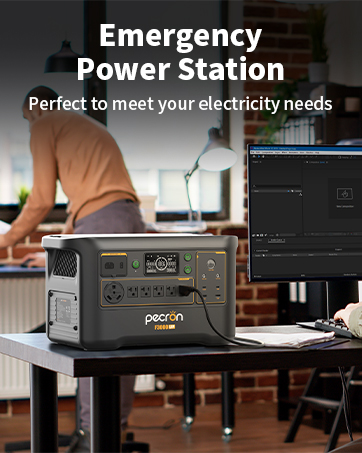
Image: The PECRON F3000LFP Power Station in a home setting, demonstrating its use as a reliable backup power source for household appliances.
วิดีโอ: เจ้าหน้าที่ผ่านview of the F3000LFP 3072Wh 3600W Power Station, detailing its features and capabilities.
5. การตั้งค่า
Before initial use, ensure the power station is fully charged. If your package includes a cart kit, assemble it according to the separate instructions provided with the cart.
5.1. ค่าธรรมเนียมเริ่มต้น
Connect the power station to a standard AC wall outlet using the provided AC charging cable. The display will indicate charging status. A full charge from 0% takes approximately 2 hours.
5.2. Cart Assembly (if applicable)
Refer to the separate assembly instructions for the trolley. Once assembled, securely place the F3000LFP power station onto the cart for enhanced portability.

Image: The PECRON F3000LFP Power Station securely mounted on its trolley, ready for transport.
6. การชาร์จสถานีไฟฟ้า
The F3000LFP offers multiple charging options:
6.1. การชาร์จผนัง AC
Connect the AC charging cable to the input port on the power station and then to a standard wall outlet. The 1800W fast charging allows for a 0-100% charge in approximately 2 hours.

Image: The PECRON F3000LFP Power Station connected to a wall outlet, illustrating its fast AC charging capability.
6.2. การชาร์จพลังงานแสงอาทิตย์
The F3000LFP supports up to 1600W solar input. Connect compatible solar panels (e.g., PECRON 200W/300W solar panels) to the solar input port. Ensure panels are positioned for maximum sunlight exposure.

Image: The PECRON F3000LFP Power Station connected to solar panels in an outdoor setting, demonstrating solar charging.

Image: A visual representation of the PECRON F3000LFP Power Station paired with a 300W solar panel for charging.
6.3. การชาร์จรถยนต์
Use a compatible 500W smart car charger (sold separately) to charge the power station from your vehicle's 12V outlet.
7. การดำเนินการ
Follow these steps to operate your F3000LFP Power Station:
7.1. การเปิด/ปิดเครื่อง
Press and hold the main power button to turn the unit on or off. The display will illuminate upon activation.
7.2. การใช้เอาต์พุต AC
Press the AC button to enable the AC outlets. Plug your devices into the desired AC ports. Ensure the total wattagกำลังไฟรวมของอุปกรณ์ที่เชื่อมต่อต้องไม่เกิน 3600 วัตต์
Video: An official video demonstrating the functions and features of the F3000LFP power station.
7.3. Using DC and USB Outputs
Press the DC button to enable the DC and USB ports. Connect your USB-C, USB-A, car charging, or DC5525 devices.
7.4. ฟังก์ชันการทำงานของ UPS
The F3000LFP features an 8-20ms Uninterruptible Power Supply (UPS). When connected to an AC power source and devices are plugged into the AC outputs, the unit can automatically switch to battery power during an outage, providing continuous power to sensitive electronics like CPAP machines and computers.

Image: The PECRON F3000LFP Power Station providing emergency power during an outage, highlighting its UPS capability.
7.5. การควบคุมแอป
Download the PECRON app to monitor power consumption, remotely start and stop devices, and customize charging/discharging strategies. This can optimize power usage efficiency.
8. การบำรุงรักษา
การบำรุงรักษาที่เหมาะสมจะช่วยให้โรงไฟฟ้าของคุณมีอายุการใช้งานยาวนานและมีประสิทธิภาพสูง:
- พื้นที่จัดเก็บ: Store the unit in a cool, dry place away from direct sunlight and extreme temperatures. For long-term storage, charge the battery to 50-80% every 3-6 months.
- การทำความสะอาด: ใช้ผ้าแห้งนุ่มๆ เช็ดทำความสะอาดภายนอกตัวเครื่อง ห้ามใช้น้ำยาทำความสะอาดหรือสารละลายที่มีฤทธิ์กัดกร่อน
- การระบายอากาศ : Regularly check that the ventilation openings are clear of dust and debris to ensure proper heat dissipation.
- การดูแลแบตเตอรี่ หลีกเลี่ยงการปล่อยแบตเตอรี่จนหมดบ่อยครั้งเพื่อยืดอายุการใช้งาน
9 การแก้ไขปัญหา
If you encounter issues with your F3000LFP, refer to the following common problems and solutions:
| ปัญหา | สาเหตุที่เป็นไปได้ | สารละลาย |
|---|---|---|
| เครื่องไม่เปิด | แบตเตอรี่หมด; ไม่ได้กดปุ่มเปิด/ปิดอย่างถูกต้อง | ชาร์จเครื่อง; กดปุ่มเปิด/ปิดค้างไว้ 3 วินาที |
| เอาต์พุต AC ไม่ทำงาน | AC output not enabled; Overload protection activated | Press the AC button; Reduce connected load, restart unit |
| ชาร์จช้า | Using a low-power charger; Solar panels not optimally positioned | Use the provided 1800W AC charger; Adjust solar panel angle/position |
| จอแสดงผลไม่ทำงาน | Unit is off; Display error | Power on the unit; Contact customer support if issue persists |
If the problem persists after attempting these solutions, please contact PECRON customer support.
10. ข้อมูลจำเพาะ
Detailed technical specifications for the PECRON F3000LFP Power Station:
| คุณสมบัติ | รายละเอียด |
|---|---|
| ชื่อรุ่น | F3000LFP |
| ความจุของแบตเตอรี่ | แบตเตอรี่ลิเธียมเฟอร์พอโลน 3072 วัตต์ชั่วโมง |
| เอาท์พุตไฟฟ้ากระแสสลับ | 3600W (คลื่นไซน์บริสุทธิ์) |
| อินพุต AC (สำหรับชาร์จ) | 1800 วัตต์ (ชาร์จเร็ว) |
| ป้อนพลังงานแสงอาทิตย์ | สูงสุด 1600W |
| ฟังก์ชั่น UPS | 8-20ms Switching Time |
| เอาท์พุต USB-C | 100วัตต์, 18วัตต์ |
| เอาต์พุต USB-A | 2x18วัตต์ |
| พอร์ตชาร์จรถยนต์ | กระแสตรง 12 โวลต์ |
| เอาต์พุต DC5525 | 2 พอร์ต |
| ขนาด (กว้าง x ยาว x สูง) | 19.3" x 11.6" x 13.1" |
| น้ำหนัก | Refer to product packaging for exact weight |
11. การรับประกันและการสนับสนุน
Your PECRON F3000LFP Power Station comes with a comprehensive warranty to ensure your peace of mind.
11.1. ข้อมูลการรับประกัน
สินค้าประกอบด้วย 2+3 Years Warranty. Please retain your proof of purchase for warranty claims. For detailed terms and conditions, refer to the warranty card included in your package or visit the official PECRON webเว็บไซต์.
11.2. การสนับสนุนลูกค้า
For technical assistance, troubleshooting, or warranty inquiries, please contact PECRON customer support through the following channels:
- เป็นทางการ Webเว็บไซต์: Visit the PECRON webเว็บไซต์นี้รวบรวมคำถามที่พบบ่อย แหล่งข้อมูลสนับสนุน และแบบฟอร์มติดต่อ
- การสนับสนุนทางอีเมล์: ดูที่บรรจุภัณฑ์ผลิตภัณฑ์ของคุณหรือที่ทางการ webเว็บไซต์สำหรับที่อยู่อีเมลฝ่ายบริการลูกค้า
- แชทออนไลน์: Some regions may offer online chat support via the PECRON webเว็บไซต์.
When contacting support, please have your product model number (F3000LFP) and purchase date readily available.