
การแนะนำ
Thank you for choosing the LIORQUE Wireless Weather Station YGH6208. This device provides accurate indoor and outdoor temperature and humidity readings, weather forecasts, and features a DCF radio-controlled clock with alarm functions. This manual will guide you through the setup, operation, and maintenance of your weather station.
เนื้อหาแพ็คเกจ
- 1 x LIORQUE Wireless Weather Station (Main Unit)
- 1 x กลางแจ้ง เซนเซอร์
- 3 x AAA Batteries (for Main Unit)
- 2 x AAA Batteries (for Outdoor Sensor)
- 1 x คู่มือผู้ใช้ (เอกสารนี้)
สินค้าเกินview
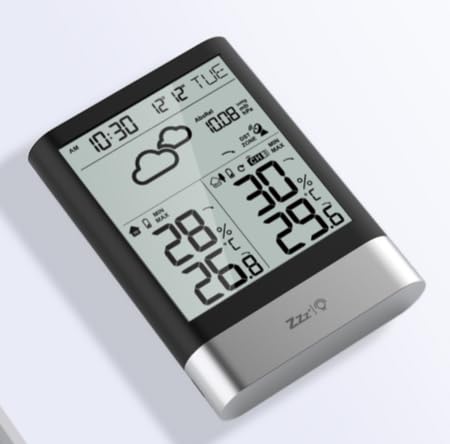
ภาพที่ 1: LIORQUE Wireless Weather Station Main Unit. This image shows the front view of the main display unit, highlighting its LCD screen and compact design.
คุณสมบัติหน่วยหลัก:
- 4.3-inch LCD screen with backlight
- จอแสดงผลอุณหภูมิและความชื้นในร่ม
- จอแสดงอุณหภูมิและความชื้นภายนอกอาคาร
- ไอคอนพยากรณ์อากาศ
- DCF radio-controlled clock with manual setting option
- Double alarm clock with snooze function
- Calendar and day of the week display (7 languages)
- Max/Min temperature and humidity records
- Air pressure display and weather trend
- แสดงเวลา 12/24 ชั่วโมง
คุณสมบัติของเซ็นเซอร์ภายนอกอาคาร:
- Wireless transmission up to 100m (open area)
- การวัดอุณหภูมิและความชื้น
- Supports hanging or standing placement
- Data updated every 30 seconds
- Supports up to 3 sensors (one included)
การตั้งค่า
1. การติดตั้งแบตเตอรี่
- เซ็นเซอร์กลางแจ้ง: Open the battery compartment cover on the back of the outdoor sensor. Insert 2 x AAA batteries, ensuring correct polarity (+/-). Close the cover.
- หน่วยหลัก: Open the battery compartment cover on the back of the main unit. Insert 3 x AAA batteries, ensuring correct polarity (+/-). Close the cover.
- The main unit will power on and display indoor readings.
2. การจับคู่เซ็นเซอร์
After installing batteries in both units, the main unit will automatically search for the outdoor sensor. The outdoor temperature and humidity should appear on the main unit's display within a few minutes. If the outdoor readings do not appear:
- Ensure both units are within range (up to 100m in open air).
- Press the "TX" button inside the outdoor sensor's battery compartment to manually send a signal.
- On the main unit, press and hold the "CHANNEL" button to initiate a manual search for the sensor.
3. การตั้งค่าเริ่มต้น (เวลา วันที่ หน่วย)
The weather station will attempt to synchronize with the DCF radio signal for automatic time setting. This may take several hours, especially in areas with weak signals. You can manually set the time and date if needed.
- การตั้งเวลาด้วยตนเอง: Press and hold the "MODE" button to enter time setting mode. Use the "UP" and "DOWN" buttons to adjust values and "MODE" to confirm and move to the next setting (e.g., 12/24 hour format, hour, minute, year, month, day, language for day of week).
- หน่วยอุณหภูมิ: กดปุ่ม "°C/°F" เพื่อสลับระหว่างองศาเซลเซียสและองศาฟาเรนไฮต์
- Air Pressure Units: Press the "BARO" button to cycle through air pressure units (e.g., hPa, inHg).
คำแนะนำการใช้งาน
แสดงข้อมูล
The 4.3-inch LCD screen displays various information:
- เวลาและวันที่: เวลาปัจจุบัน วันที่ และวันในสัปดาห์
- การอ่านค่าภายในอาคาร: อุณหภูมิและความชื้นภายในอาคารปัจจุบัน
- การอ่านหนังสือกลางแจ้ง: Current outdoor temperature and humidity from the connected sensor.
- พยากรณ์อากาศ: ไอคอนแสดงสภาพอากาศที่คาดการณ์ไว้ (เช่น แดดจัด เมฆมาก ฝนตก)
- แรงดันอากาศ: Current atmospheric pressure and trend.
- แสงไฟด้านหลัง: The screen backlight activates with a light touch and returns to normal brightness after 10 seconds to conserve battery.
ฟังก์ชั่นนาฬิกาปลุก
The weather station features a double alarm clock with snooze.
- การตั้งค่าการเตือน: กดปุ่ม "ALARM" เพื่อ view Alarm 1. Press "ALARM" again to view Alarm 2. Hold "ALARM" to enter alarm setting mode. Use "UP" and "DOWN" to adjust the hour and minute, and "ALARM" to confirm.
- การเปิด/ปิดสัญญาณเตือน: ในขณะที่ viewing an alarm, press "UP" to toggle it on or off. An alarm icon will appear when active.
- ฟังก์ชั่นเลื่อน: When an alarm sounds, press any button (except "ALARM OFF") to activate snooze. The alarm will sound again after a set interval. Press "ALARM OFF" to stop the alarm completely.
บันทึกสูงสุดและต่ำสุด
The weather station records the maximum and minimum indoor/outdoor temperature and humidity values.
- Press the "MAX/MIN" button once to display maximum recorded values.
- Press "MAX/MIN" again to display minimum recorded values.
- Press "MAX/MIN" a third time to return to current readings.
- To clear records, hold the "MAX/MIN" button while viewing บันทึก
การซ่อมบำรุง
- การเปลี่ยนแบตเตอรี่: เมื่อไฟแสดงสถานะแบตเตอรี่ต่ำปรากฏขึ้นบนหน้าจอแสดงผล ให้เปลี่ยนแบตเตอรี่ทั้งในตัวเครื่องหลักและเซ็นเซอร์ภายนอกอาคาร ควรเปลี่ยนแบตเตอรี่ทั้งหมดพร้อมกันเสมอ
- การทำความสะอาด: Clean the display and unit surfaces with a soft, damp ผ้า ห้ามใช้สารทำความสะอาดที่มีฤทธิ์กัดกร่อนหรือตัวทำละลาย
- ตำแหน่งเซนเซอร์กลางแจ้ง: For optimal performance and longevity, install the outdoor sensor in a shaded area, protected from direct sunlight and rain. Ensure it is within the 100m wireless range of the main unit.
การแก้ไขปัญหา
| ปัญหา | วิธีแก้ปัญหาที่เป็นไปได้ |
|---|---|
| ไม่มีการแสดงอุณหภูมิ/ความชื้นภายนอกอาคาร |
|
| แสดงเวลาไม่ถูกต้อง |
|
| จอแสดงผลมืดหรือว่างเปล่า |
|
| พยากรณ์อากาศดูเหมือนจะไม่แม่นยำ |
|
ข้อมูลจำเพาะ
- แบบอย่าง: YGH6208
- ยี่ห้อ: ลิออร์ค
- ประเภทจอภาพ: จอแอลซีดี
- แหล่งจ่ายไฟ (ตัวเครื่องหลัก): แบตเตอรี่ 3 x AAA (มาพร้อมกับเครื่อง)
- แหล่งจ่ายไฟ (เซ็นเซอร์ภายนอกอาคาร): แบตเตอรี่ 2 x AAA (มาพร้อมกับเครื่อง)
- ระยะสัญญาณไร้สาย: สูงสุด 100ม. (พื้นที่เปิดโล่ง)
- ความแม่นยำของอุณหภูมิ: ±0.5 องศาเซลเซียส
- เทคโนโลยีเซ็นเซอร์: Funk (Wireless)
- คุณสมบัติพิเศษ: DCF Radio Clock, Alarm, Snooze, Weather Forecast, Max/Min Records, Backlight
- ส่วนประกอบที่รวมอยู่: Weather Station Main Unit, Outdoor Sensor
การรับประกันและการสนับสนุน
LIORQUE products are designed for reliability and performance. For warranty information or technical support, please refer to the contact details provided with your purchase or visit the official LIORQUE webไซต์ โปรดเก็บหลักฐานการซื้อไว้เพื่อใช้ในการเรียกร้องการรับประกัน