
1. บทนำ
Thank you for choosing the OUKITEL P1500E PLUS Portable Power Station. This device is a high-capacity, versatile power solution designed to provide reliable electricity for various applications, including home backup, outdoor camping, travel, and emergency situations. With a robust 1536Wh LiFePO4 battery and an 1800W continuous AC output (3600W peak), it ensures your essential devices remain powered.
This manual provides important information regarding the safe operation, setup, maintenance, and troubleshooting of your P1500E PLUS. Please read it thoroughly before using the product to ensure optimal performance and safety.

Image: OUKITEL P1500E PLUS Portable Power Station in an outdoor setting, showcasing its compact design and portability.
2. คำแนะนำด้านความปลอดภัย
To ensure safe operation and prolong the lifespan of your OUKITEL P1500E PLUS, please adhere to the following safety guidelines:
- Do not disassemble, repair, or modify the unit. Incorrect assembly may lead to fire, explosion, or injury.
- Keep the device away from fire, heat sources, and direct sunlight to prevent overheating.
- Do not use or store the device in bathrooms or areas exposed to water or high humidity.
- ใช้เฉพาะสายเคเบิลและอุปกรณ์เสริมดั้งเดิมหรือที่ผ่านการรับรองเท่านั้น
- ควรหลีกเลี่ยงการทำตก การกระแทก หรือการทำให้เครื่องสั่นสะเทือนอย่างรุนแรง
- เก็บให้พ้นจากมือเด็กและสัตว์เลี้ยง
- The integrated LiFePO4 battery features a SuperSafe Battery Management System (BMS) that provides protection against short circuits, over-temperature, over-charge, and other potential hazards.
- ควรจัดให้มีการระบายอากาศที่เหมาะสมขณะใช้งานและชาร์จเพื่อป้องกันความร้อนสูงเกินไป
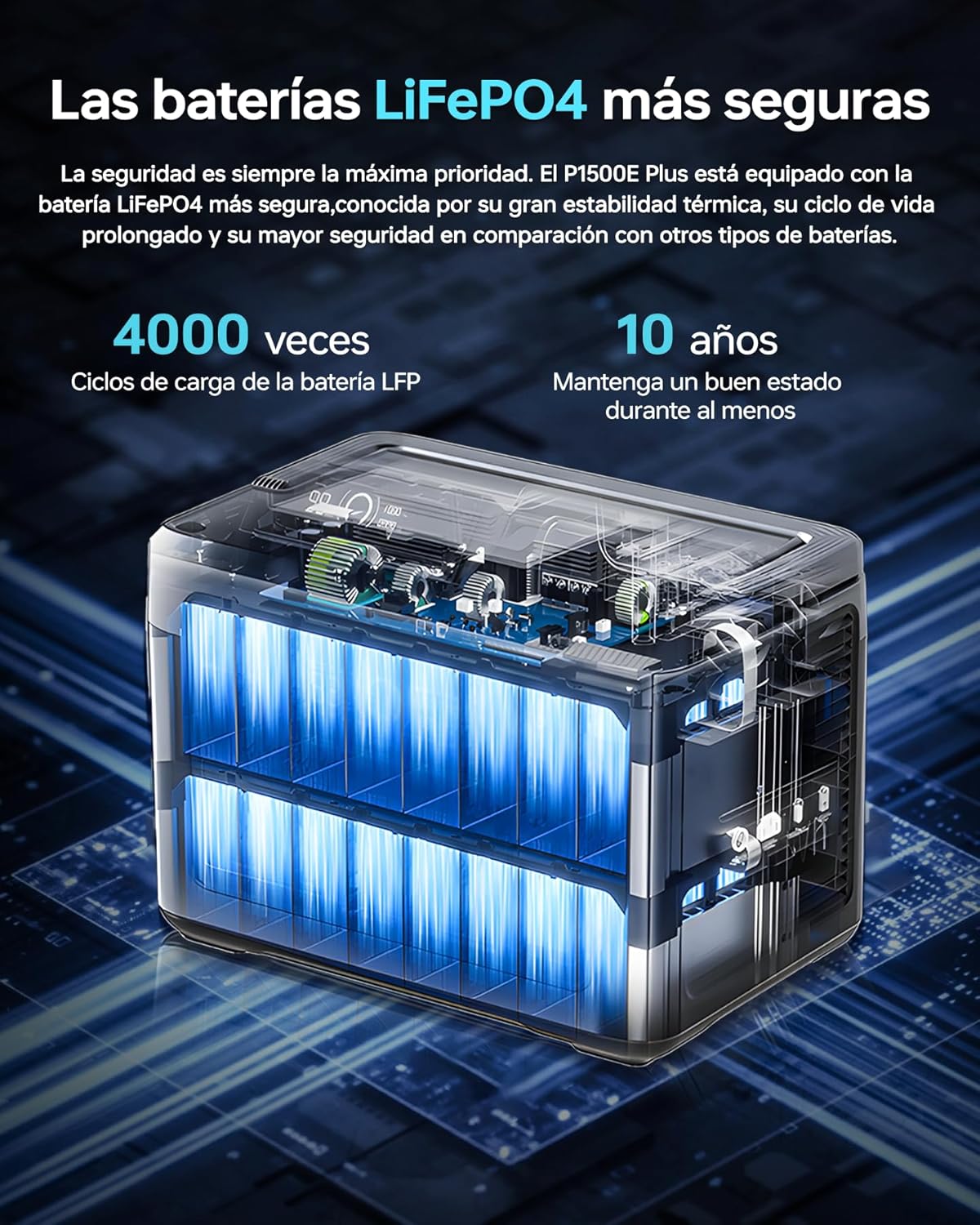
ภาพ: ภายใน view of the OUKITEL P1500E PLUS LiFePO4 battery cells, highlighting the safety and longevity of the battery technology. The text on the image indicates '4000 cycles' and '10 years' lifespan.
3. เนื้อหาบรรจุภัณฑ์
กรุณาตรวจสอบสิ่งของภายในกล่องเมื่อแกะกล่อง หากมีสินค้าใดสูญหายหรือเสียหาย โปรดติดต่อฝ่ายสนับสนุนลูกค้า
- 1 x OUKITEL P1500E PLUS Portable Power Station
- 2 x PV100 Foldable Solar Panels
- สายไฟ AC 1 เส้น
- 1 x MC4 to XT60 Cable
- 1 x Bluetooth Pairing Pin
- ใบรับประกัน 1 ใบ
- 1 x คู่มือผู้ใช้

Image: Diagram showing the contents of the OUKITEL P1500E PLUS package, including the power station, AC charging cable, MC4-XT60 cable, and manual.
4. สินค้าหมดview
4.1. พอร์ตและส่วนควบคุม
The OUKITEL P1500E PLUS is equipped with a variety of output and input ports to accommodate diverse charging needs:
- AC Outputs (x4): 1800W continuous, 3600W peak.
- USB-A QC3.0 (x2): Quick Charge for compatible devices.
- USB Type-C PD20W (x1): Power Delivery for smaller devices.
- USB Type-C PD100W (x1): High-speed Power Delivery for laptops and larger devices.
- DC5521 Outputs (x2): For DC-powered appliances.
- Car Charging Port (x1): เอาต์พุต 12V/10A
- ไฟ LED: ออกแบบมาเพื่อการส่องสว่างโดยเฉพาะ

ภาพ: รายละเอียด view of the OUKITEL P1500E PLUS ports and controls, labeling AC outputs, USB ports, DC outputs, and the car charging port.
4.2. ส่วนต่อประสานการแสดงผล
The clear digital display provides real-time information about the power station's status:
- 1. Discharge Remaining: Time remaining for discharge.
- 2. High Temperature Protection: Indicator for overheating.
- 3. Low Temperature Protection: Indicator for low temperature.
- 4. Fan Status: Indicates fan operation.
- 5. สถานะพลังงาน: ระดับการชาร์จแบตเตอรี่
- 6. UPS Mode: Indicates Uninterruptible Power Supply mode.
- 7. PV Charging Mode: Indicates solar charging.
- 8. Total Input Power: Current power input in watts.
- 9. Total Output Power: Current power output in watts.
- 10. Cigarette Lighter (12V) Output: Indicator for car port use.
- 11. DC (12V) Output: Indicator for DC output use.
- 12. โหมดเงียบ: Indicator for quiet operation.
- 13. Fast Charging Mode: Indicator for rapid charging.
- 14. Slow Charging Mode: Indicator for slower, battery-preserving charging.
- 15. การป้องกันการโอเวอร์โหลด: Indicator for excessive load.
- 16. เอาท์พุต USB: Indicator for USB-A output use.
- 17. PD Output: Indicator for USB-C Power Delivery output use.
- 18. AC Output: Indicator for AC output use.
- 19. Frequency Switching: Allows switching between 50Hz/60Hz.
- 20. WiFi / Bluetooth: Connection status for app control.

Image: Diagram illustrating the OUKITEL P1500E PLUS display interface and its indicators, with numbered labels corresponding to their functions.
5. การตั้งค่า
5.1. การชาร์จครั้งแรก
Before first use, fully charge the OUKITEL P1500E PLUS. Connect the AC power cable to the input port and plug it into a wall outlet. The display will show the charging status. It is recommended to fully charge the unit every 3 months if not in regular use.
5.2. Connecting Solar Panels
To charge using solar power, connect the PV100 solar panels to the power station using the MC4 to XT60 cable. Ensure the solar panels are placed in direct sunlight for optimal charging efficiency. The display will indicate solar charging activity.
6. คู่มือการใช้งาน
6.1. การชาร์จสถานีไฟฟ้า
The P1500E PLUS offers flexible charging options:
- การชาร์จไฟ AC: Connect the AC cable to a wall outlet. Supports fast charging (Max 1200W) and slow charging (Max 500W). Fast charging can fully charge the unit in approximately 1 hour and 40 minutes.
- การชาร์จพลังงานแสงอาทิตย์: Connect solar panels via the MC4 to XT60 cable. The unit supports up to 500W solar input.
- การชาร์จรถยนต์: Use a car charger (not included) to charge from your vehicle's 12V/24V outlet.

Image: OUKITEL P1500E PLUS charging via AC power from a wall outlet and simultaneously via foldable solar panels. The image indicates charging times for AC (1h 40m), Solar (3h 20m), Car (12h/6h), and combined AC+Solar (59 minutes).
6.2. Discharging (Using Outputs)
เพื่อจ่ายพลังงานให้กับอุปกรณ์ของคุณ:
- Press the main power button to turn on the power station.
- Press the respective output button (AC, DC, USB) for the port you wish to use. The indicator light for that output will illuminate.
- เชื่อมต่ออุปกรณ์ของคุณเข้ากับพอร์ตที่เหมาะสม
- When finished, turn off the output ports and then the main power button.
6.3. ฟังก์ชั่นยูพีเอส
The P1500E PLUS features an Uninterruptible Power Supply (UPS) function with a switchover time of less than 10 milliseconds. This ensures continuous operation for sensitive devices like PCs, servers, and freezers during sudden power outages หรือ voltage drops, preventing data loss and downtime.

Image: OUKITEL P1500E PLUS providing UPS backup to a computer setup during a simulated power outage, demonstrating its ability to maintain power for critical devices. The text on the image highlights 'UPS without interruptions of 1800W <10ms'.
6.4. การควบคุมแอป
Control your P1500E PLUS remotely via the dedicated mobile application. Use the Bluetooth pairing pin to connect your device. The app allows you to:
- ตรวจสอบสถานะแบตเตอรี่และการใช้พลังงาน
- Adjust discharge limits.
- Select charging speed (fast or slow).
- Turn outputs on/off.

Image: A user controlling the OUKITEL P1500E PLUS via a smartphone app in an outdoor setting, demonstrating the convenience of remote management. The text on the image indicates 'Smart control via application'.
7. การบำรุงรักษา
การบำรุงรักษาที่เหมาะสมจะช่วยให้โรงไฟฟ้าของคุณมีอายุการใช้งานยาวนานและมีประสิทธิภาพสูง:
- พื้นที่จัดเก็บ: Store the unit in a cool, dry place, away from direct sunlight and extreme temperatures. For long-term storage, charge the battery to 50-80% every 3 months.
- การทำความสะอาด: ใช้ผ้าแห้งนุ่มๆ เช็ดทำความสะอาดภายนอกตัวเครื่อง ห้ามใช้น้ำยาทำความสะอาดหรือสารละลายที่มีฤทธิ์กัดกร่อน
- การดูแลแบตเตอรี่ Avoid fully discharging the battery frequently. While LiFePO4 batteries are robust, maintaining a charge between 20% and 80% can extend their overall lifespan.
- การระบายอากาศ : ตรวจสอบให้แน่ใจว่าช่องระบายอากาศไม่มีฝุ่นและเศษขยะเพื่อป้องกันความร้อนสูงเกินไป
8 การแก้ไขปัญหา
If you encounter issues with your OUKITEL P1500E PLUS, refer to the following common problems and solutions:
| ปัญหา | สาเหตุที่เป็นไปได้ | สารละลาย |
|---|---|---|
| เครื่องไม่เปิด | Battery is completely discharged; Power button not pressed correctly. | Charge the unit using AC power; Press and hold the power button for 3 seconds. |
| ไม่มีเอาต์พุตจากพอร์ต AC/DC/USB | Output port not activated; Overload protection triggered; Device not compatible. | Press the corresponding output button; Reduce the load; Check device power requirements. |
| ความเร็วในการชาร์จช้า | Slow charging mode activated; Low solar input; High ambient temperature. | Switch to fast charging mode via app or unit settings; Ensure solar panels are in direct sunlight; Move to a cooler environment. |
| หน้าจอแสดงคำเตือนความร้อนสูงเกินไป | Excessive load; Poor ventilation; High ambient temperature. | Reduce the connected load; Ensure ventilation openings are clear; Move to a cooler environment. |
If the problem persists, please contact OUKITEL customer support.
9. ข้อมูลจำเพาะ
| คุณสมบัติ | ข้อมูลจำเพาะ |
|---|---|
| หมายเลขรุ่น | พี1500อี พลัส |
| ยี่ห้อ | โอคิเทล |
| ประเภทแบตเตอรี่ | ลิเธียมไอออนฟอสเฟต |
| ความจุ | 1536Wh (480000 มิลลิแอมป์) |
| เอาท์พุตไฟฟ้ากระแสสลับ | 1800W (Continuous), 3600W (Peak) |
| AC Outlets AC | 4 |
| เอาต์พุต USB-A | 2 x QC3.0 |
| เอาท์พุต USB-C | 1 x PD20W, 1 x PD100W |
| เอาท์พุท DC | 2 x DC5521, 1 x Car Charging Port (12V/10A) |
| อินพุต AC (สำหรับชาร์จ) | Max 1200W (Fast), Max 500W (Slow) |
| ป้อนพลังงานแสงอาทิตย์ | สูงสุด 500W |
| เวลาสลับระบบ UPS | <10มิลลิวินาที |
| ขนาด (กว้าง x ยาว x สูง) | 38.6 x 22.8 x 30.5 ซม. (15.2 x 9.0 x 12.0 นิ้ว) |
| น้ำหนัก | ประมาณ 14.2 กก. (31.3 ปอนด์) |
| ข้อแนะนำการใช้ | ที่อยู่อาศัย, ซีamping, Emergency |
10. การรับประกันและการสนับสนุน
The OUKITEL P1500E PLUS Portable Power Station comes with a รับประกัน 2 ปี นับจากวันที่ซื้อ การรับประกันนี้ครอบคลุมข้อบกพร่องในการผลิตและฝีมือการผลิตภายใต้การใช้งานปกติ
การรับประกันไม่ครอบคลุมถึง:
- Damage caused by misuse, abuse, or improper operation.
- Damage caused by unauthorized disassembly, repair, or modification.
- Damage caused by natural disasters or external forces.
- การสึกหรอตามปกติ
For warranty claims, technical support, or any questions regarding the use of your OUKITEL P1500E PLUS, please contact OUKITEL customer service. Please have your purchase receipt and product model number ready when contacting support.