
1. บทนำ
This manual provides essential information for the safe and efficient use of your Grundig 65 GQ 700A 65" 4K Ultra HD Google Smart QLED TV. Please read these instructions thoroughly before operating the device and retain them for future reference. This TV features Wide Color Gamut Technology for a vibrant viewการสร้างประสบการณ์
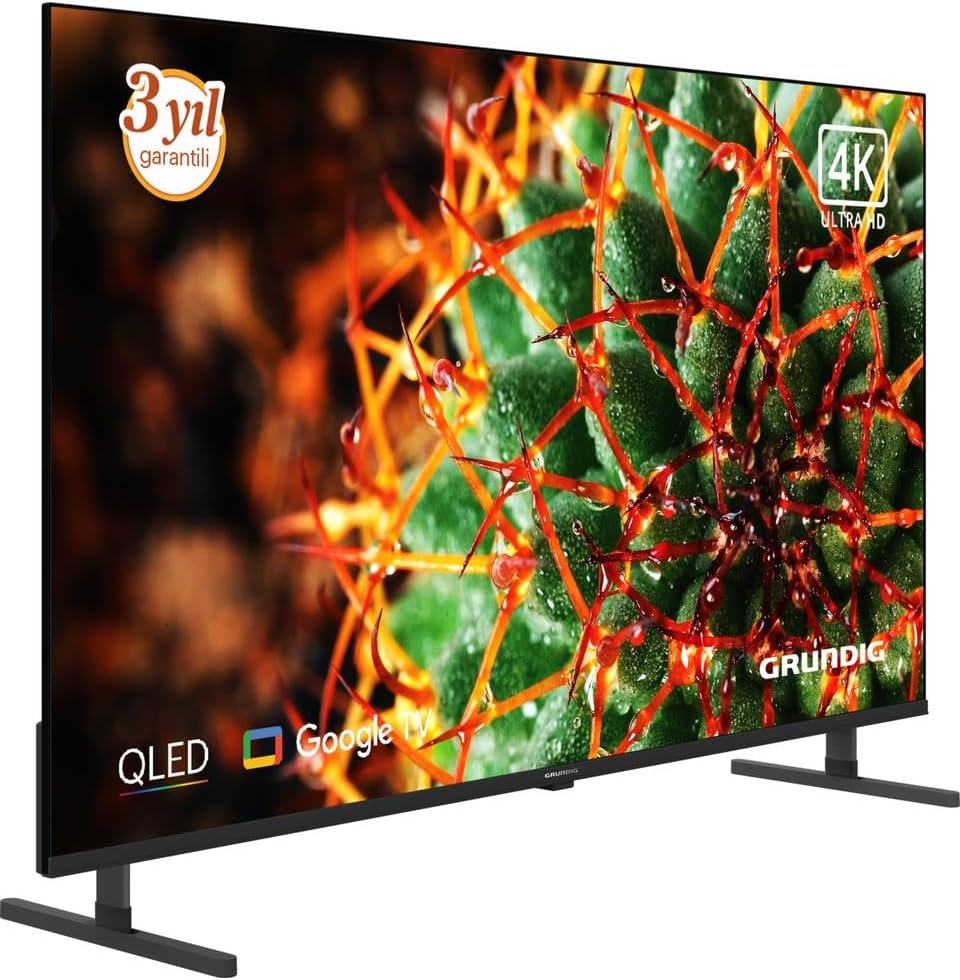
รูปที่ 1 : ด้านหน้า view of the Grundig 65 GQ 700A QLED TV.
2. ข้อมูลด้านความปลอดภัย
ปฏิบัติตามข้อควรระวังด้านความปลอดภัยต่อไปนี้เสมอเพื่อป้องกันไฟฟ้าช็อต ไฟไหม้ หรือการบาดเจ็บ:
- อย่าให้ทีวีโดนฝนหรือความชื้น
- อย่าเปิดทีวีasinง. ส่งต่อการบริการทั้งหมดให้กับบุคลากรที่มีคุณสมบัติ
- ตรวจสอบให้แน่ใจว่ามีการระบายอากาศที่เหมาะสมรอบๆ ทีวี
- เก็บทีวีให้ห่างจากแสงแดดโดยตรง แหล่งความร้อน และอุณหภูมิที่สูงหรือต่ำเกินไป
- Use only the power adapter supplied with the TV.
- Position the TV on a stable, level surface or mount it securely to a wall.
- เก็บชิ้นส่วนขนาดเล็กและวัสดุบรรจุภัณฑ์ให้พ้นมือเด็ก
3. การตั้งค่า
3.1 การแกะกล่อง
Carefully remove the TV and all accessories from the packaging. Check for any damage during transit. Retain the packaging for future transport or service needs.
3.2 การติดตั้งขาตั้ง
If you are not wall-mounting the TV, attach the included stand according to the instructions provided in the separate stand assembly guide. Ensure all screws are tightened securely.
3.3 การติดตั้งบนผนัง (ทางเลือก)
If you choose to wall-mount your TV, use a VESA-compatible wall mount kit (sold separately) and follow the wall mount manufacturer's instructions. Ensure the wall can support the weight of the TV and the mount. It is recommended to have professional installation for wall mounting.
3.4 การเชื่อมต่ออุปกรณ์ต่อพ่วง
เชื่อมต่ออุปกรณ์ภายนอกของคุณเข้ากับทีวีโดยใช้พอร์ตที่เหมาะสม ดูตำแหน่งพอร์ตได้จากภาพด้านล่าง

Figure 2: Rear panel connections of the TV.
- พอร์ต HDMI: Connect Blu-ray players, game consoles, and other HDMI-enabled devices. This model features 2 HDMI ports.
- พอร์ต USB: เชื่อมต่ออุปกรณ์จัดเก็บข้อมูล USB สำหรับการเล่นสื่อ
- พอร์ตอีเทอร์เน็ต (LAN): เชื่อมต่อสายเคเบิลอีเทอร์เน็ตสำหรับการเชื่อมต่ออินเทอร์เน็ตแบบใช้สาย
- อินพุตเสาอากาศ/สายเคเบิล: เชื่อมต่อสัญญาณเสาอากาศหรือเคเบิลทีวีของคุณ
- กำลังไฟเข้า: เชื่อมต่ออะแดปเตอร์จ่ายไฟที่ให้มา
3.5 การเปิดเครื่องครั้งแรกและการตั้งค่าครั้งแรก
- Connect the power adapter to the TV and then to a power outlet.
- กดปุ่มเปิด/ปิดบนทีวีหรือรีโมทคอนโทรลเพื่อเปิดทีวี
- ปฏิบัติตามคำแนะนำบนหน้าจอเพื่อดำเนินการตั้งค่าเริ่มต้นให้เสร็จสมบูรณ์ ซึ่งรวมถึง:
- การเลือกภาษา
- การเชื่อมต่อเครือข่าย (Wi-Fi หรือ Ethernet)
- Google Account sign-in (for Google TV features).
- การสแกนช่องสัญญาณ (สำหรับเสาอากาศ/เคเบิล)
- การยอมรับข้อกำหนดและเงื่อนไข
4. การใช้งานทีวี
4.1 การควบคุมระยะไกลจบลงview
The remote control allows you to access all functions of your TV. Ensure batteries are correctly inserted.
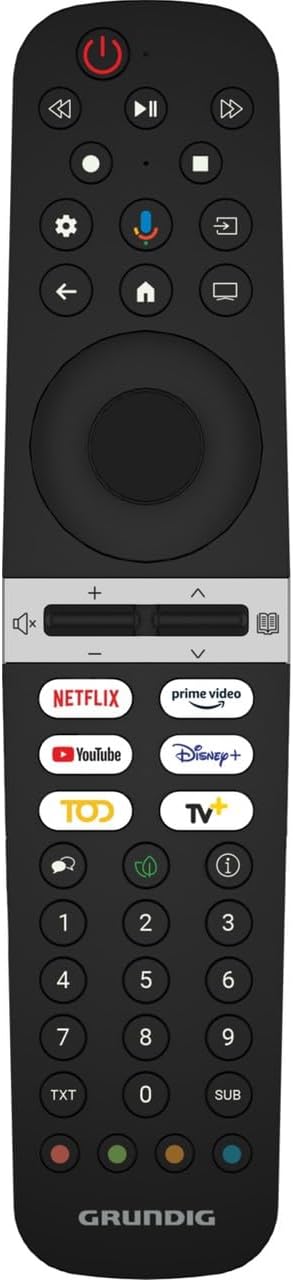
Figure 3: Grundig TV Remote Control.
- ปุ่มเปิด/ปิด: เปิดหรือปิดทีวี
- แผงนำทาง (ขึ้น/ลง/ซ้าย/ขวา/ตกลง): นำทางเมนูและยืนยันการเลือก
- ระดับเสียง +/-: ปรับระดับเสียง
- ช่อง +/-: เปลี่ยนช่องทีวี
- ปุ่มโฮม: กลับสู่หน้าจอหลักของ Google TV
- ปุ่มป้อนข้อมูล: เลือกแหล่งอินพุต (HDMI, USB, ทีวี)
- ปุ่มแอป: Direct access to popular streaming services like Netflix, Prime Video, YouTube, and Disney+.
- ปุ่ม Google Assistant: เปิดใช้งานการควบคุมด้วยเสียง
4.2 ฟังก์ชั่นพื้นฐาน
- การเปิด/ปิด: กดปุ่มเปิดปิดบนรีโมทหรือทีวี
- การปรับระดับเสียง: ใช้ปุ่มระดับเสียง +/-
- การเลือกช่อง: ใช้ปุ่มช่อง +/- หรือแผงตัวเลข
- การเลือกแหล่งสัญญาณเข้า: Press the Input button and select the desired source from the menu.
4.3 ฟีเจอร์สมาร์ททีวี (Google TV)
Your TV runs on Google TV, providing access to a vast array of apps, streaming services, and smart features.
- หน้าจอหลัก: Press the Home button to access personalized content recommendations, installed apps, and settings.
- ผู้ช่วย Google: กดปุ่ม Google Assistant บนรีโมทของคุณ แล้วพูดใส่ไมโครโฟนเพื่อค้นหาเนื้อหา ควบคุมอุปกรณ์สมาร์ทโฮม หรือรับข้อมูล
- แอปสโตร์: Download and install additional apps from the Google Play Store.
- Chromecast ในตัว: ส่งเนื้อหาจากอุปกรณ์มือถือหรือคอมพิวเตอร์ที่รองรับไปยังทีวีได้โดยตรง
4.4 การตั้งค่าภาพและเสียง
Access the settings menu to customize picture and sound preferences:
- โหมดภาพ: เลือกจากค่าที่ตั้งไว้ล่วงหน้าต่างๆ (เช่น มาตรฐาน สดใส ภาพยนตร์ เกม) หรือปรับแต่งการตั้งค่าต่างๆ เช่น ความสว่าง ความคมชัด สี และความคมชัด
- โหมดเสียง: Select audio presets (e.g., Standard, Music, Movie, Speech) or adjust equalizer settings.
- การตั้งค่าขั้นสูง: Explore options for motion smoothing, local dimming, and audio output.
5. การบำรุงรักษา
5.1 การทำความสะอาดทีวี
- ควรถอดปลั๊กทีวีทุกครั้งก่อนทำความสะอาด
- หน้าจอ: เช็ดหน้าจอเบาๆ ด้วยผ้าเนื้อนุ่มที่ไม่เป็นขุย สำหรับคราบฝังแน่น ให้ใช้น้ำยาทำความสะอาดหน้าจอสำหรับทีวีโดยเฉพาะ โดยทาลงบนผ้าก่อนแล้วค่อยเช็ดลงบนหน้าจอ
- Casing: เช็ดทีวีasing with a soft, dry cloth. Do not use abrasive cleaners, waxes, or solvents.
5.2 การอัปเดตซอฟต์แวร์
Your TV may receive software updates to improve performance and add new features. Ensure your TV is connected to the internet to receive these updates. You can usually check for updates manually in the TV's settings menu.
6 การแก้ไขปัญหา
หากคุณประสบปัญหาเกี่ยวกับทีวี โปรดดูวิธีแก้ไขทั่วไปต่อไปนี้:
| ปัญหา | วิธีแก้ปัญหาที่เป็นไปได้ |
|---|---|
| ไม่มีไฟฟ้า | ตรวจสอบว่าสายไฟเสียบเข้ากับทีวีและเต้ารับไฟฟ้าแน่นดีแล้ว ตรวจสอบให้แน่ใจว่าเต้ารับไฟฟ้าใช้งานได้ ลองเสียบกับเต้ารับอื่นดู |
| ไม่มีภาพแต่มีเสียง | ตรวจสอบให้แน่ใจว่าได้เลือกแหล่งสัญญาณเข้าที่ถูกต้องแล้ว ตรวจสอบการเชื่อมต่อสายเคเบิลกับอุปกรณ์ภายนอก ลองรีสตาร์ททีวี |
| ไม่มีเสียงแต่มีภาพ | Check the volume level and ensure the TV is not muted. Verify audio cable connections if using external speakers. Check sound output settings. |
| รีโมตคอนโทรลไม่ทำงาน | ใส่แบตเตอรี่กลับเข้าไป ตรวจสอบให้แน่ใจว่าไม่มีสิ่งกีดขวางระหว่างรีโมทและเซ็นเซอร์อินฟราเรดของทีวี เล็งรีโมทไปที่ทีวีโดยตรง |
| ไม่สามารถเชื่อมต่อ Wi-Fi ได้ | ตรวจสอบให้แน่ใจว่าเราเตอร์ Wi-Fi ของคุณเปิดอยู่และใช้งานได้ ป้อนรหัสผ่าน Wi-Fi อีกครั้ง ลองรีสตาร์ททั้งทีวีและเราเตอร์ หากเป็นไปได้ ให้ย้ายทีวีไปไว้ใกล้เราเตอร์มากขึ้น |
| ปัญหาคุณภาพของภาพ (เช่น ภาพเบลอ ภาพบิดเบี้ยว) | Check the resolution settings of the input source. Adjust picture settings (brightness, contrast, sharpness). Ensure the input cable is not damaged. |
If the problem persists after trying these solutions, please contact Grundig customer support.
7. ข้อมูลจำเพาะ
The following are the technical specifications for the Grundig 65 GQ 700A TV (Model: GY8T00):
| คุณสมบัติ | รายละเอียด |
|---|---|
| ยี่ห้อ | กรุนดิก |
| ชื่อรุ่น | GY8T00 |
| ขนาดหน้าจอ | 65 นิ้ว |
| เทคโนโลยีการแสดงผล | คิวแอลอีดี |
| ปณิธาน | 4K อุลตราเอชดี |
| อัตราการรีเฟรช | 60 เฮิรตซ์ |
| เทคโนโลยีการเชื่อมต่อ | USB, HDMI, Ethernet (LAN) |
| พอร์ต HDMI ทั้งหมด | 2 |
| ส่วนประกอบที่รวมอยู่ | อะแดปเตอร์แปลงไฟ |
| ขนาดสินค้า (ลึก x กว้าง x สูง) | 1.4D x 3.53G x 1.4Y meters |
| น้ำหนักผลิตภัณฑ์ | 500 กรัม |
| เทคโนโลยีแบ็คไลท์ | LED (Full Array Local Dimming) |
| รุ่นปี | 2025 |
| ระดับประสิทธิภาพการใช้พลังงาน | F |
Note: Product dimensions (1.4D x 3.53G x 1.4Y meters) and weight (500 Grams) provided in the source data appear to be incorrect for a 65-inch television and may refer to packaging or be a data entry error. Please refer to the official Grundig product page for accurate physical specifications.
8. การรับประกันและการสนับสนุน
8.1 ข้อมูลการรับประกัน
This product comes with a Distributor Guaranteed warranty. For specific terms and conditions, please refer to the warranty card included with your product or contact your local Grundig distributor.
8.2 การสนับสนุนลูกค้า
For technical assistance, troubleshooting beyond this manual, or warranty claims, please contact Grundig customer support. You can find contact information on the official Grundig webไซต์หรือในเอกสารที่มาพร้อมกับทีวีของคุณ
แหล่งข้อมูลออนไลน์: เยี่ยมชมอย่างเป็นทางการ กรุนดิก webเว็บไซต์ สำหรับการลงทะเบียนผลิตภัณฑ์ คำถามที่พบบ่อย และเอกสารสนับสนุนเพิ่มเติม