
1. บทนำ
Thank you for choosing the TECKNET Hybrid Active Noise Cancelling Bluetooth Headphones, Model TK-HS049. These over-ear wireless headphones are designed to provide a superior audio experience with advanced noise cancellation, comfortable wear, and extended battery life. This manual will guide you through the setup, operation, and maintenance of your new headphones.

ภาพ: ด้านหน้า view of the TECKNET Hybrid Active Noise Cancelling Bluetooth Headphones.
2. เนื้อหาบรรจุภัณฑ์
โปรดตรวจสอบสิ่งของภายในกล่องทันทีที่เปิด หากมีสิ่งใดขาดหายหรือเสียหาย โปรดติดต่อฝ่ายบริการลูกค้า
- TECKNET Hybrid Active Noise Cancelling Bluetooth Headphones (TK-HS049)
- สายชาร์จ USB-C
- สายสัญญาณเสียงขนาด 3.5 มม.
- คู่มือการใช้งาน
3. การควบคุมและตัวชี้วัด
Familiarize yourself with the buttons and ports on your headphones for optimal use.

ภาพ: ด้านข้าง view of the headphones highlighting control buttons and ports.
- ปุ่มเปิด/ปิด: กดค้างเพื่อเปิด/ปิดเครื่อง กดสั้นๆ เพื่อเล่น/หยุดชั่วคราว
- เพิ่มระดับเสียง/เพลงถัดไป: กดสั้นเพื่อเพิ่มระดับเสียง กดยาวเพื่อเล่นเพลงถัดไป
- ลดระดับเสียง/เพลงก่อนหน้า: กดสั้นเพื่อลดระดับเสียง กดยาวเพื่อเล่นเพลงก่อนหน้า
- ปุ่ม ANC: Press to cycle through Active Noise Cancellation modes (Hybrid ANC, Normal, Transparency).
- พอร์ตชาร์จ USB-C: สำหรับการชาร์จหูฟัง
- พอร์ตเสียง 3.5 มม.: สำหรับการเชื่อมต่อแบบมีสาย
- ไฟแสดงสถานะ LED: แสดงสถานะพลังงาน การจับคู่ และการชาร์จ
4. การตั้งค่า
4.1. การชาร์จหูฟัง
- เสียบสายชาร์จ USB-C เข้ากับพอร์ตชาร์จบนหูฟัง
- เชื่อมต่อปลายสายอีกด้านหนึ่งเข้ากับอะแดปเตอร์ไฟ USB (ไม่รวมอยู่ด้วย) หรือพอร์ต USB ของคอมพิวเตอร์
- ไฟ LED จะแสดงสีแดงขณะชาร์จ และจะดับลงหรือแสดงสีน้ำเงินเมื่อชาร์จเต็มแล้ว
- โดยทั่วไปการชาร์จเต็มจะใช้เวลาประมาณ 2-3 ชั่วโมง
4.2. การจับคู่บลูทู ธ
- ตรวจสอบให้แน่ใจว่าหูฟังปิดอยู่
- กดปุ่มเปิด/ปิดค้างไว้ประมาณ 5 วินาที จนกว่าไฟ LED จะกะพริบเป็นสีน้ำเงินและสีแดงสลับกัน ซึ่งแสดงว่าเข้าสู่โหมดจับคู่แล้ว
- บนอุปกรณ์ของคุณ (สมาร์ทโฟน แท็บเล็ต แล็ปท็อป) เปิดใช้งาน Bluetooth และค้นหาอุปกรณ์ที่มีอยู่
- Select "TECKNET TK-HS049" from the list of devices.
- เมื่อเชื่อมต่อแล้ว ไฟ LED แสดงสถานะจะกะพริบเป็นสีน้ำเงินช้าๆ หรืออาจติดสว่างเป็นสีน้ำเงินตลอดเวลา
4.3. การเชื่อมต่อแบบมีสาย (โหมด AUX)
You can use the headphones with a 3.5mm audio cable when the battery is low or for devices without Bluetooth connectivity.
- Plug one end of the 3.5mm audio cable into the headphone's 3.5mm audio port.
- เสียบปลายอีกด้านเข้ากับแจ็คเอาต์พุตเสียงของอุปกรณ์ของคุณ
- The headphones will automatically switch to wired mode. Bluetooth functions and ANC may be limited or unavailable in wired mode depending on the headphone's power status.
5. ปฏิบัติการ
5.1. เปิด/ปิดเครื่อง
- เปิดเครื่อง: Press and hold the Power Button for 2-3 seconds until the LED indicator lights up.
- หมดแรง: Press and hold the Power Button for 3-4 seconds until the LED indicator turns off.
5.2. การเล่นเพลง
- เล่น/หยุดชั่วคราว: กดปุ่มเปิด/ปิดสั้นๆ
- ปรับระดับเสียงขึ้น: กดปุ่มเพิ่มระดับเสียงสั้นๆ
- ลดเสียงลง: กดปุ่มลดระดับเสียงสั้นๆ
- เพลงถัดไป: กดปุ่มเพิ่มระดับเสียงค้างไว้
- แทร็กก่อนหน้า: กดปุ่มลดระดับเสียงค้างไว้
5.3. การจัดการการโทร
- รับ/วางสาย: กดปุ่มเปิด/ปิดสั้นๆ
- ปฏิเสธสาย: กดปุ่มเปิดปิดค้างไว้
- โทรซ้ำหมายเลขล่าสุด: Double-press the Power Button (if supported by your device).
5.4. โหมดตัดเสียงรบกวนแบบแอคทีฟ (ANC)
Press the ANC Button to cycle through the available noise cancellation modes:
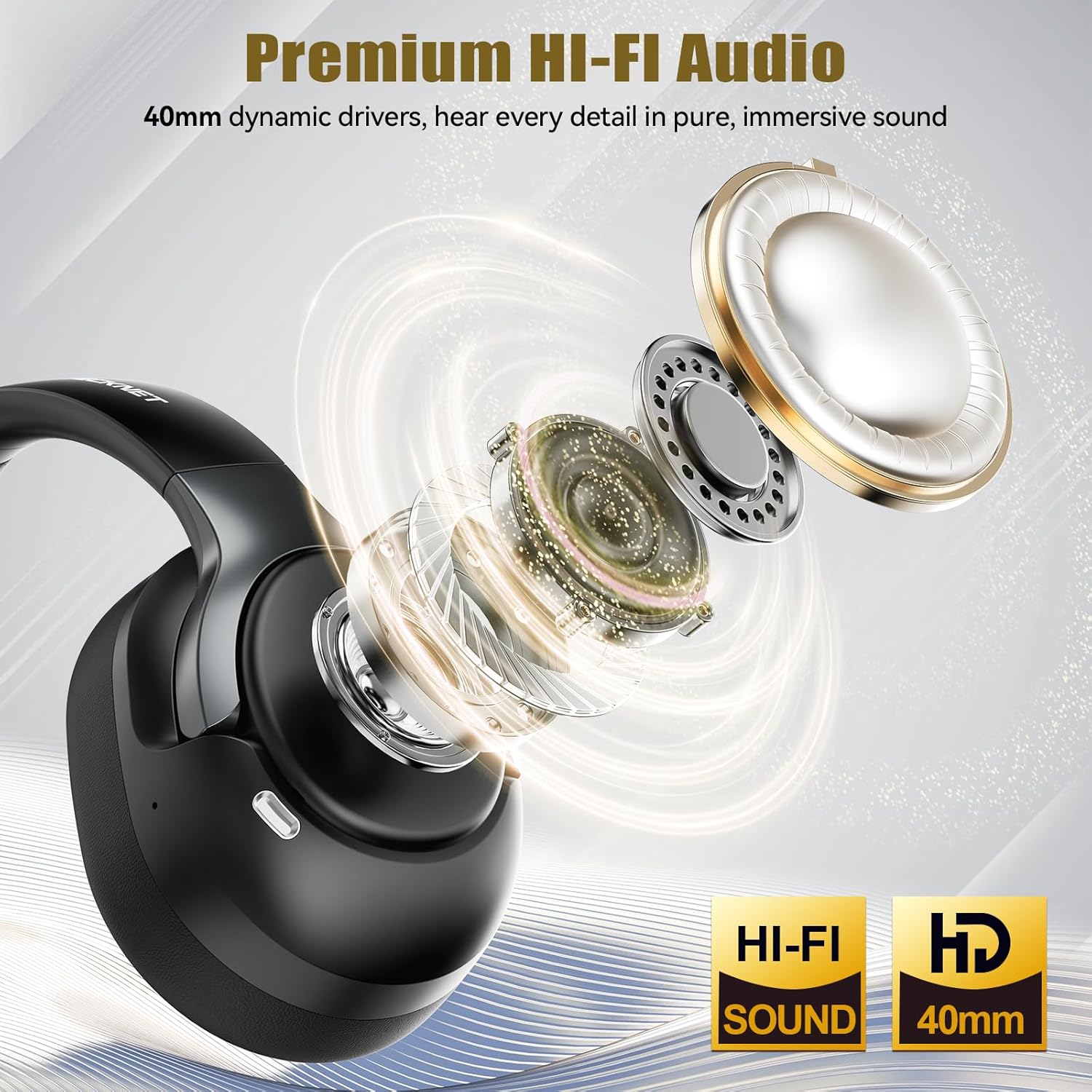
Image: Explanation of different noise control modes.
- โหมดตัดเสียงรบกวนแบบไฮบริด: Blocks up to 95% of ambient noise, ideal for travel or noisy environments.
- โหมดปกติ: Standard audio experience without active noise cancellation.
- โหมดความโปร่งใส: Allows you to hear your surroundings while listening to audio, enhancing environmental awareness.
5.5. Multiple Device Connections
The headphones support connecting to multiple devices, allowing seamless switching.

Image: Illustration of multiple device connectivity.
- Pair the headphones with each desired device following the Bluetooth pairing instructions (Section 4.2).
- To switch between connected devices, simply pause audio on the current device and start playback on the other. The headphones will automatically switch the audio source.
6. การบำรุงรักษา
6.1. การทำความสะอาด
- เช็ดหูฟังด้วยผ้าแห้งนุ่มและไม่ขุย
- ห้ามใช้น้ำยาทำความสะอาดที่มีฤทธิ์กัดกร่อน ตัวทำละลาย หรือสเปรย์เคมี
- ทำความสะอาดฟองน้ำรองหูฟังอย่างเบามือด้วยผ้าชุบน้ำหมาดๆamp เช็ดด้วยผ้าหากจำเป็น และปล่อยให้แห้งสนิทก่อนใช้งาน
6.2. การจัดเก็บ
- เก็บหูฟังไว้ในที่แห้งและเย็น หลีกเลี่ยงแสงแดดโดยตรงและอุณหภูมิที่สูงหรือต่ำเกินไป
- If storing for an extended period, charge the headphones at least once every three months to preserve battery life.
6.3. การดูแลแบตเตอรี่
- หลีกเลี่ยงการปล่อยแบตเตอรี่จนหมดบ่อยครั้ง
- อย่าให้แบตเตอรี่ถูกอุณหภูมิสูง
- โปรดใช้เฉพาะสายชาร์จที่ให้มาหรือสาย USB-C ที่ได้รับการรับรองเท่านั้น
7 การแก้ไขปัญหา
หากคุณประสบปัญหาเกี่ยวกับหูฟัง โปรดดูปัญหาทั่วไปและวิธีแก้ไขต่อไปนี้
| ปัญหา | วิธีแก้ปัญหาที่เป็นไปได้ |
|---|---|
| หูฟังไม่สามารถเปิดเครื่องได้ | ตรวจสอบให้แน่ใจว่าหูฟังชาร์จเต็มแล้ว เสียบปลั๊กแล้วลองอีกครั้ง |
| ไม่สามารถจับคู่กับอุปกรณ์ได้ | Ensure headphones are in pairing mode (flashing blue/red LED). Turn off and on Bluetooth on your device. Clear previous Bluetooth connections on your device. |
| ไม่มีเสียงหรือเสียงเบา | Check headphone and device volume levels. Ensure headphones are properly connected via Bluetooth or AUX. Try another audio source. |
| ANC ไม่ทำงานอย่างมีประสิทธิภาพ | ตรวจสอบให้แน่ใจว่าได้เปิดใช้งานโหมดตัดเสียงรบกวน (ANC) แล้ว และตรวจสอบว่าที่ครอบหูแนบสนิทกับหูของคุณดีแล้ว |
| การเชื่อมต่อไม่ต่อเนื่อง | Move closer to your device. Avoid obstacles between headphones and device. Ensure no other strong wireless signals are interfering. |
8. ข้อมูลจำเพาะ
Key technical details of the TECKNET Hybrid Active Noise Cancelling Bluetooth Headphones.

Image: Playback time details for the headphones.

Image: Details on the 40mm dynamic drivers for audio quality.
- แบบอย่าง: TK-HS049
- การเชื่อมต่อ: บลูทูธ 6.0, AUX 3.5 มม.
- การควบคุมเสียงรบกวน: ระบบตัดเสียงรบกวนแบบไฮบริด
- ไดรเวอร์เสียง: ไดรเวอร์ไดนามิกขนาด 40 มม.
- ช่วงความถี่: 20Hz - 20,000Hz
- อายุการใช้งานแบตเตอรี่: Up to 50 hours (average, may vary with ANC usage)
- วิธีการควบคุม: Physical Buttons (Volume, Power, ANC)
- ตำแหน่งหู: ครอบหู
- วัสดุ: Fabric, Silicone, Memory Foam
- ความต้านทานน้ำ: Waterproof (Note: While rated waterproof, avoid prolonged submersion or exposure to harsh conditions.)
- อุปกรณ์ที่รองรับ: Smartphones, Laptops, Tablets, Gaming Consoles, Computers, Smart Speakers, Cars (with Bluetooth support)
- สี: สีดำ
9. ข้อมูลด้านความปลอดภัย
- Do not use the headphones at excessively high volumes for extended periods to prevent hearing damage.
- ห้ามใช้หูฟังในสถานการณ์ที่ไม่สามารถได้ยินเสียงรอบข้างได้ซึ่งอาจเป็นอันตรายได้ (เช่น การขับรถ การปั่นจักรยาน การเดินอยู่บนท้องถนน)
- ควรเก็บหูฟังให้ห่างจากอุณหภูมิที่สูงจัด ความชื้นสูง และสารกัดกร่อน
- ห้ามพยายามถอดประกอบหรือดัดแปลงหูฟัง การทำเช่นนี้จะทำให้การรับประกันเป็นโมฆะและอาจทำให้เกิดความเสียหายได้
- กำจัดผลิตภัณฑ์และแบตเตอรี่ตามข้อบังคับท้องถิ่น ห้ามทิ้งรวมกับขยะทั่วไป
10. การรับประกันและการสนับสนุน
TECKNET products come with a standard warranty. For detailed warranty information, product support, or to report any issues, please visit the official TECKNET webหรือติดต่อฝ่ายบริการลูกค้าโดยตรง โปรดเก็บหลักฐานการซื้อไว้เพื่อใช้ในการเคลมประกัน