
1. บทนำ
Thank you for choosing the ROCKBROS Bike Taillight Smart Tag. This device is designed to enhance your cycling safety and provide additional security features. It integrates a powerful taillight with smart functionalities, including brake sensing, multiple light modes, and a built-in tracking locator compatible with iOS devices. Please read this manual carefully before use to ensure proper operation and maintenance.
2. Product List (What's in the Box)
ก่อนการติดตั้ง โปรดตรวจสอบให้แน่ใจว่ามีอุปกรณ์ครบทุกชิ้น:
- ROCKBROS Bike Taillight Smart Tag
- สายชาร์จ Type-C
- น็อต M5
- สกรู
- Seat cushion bracket
- ประแจ
- Rubber rings for seat post mounting

3. การตั้งค่าและการติดตั้ง
The taillight offers dual mounting options: under the seat (saddle bow) or on the seat post.
3.1. การติดตั้งหลักอาน
- Attach the seat post bracket to your bicycle's seat post using the provided rubber rings. Ensure a snug fit.
- Slide the taillight onto the bracket until it clicks into place.
- Adjust the angle of the taillight as desired.

3.2. Under-Seat (Saddle Bow) Mounting
- Secure the seat cushion bracket to the saddle rails using the M5 nut and screw with the provided wrench.
- Slide the taillight onto the bracket until it locks securely.
- Adjust the angle of the taillight for optimal visibility.
3.3. มุมปรับได้
The taillight features an adjustable angle mechanism, allowing you to tilt it up or down to suit your riding position and ensure maximum visibility.

4. คู่มือการใช้งาน
4.1. การเปิด/ปิดเครื่องและการเลือกโหมด
Press and hold the power button to turn the taillight on or off. Short press the button to cycle through the 6 available light modes. The device includes a memory function, retaining the last used mode upon restart.
4.2. Light Modes and Brightness
The taillight offers 6 distinct light modes and 2 brightness levels. To switch between high and low brightness, press the button when the taillight is off.
- Ring Steady: 11-15 hours runtime
- Center Steady: 26-35 hours runtime
- Center Slow Flash: 12-14 hours runtime
- Ring Fast Flash: 11-13 hours runtime
- โหมดการหายใจ: 27-29 hours runtime
- Center Fast Flash: 42-45 hours runtime

4.3. Smart Brake Sensing
The taillight is equipped with a smart brake sensor. When deceleration is detected, the light will automatically brighten and flash rapidly for approximately 3 seconds to alert vehicles and pedestrians behind you.

Turning Brake Sensor On/Off:
- หากต้องการปิดใช้งาน: Rotate the light upward and hold for 1 second.
- การเปิดใช้งาน: Rotate the light in the opposite direction and hold for 1 second. When enabled, the light will stay bright if tilted.
4.4. Built-in Tracking Locator
The taillight features an integrated tracking locator, compatible with iOS devices. This allows you to monitor your bike's location in real-time via a connected app, aiding in theft prevention and tracking during rides or when parked. Follow the instructions provided with your iOS device for pairing and tracking setup.
5. การชาร์จและแบตเตอรี่
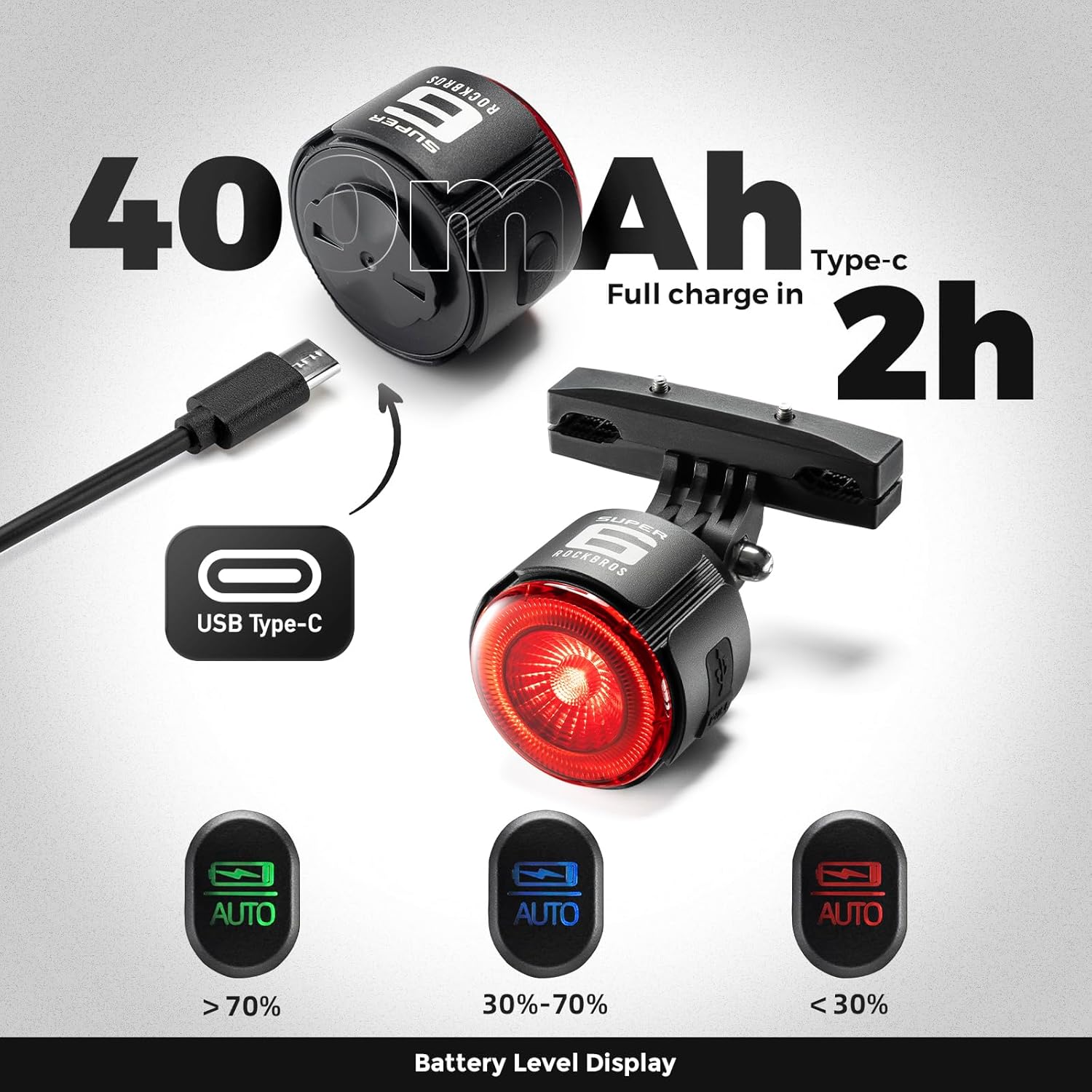
The taillight is powered by a 420mAh battery and charges via a Type-C port. A full charge typically takes approximately 2 hours.
5.1. ข้อบ่งชี้การชาร์จ
- ไฟแดง: Indicates the device is currently charging.
- ไฟเขียว: แสดงว่าอุปกรณ์ชาร์จเต็มแล้ว
5.2. Power Status Indication
The remaining battery power is indicated by different light colors:
- ไฟเขียว: ระดับแบตเตอรี่ > 70%
- แสงสีฟ้า: ระดับแบตเตอรี่ 30% - 70%
- ไฟแดง: ระดับแบตเตอรี่ < 30%
6. การบำรุงรักษา
- การทำความสะอาด: Wipe the taillight with a soft, damp ผ้า. หลีกเลี่ยงการใช้น้ำยาทำความสะอาดหรือตัวทำละลายที่มีฤทธิ์กัดกร่อน
- ความต้านทานน้ำ: The device is rated IPX5 waterproof. Ensure the Type-C charging port's dust plug is firmly inserted to maintain water resistance, especially before riding in wet conditions.
- การกระจายความร้อน: The aluminum alloy shell is designed for efficient heat dissipation. Ensure the light is not covered during operation to prevent overheating.
- พื้นที่จัดเก็บ: Store the taillight in a cool, dry place when not in use. If storing for extended periods, charge the battery to approximately 50% to prolong its lifespan.

7 การแก้ไขปัญหา
- ไฟไม่ติด: Ensure the battery is charged. Connect the taillight to a power source using the Type-C cable.
- ระบบเซ็นเซอร์เบรกไม่ทำงาน: Verify that the brake sensor is enabled (refer to section 4.3). Ensure the taillight is mounted securely and not obstructed.
- Tracking locator not connecting to iOS: Ensure Bluetooth is enabled on your iOS device. Follow the specific pairing instructions for the tracking feature. If issues persist, try resetting the taillight or consulting your iOS device's support resources.
- อายุการใช้งานแบตเตอรี่สั้น: Ensure the taillight is fully charged before use. Operating in high brightness or certain flash modes will consume battery faster. Check for any background processes if the tracking feature is constantly active.
- Light appears dim: The light has two brightness levels. Ensure you have selected the desired brightness level (refer to section 4.2).
8. ข้อมูลจำเพาะ
| ยี่ห้อ | ร็อคโบรส |
| หมายเลขรุ่น | 2420002001 |
| วัสดุ | อลูมิเนียม |
| สี | สีดำ |
| แหล่งพลังงาน | ใช้แบตเตอรี่ (420mAh) |
| พอร์ตชาร์จ | ประเภทซี |
| ระดับความต้านทานต่อน้ำ | IPX5 (กันน้ำ) |
| Number of Light Settings | 6 Modes, 2 Brightness Levels |
| ประเภทการติดตั้ง | Seat Mount & Seatpost Mount |
9. การรับประกันและการสนับสนุน
9.1. ข้อมูลการรับประกัน
This ROCKBROS Bike Taillight Smart Tag มาพร้อมกับ การรับประกันจากผู้ผลิต 2 ปีการรับประกันนี้ครอบคลุมถึงข้อบกพร่องในวัสดุและฝีมือการผลิตภายใต้การใช้งานปกติ ไม่ครอบคลุมถึงความเสียหายที่เกิดจากการใช้งานผิดวิธี อุบัติเหตุ การดัดแปลงโดยไม่ได้รับอนุญาต หรือการสึกหรอตามปกติ โปรดเก็บหลักฐานการซื้อไว้เพื่อใช้ในการเรียกร้องการรับประกัน
9.2. การสนับสนุนลูกค้า
For technical assistance, warranty claims, or any questions regarding your ROCKBROS product, please visit the official ROCKBROS store or contact their customer service. You can find more information and contact details at the ร้าน ROCKBROS บน Amazon.