
1. บทนำ
The Lefant M3 Max is an advanced robot vacuum and mop designed to provide comprehensive and hands-free floor cleaning. Equipped with dToF laser navigation, powerful 20000Pa suction, and an innovative all-in-one self-emptying station, it offers efficient cleaning for various floor types. This manual provides essential information for proper setup, operation, and maintenance of your device.
2. ข้อมูลด้านความปลอดภัย
Always read and understand all safety warnings and instructions before using this appliance to prevent injury or damage. Keep this manual for future reference.
ความปลอดภัยทั่วไป:
- เด็กอายุตั้งแต่ 8 ปีขึ้นไป รวมไปถึงบุคคลที่มีความบกพร่องทางร่างกาย ประสาทสัมผัส หรือจิตใจ หรือขาดประสบการณ์และความรู้ สามารถใช้เครื่องใช้ไฟฟ้านี้ได้ หากมีการดูแลหรือได้รับคำแนะนำเกี่ยวกับการใช้เครื่องใช้ไฟฟ้าในลักษณะที่ปลอดภัย และเข้าใจถึงอันตรายที่อาจเกิดขึ้น
- เด็กไม่ควรเล่นเครื่องใช้ไฟฟ้านี้ ไม่ควรทำความสะอาดและบำรุงรักษาเครื่องโดยเด็กโดยไม่มีผู้ดูแล
- ห้ามปล่อยให้หุ่นยนต์หยิบจับวัตถุขนาดใหญ่ ของเหลว หรือวัสดุที่กำลังลุกไหม้/มีควัน
- Ensure the charging station is placed on a level surface against a wall, with no obstacles within 1 meter (3 feet) in front and 0.5 meters (1.5 feet) on either side.
- For detailed safety guidelines, please consult the official Safety Information PDF provided with your product or available on the Lefant webเว็บไซต์.
3. เนื้อหาบรรจุภัณฑ์
ตรวจสอบว่ามีส่วนประกอบทั้งหมดอยู่ในแพ็คเกจ:
- Lefant M3 Max Robot Vacuum and Mop
- All-in-One Self-Emptying Station
- สายไฟ
- Dust Bags (2x)
- แปรงด้านข้าง (2x)
- Mop Pads (4x washable)
- HEPA Filters (2x)
- Detergent (1x)
- Cleaning Tool (1x)
- คู่มือการใช้งาน

Image: Contents of the package, including the robot, station, and accessories.
4. สินค้าหมดview
The Lefant M3 Max combines powerful vacuuming with effective mopping, featuring advanced technologies for a superior cleaning experience.
4.1 คุณสมบัติหลัก
- 20000Pa Cyclonic Suction: High-efficiency motor provides strong suction for dust, crumbs, and pet hair on various surfaces, including thick carpets.
- dToF 360° Laser Navigation: Scans the environment to create detailed maps, plan efficient cleaning paths, and supports multi-floor mapping (up to 3 maps).
- Dual Rotating Mops (200 RPM): Applies constant pressure to floors, simulating manual scrubbing to remove stubborn stains.
- ม็อบยกอัตโนมัติ (9มม.): Mops automatically lift by 9mm when carpets are detected, preventing wetting and allowing seamless cleaning transitions.
- สถานีออลอินวัน: Features automatic dust emptying (3.2L bag), 45°C hot water mop washing, and natural air drying for minimal maintenance.
- ระบบหลีกเลี่ยงสิ่งกีดขวาง PSD 190°: 9 PSD sensors detect and avoid objects of various colors and materials, even in low light, protecting furniture and the robot.
- อายุการใช้งานแบตเตอรี่ที่ยาวนานขึ้น: 5200 mAh battery provides up to 210 minutes of cleaning, covering up to 210m² on a single charge. Automatically resumes cleaning after recharging.
- การควบคุมอัจฉริยะ: Manage via the Lefant App (WiFi 2.4G/5G), Alexa, and Google Assistant for scheduling, zone settings, and voice commands.

Image: All-in-One Station for automatic cleaning and maintenance.

Image: Maximum Suction Power of 20000Pa for adaptive cleaning.

Image: Anti-Tangle Design with V-shaped brush and double combs.

Image: Deep Cleaning for Resistant Stains with 200 RPM rotating mops.

Image: Automatic carpet detection and mop lifting.

Image: 360° LiDAR Precision Navigation with 15m range and multi-floor mapping.
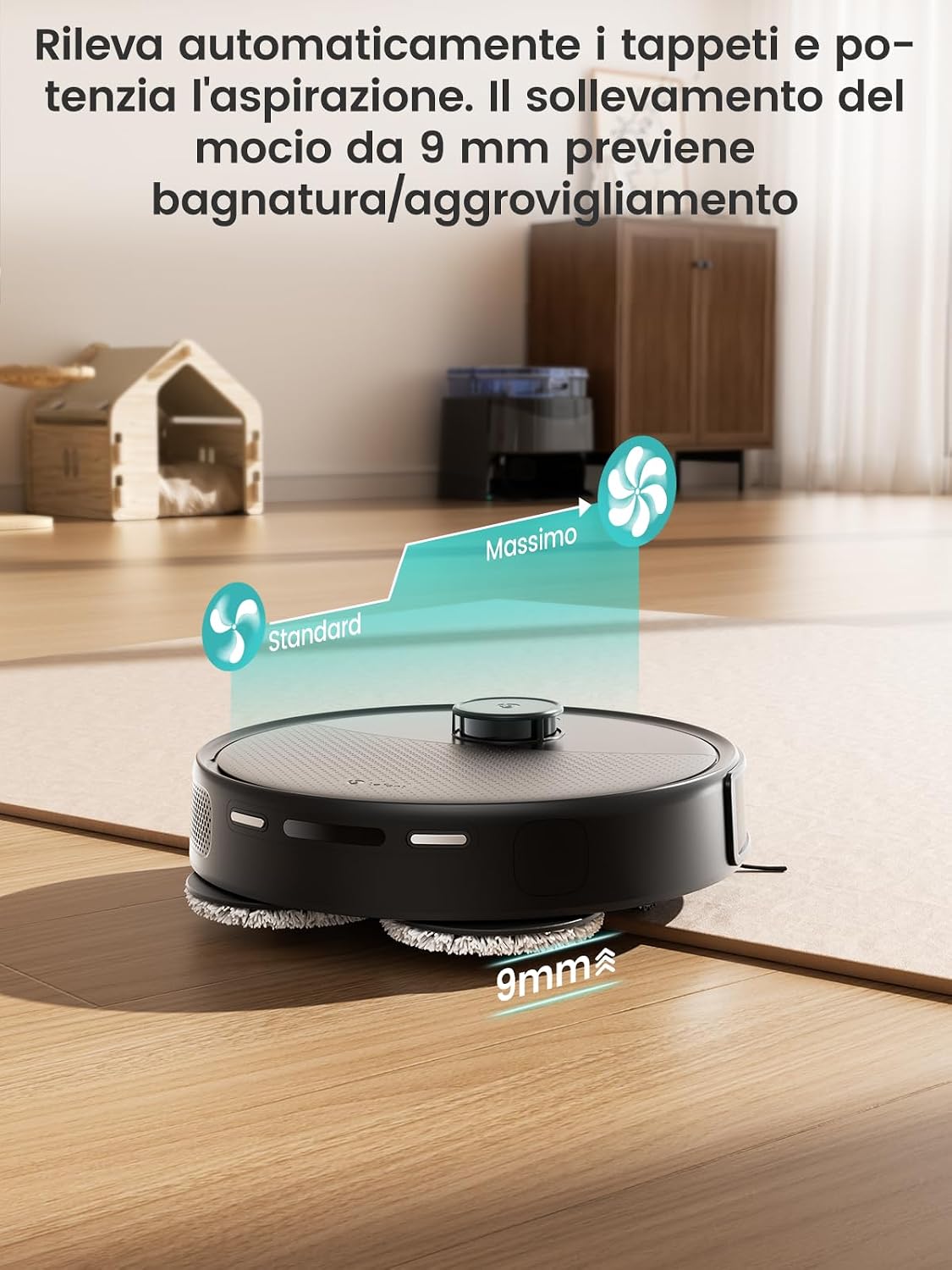
Image: 190° PSD Precision Obstacle Detection.
5. การตั้งค่า
5.1 การจัดวางสถานีชาร์จ
Place the all-in-one station on a hard, level surface against a wall. Ensure there is at least 1 meter (3 feet) of clear space in front of the station and 0.5 meters (1.5 feet) on either side to allow the robot to dock properly.
5.2 ค่าบริการเริ่มต้น
Before first use, fully charge the robot. Place the robot on the charging station. The indicator lights will show charging status. A full charge typically takes 4-5 hours.
5.3 การเชื่อมต่อกับแอป Lefant
The Lefant App allows you to control your robot, set cleaning schedules, define no-go zones, and more.
- Download the 'Lefant' app from your smartphone's app store.
- ลงทะเบียนหรือเข้าสู่ระบบบัญชีของคุณ
- Add your M3 Max robot vacuum to the app.
- Connect to your 2.4G/5G Wi-Fi network.
- Power on the robot vacuum by pressing the power button.
- Press and hold the start button for 6 seconds to enter pairing mode.
- Select 'M3 Max' in the app and wait for the robot to pair successfully.

Image: Steps to connect the Lefant robot to the app.
5.4 Connecting to Alexa / Google Assistant
Enable voice control for your Lefant M3 Max through Amazon Alexa or Google Assistant.
- Open the Lefant APP, go to "Mine" > "Voice of third parties" to access the service.
- ลงทะเบียนบัญชีผู้ใช้เสียงและรหัสผ่านของคุณตั้งแต่ขั้นตอนที่ 2
- Open the Alexa APP, go to "More" > "Skills & Games".
- ค้นหา "ชีวิตที่ชาญฉลาด"
- Click "Enable to use".
- เลือกภูมิภาคของคุณและป้อนบัญชีผู้ใช้และรหัสผ่านจากขั้นตอนที่ 2
- รอจนกว่าการเชื่อมต่อจะเสร็จสมบูรณ์

Image: Steps to connect to Alexa.
6. คู่มือการใช้งาน
6.1 การเริ่มต้นและการหยุดการทำความสะอาด
- เริ่มต้นด้วยตนเอง: กดปุ่มเปิด/ปิดบนหุ่นยนต์หนึ่งครั้งเพื่อเริ่มหรือหยุดการทำความสะอาด
- การควบคุมแอพ: Use the Lefant App to start, pause, or stop cleaning from anywhere.
6.2 โหมดการทำความสะอาดและการปรับแต่ง
The Lefant App offers various cleaning modes and customization options:
- การทำความสะอาดตามกำหนดเวลา: Set weekly cleaning schedules for specific times and days.
- การทำความสะอาดโซน: กำหนดพื้นที่เฉพาะที่หุ่นยนต์จะทำความสะอาด
- โซนห้ามเข้า: Create virtual boundaries to prevent the robot from entering certain areas (e.g., pet bowls, delicate items).
- การเพิ่มพรม: The robot automatically increases suction power when it detects carpets.
- การทำแผนที่หลายชั้น: Store up to 3 different floor maps for multi-level homes.

Image: Complete control, just as you desire, via app and smart features.

Image: All-in-one app control interface.

Image: Room-by-room customization.

Image: Multi-level mapping.
6.3 การควบคุมด้วยเสียง
Once connected to Alexa or Google Assistant, you can use voice commands to control your robot. Exampเลส:
- "Alexa, ask Lefant Robot to clean."
- "Hey Google, tell Lefant Robot to pause."

Image: Multiple control methods including app, voice, and Apple Watch.
6.4 Apple Watch Control
You can also control your Lefant M3 Max using your Apple Watch.
- Download the Lefant app on your phone and the Lefant app on your Apple Watch.
- Pair your Apple Watch with your iPhone.
- เลือกแอป Lefant บน Apple Watch ของคุณ
- Remember to click on the Lefant app on your phone and log in.
- Once logged in, connect your robot.
- กลับไปที่ Apple Watch ของคุณ ตอนนี้คุณสามารถควบคุมหุ่นยนต์ของคุณได้จากนาฬิกาเรือนนี้
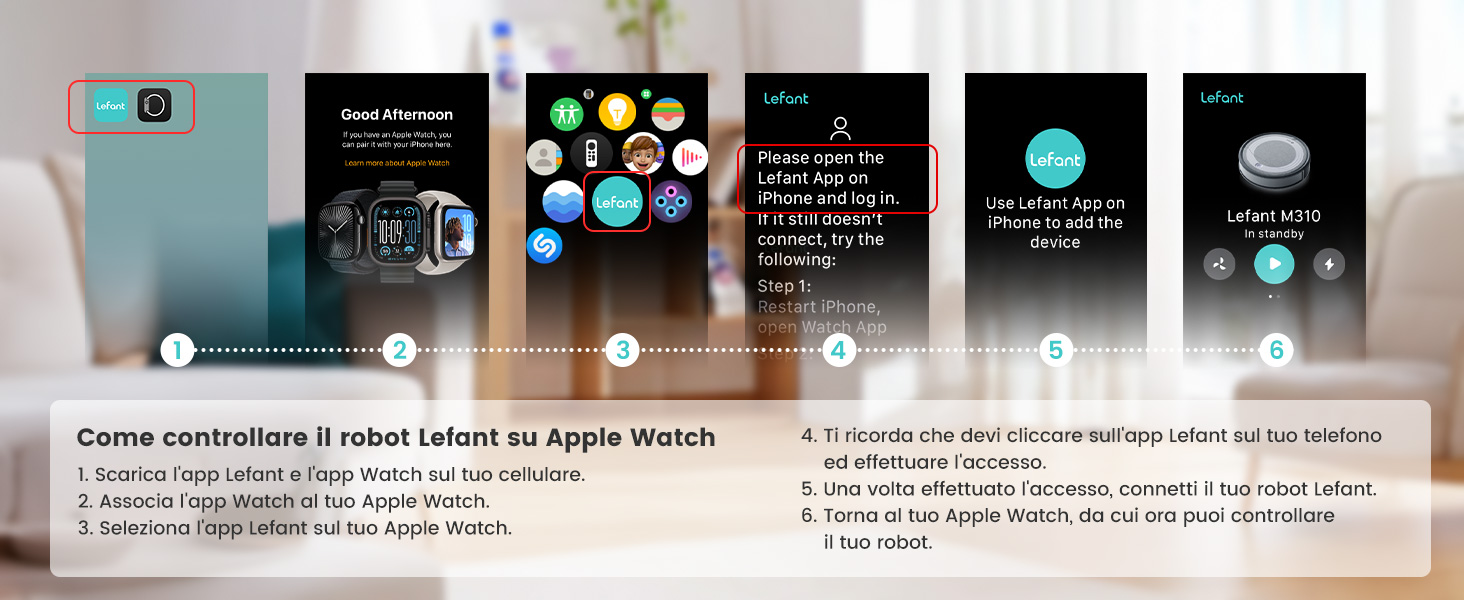
Image: Steps to control the Lefant robot on Apple Watch.
7. การบำรุงรักษา
Regular maintenance ensures optimal performance and extends the lifespan of your Lefant M3 Max.
7.1 การบำรุงรักษาสถานีแบบครบวงจร
- การดูดฝุ่นอัตโนมัติ: The 3.2L dust bag in the station needs replacement approximately every 8 weeks, depending on usage and environment.
- การซักถูพื้นอัตโนมัติ: The station automatically washes the mop pads with 45°C hot water after each cleaning cycle, effectively dissolving grease and dirt.
- Natural Air Drying: After washing, the mops are dried with natural air to prevent odors and bacterial growth.
- ฐานถอดออกได้: The base of the station is removable for easy manual cleaning of any accumulated debris.

Image: 2 Months, Zero Effort: Automatic dust emptying.

Image: Mop self-cleaning with 45°C hot water.

Image: Natural air drying for mops.

Image: Self-cleaning system and removable base.
7.2 การบำรุงรักษาส่วนประกอบหุ่นยนต์
- แปรงหลัก: Regularly check and clean the V-shaped main brush. The anti-tangle design minimizes hair wrapping, but occasional cleaning may be needed.
- แปรงด้านข้าง: Inspect side brushes for wear or damage. Replace them if necessary.
- ตัวกรอง: Clean the HEPA filter regularly. Tap it gently to remove dust. Replace filters every 3-6 months depending on usage.
- เซ็นเซอร์: Wipe the robot's sensors (dToF laser, PSD sensors) with a soft, dry cloth to ensure accurate navigation and obstacle avoidance.
8 การแก้ไขปัญหา
If you encounter issues with your Lefant M3 Max, refer to the following common solutions. For more complex problems, consult the full user manual or contact customer support.
| ปัญหา | สาเหตุที่เป็นไปได้ | สารละลาย |
|---|---|---|
| หุ่นยนต์ไม่เริ่มต้นหรือตอบสนอง | แบตเตอรี่ต่ำ, สวิตช์ไฟปิด, หุ่นยนต์ติดขัด | Charge the robot; Turn on the power switch; Clear any obstructions. |
| หุ่นยนต์ไม่สามารถกลับไปยังสถานีชาร์จได้ | สถานีชาร์จถูกกีดขวาง หุ่นยนต์อยู่ไกลจากสถานีเกินไป | Ensure clear space around station; Manually place robot closer to station. |
| ประสิทธิภาพการทำความสะอาดไม่ดี | Dustbin full; Brushes tangled; Filter clogged; Mop pads dirty. | Empty dustbin; Clean brushes; Clean/replace filter; Clean/replace mop pads. |
| ปัญหาการเชื่อมต่อแอป | Incorrect Wi-Fi password; Robot not in pairing mode; Router issues. | Verify Wi-Fi credentials; Re-enter pairing mode; Restart router. |
| Mop not washing or drying properly. | Water tanks empty; Nozzle clogged; Station malfunction. | Refill water tanks; Clean nozzle; Contact support if issue persists. |
9. ข้อมูลจำเพาะ
| คุณสมบัติ | รายละเอียด |
|---|---|
| ยี่ห้อ | เลฟองต์ |
| ชื่อรุ่น | เอ็ม3แม็กซ์ |
| พลังดูด | 20000ปาสคาล |
| ความเร็วรอบการหมุนของม็อบ | 200 รอบต่อนาที |
| ความสูงของการยกไม้ถูพื้น | 9 มม. |
| Dustbin Capacity (Station) | 3.2 ลิตร |
| ความจุถังน้ำสะอาด | 2.5 ลิตร |
| ความจุถังน้ำเสีย | 2.5 ลิตร |
| อายุการใช้งานแบตเตอรี่ | นานถึง 210 นาที |
| ประเภทแบตเตอรี่ | ลิเธียมไอออน (5200 mAh) |
| มิติ (หุ่นยนต์) | 32L x 32W x 9.7H ซม |
| น้ำหนัก (รายการ) | 9.7 กิโลกรัม |
| ประเภทการควบคุม | การควบคุมแอพ, การควบคุมด้วยเสียง |
| อุปกรณ์ที่รองรับ | สมาร์ทโฟน (อเล็กซ่า, กูเกิล แอสซิสต์) |
| ประเภทตัวกรอง | พายุไซโคลน |
| พื้นผิวที่แนะนำ | Various surfaces |
10. การรับประกันและการสนับสนุน
Lefant products come with a standard manufacturer's warranty. Please refer to the warranty card included in your package or visit the official Lefant webเว็บไซต์สำหรับข้อกำหนดและเงื่อนไขการรับประกันโดยละเอียด
For technical support, troubleshooting assistance, or to purchase replacement parts, please contact Lefant customer service through their official webไซต์หรือข้อมูลการติดต่อที่ระบุไว้ในเอกสารผลิตภัณฑ์ของคุณ
แหล่งข้อมูลออนไลน์:
- Official Lefant Webเว็บไซต์: www.lefant.com (โปรดตรวจสอบข้อมูลล่าสุด) URL)
- Lefant App: Available on iOS App Store and Google Play Store.