
1. บทนำ
Thank you for choosing the SUNLU S4 Filament Dryer. This device is designed to effectively dry 3D printer filaments, improving print quality and preventing common issues caused by moisture absorption. The S4 features a large capacity for up to four 1KG spools, rapid heating, uniform drying with triple fans, and intelligent humidity control for optimal filament conditioning.
2. คำแนะนำด้านความปลอดภัย
- อ่านคำแนะนำทั้งหมดก่อนใช้งานอุปกรณ์
- ตรวจสอบแหล่งจ่ายไฟ voltage matches the specifications indicated on the device.
- อย่าใช้งานอุปกรณ์ด้วยมือเปียกหรือในamp สภาพแวดล้อม
- ควรเก็บอุปกรณ์ให้ห่างจากวัสดุไวไฟและแหล่งความร้อน
- อย่าปิดกั้นช่องระบายอากาศระหว่างการทำงาน
- ถอดปลั๊กอุปกรณ์ออกจากเต้าเสียบไฟเมื่อไม่ใช้งานหรือก่อนทำความสะอาด
- อย่าพยายามถอดประกอบหรือซ่อมแซมอุปกรณ์ด้วยตนเอง ติดต่อฝ่ายสนับสนุนลูกค้าเพื่อขอความช่วยเหลือ
- เก็บให้พ้นจากมือเด็ก
3. เนื้อหาบรรจุภัณฑ์
กรุณาตรวจสอบแพ็คเกจสำหรับรายการต่อไปนี้:
- SUNLU S4 Filament Dryer Unit
- อะแดปเตอร์แปลงไฟ
- คู่มือการใช้งาน (เอกสารนี้)
- 1KG White High Speed PLA+2.0 Filament (bundled item)
4. สินค้าหมดview
The SUNLU S4 Filament Dryer is designed to provide optimal drying conditions for various 3D printing filaments. Key features include:
- ความจุขนาดใหญ่: Accommodates up to four 1KG spools simultaneously, enabling multi-color or multi-machine printing without interruption.
- ให้ความร้อนรวดเร็ว: Equipped with a 350W PTC heater, the S4 heats from 25℃ to 50℃ in approximately 30 minutes, ensuring efficient drying.
- Uniform Drying: Three built-in fans (two circulating on sides, one on bottom) maintain a temperature balance within ±3℃ for consistent drying throughout the box.
- Triple Security: Features PTC, temperature switch, and software protection for enhanced safety and real-time temperature monitoring.
- Smart Auto Humidity Control: Allows users to set a desired humidity range (30%~50%). The dryer automatically starts drying when humidity exceeds the set range and stops when it falls below 25% to prevent over-drying.
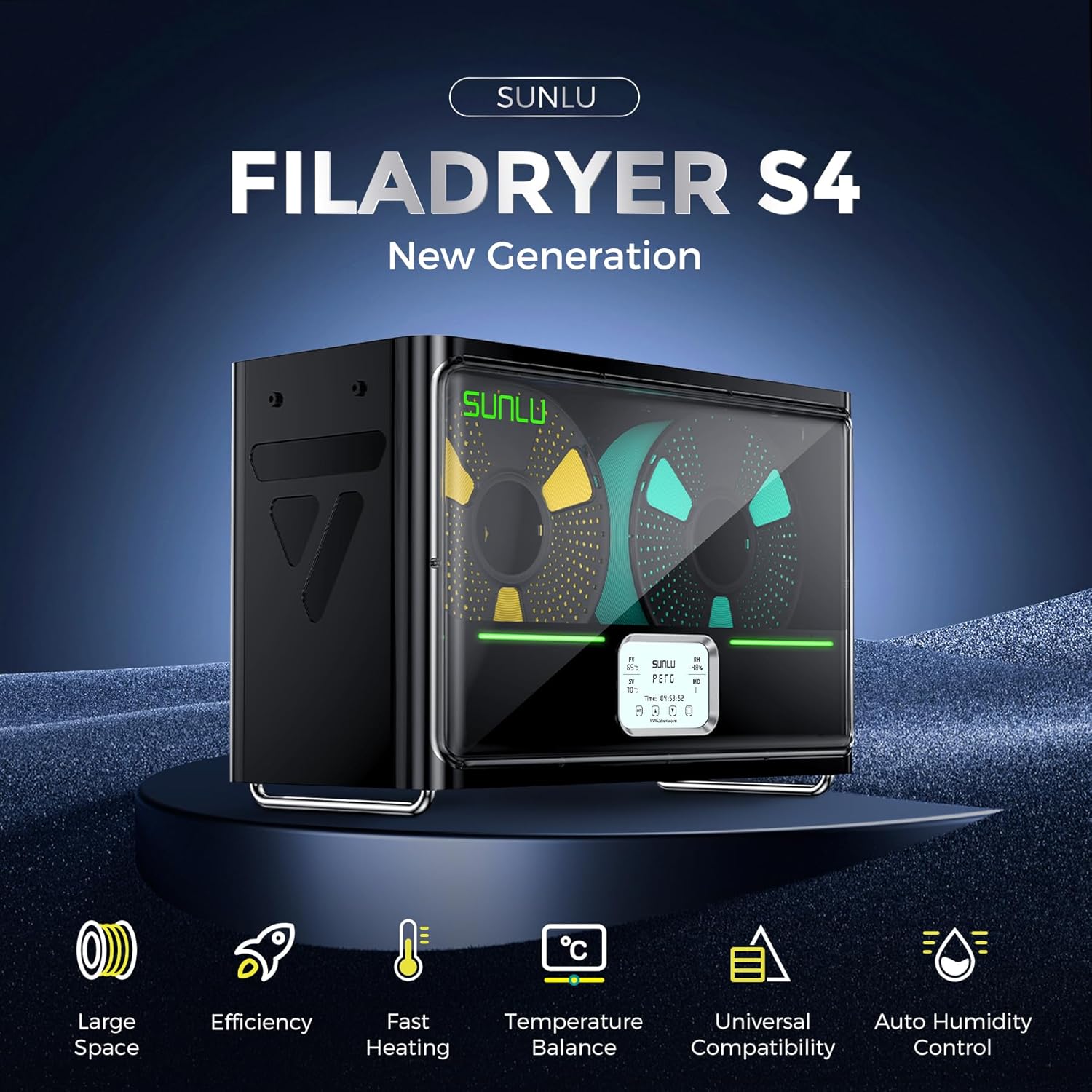
Image: The SUNLU S4 Filament Dryer highlighting its main features including large space, efficiency, fast heating, temperature balance, universal compatibility, and auto humidity control.
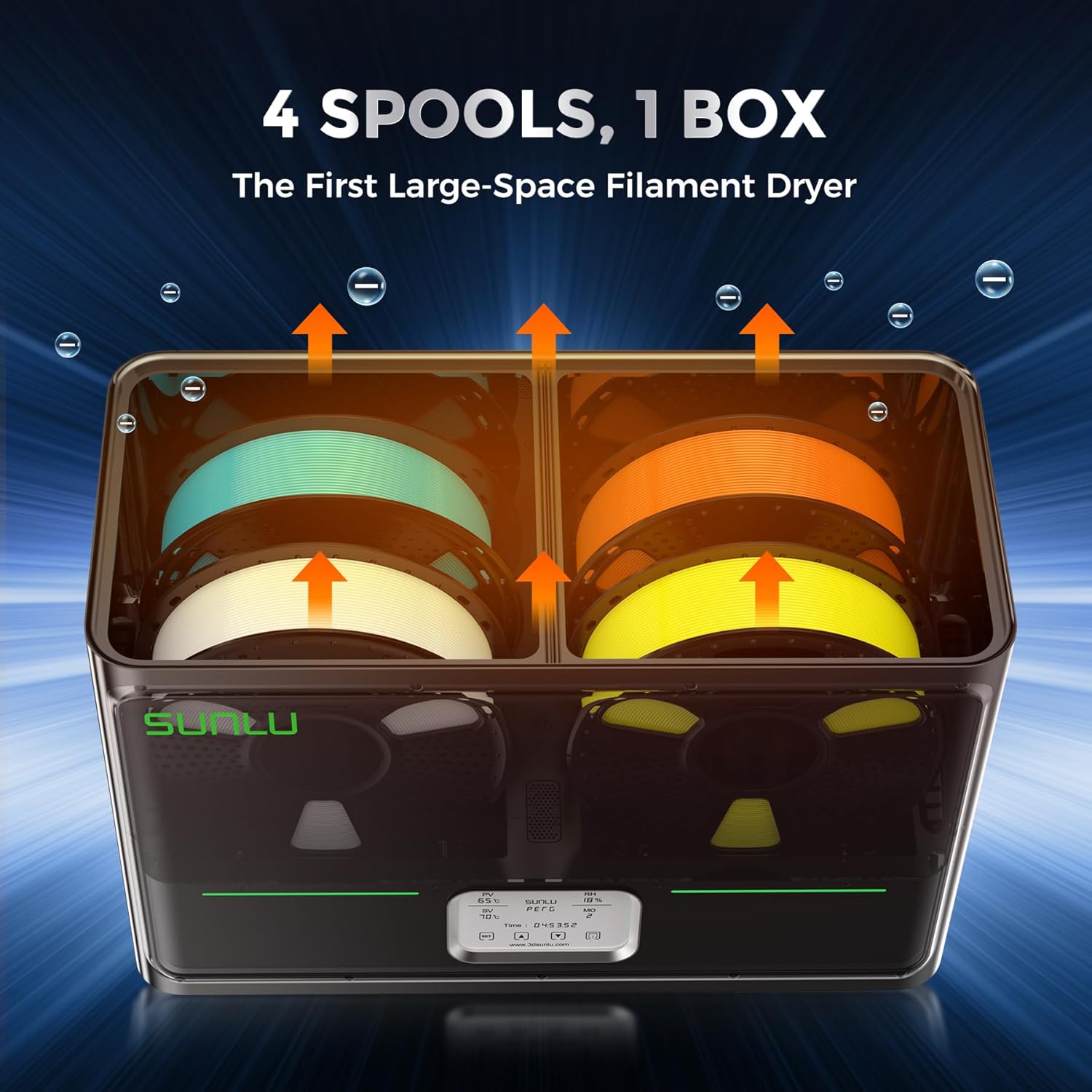
ภาพ: ภายใน view of the SUNLU S4 Filament Dryer demonstrating its capacity to hold four 1KG filament spools, with arrows indicating airflow for drying.

Image: A visual comparison showing a 3D printed object made with wet filament (left, rough surface) versus the same object made with dried filament (right, smooth surface), illustrating the benefits of drying.
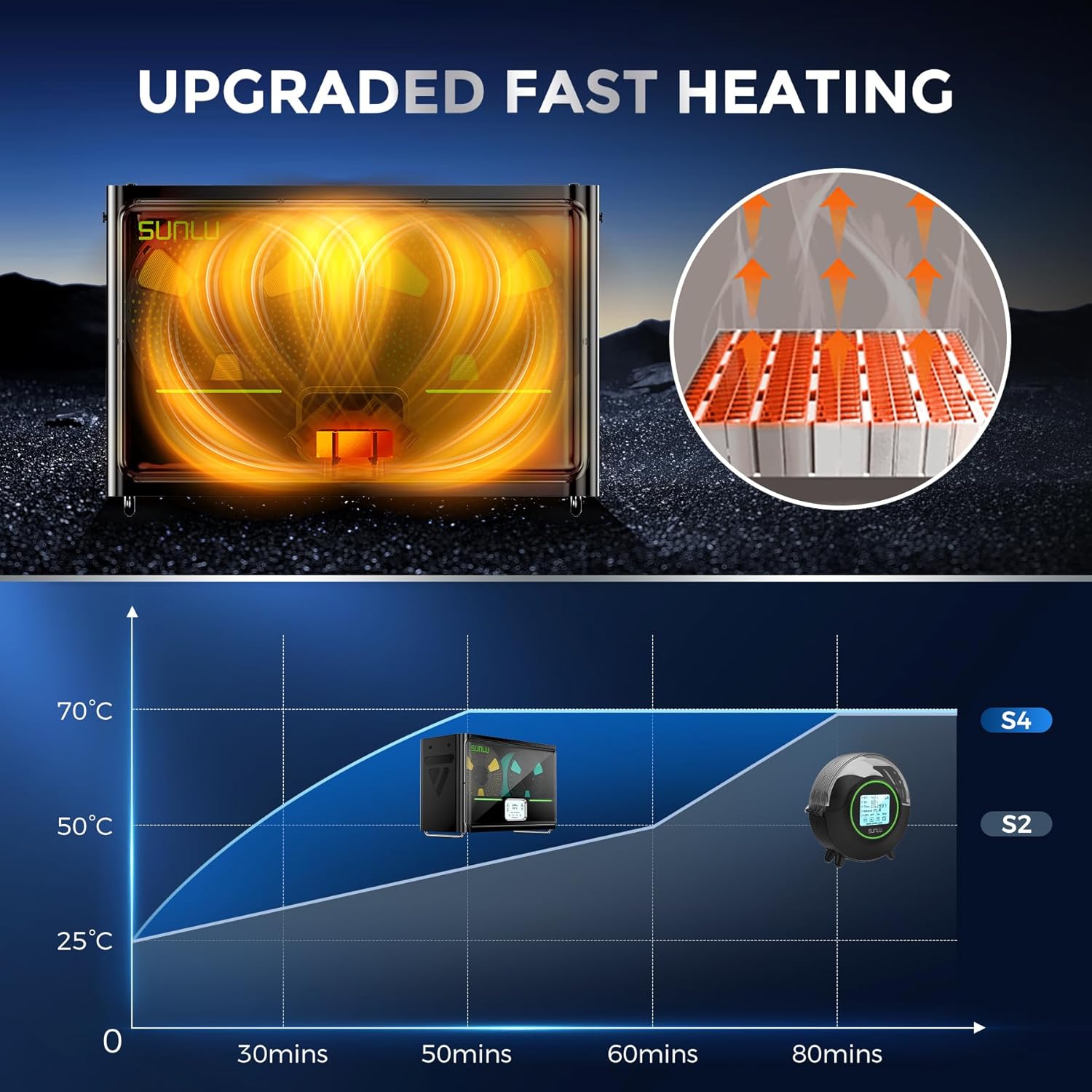
Image: A graph illustrating the rapid heating capability of the SUNLU S4, showing it reaches 50°C from 25°C in approximately 30 minutes, significantly faster than previous models.

Image: An illustration depicting the three internal fans of the SUNLU S4, highlighting their role in circulating air for uniform and 360-degree drying of filament.

Image: A diagram showing the triple security features of the S4: Smart PTC, Temperature Switch, and Software Protection, ensuring safe operation with real-time temperature monitoring.
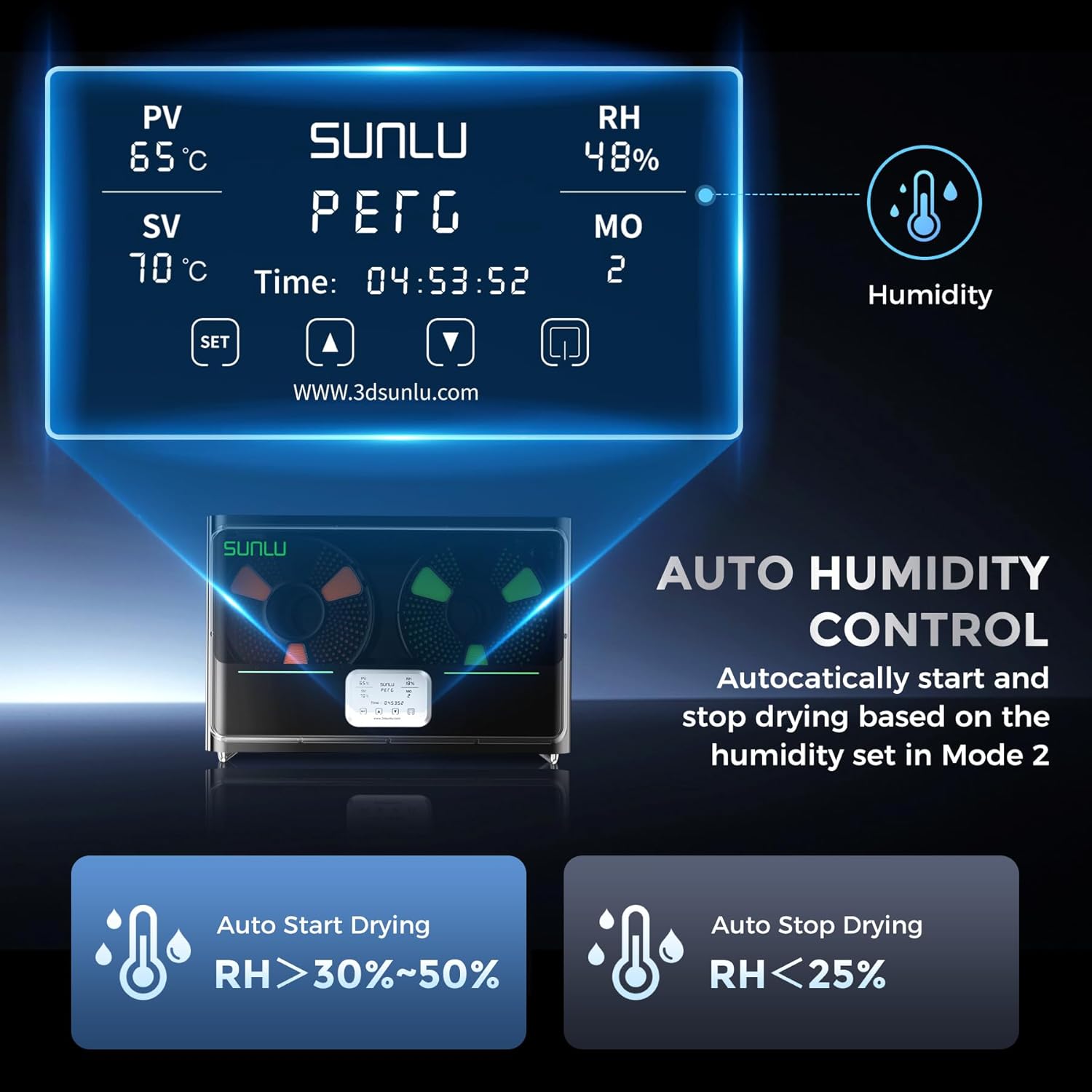
Image: The control panel display of the SUNLU S4, showing current temperature (PV), set temperature (SV), relative humidity (RH), and mode (MO). It also illustrates the auto humidity control logic for starting and stopping drying.
5. การตั้งค่า
- แกะ: Carefully remove the SUNLU S4 Filament Dryer and all accessories from the packaging.
- การจัดวาง: Place the dryer on a stable, flat, and heat-resistant surface, ensuring adequate ventilation around the unit.
- โหลดเส้นใย: Open the lid of the dryer. Place up to four 1KG filament spools onto the internal rollers. Ensure the filament can unroll smoothly.
- เชื่อมต่อพลังงาน: Plug the power adapter into the dryer's power input port, then connect the adapter to a suitable power outlet.
- เปิดเครื่อง: Press the power button to turn on the device. The display will illuminate.
6. คู่มือการใช้งาน
The SUNLU S4 offers various modes for drying filament. Refer to the display and control buttons for operation.
6.1. การทำงานพื้นฐาน
- เปิด/ปิดเครื่อง: กดปุ่มเปิด/ปิดเพื่อเปิดหรือปิดเครื่อง
- Temperature Setting (SV): Use the 'SET' button to enter temperature adjustment mode. Use the up/down arrows to set the desired drying temperature. Press 'SET' again to confirm.
- Drying Time Setting: The dryer typically operates for a set duration or until humidity targets are met. Consult the on-screen display for current drying time.
6.2. Auto Humidity Control (Mode 2)
This mode allows the dryer to automatically manage humidity levels to prevent over-drying while ensuring optimal conditions.
- Activate Mode 2: Navigate to Mode 2 on the display.
- Set Humidity Range: In Mode 2, you can adjust the target humidity range, typically between 30% and 50%.
- การทำงานอัตโนมัติ: The S4 will automatically initiate drying when the internal relative humidity (RH) rises above your set range.
- หยุดอัตโนมัติ: Drying will automatically cease when the internal RH drops below 25%, preserving filament quality.
บันทึก: Always refer to the specific filament manufacturer's recommendations for optimal drying temperatures and durations.
7. การบำรุงรักษา
- การทำความสะอาด: Ensure the device is unplugged before cleaning. Use a soft, dry cloth to wipe the exterior. Do not use abrasive cleaners or solvents.
- การทำความสะอาดภายใน: Periodically check the interior for any filament debris or dust. Use a soft brush or compressed air to gently remove any accumulation.
- พื้นที่จัดเก็บ: When not in use for extended periods, store the dryer in a cool, dry place, away from direct sunlight and moisture.
8 การแก้ไขปัญหา
| ปัญหา | สาเหตุที่เป็นไปได้ | สารละลาย |
|---|---|---|
| อุปกรณ์ไม่เปิดเครื่อง | ไม่มีแหล่งจ่ายไฟ; การเชื่อมต่อหลวม | Check power cable connection; ensure outlet is functional. |
| เส้นใยไม่แห้งสนิท | Incorrect temperature/time settings; heavily saturated filament | Increase drying temperature or duration; ensure correct mode is selected. |
| ความผันผวนของอุณหภูมิ | Blocked vents; extreme ambient temperature | Ensure vents are clear; operate in a stable room temperature environment. |
| จอแสดงผลไม่ทำงาน | Power issue; internal fault | Power cycle the device. If issue persists, contact support. |
9. ข้อมูลจำเพาะ
| คุณสมบัติ | รายละเอียด |
|---|---|
| แบบอย่าง | S4 |
| ยี่ห้อ | ซุนลู่ |
| พลังงานความร้อน | 350W PTC Heater |
| ความจุของเส้นใย | Up to 4 x 1KG spools |
| การควบคุมอุณหภูมิ | ±3℃ balance |
| การควบคุมความชื้น | Auto start (RH > 30-50%), Auto stop (RH < 25%) |
| คุณสมบัติด้านความปลอดภัย | PTC, Temperature Switch, Software Protection |
| ASIN | B0FS74DPRD |
| วันที่พร้อมใช้งานครั้งแรก | 6 กรกฎาคม 2025 |
10. การรับประกันและการสนับสนุน
SUNLU products are manufactured to high-quality standards. For warranty information, technical support, or service inquiries, please refer to the official SUNLU website or contact your retailer. Please have your product model (S4) and purchase information ready when contacting support.