
การแนะนำ
Thank you for choosing the Digitus DA-70919 USB-C 8K 12-Port Docking Station. This device is designed to expand the connectivity of your USB-C enabled laptop or computer, providing a comprehensive solution for video output, data transfer, network access, and power delivery. Please read this manual carefully to ensure proper installation and operation.
สินค้าเกินview
The Digitus DA-70919 docking station offers 12 essential ports to enhance your workspace. It supports high-resolution video output, fast data transfer, and efficient power delivery to your host device.

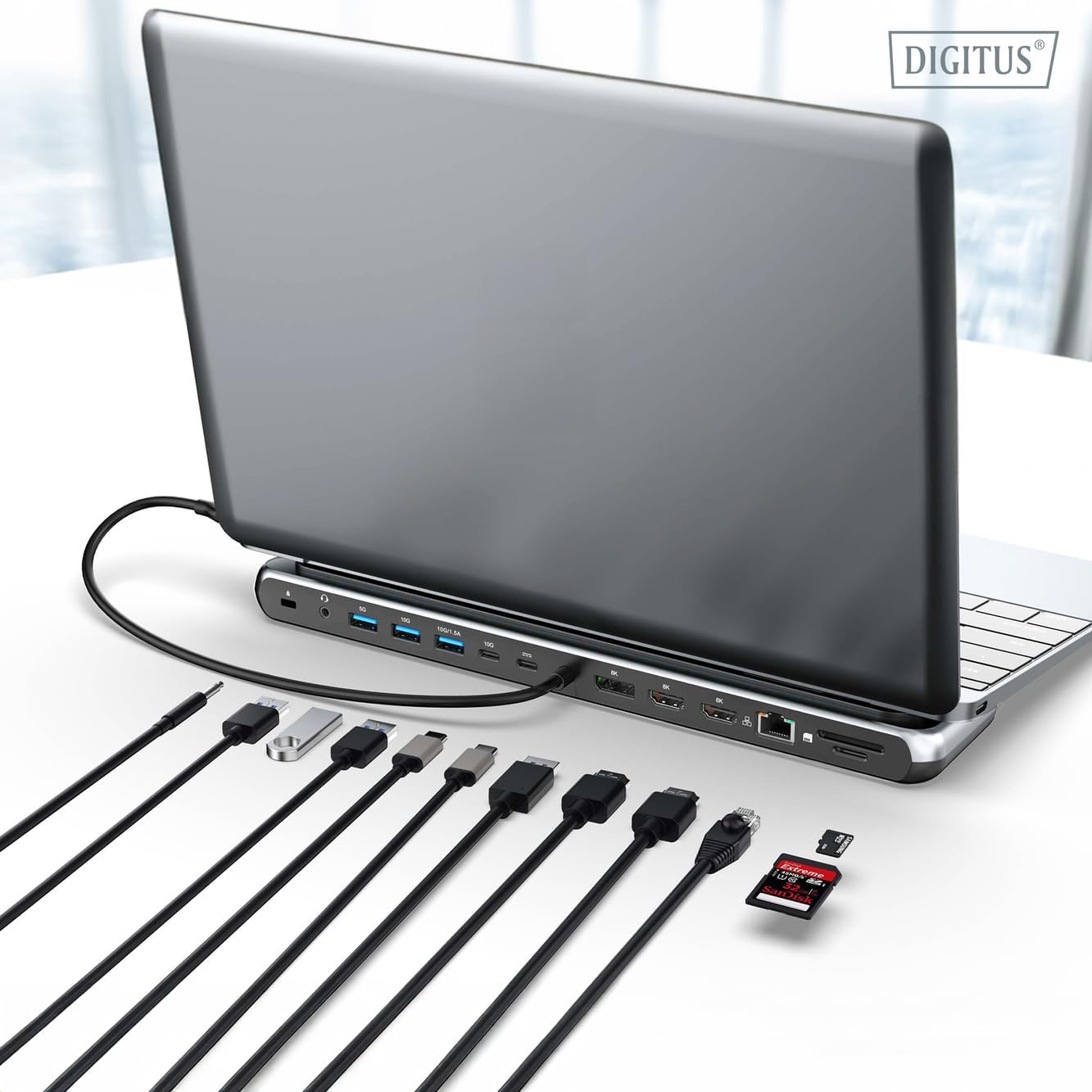
รูปที่ 1: Detailed diagram of the Digitus DA-70919 docking station ports and their functions. This diagram labels each of the 12 ports on the docking station, including Audio Jack, USB-A, USB-C, USB-C PD, DisplayPort, HDMI, RJ45 Gigabit Ethernet, and SD/MicroSD card slots, along with anti-theft protection.

รูปที่ 2: ด้านหน้า view of the Digitus DA-70919 docking station showing all accessible ports. A clear view of the docking station's front panel, displaying the various input and output ports including USB-A, USB-C, HDMI, DisplayPort, Ethernet, and card readers.
คุณสมบัติหลัก:
- เอาท์พุตวิดีโอ: 2x HDMI, 1x DisplayPort (DP) supporting up to 8K/30Hz for single display, or multi-display configurations.
- พอร์ตข้อมูล USB: 2x USB-A 3.2 Gen 2 (10Gbps), 1x USB-A 3.2 Gen 1 (5Gbps), 1x USB-C 3.2 Gen 2 (10Gbps).
- กำลังส่ง (PD): USB-C PD 3.0 port for charging your host laptop (up to 85W output).
- เครือข่าย: Gigabit Ethernet (RJ45) for stable wired internet connection.
- เครื่องอ่านการ์ด: SD and MicroSD card slots with 104 MBps transfer speed.
- เสียง: แจ็คเสียงขนาด 3.5 มม. สำหรับหูฟังหรือลำโพง
คำแนะนำการตั้งค่า
Follow these steps to set up your Digitus DA-70919 docking station:
- Check Host USB-C Port Compatibility: Ensure your laptop's USB-C port supports DisplayPort Alternate Mode (DP Alt Mode) for video output and Power Delivery for charging. Without DP Alt Mode, video output will not function.

รูปที่ 3: Guide to USB-C port compatibility for DisplayPort Alternate Mode. This graphic explains which types of USB-C ports on your laptop support the full functionality of the docking station, specifically highlighting the requirement for DisplayPort Alternate Mode (DP Alt Mode) for video output.
- เชื่อมต่อกับอุปกรณ์โฮสต์: Connect the integrated USB-C cable from the docking station to the USB-C port on your laptop.
- เชื่อมต่ออะแดปเตอร์ไฟ (เป็นทางเลือกแต่แนะนำ): If you wish to charge your laptop via the docking station or power high-demand peripherals, connect a USB-C Power Delivery adapter (not included, up to 100W recommended) to the USB-C PD input port on the docking station.
- เชื่อมต่อจอแสดงผลภายนอก: Connect your monitors to the HDMI and/or DisplayPort outputs on the docking station using appropriate cables.
- เชื่อมต่ออุปกรณ์ต่อพ่วง: Plug in your USB devices (keyboard, mouse, external drives), Ethernet cable, SD/MicroSD cards, and audio devices to the corresponding ports on the docking station.
- การติดตั้งไดร์เวอร์: In most cases, the docking station is plug-and-play and does not require additional drivers. If prompted, allow your operating system to install any necessary drivers automatically.
คำแนะนำการใช้งาน
โหมดการแสดงผล
แท่นวางอุปกรณ์รองรับการกำหนดค่าจอแสดงผลหลากหลายรูปแบบ:
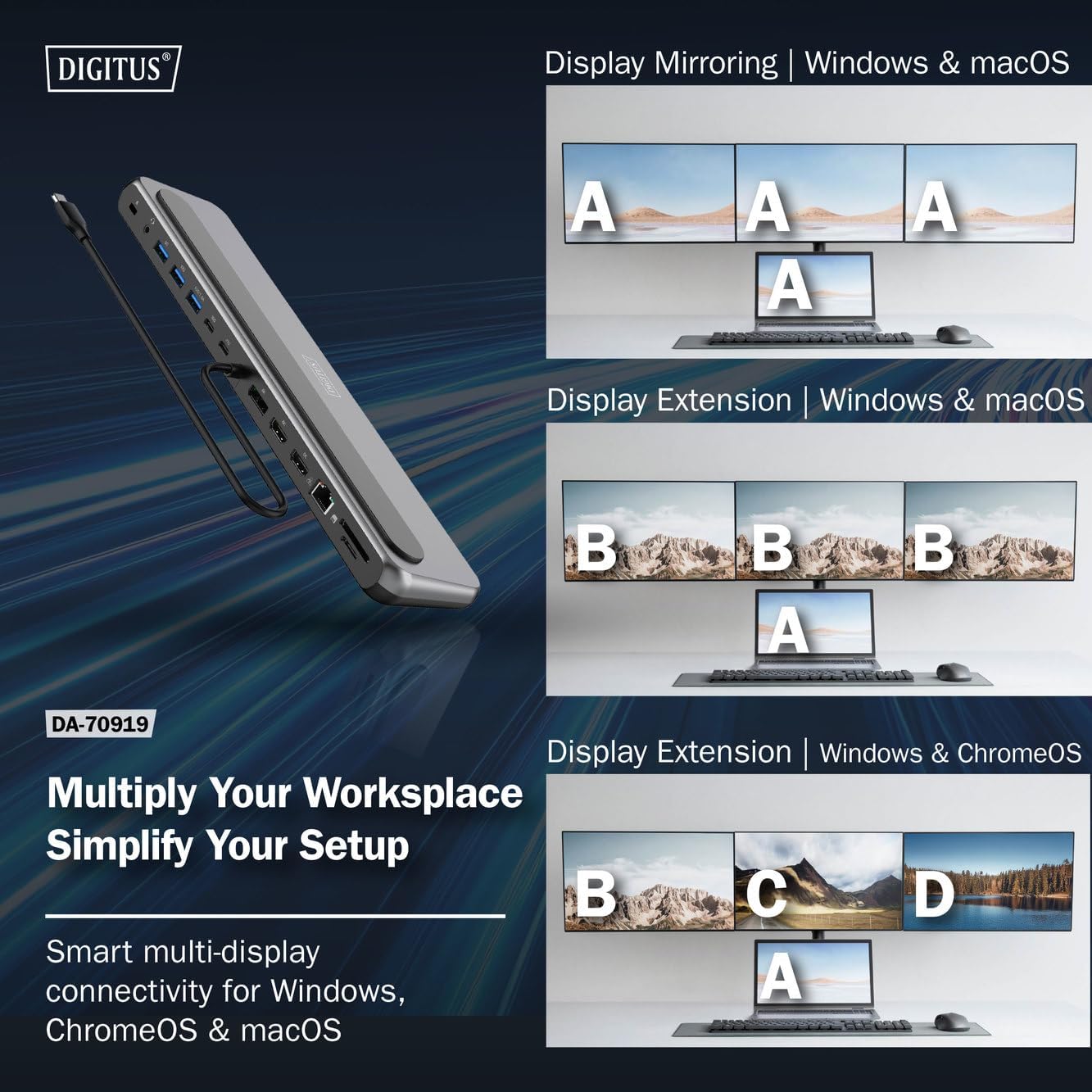
รูปที่ 4: Diagram showing display mirroring and extension modes for Windows, macOS, and ChromeOS. This image illustrates the various display configurations supported by the docking station, including mirroring your screen or extending it across multiple external monitors on Windows, macOS, and ChromeOS.
- โหมดมิเรอร์: ฟังก์ชันนี้จะแสดงผลหน้าจอแล็ปท็อปของคุณบนจอภาพภายนอก
- Extend Mode (Windows/ChromeOS): Extends your desktop across multiple external monitors, allowing for a multi-tasking environment. Supports dual monitors (2x 4K/60Hz) and triple monitors (1x 4K/60Hz + 2x 4K/30Hz) in MST (Multi Stream Transport) mode.
- Extend Mode (macOS): macOS typically supports extended desktop to one external monitor, with other external monitors mirroring each other.
To configure display settings, access your operating system's display settings (e.g., Windows Display Settings, macOS System Preferences > Displays).
การโอนข้อมูล
Utilize the USB-A and USB-C data ports for connecting external storage devices, keyboards, mice, and other USB peripherals. The USB 3.2 Gen 2 ports offer speeds up to 10Gbps, while the USB 3.2 Gen 1 port offers speeds up to 5Gbps.
การส่งกำลัง
When a compatible USB-C PD power adapter is connected to the docking station's PD input port, the docking station can deliver up to 85W of power to charge your connected laptop. This allows you to power your laptop and peripherals through a single USB-C connection.
รูปที่ 5: Illustration of the docking station's fast charging capability via USB-C Power Delivery. This image demonstrates the Power Delivery function, showing a 100W input to the docking station and an 85W output to charge the connected laptop.
การเชื่อมต่อเครือข่าย
Connect an Ethernet cable to the RJ45 port for a stable and high-speed wired network connection (10/100/1000 Mbps Gigabit Ethernet).
เครื่องอ่านการ์ด
Insert SD or MicroSD cards into the dedicated slots for quick access to photos, videos, and other files. The card readers support transfer speeds up to 104 MBps.
เอาท์พุตเสียง
Connect your headphones or speakers to the 3.5mm audio jack for audio output.
การซ่อมบำรุง
- การทำความสะอาด: Use a soft, dry cloth to clean the surface of the docking station. Avoid using liquid cleaners or solvents.
- พื้นที่จัดเก็บ: เก็บแท่นวางไว้ในที่แห้งและเย็น หลีกเลี่ยงแสงแดดโดยตรงและอุณหภูมิที่สูงหรือต่ำเกินไป
- การจัดการ: Avoid dropping or subjecting the device to strong impacts. Do not attempt to disassemble the docking station.
การแก้ไขปัญหา
หากคุณพบปัญหาเกี่ยวกับแท่นวางอุปกรณ์ โปรดดูวิธีแก้ไขปัญหาทั่วไปต่อไปนี้:
- ไม่มีการแสดงผล:
- ตรวจสอบให้แน่ใจว่าพอร์ต USB-C ของแล็ปท็อปของคุณรองรับ DisplayPort Alternate Mode
- Check all video cables (HDMI/DP) are securely connected to both the docking station and the monitor.
- ตรวจสอบให้แน่ใจว่าจอภาพเปิดอยู่และตั้งค่าแหล่งสัญญาณเข้าถูกต้องแล้ว
- ลองเชื่อมต่อจอภาพทีละจอเพื่อแยกปัญหา
- อัปเดตไดรเวอร์การ์ดจอของแล็ปท็อปของคุณ
- ไม่มีระบบจ่ายไฟให้กับแล็ปท็อป:
- Ensure a compatible USB-C PD power adapter (up to 100W) is connected to the docking station's PD input port.
- ตรวจสอบว่าพอร์ต USB-C ของแล็ปท็อปของคุณรองรับการจ่ายพลังงาน
- ตรวจสอบอะแดปเตอร์ไฟฟ้าและสายไฟว่าชำรุดเสียหายหรือไม่
- อุปกรณ์ USB ไม่ได้รับการรู้จัก:
- เชื่อมต่ออุปกรณ์ USB อีกครั้งกับพอร์ตอื่นบนแท่นวาง
- Ensure the docking station is properly connected to the host laptop.
- If using a high-power USB device, ensure the docking station is connected to an external power adapter.
- ปัญหาการเชื่อมต่ออีเทอร์เน็ต:
- ตรวจสอบการเชื่อมต่อสายเคเบิลอีเทอร์เน็ตกับทั้งสถานีเชื่อมต่อและเราเตอร์/โมเด็มของคุณ
- ตรวจสอบการตั้งค่าเครือข่ายบนแล็ปท็อปของคุณ
- รีสตาร์ทเราเตอร์/โมเด็มและแล็ปท็อปของคุณ
- เครื่องอ่านบัตรใช้งานไม่ได้:
- Ensure the SD/MicroSD card is inserted correctly and fully.
- Test the card with another device to confirm it is not damaged.
ข้อมูลจำเพาะ
| คุณสมบัติ | ข้อมูลจำเพาะ |
|---|---|
| แบบอย่าง | DA-70919 |
| การเชื่อมต่อโฮสต์ | พอร์ต USB-C (สายเคเบิลในตัว) |
| เอาท์พุตวิดีโอ | 2x HDMI, 1x DisplayPort (DP) |
| Max. Single Display Resolution | 8K (7680x4320) @ 30Hz |
| Max. Dual Display Resolution (MST) | 2x 4K (3840x2160) @ 60Hz |
| Max. Triple Display Resolution (MST) | 1x 4K@60Hz + 2x 4K@30Hz |
| พอร์ตข้อมูล USB-A | 2x USB 3.2 Gen 2 (10Gbps), 1x USB 3.2 Gen 1 (5Gbps) |
| พอร์ตข้อมูล USB-C | 1x ยูเอสบี 3.2 เจนเนอเรชั่น 2 (10Gbps) |
| Power Delivery (PD) Input | USB-C PD 3.0 (up to 100W) |
| Power Delivery (PD) Output to Host | สูงสุดถึง 85W |
| อีเธอร์เน็ต | RJ45 Gigabit (10/100/1000 Mbps) |
| เครื่องอ่านการ์ด | SD, MicroSD (104 MBps) |
| เสียง | แจ็คเสียง 1x 3.5 มม. |
| ความเข้ากันได้ | วินโดวส์, macOS, ChromeOS |
| อุณหภูมิในการทำงาน | 0°C ถึง 45°C (32°F ถึง 113°F) |
| อุณหภูมิในการจัดเก็บ | -10°C ถึง 70°C (14°F ถึง 158°F) |
การรับประกันและการสนับสนุน
The Digitus DA-70919 USB-C 8K 12-Port Docking Station comes with a รับประกัน 2 ปี นับจากวันที่ซื้อ การรับประกันนี้ครอบคลุมถึงข้อบกพร่องจากการผลิตและรับรองว่าผลิตภัณฑ์ทำงานได้ตามที่ระบุไว้ภายใต้การใช้งานปกติ
For technical support, warranty claims, or further assistance, please contact your retailer or visit the official Digitus website for contact information. Please have your product model number (DA-70919) and proof of purchase ready when seeking support.