
การแนะนำ
This manual provides essential instructions for the safe operation, setup, and maintenance of your DEERC M66 1080P Drone. Designed for beginners, teenagers, and families, this drone features a 4.3-inch screen remote control, a 1080P camera for close-up aerial photography, a brushless motor for stable flight, and 5G transmission for a smooth live view. Please read this manual thoroughly before operating the drone to ensure proper use and to prevent damage or injury.
ข้อมูลด้านความปลอดภัย
คำเตือน: ให้ใช้ภายใต้การดูแลของผู้ใหญ่โดยตรงเท่านั้น
- ควรควบคุมโดรนในพื้นที่เปิดโล่ง ห่างจากผู้คน สัตว์ และสิ่งกีดขวาง
- ตรวจสอบให้แน่ใจว่าใบพัดทุกชิ้นติดตั้งแน่นสนิทก่อนทำการบิน
- ห้ามบินใกล้สนามบินหรือเขตห้ามบิน
- หลีกเลี่ยงการบินในช่วงที่มีลมแรงหรือสภาพอากาศเลวร้าย
- โปรดระวังอย่าให้มือและผมอยู่ใกล้ใบพัดที่กำลังหมุน
- Do not touch the motors immediately after flight as they may be hot.
- ควรปิดโดรนและรีโมทคอนโทรลทุกครั้งเมื่อไม่ได้ใช้งาน
- ปฏิบัติตามกฎระเบียบและกฎหมายท้องถิ่นทั้งหมดเกี่ยวกับการใช้งานโดรน
เนื้อหาแพ็คเกจ
ตรวจสอบว่ารายการทั้งหมดที่ระบุไว้ด้านล่างนี้รวมอยู่ในแพ็คเกจของคุณ:
- 1 x DEERC M66 Drone
- 1 x Remote Control with 4.3-inch Screen
- 2 x Drone Batteries (Lithium-polymer)
- ใบพัดสำรอง 4 ใบ
- สายชาร์จ USB 1 เส้น
- ไขควง 1 อัน
- การ์ดหน่วยความจำ 1 ใบ
- กระเป๋าถือ 1 ใบ
- คู่มือการใช้งาน (เอกสารนี้)

ภาพ: A visual representation of all components included in the DEERC M66 drone package, laid out neatly. This includes the folded drone, the remote control, two batteries, spare propellers, a USB charging cable, a screwdriver, a memory card, and a carrying bag.
การตั้งค่า
1. การติดตั้งและการชาร์จแบตเตอรี่
The DEERC M66 drone comes with two Lithium-polymer batteries, providing up to 40 minutes of total flight time. Ensure batteries are fully charged before each flight.
- เสียงหึ่งๆแบตเตอรี่: Insert the drone battery into the battery compartment on the rear of the drone until it clicks into place. To charge, connect the USB charging cable to the battery and a suitable USB power source (e.g., computer, USB adapter). The charging indicator will show the charging status.
- แบตเตอรี่รีโมทคอนโทรล: The remote control requires 2 D batteries (not included). Open the battery compartment on the back of the remote control and insert the batteries, observing the correct polarity.
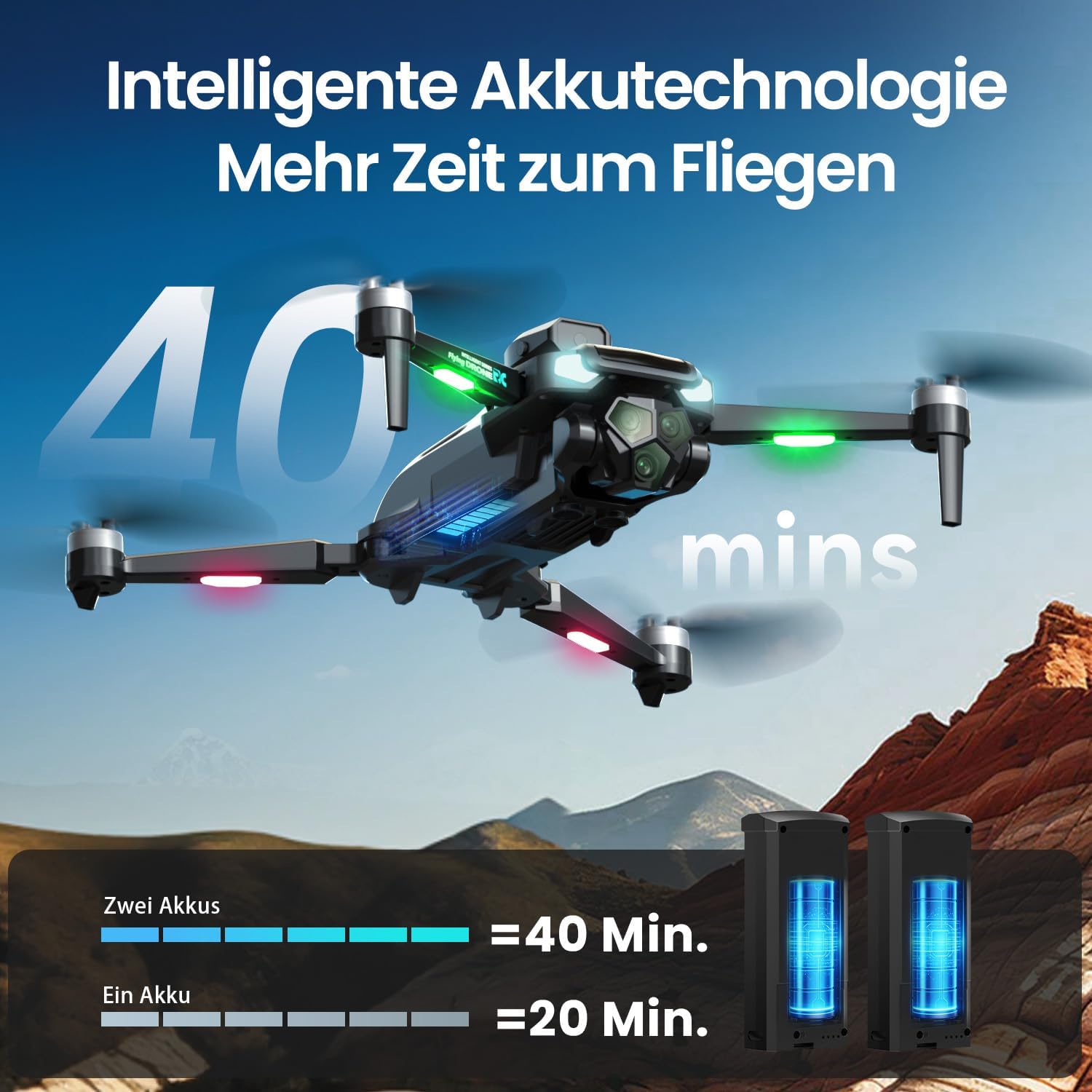
ภาพ: The DEERC M66 drone in flight, with an overlay indicating "40 mins" flight time. Below, two drone batteries are shown, illustrating that two batteries provide 40 minutes of flight, while one provides 20 minutes. This highlights the extended flight capability.
2. การติดตั้งใบพัด
The drone's propellers are designed for easy replacement. If a propeller is damaged, replace it with a spare from the package.
- Identify the correct propeller type (A or B) for each motor arm.
- Align the propeller with the motor shaft and press down firmly until it is securely attached.
- ตรวจสอบให้แน่ใจว่าใบพัดทุกใบหมุนได้อย่างอิสระโดยไม่มีสิ่งกีดขวาง
3. การตั้งค่าการควบคุมระยะไกล
The remote control features an integrated 4.3-inch screen, eliminating the need for a smartphone.
- Unfold the remote control's screen and antennas.
- กดปุ่มเปิด/ปิดเพื่อเปิดรีโมทคอนโทรล
- Power on the drone. The remote control and drone will automatically pair. A successful connection will be indicated by a stable light on the drone and a live video feed on the remote's screen.
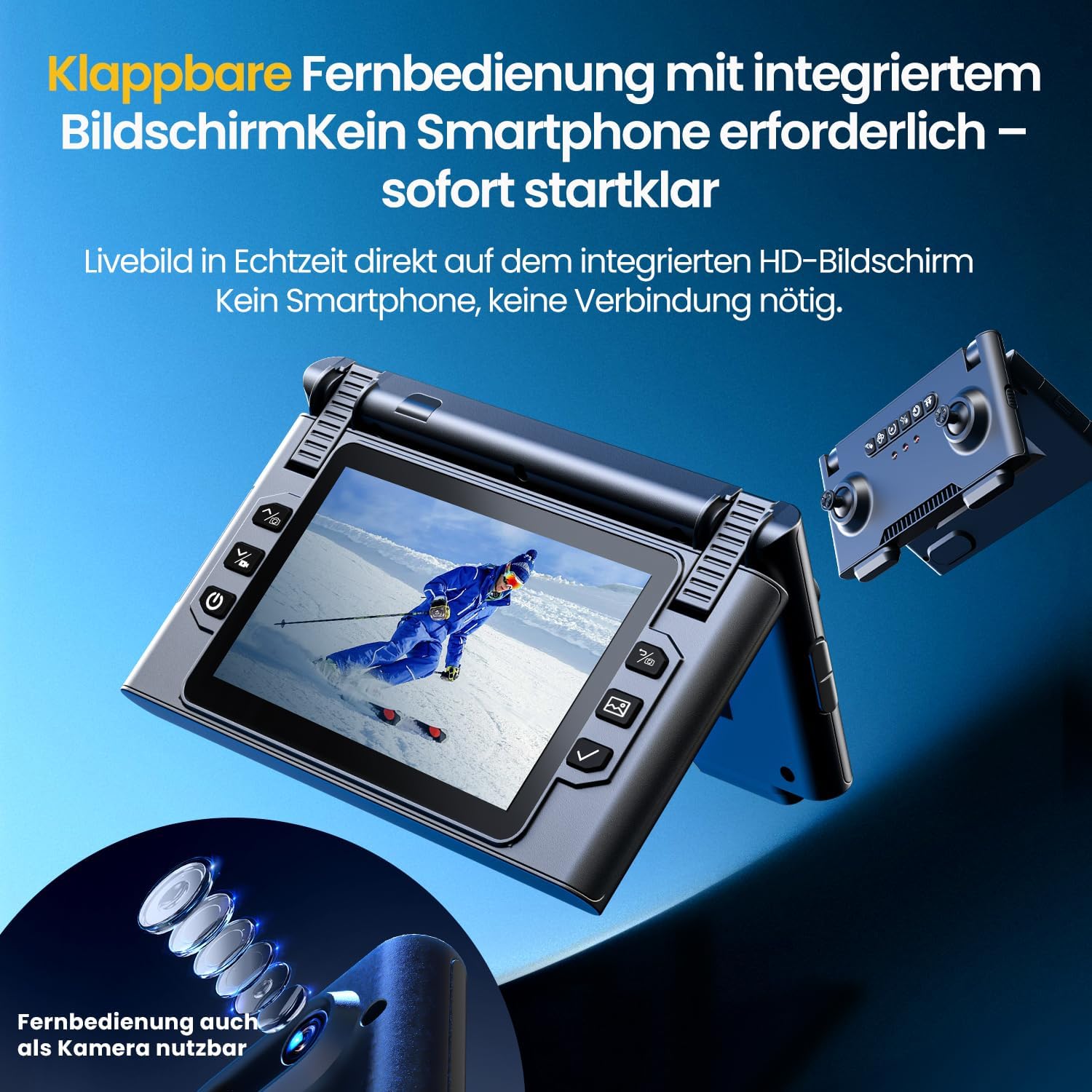
ภาพ: ภาพระยะใกล้ view of the DEERC M66 drone's foldable remote control, showcasing its integrated 4.3-inch HD screen. The screen displays a live feed, and the remote's buttons and joysticks are visible. This design allows for immediate flight without a smartphone connection.
คำแนะนำการใช้งาน
1. การควบคุมการบินขั้นพื้นฐาน
- การขึ้น/ลงจอดด้วยปุ่มเดียว: Press the dedicated button on the remote control for automatic takeoff or landing.
- โหมดไม่มีหัว: Activate Headless Mode to simplify flight orientation. In this mode, the drone's front will always be the direction the remote control is facing, regardless of the drone's actual orientation.
- หยุดฉุกเฉิน: ในกรณีฉุกเฉิน ให้กดปุ่มหยุดฉุกเฉินเพื่อตัดกระแสไฟไปยังมอเตอร์ทันที

ภาพ: Three distinct panels illustrating beginner-friendly flight features. The first shows the drone taking off from a landing pad, representing one-button start and landing. The second depicts the drone in headless mode, with arrows indicating simplified directional control. The third shows the drone descending rapidly, symbolizing the emergency stop function.
2. Flight Modes and Tricks
- การปรับความเร็ว: The drone offers 3 speed levels (Slow, Medium, Fast) to accommodate different skill levels and flying environments. Adjust the speed using the dedicated button on the remote control.
- พลิก 360°: Perform impressive aerial stunts with a single button press. Ensure sufficient altitude and clear surroundings before attempting flips.

ภาพ: Two panels demonstrating advanced flight capabilities. The top panel shows the drone performing a 360-degree flip with a single button press, illustrating an aerial trick. The bottom panel displays three drones at different speeds (Slow, Medium, Fast), indicating the adjustable speed settings for varied flight experiences.
3. การใช้งานและคุณสมบัติของกล้อง
The integrated 1080P camera is designed for clear close-up shots and everyday scenes.
- กล้อง HD 1080P: Capture high-definition photos and videos. The camera features a 90° adjustable lens for flexible wide-angle shots.
- การควบคุมด้วยท่าทาง: Initiate photo and video recording with simple hand gestures, making it easy to capture moments without touching the remote.
- การส่งสัญญาณ 5G: Enjoy a stable live image feed on the remote control's screen up to approximately 100 meters, providing real-time visual feedback for precise control.

ภาพ: รายละเอียด view of the DEERC M66 drone, highlighting its 1080P HD camera with a 90-degree adjustable lens. The image also shows a comparison between 1080P and 720P resolution, emphasizing the clarity of the 1080P camera for aerial views.

ภาพ: Two panels demonstrating gesture control. The top panel shows a person making a hand gesture to take a photo, indicated by a camera icon. The bottom panel shows another person making a different hand gesture to record a video, indicated by a video camera icon. This illustrates the ease of capturing media hands-free.
4. Obstacle Avoidance and Stability
- การหลีกเลี่ยงอุปสรรค 360°: The drone is equipped with 360° obstacle avoidance to help reduce collisions, making it safer for beginners.
- การวางตำแหน่งการไหลของแสง: Optical flow sensors ensure stable positioning at low altitudes, contributing to a calm and uniform flight experience, especially indoors or in confined outdoor spaces.
- มอเตอร์ไร้แปรงถ่าน: The brushless motor provides quiet and stable flight performance, enhancing durability and efficiency.

ภาพ: The DEERC M66 drone flying near a rocky surface, with visual cues indicating obstacle avoidance sensors and stable flight. An inset shows a brushless motor, emphasizing its quiet and uniform operation. This image highlights the drone's stability features and collision prevention.
การซ่อมบำรุง
- การทำความสะอาด: Regularly clean the drone body, propellers, and camera lens with a soft, dry cloth. Avoid using liquids or solvents.
- การเปลี่ยนใบพัด: Inspect propellers for damage before each flight. Replace any bent, cracked, or chipped propellers immediately using the provided screwdriver and spare propellers.
- การดูแลแบตเตอรี่ Store batteries in a cool, dry place. Do not overcharge or over-discharge batteries. If the drone will not be used for an extended period, charge batteries to approximately 50% before storage.
- การตรวจสอบมอเตอร์: Periodically check the brushless motors for any debris or obstructions. Ensure they spin freely.
การแก้ไขปัญหา
| ปัญหา | สาเหตุที่เป็นไปได้ | สารละลาย |
|---|---|---|
| โดรนไม่สามารถเปิดเครื่องได้ | แบตเตอรี่ไม่ได้รับการชาร์จหรือใส่ไม่ถูกต้อง | Ensure drone battery is fully charged and correctly inserted. Check remote control batteries. |
| Remote control does not connect to drone. | Drone and remote are not paired or too far apart. | Ensure both devices are powered on and within range. Restart both devices and try pairing again. |
| Drone is unstable during flight. | Damaged propellers, uncalibrated sensors, or strong winds. | Check and replace damaged propellers. Perform sensor calibration (refer to advanced settings in the remote control). Avoid flying in windy conditions. |
| คุณภาพของภาพจากกล้องไม่ดี หรือไม่มีการถ่ายทอดสด | Weak 5G signal, dirty lens, or memory card issue. | Ensure drone is within 5G transmission range (approx. 100m). Clean the camera lens. Check if the memory card is properly inserted and has free space. |
| Drone drifts during hover. | Uncalibrated gyroscope or optical flow sensor. | Perform gyroscope and optical flow sensor calibration as per remote control instructions. |
ข้อมูลจำเพาะ
| คุณสมบัติ | รายละเอียด |
|---|---|
| หมายเลขรุ่น | M66 |
| ยี่ห้อ | เดียร์ค |
| ขนาด (กว้าง x ยาว x สูง) | 15 x 8 x 7.5 ซม. (พับ) |
| น้ำหนักสินค้า | 148 กรัม |
| ความละเอียดของกล้อง | 1080p (การบันทึกวิดีโอ) |
| หน้าจอควบคุมระยะไกล | 4.3 นิ้ว |
| เวลาบิน | สูงสุด 40 นาที (พร้อมแบตเตอรี่ 2 ก้อน) |
| ประเภทมอเตอร์ | มอเตอร์แบบไม่มีแปรงถ่าน |
| เทคโนโลยีส่งกำลัง | 5G Wi-Fi |
| คุณสมบัติพิเศษ | Optical Flow Positioning, 360° Obstacle Avoidance, 360° Flip, Headless Mode, 3 Speed Levels |
| องค์ประกอบของแบตเตอรี่ | ลิเธียมโพลิเมอร์ |
| แบตเตอรี่รีโมทคอนโทรล | 2 x D batteries (not included) |
| ช่วงอายุ (คำอธิบาย) | 12 ปีขึ้นไป |
การรับประกันและการสนับสนุน
For warranty information and technical support, please refer to the contact details provided with your purchase or visit the official DEERC webไซต์นี้ โปรดเก็บหลักฐานการซื้อไว้เพื่อใช้ยืนยันการรับประกัน
- นโยบายการคืนสินค้า: 30-day refund/replacement policy (as per Amazon.com.be).
- ผู้ผลิต: เดียร์ค
- ผู้ขาย: HOLYTON (fulfilled by Amazon)