
การแนะนำ
The Rapoo M308 is a versatile multi-mode wireless mouse designed for efficiency and comfort. It features an ambidextrous design, allowing comfortable use for both right-handed and left-handed individuals. With its dual connectivity options, Bluetooth 5.0 and 2.4 GHz wireless, you can seamlessly connect to up to three devices and switch between them with ease. The mouse is engineered for long-lasting performance, offering a battery life of up to 12 months.
เนื้อหาแพ็คเกจ
- Rapoo M308 Multi-mode Wireless Mouse
- ตัวรับสัญญาณ USB (เก็บไว้ในเมาส์)
- แบตเตอรี่ AA 2 ก้อน
- คู่มือการเริ่มต้นฉบับย่อ (คู่มือนี้)
สินค้าเกินview
Familiarize yourself with the components of your Rapoo M308 mouse.
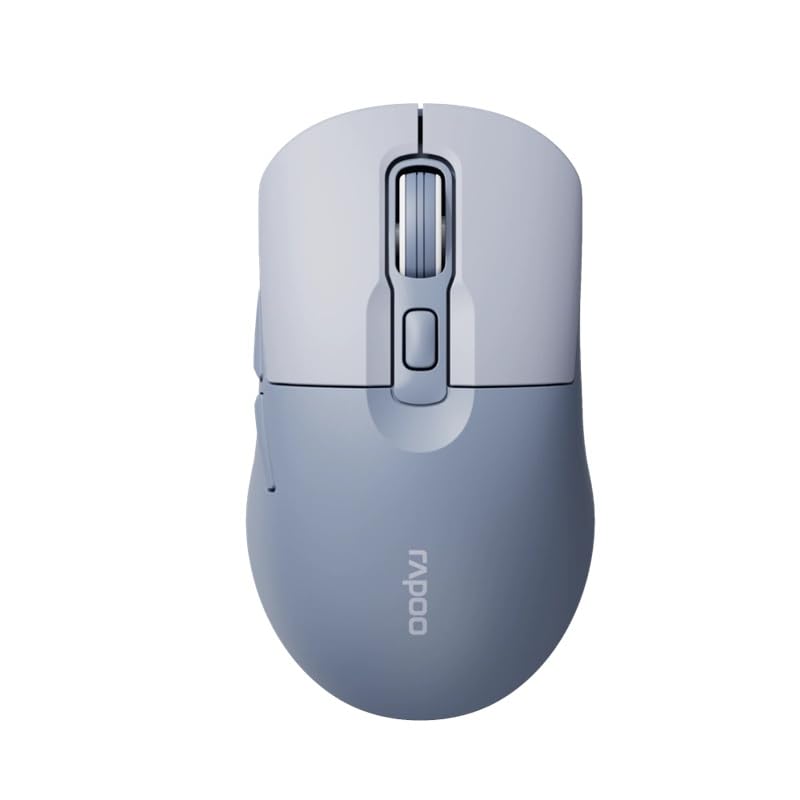
Image: The Rapoo M308 Multi-mode Wireless Mouse in blue, showcasing its ergonomic, ambidextrous design with a scroll wheel and multiple buttons.
- ปุ่มซ้าย: ฟังก์ชั่นคลิกซ้ายมาตรฐาน
- ปุ่มขวา: ฟังก์ชั่นคลิกขวามาตรฐาน
- ล้อเลื่อน: สำหรับการเลื่อนและฟังก์ชั่นคลิกกลาง
- ปุ่ม DPI: ปรับความไวของเคอร์เซอร์ (DPI)
- Mode Switch Button/Indicator: Switches between connected devices (2.4G, Bluetooth 1, Bluetooth 2) and indicates current mode.
- ปุ่มด้านข้าง: Forward/Backward navigation (programmable).
- ช่องใส่แบตเตอรี่: Located on the underside, holds 2 AA batteries.
- ช่องเสียบตัวรับสัญญาณ USB: Located inside the battery compartment for storage.
การตั้งค่า
1. การติดตั้งแบตเตอรี่
- เปิดฝาช่องใส่แบตเตอรี่ที่อยู่ด้านล่างของเมาส์
- ใส่แบตเตอรี่ AA สองก้อน โดยตรวจสอบให้แน่ใจว่าขั้วถูกต้อง (+/-)
- ปิดฝาช่องใส่แบตเตอรี่
2 การเชื่อมต่อผ่านระบบไร้สาย 2.4 GHz
- Remove the USB receiver from its storage slot inside the battery compartment.
- เสียบตัวรับสัญญาณ USB เข้ากับพอร์ต USB ที่พร้อมใช้งานบนคอมพิวเตอร์ของคุณ
- Turn on the mouse. The mouse should automatically connect to your computer. The mode indicator light will show a steady green light for a few seconds.
3. การเชื่อมต่อผ่าน Bluetooth
The M308 mouse supports two Bluetooth connections (BT1 and BT2).
- เปิดเมาส์
- Press the mode switch button to select either Bluetooth 1 (blue light flashes slowly) or Bluetooth 2 (blue light flashes slowly).
- Press and hold the mode switch button for 3 seconds until the blue light starts flashing rapidly. This indicates the mouse is in pairing mode.
- บนคอมพิวเตอร์หรืออุปกรณ์ของคุณ ไปที่การตั้งค่าบลูทูธและค้นหาอุปกรณ์ใหม่
- Select "Rapoo M308" from the list of available devices to pair.
- Once paired, the blue light will become steady for a few seconds and then turn off.
คำแนะนำการใช้งาน
การสลับระหว่างอุปกรณ์
The Rapoo M308 allows you to connect to up to three devices (one 2.4G wireless and two Bluetooth devices) and switch between them.
- Briefly press the mode switch button to cycle through the connected devices: 2.4G (green light), Bluetooth 1 (blue light), Bluetooth 2 (blue light).
- The indicator light will briefly illuminate in the corresponding color to confirm the selected mode.
การปรับ DPI
Press the DPI button (usually located behind the scroll wheel) to cycle through different DPI settings. This changes the cursor speed and sensitivity. The indicator light may flash to show the current DPI level (e.g., one flash for low DPI, two for medium, etc.).
การซ่อมบำรุง
- การทำความสะอาด: ใช้ผ้านุ่มและแห้งเช็ดทำความสะอาดเมาส์ สำหรับคราบฝังแน่น ให้เช็ดเบาๆamp สามารถใช้ผ้าได้ แต่ต้องแน่ใจว่าไม่มีความชื้นเข้าไปในอุปกรณ์
- การเปลี่ยนแบตเตอรี่: When the mouse performance degrades or the indicator light signals low battery, replace the two AA batteries following the installation steps.
- พื้นที่จัดเก็บ: เมื่อไม่ได้ใช้งานเป็นเวลานาน ให้ปิดเมาส์เพื่อประหยัดแบตเตอรี่ เก็บตัวรับสัญญาณ USB ไว้ในเมาส์เพื่อป้องกันการสูญหาย
การแก้ไขปัญหา
- เมาส์ไม่ตอบสนอง:
- ตรวจสอบว่าเมาส์เปิดอยู่หรือไม่
- ตรวจสอบให้แน่ใจว่าได้ติดตั้งแบตเตอรี่อย่างถูกต้องและแบตเตอรี่ไม่หมด หากจำเป็นให้เปลี่ยนแบตเตอรี่ใหม่
- สำหรับการเชื่อมต่อ 2.4G โปรดตรวจสอบให้แน่ใจว่าตัวรับสัญญาณ USB เสียบเข้ากับพอร์ต USB ที่ใช้งานได้แน่นดีแล้ว ลองใช้พอร์ต USB อื่น
- For Bluetooth connection, ensure the mouse is in the correct Bluetooth mode (BT1 or BT2) and successfully paired with your device. Re-pair if needed.
- การเคลื่อนที่ของเคอร์เซอร์ผิดปกติหรือช้า:
- ทำความสะอาดเซ็นเซอร์ออปติคัลที่อยู่ใต้เมาส์
- ตรวจสอบให้แน่ใจว่าคุณกำลังใช้เมาส์บนพื้นผิวที่เหมาะสม (ไม่สะท้อนแสง ไม่โปร่งใส)
- ปรับค่า DPI โดยใช้ปุ่ม DPI
- ไม่สามารถสลับระหว่างอุปกรณ์ได้:
- Ensure all devices are properly connected (2.4G receiver plugged in, Bluetooth devices paired).
- Briefly press the mode switch button to cycle through modes. A long press will initiate Bluetooth pairing mode.
ข้อมูลจำเพาะ
| ชื่อยี่ห้อ | ราปู |
| แบบอย่าง | M308 |
| เทคโนโลยีการเชื่อมต่อ | บลูทูธ 5.0, ความถี่วิทยุ 2.4 GHz |
| คุณสมบัติพิเศษ | น้ำหนักเบา |
| การตรวจจับการเคลื่อนไหว | ออฟติคอล |
| จำนวนปุ่ม | 4 |
| การวางแนวมือ | ถนัดทั้งสองมือ |
| การใช้ที่แนะนำ | สำนักงาน |
| อุปกรณ์ที่รองรับ | คอมพิวเตอร์ส่วนบุคคล, แล็ปท็อป |
| น้ำหนักสินค้า | 50 กรัม |
| ระบบปฏิบัติการ | ลินุกซ์, แมค, วินโดวส์ |
| อายุการใช้งานแบตเตอรี่ | 12 เดือน |
| จำนวนแบตเตอรี่ | 2 AA (รวม) |
| แหล่งพลังงาน | ใช้พลังงานจากแบตเตอรี่ |
| ระบบปฏิบัติการขั้นต่ำที่จำเป็น | Mac OS 14 Sonoma, Windows 11 |
| วัสดุ | พลาสติก |
| ประเทศต้นกำเนิด | จีน |
| ส่วนประกอบที่รวมอยู่ | หนู |
การรับประกันและการสนับสนุน
The Rapoo M308 Multi-mode Wireless Mouse comes with a รับประกัน 2 ปี นับจากวันที่ซื้อ การรับประกันนี้ครอบคลุมถึงข้อบกพร่องจากการผลิตและการทำงานผิดปกติภายใต้การใช้งานปกติ
For technical support, warranty claims, or further assistance, please refer to the contact information provided on the Rapoo official website or your local distributor's support channels. Please retain your proof of purchase for warranty validation.