
Cuifati CUIFATIvd1g4kecbu
Cuifati 4G CPE Cat6 Mobile WiFi Hotspot Router User Manual
Model: CUIFATIvd1g4kecbu
1. บทนำ
This manual provides detailed instructions for the setup, operation, and maintenance of your Cuifati 4G CPE Cat6 Mobile WiFi Hotspot Router. This device offers secure, high-speed internet sharing across multiple devices using a SIM card, making it suitable for various environments including home, office, and outdoor activities.
2. เนื้อหาบรรจุภัณฑ์
โปรดตรวจสอบว่าสินค้าทั้งหมดที่ระบุไว้ด้านล่างนี้มีอยู่ในแพ็คเกจของคุณ:
- Cuifati 4G CPE Cat6 Mobile WiFi Hotspot Router
- อะแดปเตอร์แปลงไฟ
- สายเคเบิลอีเทอร์เน็ต
- Carabiner (for portability)
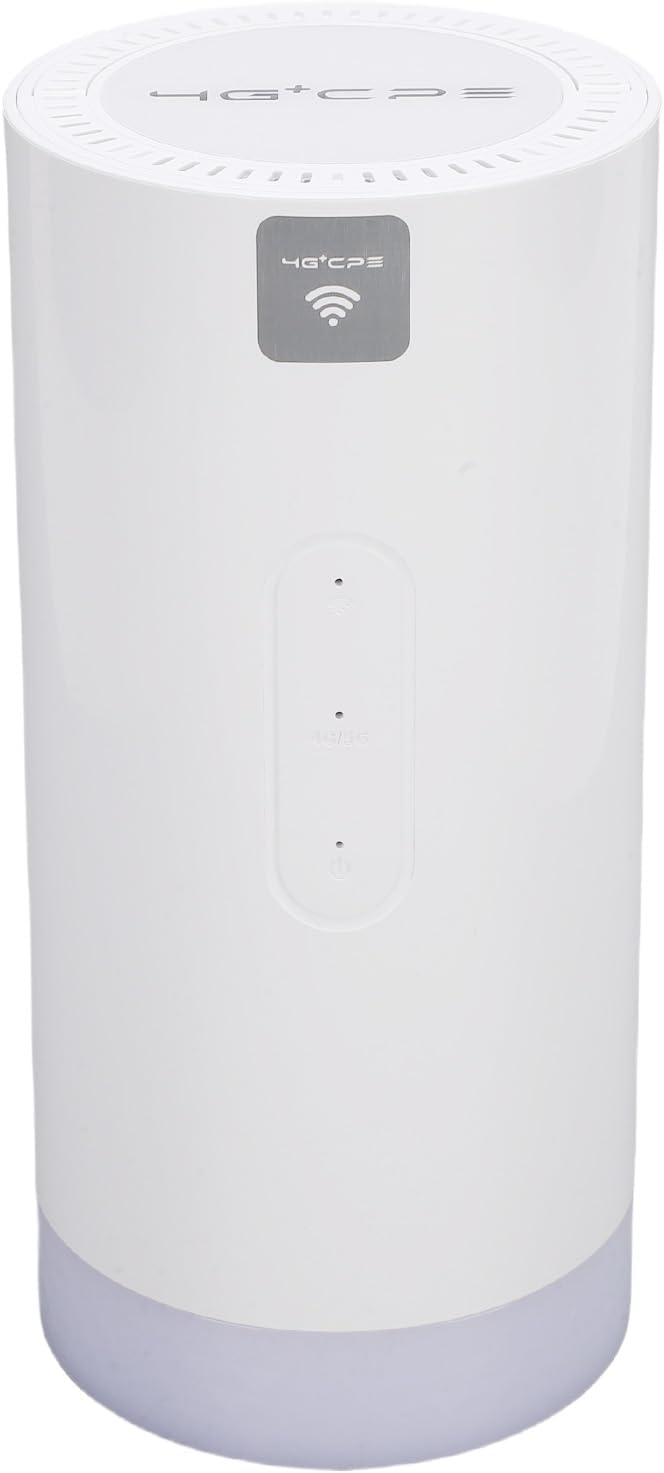
Image: Package contents including the router, power adapter, Ethernet cable, and carabiner.
3. สินค้าหมดview
3.1 แผงด้านหน้า

ภาพ: ด้านหน้า view of the router, showing LED indicators and the 4G+CPE logo.
The front panel features LED indicators for WiFi connection status, network connection status, and battery level, providing an intuitive display of the device's operational status.
3.2 แผงด้านหลังและพอร์ต

ภาพ: ด้านหลัง view of the router, displaying various ports and the product information label.
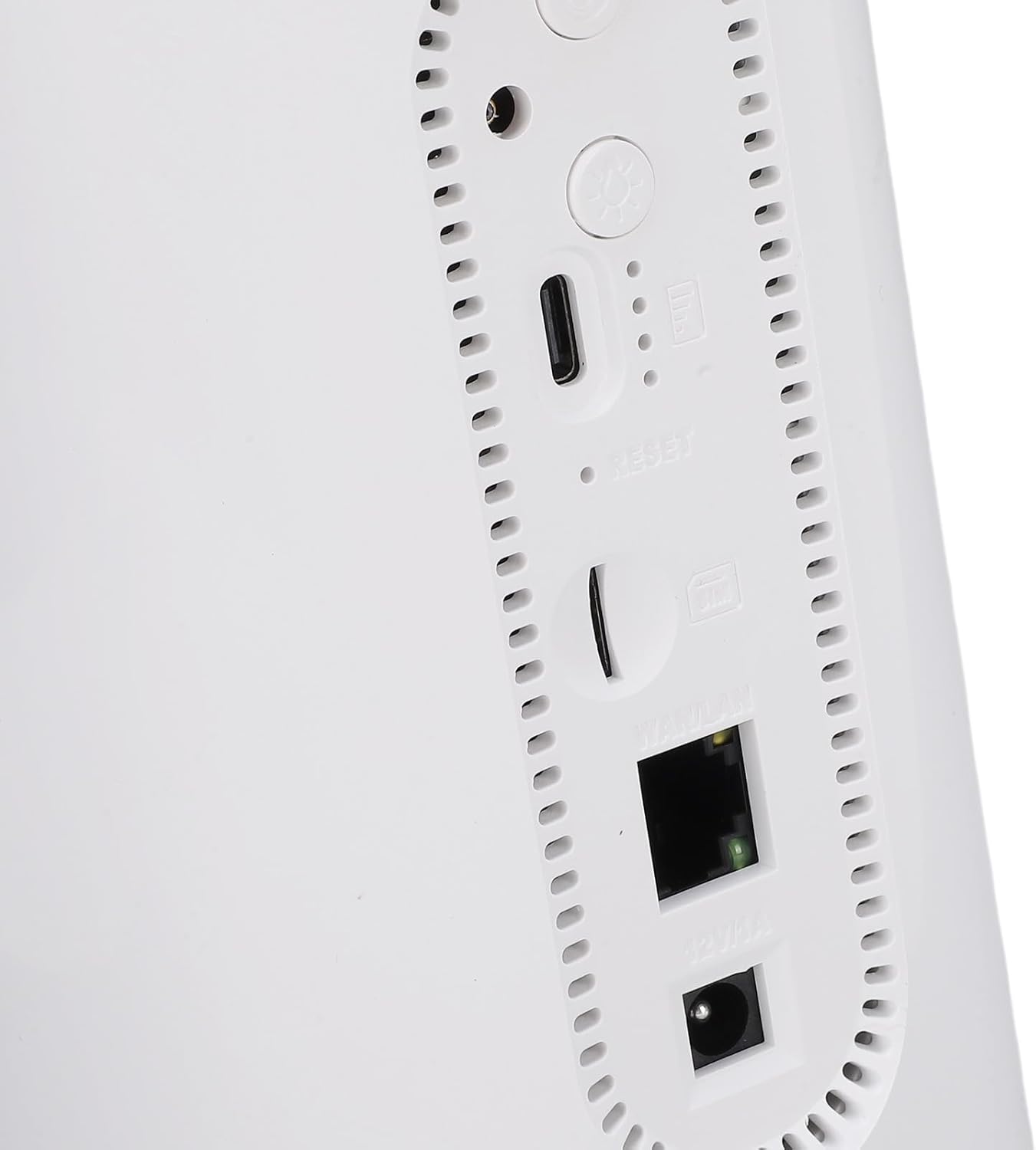
ภาพ: ระยะใกล้ view of the rear ports, including SIM card slot, Reset button, WAN/LAN port, and power input.
The rear panel includes essential ports and controls:
- ช่องใส่ซิมการ์ด: For inserting a Micro SIM card.
- ปุ่มรีเซ็ต: ใช้เพื่อคืนค่าการตั้งค่าจากโรงงาน
- พอร์ต WAN/LAN: An Ethernet port for wired connections or connecting to an existing network.
- กำลังไฟเข้า: สำหรับการเชื่อมต่ออะแดปเตอร์ไฟฟ้า
- ปุ่มเปิด/ปิด: เพื่อเปิดหรือปิดอุปกรณ์
- Camping Light Button: To activate or deactivate the colorful light feature.
4. การตั้งค่า
4.1 การติดตั้งซิมการ์ด
- ตรวจสอบให้แน่ใจว่าเราเตอร์ปิดอยู่
- ค้นหาช่องใส่การ์ด SIM บนแผงด้านหลัง
- Insert a Micro SIM card into the slot with the gold contacts facing down and the notched corner oriented correctly. Push until it clicks into place.
- To remove, gently push the SIM card again until it ejects.
4.2 การเปิดเครื่อง
- Connect the provided power adapter to the power input port on the rear panel.
- เสียบอะแดปเตอร์ไฟฟ้าเข้ากับเต้ารับไฟฟ้าที่ผนัง
- Press and hold the Power Button until the LED indicators illuminate. The device will begin to boot up.
4.3 การเชื่อมต่อ WiFi ครั้งแรก
- Once the router is powered on and the network indicator shows a stable connection, locate the default WiFi Network Name (SSID) and Password (PWD) on the label at the bottom or rear of the device. (Example: SSID: 4G+CPE-XXXX, PWD: XXXXXXXXXX)
- On your smartphone, tablet, or computer, search for available WiFi networks.
- Select the SSID corresponding to your router.
- Enter the default PWD when prompted.
- ตอนนี้คุณควรเชื่อมต่ออินเทอร์เน็ตแล้ว
5. คู่มือการใช้งาน
5.1 การเชื่อมต่ออุปกรณ์
You can connect multiple devices to the router via WiFi. For wired connections, use an Ethernet cable to connect a device to the WAN/LAN port.
5.2 การเข้าถึง Web อินเตอร์เฟซการจัดการ
To configure advanced settings, access the web อินเทอร์เฟซการจัดการ:
- Ensure your device is connected to the router's WiFi network.
- เปิด web เบราว์เซอร์ (เช่น Chrome, Firefox)
- ป้อนที่อยู่ IP เริ่มต้น (เช่น 192.168.199.1) into the address bar and press Enter. This IP address is typically found on the product label.
- ป้อนชื่อผู้ใช้เริ่มต้น (เช่น แอดมิน) และรหัสผ่าน (เช่น แอดมิน) when prompted. These credentials are also on the product label.
- From the interface, you can change WiFi settings, view connected devices, and manage network preferences.
5.3 ไฟแสดงสถานะ LED
The LED indicators on the front panel provide visual feedback on the router's status:
- ตัวบ่งชี้ WiFi: Shows the status of the WiFi network.
- ตัวบ่งชี้เครือข่าย: Displays the status of the 4G/3G/2G mobile network connection.
- ไฟแสดงสถานะแบตเตอรี่: ระบุระดับแบตเตอรี่ปัจจุบัน
Refer to the full product specifications for detailed indicator behavior (e.g., solid, blinking, color codes).
5.4 องศาเซลเซียสamping ฟังก์ชั่นแสง
This router includes a colorful light feature. Press the dedicated Camping Light Button on the rear panel to activate or deactivate this function. This can be useful for outdoor activities.
6. การบำรุงรักษา
- การทำความสะอาด: ใช้ผ้านุ่มและแห้งเช็ดทำความสะอาดอุปกรณ์ หลีกเลี่ยงการใช้น้ำยาทำความสะอาดหรือวัสดุที่มีฤทธิ์กัดกร่อน
- พื้นที่จัดเก็บ: Store the router in a cool, dry place away from direct sunlight and extreme temperatures.
- การดูแลแบตเตอรี่ เพื่อให้แบตเตอรี่ใช้งานได้นานที่สุด ควรหลีกเลี่ยงการปล่อยให้แบตเตอรี่หมดจนเกลี้ยงบ่อยๆ หากเก็บรักษาเป็นเวลานาน ควรชาร์จแบตเตอรี่ให้มีระดับประมาณ 50%
- อัพเดตเฟิร์มแวร์: ตรวจสอบผู้ผลิตเป็นระยะ webเว็บไซต์หรือ web ส่วนติดต่อการจัดการสำหรับการอัปเดตเฟิร์มแวร์ที่มีอยู่ เพื่อให้มั่นใจถึงประสิทธิภาพและความปลอดภัยสูงสุด
7 การแก้ไขปัญหา
- ไม่มีการเชื่อมต่ออินเทอร์เน็ต:
- ตรวจสอบให้แน่ใจว่าได้ใส่ซิมการ์ดอย่างถูกต้องและเปิดใช้งานแพ็กเกจอินเทอร์เน็ตแล้ว
- Check the network LED indicator. If it's off or red, there might be a network issue or no signal.
- รีสตาร์ทเราเตอร์และอุปกรณ์ที่เชื่อมต่ออยู่
- ตรวจสอบการตั้งค่า APN ใน web ส่วนติดต่อการจัดการ (ถ้ามี)
- ไม่สามารถเชื่อมต่อ WiFi ได้:
- ตรวจสอบให้แน่ใจว่าไฟ LED แสดงสถานะ WiFi ติดอยู่
- โปรดตรวจสอบให้แน่ใจว่าคุณป้อนรหัสผ่าน WiFi ถูกต้อง
- ขยับเข้าไปใกล้เราเตอร์มากขึ้นเพื่อปรับปรุงความแรงของสัญญาณ
- รีสตาร์ทเราเตอร์
- ความเร็วอินเตอร์เน็ตช้า:
- ตรวจสอบความแรงของสัญญาณเครือข่ายมือถือของคุณ
- ลดจำนวนอุปกรณ์ที่เชื่อมต่อ
- ตรวจสอบให้แน่ใจว่าไม่มีแอปพลิเคชันใดที่ทำงานอยู่เบื้องหลังและใช้แบนด์วิดท์มากเกินไป
- Try moving the router to a location with better signal reception.
- เราเตอร์ไม่ตอบสนอง:
- Press and hold the Power Button for 10 seconds to force a shutdown, then restart.
- If issues persist, perform a factory reset by pressing the Reset button with a pin for 5-10 seconds. Note: This will erase all custom settings.
8. ข้อมูลจำเพาะ
| คุณสมบัติ | ข้อมูลจำเพาะ |
|---|---|
| หมายเลขรุ่น | CUIFATIvd1g4kecbu |
| ยี่ห้อ | กุยฟาติ |
| เทคโนโลยีการเชื่อมต่อ | 4G LTE (Cat6), Ethernet |
| ไร้มาตรฐาน | 802.11 b/g/n/AC (2.4G, 5.8G) |
| ความเร็ว WiFi | 2.4G: 300Mbps, 5.8G: 866Mbps |
| ระดับย่านความถี่ | Tri-Band (LTE FDD, TDD, WCDMA, EDGE) |
| ประเภทซิมการ์ด | Micro SIM x 1 |
| ความจุของแบตเตอรี่ | 10000mAh Lithium Cell (Built-in) |
| การเข้ารหัส | WiFi Protected Access™ (WPA/WPA2) 2 |
| ขนาด | ขนาดโดยประมาณ 200x95x92 มม. / 7.87x3.74x3.62 นิ้ว |
| น้ำหนักสินค้า | 1.88 ปอนด์ |
| อุปกรณ์ที่รองรับ | Smartphones, Tablets, Laptops, Computers |
| ข้อแนะนำการใช้ | ในร่ม/กลางแจ้ง |
9. การรับประกันและการสนับสนุน
For warranty information and technical support, please refer to the documentation included with your purchase or contact Cuifati customer service directly. You may also visit the official Cuifati webไซต์เพื่อขอความช่วยเหลือและทรัพยากรเพิ่มเติม
Ask a question about this manual
Ask about setup, troubleshooting, compatibility, parts, safety, or missing instructions. Manuals+ will review the question and use this page’s manual context to help answer it.