
การแนะนำ
This manual provides essential information for setting up, operating, maintaining, and troubleshooting your Samsung Galaxy A07 4G smartphone (Model SM-A075/DS). Please read this manual thoroughly to ensure proper use and to maximize the device's features.
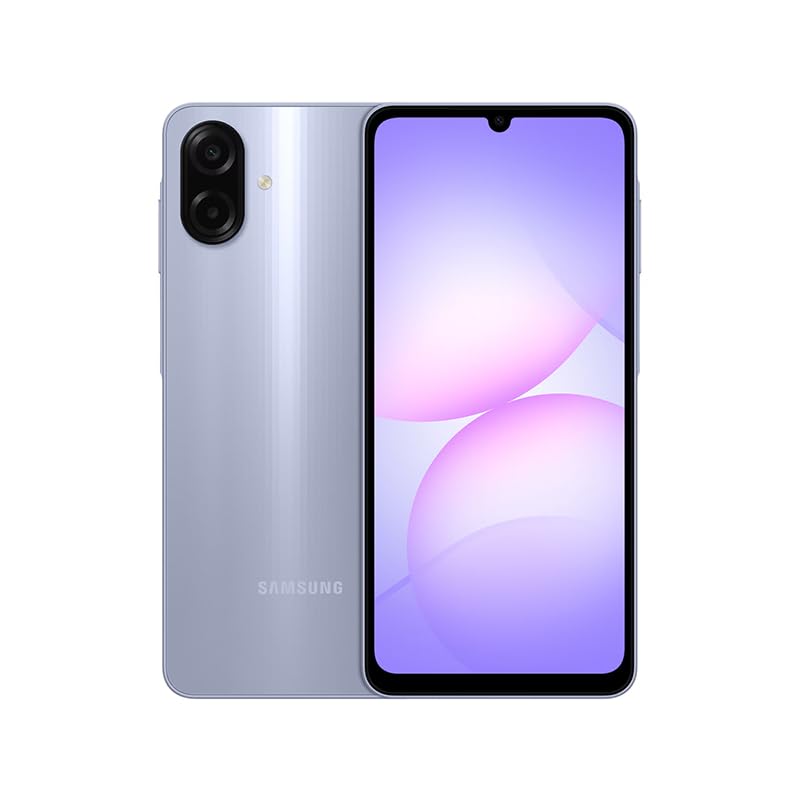
Figure 1: Samsung Galaxy A07 4G Front View
1. การตั้งค่า
1.1 การแกะกล่องและการตรวจสอบเบื้องต้น
Carefully remove all items from the packaging. Verify that all components are present. The box should contain the Samsung Galaxy A07 4G smartphone and a USB Cable. A charger is not included.

Figure 2: Device in packaging
1.2 การใส่ซิมการ์ดและการ์ด MicroSD
- ค้นหาถาดซิมที่ด้านข้างของอุปกรณ์
- Use the provided SIM ejector tool (if included, otherwise a small paperclip) to open the SIM tray.
- Carefully place your SIM card(s) and/or MicroSD card into the designated slots on the tray. This device supports Dual SIM and MicroSD up to 1TB.
- Gently push the SIM tray back into the device until it is flush.

รูปที่ 3: ด้านข้าง view พร้อมตำแหน่งถาดใส่ซิม
1.3 การเปิดเครื่องครั้งแรกและการกำหนดค่า
- กดปุ่มเปิด/ปิดค้างไว้ (อยู่ด้านข้าง) จนกระทั่งโลโก้ Samsung ปรากฏขึ้น
- ทำตามคำแนะนำบนหน้าจอเพื่อทำการตั้งค่าเบื้องต้นให้เสร็จสมบูรณ์ รวมถึงการเลือกภาษา การเชื่อมต่อ Wi-Fi การตั้งค่าบัญชี Google และการตั้งค่าความปลอดภัย
2. คู่มือการใช้งาน
2.1 การแสดงผลและการนำทาง
The Samsung Galaxy A07 features a 6.7-inch PLS LCD display with a 90 Hz refresh rate for smooth visuals.
- ท่าทางสัมผัส: แตะเพื่อเลือก ปัดเพื่อเลื่อน บีบเพื่อซูม
- หน้าจอหลัก: ปรับแต่งด้วยวิดเจ็ตและทางลัดแอป
- แผงการแจ้งเตือน: ปัดลงจากด้านบนของหน้าจอเพื่อเข้าถึงการตั้งค่าด่วนและการแจ้งเตือน
2.2 การใช้งานกล้อง
The device is equipped with a 50 MP Pro-Grade main camera and an 8 MP front camera.
- เปิดแอปพลิเคชันกล้องจากหน้าจอหลักหรือลิ้นชักแอปของคุณ
- เลือกโหมดที่คุณต้องการ (ภาพถ่าย, วิดีโอ, ภาพบุคคล ฯลฯ)
- แตะปุ่มชัตเตอร์เพื่อถ่ายภาพหรือเริ่ม/หยุดการบันทึกวิดีโอ
- ใช้การควบคุมการซูมบนหน้าจอเพื่อปรับการขยายภาพ
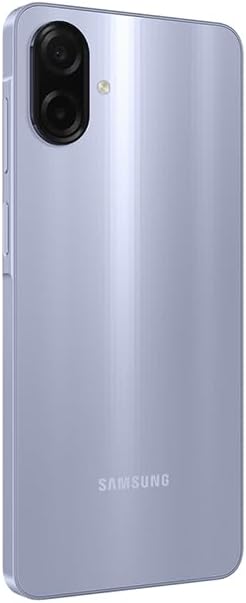
Figure 4: Rear Camera System
2.3 การเชื่อมต่อ
- ไวไฟ : Connect to wireless networks via Settings > Connections > Wi-Fi. Supports 802.11a/b/g/n/ac 2.4GHz+5GHz.
- บลูทูธ: จับคู่กับอุปกรณ์บลูทูธอื่น ๆ ผ่าน การตั้งค่า > การเชื่อมต่อ > บลูทูธ
- ข้อมูลมือถือ: Ensure your SIM card is active for 4G LTE connectivity. Compatible with T-Mobile, Mint, Tello, and Global GSM networks.
- จีพีเอส: Location services are supported via GPS, Glonass, Beidou, Galileo, QZSS.
3. การบำรุงรักษา
3.1 การอัปเดตซอฟต์แวร์
Regularly check for and install software updates to ensure optimal performance, security, and access to new features. Your device is designed to receive 6 major OS upgrades and 6 years of security updates.
- ไปที่ การตั้งค่า > การอัปเดตซอฟต์แวร์ > ดาวน์โหลดและติดตั้ง
3.2 การทำความสะอาดอุปกรณ์ของคุณ
To clean your device, use a soft, lint-free cloth. Avoid abrasive materials or harsh chemicals. The device has an IP54 rating, providing protection against dust and water splashes.
- Wipe the screen and back panel gently.
- ห้ามจุ่มอุปกรณ์ลงในน้ำ
3.3 การดูแลแบตเตอรี่
อุปกรณ์นี้มาพร้อมแบตเตอรี่ขนาด 5000 mAh เพื่อยืดอายุการใช้งานแบตเตอรี่:
- หลีกเลี่ยงอุณหภูมิที่สูงหรือต่ำเกินไป
- ใช้สาย USB ที่ให้มาเพื่อชาร์จ
- อย่าปล่อยให้แบตเตอรี่หมดจนหมดบ่อยๆ
4 การแก้ไขปัญหา
4.1 อุปกรณ์ไม่เปิดเครื่อง
- ตรวจสอบให้แน่ใจว่าแบตเตอรี่ชาร์จเต็มแล้ว เสียบอุปกรณ์เข้ากับเครื่องชาร์จอย่างน้อย 10 นาที
- กดปุ่มเปิด/ปิดค้างไว้ 10-15 วินาทีเพื่อรีสตาร์ทอัตโนมัติ
4.2 ปัญหาการเชื่อมต่อเครือข่าย
- ตรวจสอบว่าคุณได้ใส่ซิมการ์ดอย่างถูกต้องหรือไม่
- Verify that mobile data is enabled in Settings > Connections > Data usage.
- รีสตาร์ทอุปกรณ์
- Ensure your device is compatible with your carrier's network (T-Mobile, Mint, Tello, Global GSM).
4.3 แอปขัดข้องหรือหยุดทำงาน
- ปิดและเปิดแอปใหม่อีกครั้ง
- ล้างแคชของแอป (การตั้งค่า > แอป > [ชื่อแอป] > พื้นที่จัดเก็บ > ล้างแคช)
- ตรวจสอบให้แน่ใจว่าซอฟต์แวร์ของอุปกรณ์ของคุณได้รับการอัปเดตแล้ว
5. ข้อมูลจำเพาะ
| คุณสมบัติ | รายละเอียด |
|---|---|
| ชื่อรุ่น | Samsung Galaxy A07 4G (SM-A075/DS) |
| แสดง | 6.7 inches PLS LCD, 720 x 1600 (HD+), 90 Hz Refresh Rate |
| โปรเซสเซอร์ | แปดคอร์ (2x2.2 GHz Cortex-A76 และ 6x2.0 GHz Cortex-A55) |
| แรม | 4GB |
| พื้นที่จัดเก็บ | 64 GB (expandable via MicroSD up to 1TB) |
| กล้องหลัง | 50 MP (wide, PDAF), 2 MP (depth) |
| กล้องหน้า | 8 MP (กว้าง) |
| แบตเตอรี่ | 5000 มิลลิแอมป์ |
| ระบบปฏิบัติการ | แอนดรอยด์ |
| การเชื่อมต่อ | 4G LTE, Wi-Fi 802.11a/b/g/n/ac (2.4GHz+5GHz), Bluetooth, GPS, Glonass, Beidou, Galileo, QZSS |
| พอร์ต | USB Type-C, 3.5mm Stereo Earjack |
| ขนาด | Approx. 2 x 2 x 2 inches (Product Dimensions), 7.6 mm thickness |
| น้ำหนัก | 9.2 ออนซ์ |
| ความทนทาน | IP54 ป้องกันฝุ่นและน้ำ |
| รวมอยู่ในกล่อง | USB Cable (Charger NOT Included) |
6. การรับประกันและการสนับสนุน
6.1 ข้อมูลการรับประกัน
This Samsung Galaxy A07 4G (Model SM-A075/DS) is a Latin American Version and comes with a รับประกัน 1 ปี valid in South, Central, Latin America, and the Caribbean. Please ensure your device model is SM-A075/DS for local warranty coverage in Latin America.
For warranty claims or service, please contact Samsung customer support in your region. Proof of purchase may be required.
6.2 การสนับสนุนลูกค้า
หากต้องการความช่วยเหลือเพิ่มเติม การสนับสนุนทางเทคนิค หรือค้นหาศูนย์บริการ โปรดไปที่เว็บไซต์สนับสนุนอย่างเป็นทางการของซัมซุง website for your region or refer to the contact information provided in your product packaging.