
OHAYO X10 Max
OHAYO X10 Max Bluetooth Speaker Instruction Manual
Welcome to your new OHAYO X10 Max Portable Bluetooth Speaker.
1. ข้อมูลด้านความปลอดภัยที่สำคัญ
- ห้ามให้ลำโพงสัมผัสกับอุณหภูมิที่สูงหรือต่ำเกินไปหรือโดนแสงแดดโดยตรงเป็นเวลานาน
- ควรวางลำโพงให้ห่างจากแหล่งความร้อน วัตถุมีคม และวัสดุที่มีฤทธิ์กัดกร่อน
- ห้ามถอดประกอบ ซ่อมแซม หรือดัดแปลงลำโพงด้วยตนเอง หากจำเป็น โปรดติดต่อช่างผู้ชำนาญการ
- โปรดตรวจสอบให้แน่ใจว่าฝาปิดช่องชาร์จปิดสนิทเมื่อใช้งานลำโพงใกล้กับน้ำ เพื่อรักษามาตรฐานกันน้ำระดับ IPX7
- ใช้เฉพาะสายชาร์จที่ให้มาหรือสาย USB-C ที่ผ่านการรับรองสำหรับการชาร์จเท่านั้น
2. เนื้อหาบรรจุภัณฑ์
- 1 x OHAYO X10 Max Bluetooth Speaker (White)
- 1 x USB-C Charging Cable (charging plug not contained)
- สายเคเบิล AUX 1 x 3.5mm
- 1 x คู่มือผู้ใช้
- 1 x สายคล้องคอ
3. สินค้าหมดview
The OHAYO X10 Max is a versatile portable Bluetooth speaker designed for high-quality audio and durability. It features a powerful 25W sound output with active bass, IPX7 waterproofing, and a long-lasting 24-hour battery. Enjoy dynamic sound with colorful RGB lighting effects, dual pairing for stereo sound, and multiple input modes.
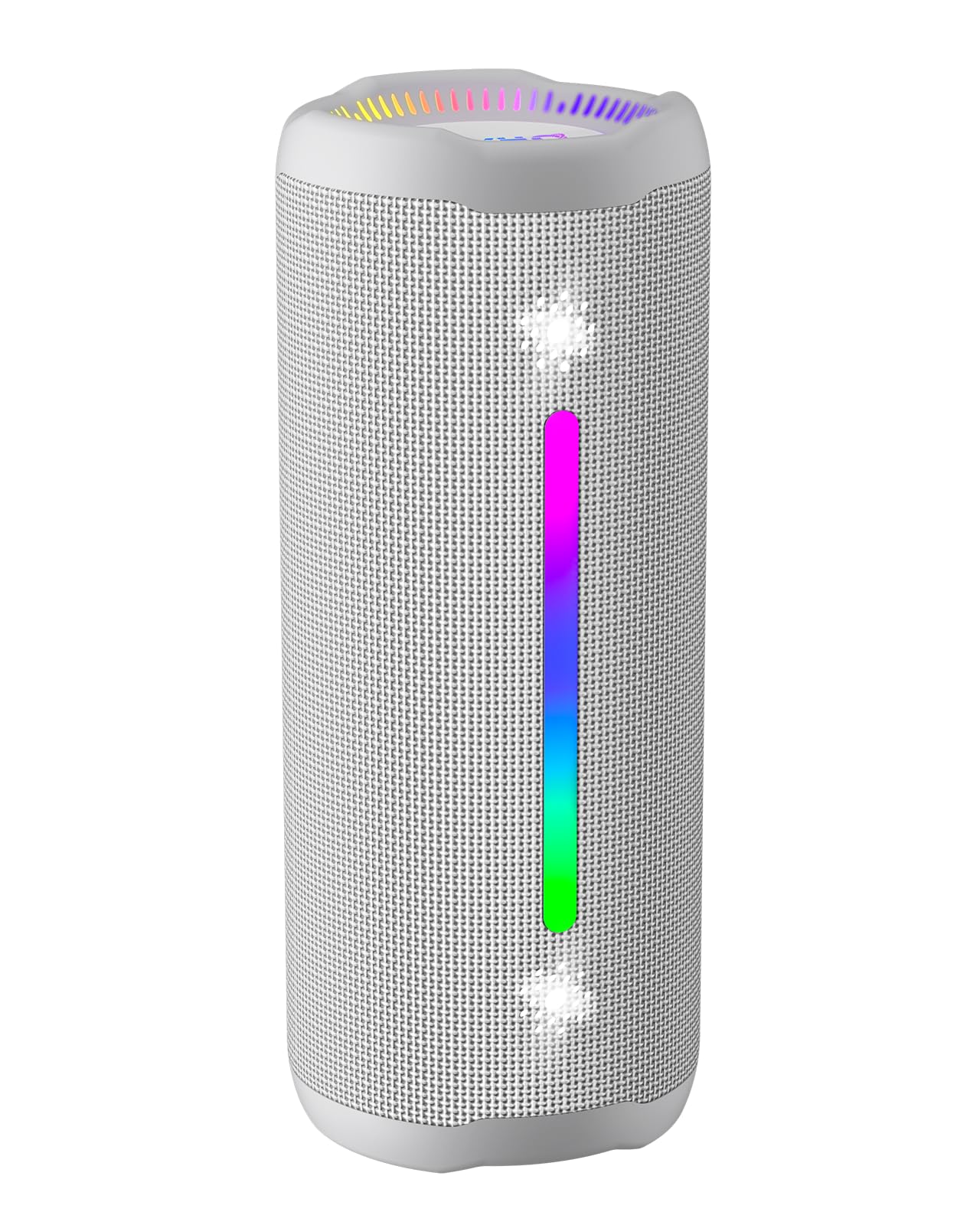
Figure 3.1: OHAYO X10 Max Bluetooth Speaker (White)

Figure 3.2: OHAYO X10 Max Bluetooth Speaker - Fully upgraded from appearance to performance.

Figure 3.3: 25W Deep Bass Sound - Independent channel design for accurate audio performance.

Figure 3.4: 6 Dazzling RGB Light Effects - Syncs with music for an immersive experience.

Figure 3.5: IPX7 Waterproof - Highly sealed design for use in various environments.

Figure 3.6: 24H Ultra-Long Battery Life - 6600mAh battery for extended playback.
4. การควบคุมและตัวชี้วัด
The OHAYO X10 Max features intuitive controls for easy operation.

รูปที่ 4.1: แผงควบคุมและพอร์ตต่างๆ
- ปุ่มเปิด/ปิด: Press and hold to power on/off. Short press to switch between input modes (Bluetooth, AUX, TF Card, USB-Audio).
- Volume Up (>): กดสั้นเพื่อเพิ่มระดับเสียง กดยาวเพื่อเล่นเพลงถัดไป
- Volume Down (<): กดสั้นเพื่อลดระดับเสียง กดยาวเพื่อเล่นเพลงก่อนหน้า
- ปุ่มเบส: Press to activate/deactivate Bass Boost mode.
- ปุ่มเล่น/หยุดชั่วคราว/โทรออก: กดสั้นๆ เพื่อเล่น/หยุดเพลง กดสั้นๆ เพื่อรับ/วางสาย กดค้างเพื่อปฏิเสธสาย กดสองครั้งเพื่อเปิดใช้งานผู้ช่วยเสียง
- ไฟแสดงสถานะแบตเตอรี่: Four LED lights indicate battery level.
- แถบไฟ RGB: Displays various colorful lighting effects.
- พอร์ตการชาร์จ (USB-C): สำหรับชาร์จลำโพง
- พอร์ต AUX-in: สำหรับการเชื่อมต่อเสียงแบบมีสาย
- ช่องเสียบการ์ด TF: สำหรับเล่นเพลงโดยตรงจาก MicroSD การ์ด
5. การตั้งค่า
5.1 การชาร์จลำโพง
Before first use, fully charge the speaker. Connect the provided USB-C charging cable to the speaker's charging port and the other end to a 5V/2A USB power adapter (not included). The battery indicator lights will blink during charging and remain steady when fully charged.
5.2 การเปิด/ปิดเครื่อง
Press and hold the Power button for approximately 3 seconds to turn the speaker on or off. A voice prompt will confirm the action.
5.3 การจับคู่บลูทูธ
- Turn on the speaker. It will automatically enter Bluetooth pairing mode, indicated by a blinking blue LED.
- เปิดใช้งานบลูทูธบนอุปกรณ์ของคุณ (สมาร์ทโฟน แท็บเล็ต ฯลฯ)
- ค้นหา "X10 Max" in your device's Bluetooth list and select it to connect.
- เมื่อเชื่อมต่อแล้ว จะมีเสียงแจ้งเตือนยืนยันการจับคู่สำเร็จ
การจับคู่ระบบเสียงสเตอริโอไร้สาย 5.4 True Wireless Stereo (TWS)
To achieve a true wireless stereo experience, you can pair two OHAYO X10 Max speakers together.

รูปที่ 5.1: การจับคู่สเตอริโอไร้สายแบบ True Wireless
- Ensure both X10 Max speakers are powered on and not connected to any other Bluetooth device.
- On one speaker (this will be the primary speaker), double-press the Power button. It will enter TWS pairing mode.
- The two speakers will automatically connect to each other. A voice prompt will confirm successful TWS pairing.
- ทีนี้ ให้เชื่อมต่ออุปกรณ์ของคุณกับลำโพงหลักผ่านบลูทูธ ตามที่อธิบายไว้ในหัวข้อ 5.3
5.5 การเชื่อมต่อผ่านช่อง AUX
Use the provided 3.5mm AUX cable to connect the speaker to devices without Bluetooth capability.
Figure 5.2: 4 Input Modes - Including AUX, TF, and USB-Audio.
- Connect one end of the AUX cable to the speaker's AUX-in port.
- เชื่อมต่อปลายอีกด้านหนึ่งเข้ากับเอาต์พุตเสียงของอุปกรณ์ของคุณ
- The speaker will automatically switch to AUX mode. If not, short press the Power button to cycle through modes until AUX mode is activated.
5.6 Using TF Card
Insert a MicroSD (TF) card with MP3/WAV/FLAC/WMA audio files into the TF card slot. The speaker will automatically switch to TF card mode and begin playback. Short press the Power button to cycle through modes if needed.
5.7 Using USB-Audio
Connect the speaker to a computer using the USB-C cable. The speaker can function as an external audio output device for your computer. Short press the Power button to cycle through modes if needed.
6. คู่มือการใช้งาน
6.1 การเล่นเพลง
- เล่น/หยุดชั่วคราว: กดปุ่มเล่น/หยุดชั่วคราว/โทรสั้นๆ
- การควบคุมระดับเสียง: Short press the Volume Up (>) or Volume Down (<) buttons.
- เพลงถัดไป: Long press the Volume Up (>) button.
- แทร็กก่อนหน้า: Long press the Volume Down (<) button.
6.2 ฟังก์ชั่นเพิ่มเสียงเบส
Press the 'BASS' button to activate or deactivate the enhanced bass mode. This feature provides deeper and richer low frequencies for a more impactful audio experience.
โหมดแสง RGB 6.3 โหมด
The speaker features dynamic RGB lighting. The lights will automatically sync with the music beat. To turn the lights on/off, refer to the specific control instructions in your quick start guide or experiment with the mode button if available.
6.4 การโทรแบบแฮนด์ฟรี
เมื่อเชื่อมต่อกับสมาร์ทโฟนผ่านบลูทูธแล้ว ลำโพงนี้สามารถใช้สำหรับการโทรแบบแฮนด์ฟรีได้

รูปที่ 6.1: คุณสมบัติการโทรแบบแฮนด์ฟรี
- รับ/วางสาย: กดปุ่มเล่น/หยุดชั่วคราว/โทรสั้นๆ
- ปฏิเสธสาย: กดปุ่มเล่น/หยุดชั่วคราว/โทรค้างไว้
- เปิดใช้งาน Voice Assistant: Double press the Play/Pause/Call button.
7. การบำรุงรักษา
- การทำความสะอาด: เช็ดลำโพงด้วย d . นุ่มๆamp ผ้า. อย่าใช้สารเคมีที่รุนแรงหรือน้ำยาทำความสะอาดที่มีฤทธิ์กัดกร่อน
- พื้นที่จัดเก็บ: เก็บลำโพงไว้ในที่แห้งและเย็น หลีกเลี่ยงแสงแดดโดยตรงและอุณหภูมิที่สูงหรือต่ำเกินไปเมื่อไม่ได้ใช้งานเป็นเวลานาน
- การดูแลแบตเตอรี่ เพื่อยืดอายุการใช้งานแบตเตอรี่ ควรชาร์จลำโพงอย่างน้อยทุกๆ สามเดือนหากไม่ได้ใช้งานเป็นประจำ
8 การแก้ไขปัญหา
| ปัญหา | สาเหตุที่เป็นไปได้ | สารละลาย |
|---|---|---|
| ลำโพงไม่เปิดเครื่อง | แบตเตอรี่อ่อน | ชาร์จลำโพงให้เต็ม |
| ไม่สามารถจับคู่ผ่านบลูทูธได้ | ลำโพงไม่ได้อยู่ในโหมดจับคู่ อุปกรณ์ Bluetooth ปิดอยู่ ห่างจากอุปกรณ์มากเกินไป | Ensure speaker is in pairing mode (blinking blue LED). Turn on device Bluetooth. Move device closer to speaker (within 10 meters). |
| ไม่มีเสียงหรือเสียงเบา | ระดับเสียงลำโพงหรืออุปกรณ์เบาเกินไป; โหมดอินพุตไม่ถูกต้อง | Increase volume on both speaker and device. Check if the correct input mode (Bluetooth, AUX, TF) is selected. |
| การจับคู่ TWS ล้มเหลว | ลำโพงอยู่ห่างกันเกินไป หรือลำโพงตัวหนึ่งเชื่อมต่อกับอุปกรณ์อื่นอยู่แล้ว | Ensure speakers are close to each other. Disconnect any existing Bluetooth connections before TWS pairing. |
| ความผิดเพี้ยนของเสียง | ระดับเสียงสูงเกินไป; แบตเตอรี่เหลือน้อย | ลดระดับเสียงลง ชาร์จลำโพง |
9. ข้อมูลจำเพาะ
| คุณสมบัติ | ข้อมูลจำเพาะ |
|---|---|
| ชื่อรุ่น | X10 สูงสุด |
| เวอร์ชันบลูทูธ | 5.3 |
| เทคโนโลยีการสื่อสารไร้สาย | บลูทูธ |
| กำลังขับสูงสุดของลำโพง | 35 Watts (25W effective) |
| ความจุของแบตเตอรี่ | 6600 มิลลิแอมป์ |
| เวลาเล่น | Up to 24 hours (varies with volume and light use) |
| ระดับความต้านทานต่อน้ำ | IPX7 (กันน้ำ) |
| อินพุต Voltage | 5 โวลต์ (กระแสตรง) |
| การตอบสนองความถี่ | ความถี่ 20 กิโลเฮิรตซ์ |
| อัตราส่วนสัญญาณต่อเสียงรบกวน | 80 เดซิเบล |
| ประเภทไดร์เวอร์เสียง | ไดร์เวอร์แบบไดนามิก |
| เส้นผ่านศูนย์กลางวูฟเฟอร์ | 75 มิลลิเมตร |
| เส้นผ่านศูนย์กลางทวีตเตอร์ | 26 มิลลิเมตร |
| ขนาดสินค้า | ลึก 2.95 นิ้ว x กว้าง 2.95 นิ้ว x สูง 7.28 นิ้ว |
| น้ำหนักสินค้า | 450 กรัม (15.9 ออนซ์) |
| วัสดุ | อะคริโลไนไตรล์ บิวทาไดอีน สไตรีน (ABS), อะลูมิเนียม |
| วิธีการควบคุม | ปุ่มกด |
| คุณสมบัติพิเศษ | Bass Boost, AUX, Hi-Res Audio, 24-Hour Playtime, IPX7 Waterproof, TF Card Port, Dual Passive Radiators, Hands-free, True Wireless Stereo Pairing, Shockproof |
10. การรับประกันและการสนับสนุน
The OHAYO X10 Max Bluetooth Speaker comes with an extended warranty. For specific warranty details and to register your product, please refer to the information provided in your quick start guide or contact OHAYO customer support.
For technical support or customer service inquiries, please contact OHAYO Direct. Contact information may be found in your product packaging or on the official OHAYO webเว็บไซต์.
11. วิดีโอผลิตภัณฑ์อย่างเป็นทางการ
Video 11.1: Official OHAYO Portable Bluetooth Speaker overview by OHAYO Direct. This video highlights key features and design elements of the speaker.
Ask a question about this manual
Ask about setup, troubleshooting, compatibility, parts, safety, or missing instructions. Manuals+ will review the question and use this page’s manual context to help answer it.