
1. บทนำ
The SinoTrack V529 OBD2 Scanner is a professional diagnostic tool designed to provide comprehensive vehicle health reports. It offers a range of functions including reading and clearing diagnostic trouble codes, live data streaming, battery health tests, I/M readiness checks, and performance testing for gasoline vehicles. This manual provides detailed instructions for setting up and operating your V529 scanner.
1.1 เนื้อหาบรรจุภัณฑ์
- V529 OBD2 Diagnostic Scanner
- PU Waterproof Bag
- คู่มือการใช้งาน
1.2 คุณสมบัติหลัก
- อ่านและล้างรหัส: Access and clear diagnostic trouble codes (DTCs) across multiple vehicle systems.
- สตรีมข้อมูลสด: View real-time data from various sensors, including oxygen sensor tests, with graphing capabilities.
- Battery Test & Voltagการตรวจสอบอี: วัดปริมาณแบตเตอรี่tage and cranking health to prevent unexpected breakdowns.
- สถานะความพร้อม I/M: Check the status of emission-related monitors to determine if the vehicle is ready for an inspection/maintenance test.
- Mode 6 & Mode 8 (EVAP Test): Utilize advanced emissions monitoring and EVAP system tests.
- การทดสอบประสิทธิภาพ: Conduct acceleration, braking, and distance tests to evaluate vehicle safety and performance.
- DTC Library & Repair Guidance: Access an extensive built-in database of over 40,000 fault codes with definitions and troubleshooting guides.
- การออกแบบที่เป็นมิตรต่อผู้ใช้: Features a 2.8-inch color screen, quick search function, data replay, and a smart indicator light.
- รองรับหลายภาษา: Supports 12 languages including English, German, French, Spanish, Japanese, and Russian.
2. ข้อมูลด้านความปลอดภัย
Please read and understand all safety instructions before using the SinoTrack V529 OBD2 Scanner. Failure to follow these instructions may result in injury or damage to the device or vehicle.
- ควรทดสอบรถยนต์ในสภาพแวดล้อมที่ปลอดภัยเสมอ
- ห้ามสวมใส่เสื้อผ้าหลวมๆ หรือเครื่องประดับขณะทำงานกับรถยนต์
- Keep the scanner away from hot engine parts or moving components.
- ตรวจสอบให้แน่ใจว่ารถจอดอยู่บนพื้นราบและดึงเบรกมือไว้
- Never connect or disconnect the scanner while the ignition is on or the engine is running, unless specifically instructed by a diagnostic procedure.
- Use appropriate eye protection and gloves when necessary.
- The V529 is designed for gasoline vehicles and does not support advanced functions like ABS, SRS, TPMS, transmission temperature, service resets, or MS-CAN connections.
3. การตั้งค่า
The SinoTrack V529 scanner is designed for easy plug-and-play operation. It draws power directly from your vehicle's OBD-II port.
3.1 Locating the OBD-II Port
The OBD-II (On-Board Diagnostics II) port is typically located under the dashboard on the driver's side of the vehicle. In some vehicles, it may be found in the center console area or near the passenger side. Refer to your vehicle's owner's manual if you have difficulty locating it.
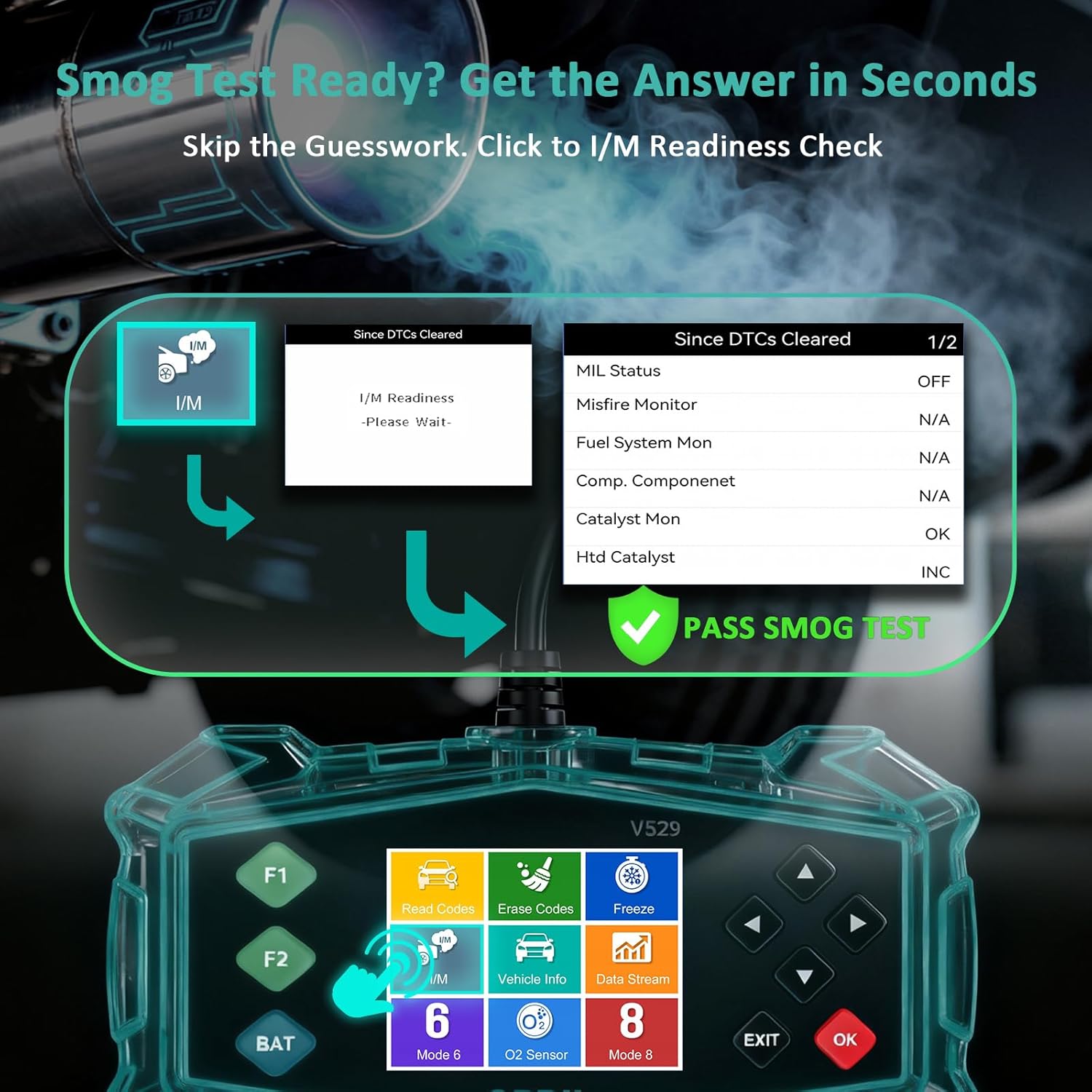
Figure 3.1: Universal Compatibility and OBD-II Port Location
3.2 การเชื่อมต่อเครื่องสแกนเนอร์
- ตรวจสอบให้แน่ใจว่ากุญแจรถอยู่ที่ OFF
- Plug the V529 scanner's OBD-II connector firmly into the vehicle's OBD-II port.
- หมุนกุญแจรถไปที่ตำแหน่งเปิด (เครื่องยนต์อาจดับหรือทำงานอยู่ก็ได้ ขึ้นอยู่กับการทดสอบ) เครื่องสแกนจะเปิดเครื่องโดยอัตโนมัติ
4. คู่มือการใช้งาน
The V529 features a user-friendly interface with a 2.8-inch color screen and intuitive navigation buttons.
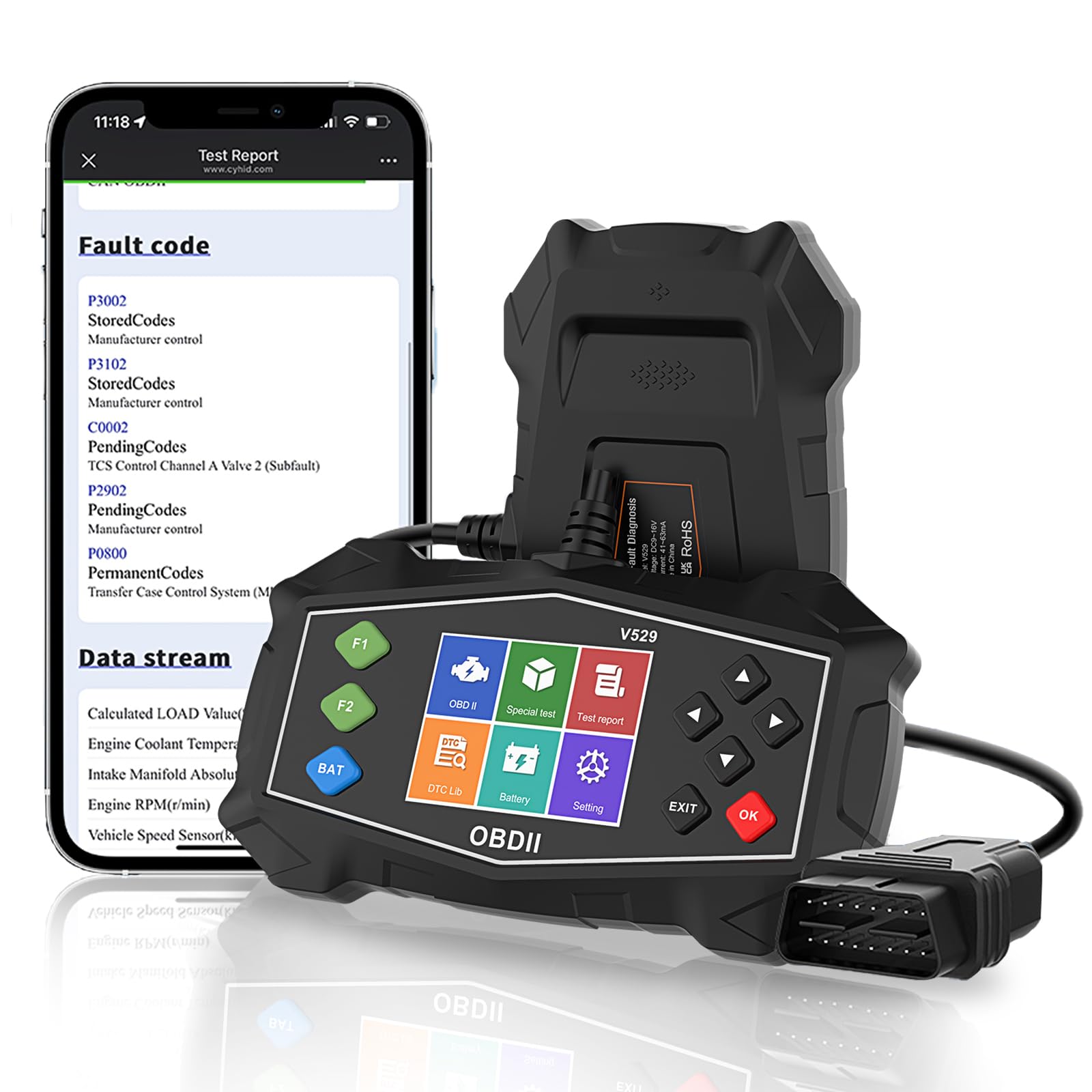
Figure 4.1: SinoTrack V529 Main Interface Overview
4.1 การนำทางพื้นฐาน
- ใช้ ขึ้น/ลง ปุ่มลูกศรสำหรับเลื่อนดูตัวเลือกเมนู
- ใช้ ซ้าย/ขวา arrow buttons to navigate between screens or adjust values.
- กดปุ่ม OK button to confirm a selection or enter a menu.
- กดปุ่ม EXIT ปุ่มเพื่อกลับไปยังหน้าจอที่แล้วหรือออกจากฟังก์ชั่น
4.2 การอ่านและการล้างรหัสข้อผิดพลาดในการวินิจฉัย (DTCs)
This function allows you to retrieve and clear fault codes that illuminate the Check Engine Light (MIL).

รูปที่ 4.2: ฟังก์ชันการวินิจฉัยหลัก
- จากเมนูหลัก เลือก อ่านรหัส ถึง view DTC ในปัจจุบัน รอดำเนินการ และถาวร
- The scanner will display the codes and their definitions.
- หากต้องการล้างรหัส ให้เลือก ลบรหัส from the main menu. Confirm your selection when prompted.
- Note: Clearing codes will turn off the Check Engine Light, but if the underlying issue is not resolved, the light will reappear.
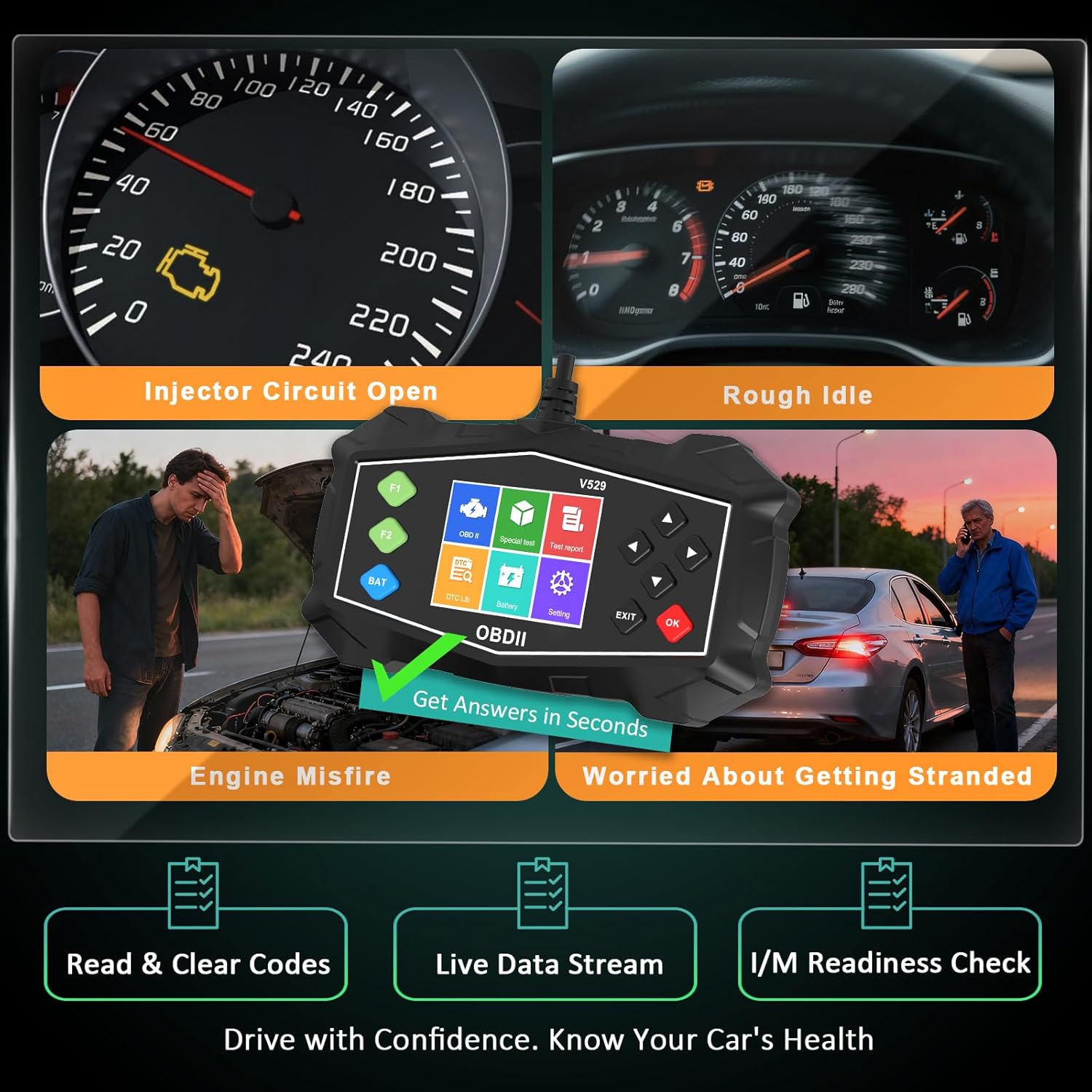
Figure 4.3: Identifying Common Vehicle Issues
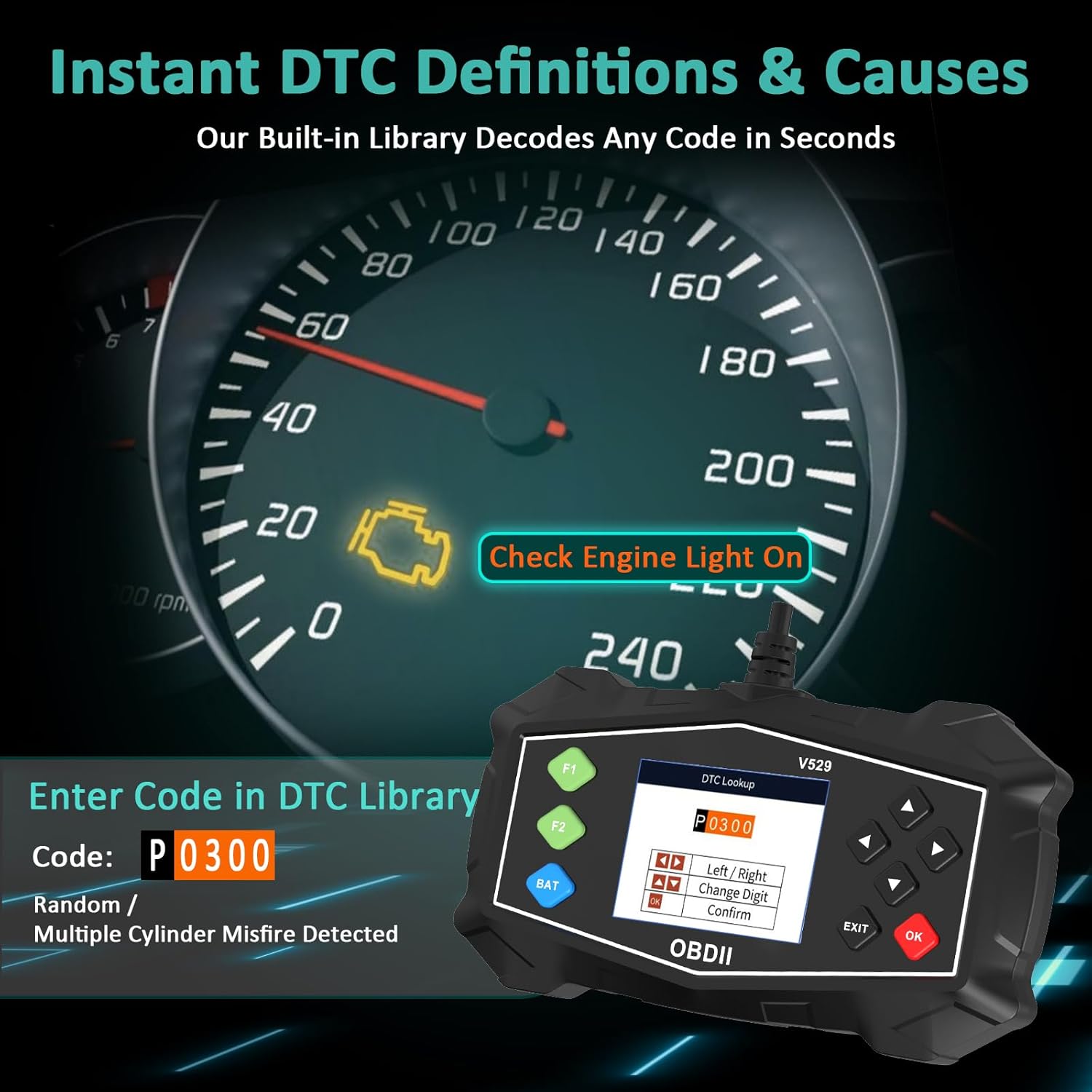
4.3 การค้นหา DTC
The V529 includes an extensive built-in library to define DTCs.
- จากเมนูหลัก เลือก ห้องสมุดดีทีซี.
- Enter the 5-character DTC using the arrow buttons and OK ปุ่ม.
- The scanner will display the definition and potential causes for the code.

Figure 4.4: Instant DTC Definitions
4.4 สตรีมข้อมูลสด
Monitor real-time sensor data to observe vehicle performance and diagnose intermittent issues.
- จากเมนูหลัก เลือก ข้อมูลสด.
- เลือกที่จะ view data in list format or graphical format.
- Scroll through the various parameters such as engine RPM, coolant temperature, fuel trim, and oxygen sensor readings.
รูปที่ 4.5: อินเทอร์เฟซสตรีมข้อมูลแบบเรียลไทม์
4.5 การตรวจสอบความพร้อม I/M
This function checks the status of the vehicle's emission-related monitoring systems.
- จากเมนูหลัก เลือก ความพร้อมของฉัน/ฉัน.
- The scanner will display the status of various monitors (e.g., Misfire Monitor, Fuel System Monitor, O2 Sensor Monitor).
- A 'Ready' status indicates the monitor has completed its diagnostic cycle. 'Not Ready' means the cycle is incomplete.

Figure 4.6: I/M Readiness Status
4.6 การทดสอบแบตเตอรี่
Perform a quick test to assess the vehicle's battery voltage and cranking health.
- จากเมนูหลัก เลือก การทดสอบแบตเตอรี่.
- Follow the on-screen prompts to perform the test.
- The scanner will display the battery voltage and a health assessment.
4.7 Mode 6 & Mode 8 (EVAP Test)
These advanced functions provide access to non-continuous monitor test results and allow for control of the EVAP system leak test.
- โหมด 6: Retrieves test results for continuously and non-continuously monitored systems.
- Mode 8 (EVAP Test): เริ่มการทดสอบระบบควบคุมการระเหยระเหย (EVAP) เพื่อตรวจสอบการรั่วไหล
4.8 Performance Tests
Evaluate your vehicle's acceleration, braking, and distance performance.
- จากเมนูหลัก เลือก การทดสอบประสิทธิภาพ.
- Choose the desired test (Acceleration, Braking, or Distance).
- Follow the on-screen instructions carefully to perform the test safely.
5. การบำรุงรักษา
Proper maintenance ensures the longevity and reliable operation of your SinoTrack V529 scanner.
- การทำความสะอาด: ใช้แบบนุ่มๆamp ใช้ผ้าเช็ดทำความสะอาดภายนอกเครื่องสแกน ห้ามใช้สารทำความสะอาดที่มีฤทธิ์กัดกร่อนหรือตัวทำละลาย
- พื้นที่จัดเก็บ: Store the scanner in its protective PU waterproof bag when not in use. Keep it in a dry, cool place away from direct sunlight and extreme temperatures.
- การดูแลสายเคเบิล: Avoid bending or crimping the OBD-II cable excessively. Always grasp the connector when plugging or unplugging, not the cable itself.
- การอัปเดตซอฟต์แวร์: Check the SinoTrack official webไซต์เป็นระยะสำหรับการอัปเดตซอฟต์แวร์ที่มีอยู่เพื่อให้มั่นใจถึงประสิทธิภาพและความเข้ากันได้ที่เหมาะสมที่สุด
6 การแก้ไขปัญหา
If you encounter issues while using your SinoTrack V529 scanner, refer to the following common problems and solutions:
| ปัญหา | สาเหตุที่เป็นไปได้ | สารละลาย |
|---|---|---|
| เครื่องสแกนเนอร์ไม่สามารถเปิดเครื่องได้ | Loose connection; vehicle ignition off; blown fuse in vehicle's OBD-II circuit. | Ensure the scanner is firmly connected. Turn vehicle ignition to ON. Check vehicle's fuse box for a blown fuse related to the OBD-II port. |
| ข้อความ "ข้อผิดพลาดลิงค์" หรือ "ข้อผิดพลาดในการสื่อสาร" | Incorrect protocol; vehicle not OBD-II compliant; faulty connection. | Verify your vehicle is OBD-II compliant (most vehicles 1996 and newer). Ensure the connection is secure. Try on another OBD-II compliant vehicle if possible. |
| ไม่สามารถล้าง DTC ได้ | Ignition not in ON position; underlying fault still present. | Ensure ignition is ON (engine off). If the fault is still active, the code cannot be cleared until the issue is repaired. |
| หน้าจอค้างหรือไม่ตอบสนอง | ซอฟต์แวร์มีปัญหาชั่วคราว | Disconnect the scanner from the vehicle, wait a few seconds, then reconnect. If the issue persists, contact customer support. |
7. ข้อมูลจำเพาะ
| คุณสมบัติ | รายละเอียด |
|---|---|
| ยี่ห้อ | ซิโนแทร็ก |
| แบบอย่าง | วี529 |
| ขนาดหน้าจอ | 2.8 นิ้ว |
| แหล่งพลังงาน | ไฟฟ้าแบบมีสาย (ผ่านพอร์ต OBD-II) |
| ระบบปฏิบัติการ | Android 4.0 (Internal System) |
| ประเภทความพอดีของยานยนต์ | Universal Fit (for OBD-II compliant gasoline vehicles) |
| รองรับโปรโตคอล OBDII | SAE J1850 PWM, SAE J1850 VPW, ISO9141-2, ISO14230-4 KWP (5 baud init), ISO14230-4 KWP (fast init), ISO15765-4 CAN (11bit ID, 500 Kbaud), ISO15765-4 CAN (29bit ID, 500 Kbaud), ISO15765-4 CAN (11bit ID, 250 Kbaud), ISO15765-4 CAN (29bit ID, 250 Kbaud) |
| น้ำหนักสินค้า | 15.5 ออนซ์ |
| ขนาดแพ็คเกจ | 8.7 x 5.08 x 1.93 นิ้ว |
8. การรับประกันและการสนับสนุน
SinoTrack products are designed for reliability and performance. For warranty information, technical support, or service inquiries, please refer to the contact information provided in your product packaging or visit the official SinoTrack webไซต์นี้ โปรดเก็บใบเสร็จรับเงินที่ซื้อไว้เพื่อใช้เรียกร้องการรับประกัน
สำหรับแหล่งข้อมูลเพิ่มเติมและคำถามที่พบบ่อย คุณสามารถเยี่ยมชมได้ที่ ร้าน SinoTrack บน Amazon.