
1. บทนำ
This manual provides essential instructions for the installation, operation, and maintenance of your Aninerel 3000W Hybrid Solar Inverter, model ANJ-3KW-LV-WIFI. This device is designed to convert 24V DC power to 110V AC pure sine wave power, suitable for various off-grid and backup power applications. Please read this manual thoroughly before installation and use to ensure safe and efficient operation.
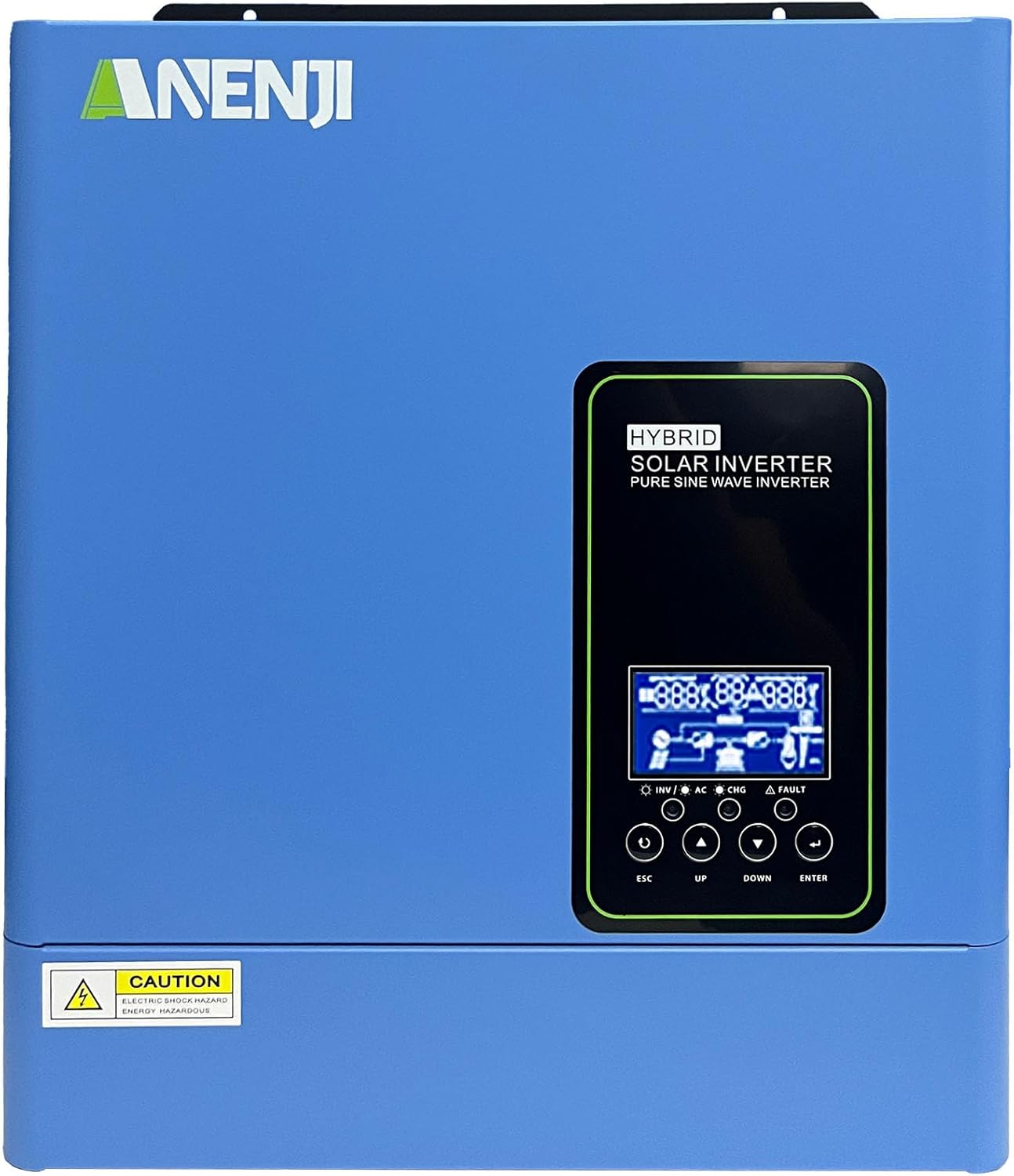
รูปที่ 1.1 : ด้านหน้า view of the Aninerel 3000W Hybrid Solar Inverter. The inverter features a blue casing with the Aninerel logo and a central LCD display panel with control buttons.
2. คำแนะนำด้านความปลอดภัย
โปรดปฏิบัติตามข้อควรระวังด้านความปลอดภัยต่อไปนี้เสมอ เพื่อลดความเสี่ยงจากไฟฟ้าช็อต ไฟไหม้ หรือการบาดเจ็บ:
- Read all instructions and cautionary markings on the unit and in this manual before installation or operation.
- Do not disassemble the inverter. Refer servicing to qualified personnel. Incorrect reassembly may result in electric shock or fire.
- เพื่อลดความเสี่ยงจากไฟฟ้าช็อต ควรถอดสายไฟทั้งหมดออกก่อนที่จะดำเนินการบำรุงรักษาหรือทำความสะอาดใดๆ
- This inverter is designed for indoor or semi-outdoor use with an IP65 rating. Avoid direct exposure to rain or snow.
- Ensure proper ventilation around the inverter to prevent overheating. Do not block ventilation openings.
- ควรใช้เครื่องมือและอุปกรณ์ป้องกันส่วนบุคคลที่เหมาะสมในระหว่างการติดตั้ง
- Ensure all wiring connections are tight and secure to prevent loose connections that can cause overheating.
- ห้ามเชื่อมต่ออินเวอร์เตอร์เข้ากับโครงข่ายไฟฟ้าสาธารณะโดยไม่ได้รับอนุญาตอย่างถูกต้องและไม่ปฏิบัติตามมาตรการความปลอดภัย
3. สินค้าหมดview
The Aninerel 3000W Hybrid Solar Inverter integrates a pure sine wave inverter, an MPPT solar charge controller, and a battery charger into one compact unit. It is designed to provide uninterrupted power support.
3.1 คุณสมบัติหลัก
- 3000W Pure Sine Wave Output: Converts 24V DC to 110V AC, providing stable power for sensitive electronics.
- ตัวควบคุมการชาร์จพลังงานแสงอาทิตย์ MPPT 100A ในตัว: Maximizes solar energy harvesting with up to 500VDC PV input.
- Flexible Charging and Output Modes: Offers multiple modes (Solar Only, AC Priority, Hybrid Charging; Mains Priority, PV Priority, Hybrid Output) for diverse power management.
- ความเข้ากันได้ของแบตเตอรี่ที่กว้าง: Supports AGM, GEL, Lead-acid, Li-ion, and LiFePO4 24V batteries.
- จอแสดงผล LCD อัจฉริยะ: Provides real-time monitoring and allows for easy configuration of system settings.
- Wi-Fi ในตัว: Enables remote monitoring of the inverter status (registration required).
- การออกแบบที่แข็งแกร่ง: IP65-rated enclosure for durability in various environments, with intelligent cooling.
- การคุ้มครองที่ครอบคลุม: รวมถึงโอเวอร์โวลด้วยtage, อันเดอร์โวลtage, reverse polarity, and short circuit protection.

รูปที่ 3.1: แผงด้านหน้าและด้านหลังview. This diagram labels the LCD display, indicators, function buttons, RS485 communication port, grounding terminal, battery input, dry contact port, built-in Wi-Fi, AC input, AC output, PV input, and power on/off switch.
3.2 แผงด้านหน้าและไฟแสดงสถานะ
- จอแสดงผล LCD: Shows system status, operational data, and configuration settings.
- ไฟแสดงสถานะการชาร์จ: Illuminates to indicate battery charging status.
- ตัวบ่งชี้สถานะ: Provides general operational status of the inverter.
- ตัวบ่งชี้ความผิดปกติ: Lights up to signal system errors or warnings.
- ปุ่มฟังก์ชัน (ESC, ขึ้น, ลง, ENTER): ใช้สำหรับนำทางเมนูและปรับการตั้งค่าบนหน้าจอ LCD
3.3 การเชื่อมต่อแผงด้านหลัง
- พอร์ตการสื่อสาร RS485: For external communication and monitoring.
- ขั้วต่อสายดิน: จำเป็นอย่างยิ่งสำหรับการต่อสายดินเพื่อความปลอดภัย
- อินพุตแบตเตอรี่: Connects to the 24V battery bank.
- พอร์ตสัมผัสแห้ง: สำหรับการควบคุมหรือส่งสัญญาณจากภายนอก
- Built-in Wi-Fi Module: For wireless monitoring.
- อินพุตไฟฟ้ากระแสสลับ: Connects to grid utility or generator AC power.
- เอาต์พุต AC: เชื่อมต่อกับอุปกรณ์ไฟฟ้าในครัวเรือน
- อินพุต PV: Connects to solar panel arrays.
- สวิตช์เปิด/ปิด: ควบคุมกำลังไฟหลักไปยังอินเวอร์เตอร์
4. การติดตั้ง & ตั้งค่า
Proper installation is crucial for the safe and efficient operation of your hybrid solar inverter. Ensure all connections are made by a qualified electrician and adhere to local electrical codes.
4.1 การติดตั้งอินเวอร์เตอร์
- เลือกสถานที่ที่เหมาะสมซึ่งแห้ง มีอากาศถ่ายเทสะดวก และป้องกันจากแสงแดดและความชื้นโดยตรง
- ตรวจสอบให้แน่ใจว่ามีพื้นที่ว่างรอบๆ อินเวอร์เตอร์เพียงพอ เพื่อให้มีการไหลเวียนของอากาศและการระบายความร้อนที่เหมาะสม
- Mount the inverter vertically on a sturdy surface using appropriate fasteners.
4.2 การเชื่อมต่อสายไฟ
Follow the wiring diagram carefully. All wiring should be performed with the inverter and all power sources disconnected.
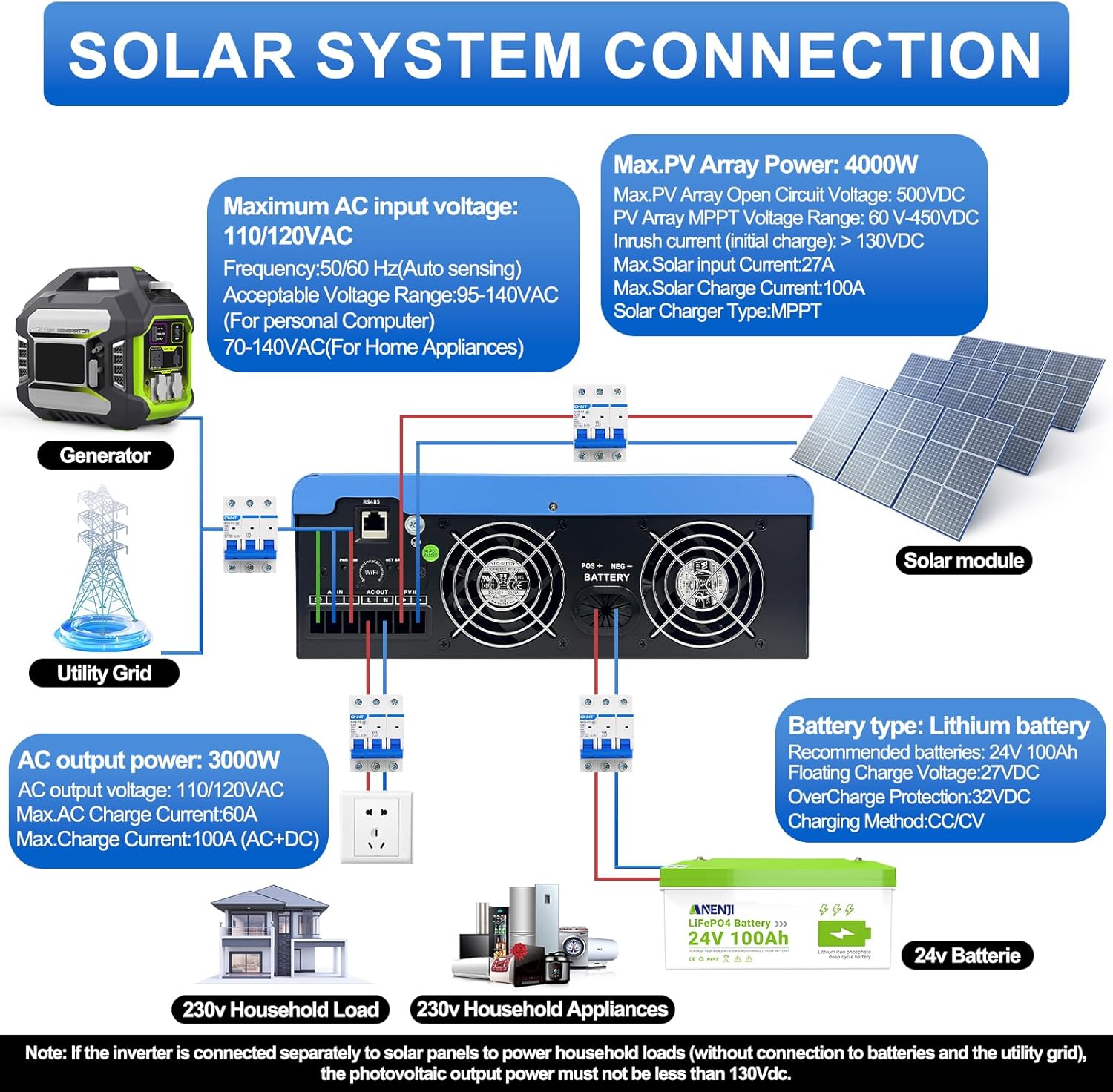
Figure 4.1: Solar System Connection Diagram. This diagram illustrates the connections for solar panels, generator, utility grid, 24V battery, and household loads to the inverter. It shows the PV input, battery input, AC input, and AC output terminals.
4.2.1 การเชื่อมต่อแบตเตอรี่
- Connect the 24V battery bank to the battery input terminals on the inverter. Ensure correct polarity (+ to + and - to -).
- Use appropriate cable gauges for the battery connections to handle the expected current.
- The ANJ-3KW-LV-WIFI model supports a 24-volt DC system and is recommended for use with batteries of at least 100 ampere-hours capacity.

Figure 4.2: Inverter Battery Connection. This diagram shows wiring configurations for both 12-volt and 24-volt battery systems, emphasizing correct series/parallel connections for the desired voltage.
4.2.2 การเชื่อมต่อแผงโซลาร์เซลล์ (PV)
- Connect the solar panel array to the PV input terminals. Observe correct polarity.
- Ensure the total open circuit voltage of the PV array does not exceed 500VDC.
- MPPT เล่มtage range is 60-450VDC. Ensure your PV array voltage falls within this range for optimal charging.
4.2.3 การเชื่อมต่ออินพุต AC
- Connect the utility grid or generator AC power to the AC input terminals.
- The inverter supports 110/120VAC input with auto-sensing frequency (50/60Hz).
4.2.4 การเชื่อมต่อเอาต์พุต AC
- Connect your household loads or appliances to the AC output terminals.
- The inverter provides 3000W continuous AC output at 110/120VAC.
4.3 การเพิ่มพลังเริ่มต้น
- After all connections are secure, switch on the battery breaker first.
- Then, switch on the PV array breaker (if applicable).
- Finally, switch on the AC input breaker (if applicable) and the inverter's main power switch.
- Observe the LCD display for initial boot-up and status indicators.
5. การดำเนินการ
The inverter offers various configurable settings to optimize power management based on your specific needs.
5.1 จอแสดงผล LCD และการตั้งค่า
The LCD display provides real-time information and allows you to configure operational parameters using the function buttons.
- ใช้ UP และ ลง ปุ่มสำหรับเลื่อนดูตัวเลือกในเมนู
- กด เข้า เพื่อเลือกตัวเลือกหรือยืนยันการตั้งค่า
- กด เอสซีเอส to exit a menu or cancel an action.
5.2 Charging Priority Modes
These settings determine how the battery bank is charged from available power sources.

Figure 5.1: Charger Source Priority. This diagram illustrates three charging priority options: Solar First (solar panels charge first, AC input only if solar is unavailable), Solar and AC Input Simultaneously (both solar and utility charge at the same time), and Solar Only (solar energy is the exclusive charging source).
- โซลาร์เฟิร์ส: Prioritizes solar power for charging. AC input will only charge the battery when solar power is insufficient or unavailable.
- AC Priority (Utility Priority): Prioritizes AC input (utility or generator) for charging. Solar power will supplement or take over if AC input is unavailable.
- พลังงานแสงอาทิตย์เท่านั้น: The inverter will only charge the battery bank from solar power. AC input will not be used for charging.
5.3 Output Priority Modes
These settings determine the power source for your connected loads.

Figure 5.2: Output Source Priority. This diagram shows three output priority options: Solar First (power from solar first, AC input supplements if solar is insufficient), AC First (redirects AC input to power loads, uses solar/batteries when AC is unavailable), and DC Priority (prioritizes solar first, then battery, then AC input only when voltage drops to a programmable value).
- โซลาร์เฟิร์สต์ (PV Priority): Prioritizes solar power to supply loads. If solar power is insufficient, the battery bank will supplement, and then AC input will be used.
- AC First (Mains Priority): Prioritizes AC input (utility or generator) to power loads. If AC input is unavailable, the inverter will switch to battery power.
- DC Priority (Battery Priority): Prioritizes solar power first, then battery power. AC input will only engage when the battery voltage drops below a programmable threshold.
5.4 การตรวจสอบผ่าน Wi-Fi
The built-in Wi-Fi module allows for remote monitoring of your inverter's performance and status via a dedicated application. Registration may be required to access this feature.

Figure 5.3: Wi-Fi Monitoring. This image depicts a user monitoring the hybrid inverter's status wirelessly via a smartphone application, highlighting the convenience of the built-in Wi-Fi feature.
6. การบำรุงรักษา
Regular maintenance helps ensure the longevity and optimal performance of your Aninerel Hybrid Solar Inverter.
- การทำความสะอาด: ควรทำความสะอาดภายนอกของอินเวอร์เตอร์ด้วยผ้าแห้งเป็นระยะ ตรวจสอบให้แน่ใจว่าช่องระบายอากาศปราศจากฝุ่นและสิ่งสกปรก
- การเชื่อมต่อ: Annually check all electrical connections (battery, PV, AC input/output) for tightness and corrosion. Tighten any loose connections.
- สิ่งแวดล้อม: ตรวจสอบให้แน่ใจว่าสภาพแวดล้อมในการติดตั้งคงอยู่ในช่วงอุณหภูมิและความชื้นที่กำหนดไว้
- เฟิร์มแวร์: ตรวจสอบของผู้ผลิต webเข้าชมเว็บไซต์เพื่อตรวจสอบการอัปเดตเฟิร์มแวร์ที่มีให้ใช้งาน เพื่อปรับปรุงประสิทธิภาพหรือเพิ่มคุณสมบัติใหม่ๆ
7 การแก้ไขปัญหา
ส่วนนี้นำเสนอวิธีแก้ไขปัญหาทั่วไปที่คุณอาจพบ หากปัญหายังคงอยู่ โปรดติดต่อฝ่ายสนับสนุนลูกค้า
| ปัญหา | สาเหตุที่เป็นไปได้ | สารละลาย |
|---|---|---|
| อินเวอร์เตอร์ไม่เปิด | ไม่มีการเชื่อมต่อแบตเตอรี่หรือแบตเตอรี่เหลือน้อยtage; Power switch off; Loose wiring. | ตรวจสอบการเชื่อมต่อแบตเตอรี่และปริมาตรtage; ตรวจสอบให้แน่ใจว่าสวิตช์ไฟเปิดอยู่; ตรวจสอบว่าสายไฟทั้งหมดแน่นหนาดีแล้ว |
| ไม่มีเอาท์พุต AC | Overload; Short circuit on output; Inverter in fault mode; Output priority setting. | Reduce load; Check for short circuits; Refer to LCD fault codes; Adjust output priority settings. |
| แบตเตอรี่ไม่ชาร์จจากพลังงานแสงอาทิตย์ | PV ต่ำtage; Incorrect PV connection; Solar charging disabled; Faulty solar panels. | ตรวจสอบแรงดันไฟฟ้าของแผงโซลาร์เซลล์tage (must be >60VDC); Verify PV polarity; Check charging priority settings; Inspect solar panels. |
| คำเตือนเรื่องความร้อนสูงเกินไป | การระบายอากาศไม่เพียงพอ; อุณหภูมิแวดล้อมสูงเกินไป; การโอเวอร์โหลด | Ensure clear airflow around inverter; Relocate to cooler area; Reduce connected load. |
| การตรวจสอบ Wi-Fi ไม่ทำงาน | No Wi-Fi signal; Incorrect app configuration; Registration issue. | Check Wi-Fi signal strength; Reconfigure app settings; Contact support for registration issues. |
8. ข้อมูลจำเพาะ
Technical specifications for the Aninerel 3000W Hybrid Solar Inverter ANJ-3KW-LV-WIFI:
| คุณสมบัติ | ข้อมูลจำเพาะ |
|---|---|
| หมายเลขรุ่น | ANJ-3KW-LV-WIFI |
| กำลังไฟออกต่อเนื่อง | 3000วัตต์ |
| กำลังขับสูงสุด | 6000วัตต์ |
| กระแสตรงอินพุตVoltage | 24โวลต์ |
| กระแสไฟขาออกVoltage | กระแสสลับ 110 โวลต์ |
| รูปคลื่นเอาท์พุต | เพียวไซน์เวฟ |
| กำลังไฟฟ้าเข้า PV สูงสุด | 4000วัตต์ |
| ตัวควบคุม MPPT กระแสไฟฟ้า | 100เอ |
| แม็กซ์ PV Open Circuit Voltage | 500VDC |
| PV Array MPPT ฉบับที่tagอี เรนจ์ | 60-450VDC |
| กระแสไฟเข้า AC สูงสุด | 60เอ |
| ความถี่เอาต์พุต | 50/60Hz (การตรวจจับอัตโนมัติ) |
| ความเข้ากันได้ของแบตเตอรี่ | AGM, GEL, Lead-acid, Li-ion, LiFePO4 (24V) |
| ระดับการป้องกัน | IP65 |
| ขนาดสินค้า | 15 x 6.98 x 18 นิ้ว |
| น้ำหนักสินค้า | 16.5 ปอนด์ |
9. การรับประกันและการสนับสนุน
For warranty information, please refer to the warranty card included with your product or visit the official Aninerel website. For technical support, troubleshooting assistance, or service inquiries, please contact Aninerel customer service through their official channels.
Manufacturer: Shenzhen Anenji Energy Technology Co.,Ltd