
1. บทนำ
The Radioddity X1 Walkie Talkies are designed for reliable two-way communication in various environments. Featuring an IP67 waterproof and dustproof rating, durable construction, and advanced noise reduction, these FRS radios are suitable for outdoor adventures, professional use, and emergency situations. They offer a long communication range and include essential features like NOAA weather alerts and voice-activated transmission (VOX).

Image: The Radioddity X1 Walkie Talkie, showcasing การออกแบบที่แข็งแกร่ง
2. อะไรอยู่ในกล่อง
Upon opening your Radioddity X1 package, you should find the following items:
- 2 x Radioddity X1 Walkie Talkies
- 2 x แบตเตอรี่แบบชาร์จไฟได้
- สายชาร์จ USB-C 2-in-1 จำนวน 1 เส้น
- 2 x เข็มขัดคลิป
- สายคล้องมือ 2 เส้น
- อะแดปเตอร์ 1 ชิ้น
- 1 x คู่มือผู้ใช้ (เอกสารนี้)

Image: All components included in the Radioddity X1 package, including two radios, batteries, charging cable, belt clips, hand straps, and adapters.
3. การตั้งค่า
3.1. การติดตั้งแบตเตอรี่
- ตรวจสอบให้แน่ใจว่าวิทยุสื่อสารปิดอยู่
- ค้นหาช่องใส่แบตเตอรี่ที่ด้านหลังของเครื่อง
- วางแบตเตอรี่ให้ตรงกับขั้ว แล้วค่อยๆ ดันเข้าไปในช่องจนกระทั่งได้ยินเสียงคลิกเข้าที่
3.2. การชาร์จแบตเตอรี่
The Radioddity X1 features a 2500mAh rechargeable lithium battery. For optimal performance, fully charge the battery before first use.
- Connect the provided USB-C charging cable to the charging port on the walkie talkie.
- Connect the other end of the USB-C cable to the adapter, and then plug the adapter into a standard power outlet. Alternatively, you can connect the USB-C cable to a compatible USB power source (e.g., computer, power bank).
- ไฟแสดงสถานะแบตเตอรี่บนจอแสดงผลจะแสดงสถานะการชาร์จ โดยทั่วไปการชาร์จจนเต็มจะใช้เวลาหลายชั่วโมง
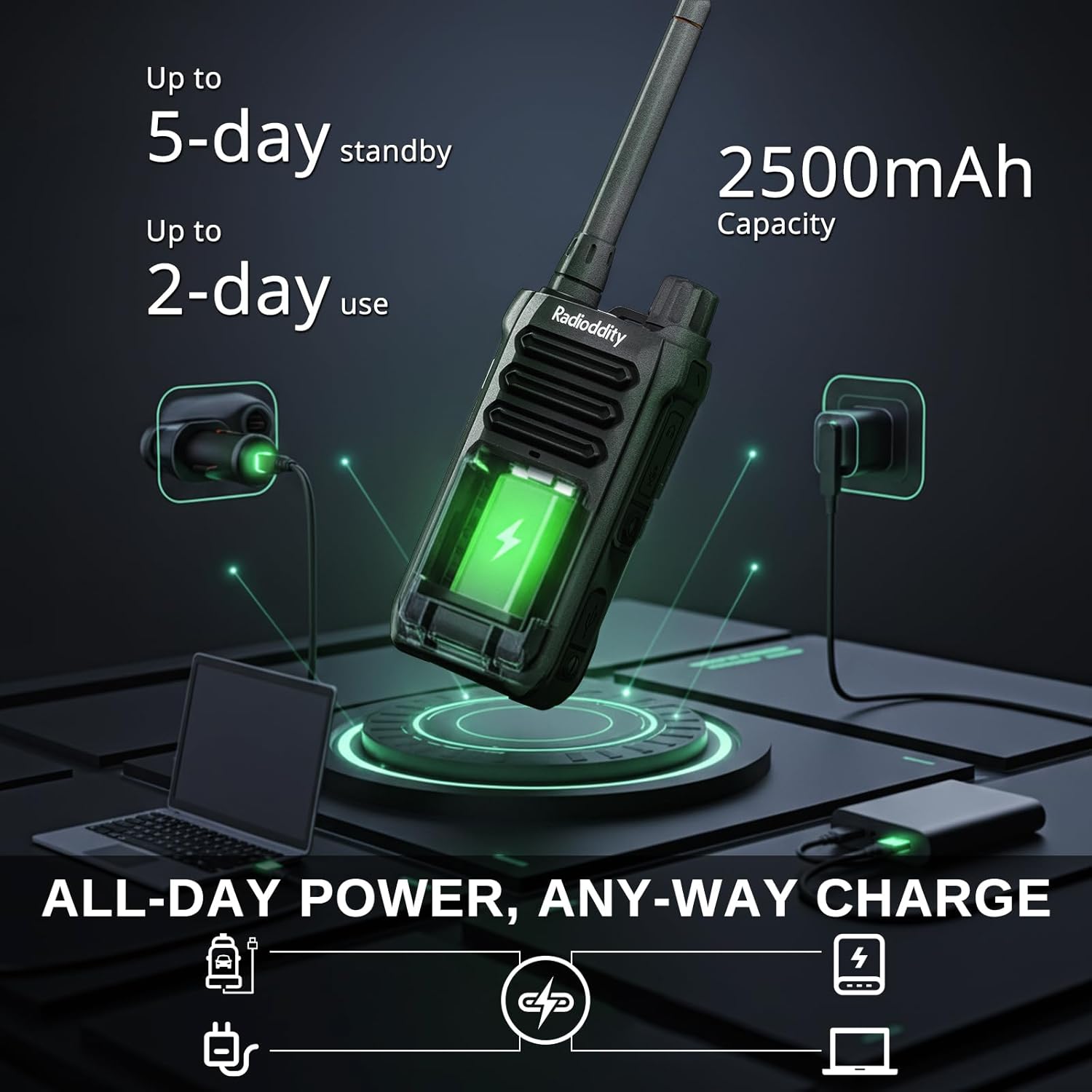
Image: The Radioddity X1 Walkie Talkie connected to a USB-C charger, illustrating the charging process.
3.3. การติดตั้งอุปกรณ์เสริม
- คลิปหนีบเข็มขัด: Secure the belt clip to the designated slot on the back of the walkie talkie.
- สายคล้องมือ: Thread the hand strap through the loop on the top or side of the walkie talkie for added security.
3.4. การเปิด/ปิดเครื่อง
To power on or off the device, rotate the power/volume knob located on the top of the unit clockwise to turn on, and counter-clockwise until it clicks to turn off.
4. คู่มือการใช้งาน
4.1. การเลือกช่อง
The Radioddity X1 comes pre-programmed with 22 FRS channels. To select a channel:
- กดปุ่ม เมนู ปุ่มเพื่อเข้าสู่เมนู
- ใช้ ลูกศรขึ้น/ลง ปุ่มต่างๆ สำหรับนำทางไปยังการตั้งค่าช่องสัญญาณ
- กด OK เพื่อยืนยันจากนั้นใช้ ลูกศรขึ้น/ลง ปุ่มเพื่อเลือกช่องที่ต้องการ (1-22)
- กด OK again to save the selection and เมนู ที่จะออกไป
4.2. รหัสความเป็นส่วนตัว (CTCSS/DCS)
The radio supports 155 privacy codes (CTCSS/DCS) to filter out unwanted conversations on a channel. While not providing true privacy, these codes ensure you only hear transmissions from radios set to the same channel and code.
- กดปุ่ม เมนู ปุ่ม.
- Navigate to the CTCSS or DCS setting using the ลูกศรขึ้น/ลง ปุ่ม
- กด OK, then select your desired code.
- กด OK เพื่อบันทึกและ เมนู to exit. Ensure all radios in your group use the same channel and privacy code.
4.3. ปุ่มกดเพื่อพูด (PTT)
ในการส่ง ให้กดปุ่มขนาดใหญ่ค้างไว้ ปตท. กดปุ่มด้านข้างวิทยุ พูดให้ชัดเจนใส่ไมโครโฟน ปล่อยมือ ปตท. ปุ่มสำหรับฟัง
4.4. VOX Function (Voice Operated Transmission)
The VOX function allows for hands-free operation. When activated, the radio transmits automatically when it detects your voice.
- กดปุ่ม เมนู ปุ่ม.
- นำทางไปที่ วอกซ์ การตั้งค่า
- กด OK, then select an appropriate sensitivity level (higher numbers for lower sensitivity).
- กด OK เพื่อบันทึกและ เมนู ที่จะออกไป

Image: Icon representing the Voice Operated Transmission (VOX) function.
4.5. การแจ้งเตือนสภาพอากาศจาก NOAA
Stay informed with 10 built-in NOAA weather channels providing real-time alerts.
- กดปุ่ม เมนู ปุ่ม.
- นำทางไปที่ โนอาเอ การตั้งค่า
- กด OK, then select the desired NOAA channel or activate weather alerts.
- กด OK เพื่อบันทึกและ เมนู ที่จะออกไป

Image: Icon representing the NOAA Scan & Alert feature.
4.6. การบันทึกการเล่น
The Radioddity X1 features a unique recording playback function for up to 20 messages.
- To record, press and hold the dedicated บันทึก button (if available, or refer to specific menu options).
- To play back recorded messages, press the รีเพลย์ ปุ่ม.

Image: The Radioddity X1 display showing the recording and replay functions, highlighting its audio safety net capability.

Image: Icon representing the Recording function.
4.7. การลดเสียงรบกวน
The dual-way noise reduction feature ensures clear communication even in noisy environments.

Image: The Radioddity X1 in a construction setting, illustrating its noise reduction capabilities for clear communication.
5. การบำรุงรักษา
5.1. การดูแลรักษา กันน้ำและกันฝุ่น ระดับ IP67
The Radioddity X1 is rated IP67, meaning it is dustproof and can withstand submersion in up to 1 meter of water for 30 minutes. To maintain its integrity:
- Ensure all port covers (e.g., charging port, accessory port) are securely closed before exposure to water or dust.
- After exposure to water, wipe the radio dry with a clean cloth. Do not charge the radio if the charging port is wet.
- ควรหลีกเลี่ยงการแช่น้ำนานเกินกว่าระดับความลึกและเวลาที่กำหนด

Image: The Radioddity X1 Walkie Talkie submerged in clear water, demonstrating its IP67 waterproof capability.

Image: The Radioddity X1 Walkie Talkie partially covered in sand, highlighting its dustproof design.
5.2. การดูแลแบตเตอรี่
The 2500mAh battery provides up to 48 hours of average use. To prolong battery life:
- Avoid fully discharging the battery regularly.
- ควรเก็บวิทยุไว้ในที่แห้งและเย็นเมื่อไม่ได้ใช้งาน
- ใช้เฉพาะสายชาร์จและอะแดปเตอร์ที่ให้มาเท่านั้น
5.3. การทำความสะอาด
เช็ดวิทยุด้วยผ้านุ่มdamp ผ้า. อย่าใช้สารเคมีที่รุนแรงหรือน้ำยาทำความสะอาดที่มีฤทธิ์กัดกร่อน
6 การแก้ไขปัญหา
| ปัญหา | สาเหตุที่เป็นไปได้ | สารละลาย |
|---|---|---|
| ไม่มีไฟฟ้า | แบตเตอรี่เหลือน้อยหรือติดตั้งไม่ถูกต้อง | ชาร์จแบตเตอรี่หรือติดตั้งแบตเตอรี่ใหม่ |
| ไม่สามารถส่งหรือรับได้ | รหัสช่องหรือรหัสความเป็นส่วนตัวไม่ถูกต้อง นอกช่วงที่กำหนด | Verify channel and privacy code settings. Move closer to the other radio. |
| คุณภาพเสียงไม่ดี | Weak signal, interference, or volume too low. | Adjust volume. Move to an area with less obstruction. Check for interference sources. |
| ระยะการสื่อสารสั้น | Obstructions (buildings, terrain), low power channel. | Move to an open area. Use channels 1-7 or 15-22 for higher power output. |
7. ข้อมูลจำเพาะ
| คุณสมบัติ | รายละเอียด |
|---|---|
| ยี่ห้อ | กัมมันตภาพรังสี |
| หมายเลขรุ่น | X1 |
| สี | สีดำ |
| จำนวนช่องสัญญาณ | 22 (FRS) |
| ช่วงความถี่ | เอฟอาร์เอส |
| ระยะการสนทนาสูงสุด | 5 Miles (open areas), 2 Miles (urban settings) |
| ระดับความต้านทานต่อน้ำ | กันน้ำระดับ IP67 |
| คุณสมบัติพิเศษ | Dust Proof, Emergency Alarm (SOS), Long Range, Shockproof, Voice Operated Transmission (VOX), Noise Reduction, NOAA Weather Alerts, Recording Playback |
| ความจุของแบตเตอรี่ | แบตเตอรี่ลิเธียม 2500mAh |
| อายุการใช้งานแบตเตอรี่โดยเฉลี่ย | 48 ชั่วโมง |
| การชาร์จไฟ | ยูเอสบี-ซี |
| ขนาดสินค้า (ลึก x กว้าง x สูง) | 1.1" x 2.4" x 7.1" |
| รหัส FCC | 2AN62-X1 |

Image: Visual representation of the Radioddity X1's communication range, showing up to 5 miles in open areas and 2 miles in urban settings.

Image: The Radioddity X1 Walkie Talkie on the ground at a construction site, illustrating its durability and shockproof design after 1,000+ drop tests.
8. การรับประกันและการสนับสนุน
8.1. ข้อมูลการรับประกัน
The Radioddity X1 Walkie Talkies come with an รับประกัน 18 เดือน from the date of purchase. This warranty covers manufacturing defects and ensures your product is free from material and workmanship flaws under normal use. Please retain your proof of purchase for warranty claims.
8.2. การสนับสนุนลูกค้า
For technical assistance, troubleshooting, or warranty inquiries, please visit the official Radioddity website or contact their customer support team. You can find contact information and additional resources on their webเว็บไซต์: www.radioddity.com.
9. วิดีโอผลิตภัณฑ์
Radioddity X1 | Built for Harsh Conditions
Video: This official Radioddity video demonstrates the X1's robust features, including its IP67 dustproof and waterproof capabilities, drop resistance, car-crush resistance, long-range communication, and noise-cancelling audio, highlighting its suitability for challenging environments.