
1. บทนำ
This manual provides detailed instructions for the ANRAN Q04 5MP Solar Security Camera and the ANRAN F2M3 Solar Light Security Camera. It covers essential information regarding product setup, operation, maintenance, and troubleshooting to ensure optimal performance and longevity of your devices. Please read this manual thoroughly before installation and use.
2. สินค้าหมดview
2.1 ANRAN Q04 5MP Solar Security Camera
The ANRAN Q04 is a 5-megapixel wireless outdoor security camera featuring an integrated solar panel for continuous power. It offers pan and tilt capabilities for wide area surveillance.

Image: Two ANRAN Q04 solar security cameras, showcasing their design with integrated solar panels and dual antennas.

Image: An ANRAN Q04 camera illustrating its 355-degree pan and 90-degree tilt capabilities, with a smartphone displaying the live view.
2.2 ANRAN F2M3 Solar Light Security Camera
The ANRAN F2M3 combines a security camera with a motion-activated light, powered by a separate solar panel and a 5000 mAh battery. It includes features like two-way audio, a siren, and multiple night vision modes.

Image: Two ANRAN F2M3 solar light security cameras shown alongside their separate solar panels.

Image: An ANRAN F2M3 camera mounted on a wall, emphasizing its dual function as a wall light and camera, powered by a 3W solar panel and a 5000 mAh battery.

Image: An ANRAN F2M3 camera demonstrating its PIR detection and motion-activated light, along with icons for notification, 2-way audio, 70db siren, and 200-lumen brightness.
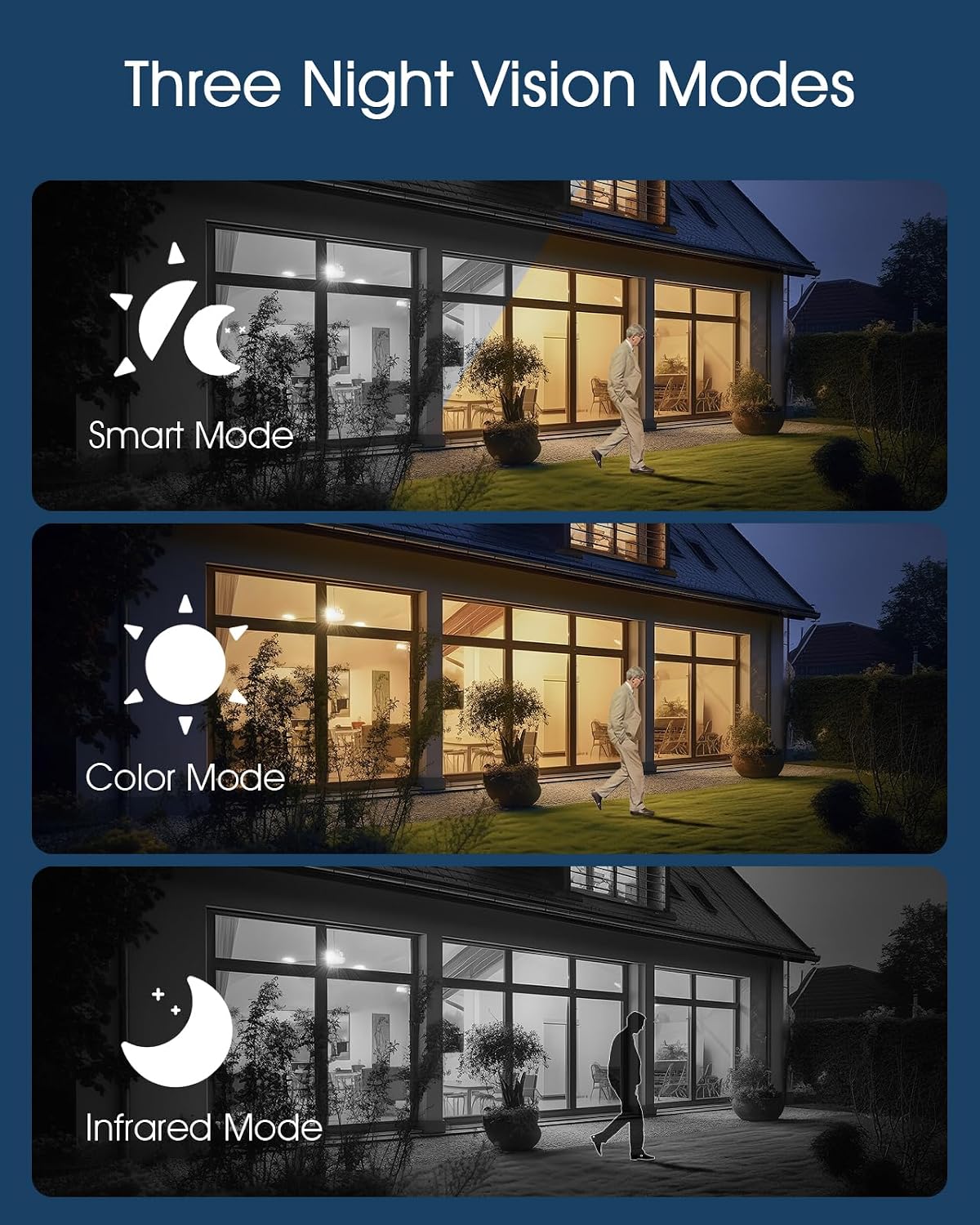
Image: Illustrations of the three night vision modes available for the F2M3 camera: Smart Mode, Color Mode, and Infrared Mode.
3. การตั้งค่า
3.1 การแกะกล่องและการชาร์จครั้งแรก
Carefully unpack all components. Before installation, ensure the camera's battery is fully charged. Connect the camera to a power source using the provided USB cable for several hours.
3.2 การติดตั้ง
Select an optimal location for your camera, ensuring good Wi-Fi signal strength and direct sunlight exposure for the solar panel. Mount the camera securely using the provided screws and mounting bracket.
ANRAN Q04 Installation
The Q04 camera features an integrated solar panel. Mount it in a location that receives ampควรให้แสงแดดส่องถึงโดยตรงตลอดทั้งวันเพื่อเพิ่มประสิทธิภาพการชาร์จให้สูงสุด

Image: A woman installing an ANRAN Q04 camera on a wall, demonstrating the simple installation process without the need for a separate solar panel.
ANRAN F2M3 Installation
The F2M3 camera uses a separate solar panel. Mount the camera at the desired surveillance point and position the solar panel in a location with maximum sun exposure, connecting it to the camera with the provided cable.

Image: A man installing an ANRAN F2M3 camera on an exterior wall, highlighting its easy installation and instant connection to 2.4GHz WiFi.
3.3 การเชื่อมต่อแอพ
- Download the official ANRAN app from your smartphone's app store.
- สร้างบัญชีและเข้าสู่ระบบ
- Follow the in-app instructions to add your camera. Ensure your Wi-Fi network is 2.4GHz, as the cameras do not support 5GHz Wi-Fi.
- Scan the QR code on the camera or manually enter the device ID to pair.
4. คู่มือการใช้งาน
4.1 สด View และการบันทึก
Once connected, open the ANRAN app to access the live video feed from your camera. You can initiate manual recordings or capture screenshots directly from the live view อินเทอร์เฟซ
4.2 การตรวจจับการเคลื่อนไหวและการแจ้งเตือน
Configure motion detection sensitivity and alert settings within the app. The cameras will send notifications to your smartphone when motion is detected. For the F2M3, motion detection also activates the integrated light and can trigger the siren.
4.3 Two-Way Audio (F2M3)
The F2M3 camera supports two-way audio communication. Use the microphone and speaker icons in the app to speak through the camera and hear audio from its vicinity.
4.4 Night Vision Modes (F2M3)
The F2M3 offers three night vision modes:
- โหมดอัจฉริยะ: สลับระหว่างอินฟราเรดและการมองเห็นตอนกลางคืนแบบสีโดยอัตโนมัติตามการเคลื่อนไหวที่ตรวจพบ
- โหมดสี: Utilizes the integrated light to provide full-color video at night.
- โหมดอินฟราเรด: Provides black and white video using infrared LEDs for discreet surveillance.
4.5 Pan & Tilt Control (Q04)
For the Q04 camera, use the directional controls within the app to remotely adjust the camera's viewing angle (355° horizontal pan and 90° vertical tilt).
5. การบำรุงรักษา
5.1 การทำความสะอาด
Regularly clean the camera lens and solar panel surfaces with a soft, damp ใช้ผ้าเช็ดทำความสะอาดเพื่อให้ได้ภาพที่คมชัดและชาร์จพลังงานแสงอาทิตย์ได้อย่างมีประสิทธิภาพ หลีกเลี่ยงการใช้สารทำความสะอาดที่มีฤทธิ์กัดกร่อน
5.2 การดูแลแบตเตอรี่
To prolong battery life, ensure the solar panel receives adequate sunlight. In prolonged periods of low light, consider temporarily charging the camera via USB if accessible.
การอัปเดตเฟิร์มแวร์ 5.3 รายการ
Check the ANRAN app periodically for available firmware updates. Keeping your camera's firmware up-to-date ensures optimal performance, security, and access to new features.
6 การแก้ไขปัญหา
6.1 กล้องไม่เปิด
- Ensure the battery is fully charged. Connect to a USB power source for several hours.
- Verify the solar panel connection (F2M3) or ensure the integrated panel (Q04) is receiving sunlight.
6.2 ไม่สามารถเชื่อมต่อ Wi-Fi ได้
- Confirm your Wi-Fi network is 2.4GHz. These cameras do not support 5GHz Wi-Fi.
- ตรวจสอบให้แน่ใจว่ากล้องอยู่ในระยะของเราเตอร์ Wi-Fi ของคุณ
- รีสตาร์ทเราเตอร์และกล้องของคุณ
- Reset the camera to factory settings (refer to app for specific instructions) and attempt pairing again.
6.3 คุณภาพของภาพไม่ดี
- ทำความสะอาดเลนส์กล้อง
- ตรวจสอบให้แน่ใจว่าไม่มีสิ่งกีดขวางใดๆ ในมุมมองของกล้อง view.
- ตรวจสอบความแรงของสัญญาณ Wi-Fi สัญญาณอ่อนอาจส่งผลต่อคุณภาพการสตรีมได้
6.4 การตรวจจับการเคลื่อนไหวไม่ทำงาน
- ตรวจสอบให้แน่ใจว่าได้เปิดใช้งานการตั้งค่าการตรวจจับการเคลื่อนไหวในแอปแล้ว
- ปรับระดับความไว
- Ensure the camera's PIR sensor (F2M3) or motion detection area (Q04) is clear of obstructions.
7. ข้อมูลจำเพาะ
| คุณสมบัติ | ANRAN Q04 | ANRAN F2M3 |
|---|---|---|
| ปณิธาน | 5 เมกะพิกเซล | Not specified (typically 1080p/2K for light cameras) |
| แหล่งพลังงาน | Integrated Solar Panel, Rechargeable Battery | Separate 3W Solar Panel, 5000 mAh Battery |
| การเชื่อมต่อ | Wi-Fi 2.4GHz (IEEE 802.11b/g/n) | |
| แพน/เอียง | แพน 355°, เอียง 90° | เลขที่ |
| การมองเห็นตอนกลางคืน | อินฟราเรดมองเห็นกลางคืน | Smart Mode, Color Mode, Infrared Mode |
| เสียง | One-Way Audio (Listening) | ระบบเสียงสองทาง |
| เอาท์พุตแสง | เลขที่ | 200-Lumen Motion-Activated Light |
| ไซเรน | เลขที่ | 70db Siren |
| การตรวจจับ | การตรวจจับการเคลื่อนไหว | PIR Detection, Motion Detection |
| คะแนนกลางแจ้ง | Weatherproof (specific IP rating not provided, but designed for outdoor use) | |
8. การรับประกันและการสนับสนุน
ผลิตภัณฑ์ของ ANRAN โดยทั่วไปมาพร้อมกับการรับประกันแบบจำกัด โปรดดูรายละเอียดในบัตรรับประกันที่แนบมากับผลิตภัณฑ์ของคุณ หรือเยี่ยมชมเว็บไซต์อย่างเป็นทางการของ ANRAN webเว็บไซต์สำหรับข้อกำหนดและเงื่อนไขการรับประกันโดยละเอียด
For technical support, troubleshooting assistance, or any product-related inquiries, please contact ANRAN customer service through the contact information provided on their official website or within the ANRAN app.