
การแนะนำ
This manual provides detailed instructions for the installation, operation, and maintenance of your ANRAN Q04 Solar 4G LTE Security Camera. Please read this manual thoroughly before using the product to ensure proper functionality and safety. Keep this manual for future reference.

Image: Two ANRAN Q04 white solar security cameras, showcasing the solar panel and antenna design.
เนื้อหาแพ็คเกจ
Verify that all components are present in your package. If any items are missing or damaged, please contact customer support.
- ANRAN Q04 Solar 4G LTE Security Camera(s)
- แผงโซลาร์เซลล์ (แบบติดตั้งในตัวหรือแบบแยก ขึ้นอยู่กับรุ่นย่อย)
- ตัวยึดและสกรู
- สายชาร์จ USB
- คู่มือการใช้งาน (เอกสารนี้)
- SIM Card (pre-installed or included, depending on region/package)
- MicroSD Card (optional, may be included in some packages)
สินค้าเกินview
The ANRAN Q04 camera is a wireless outdoor security solution featuring 4G LTE connectivity and solar power. It is designed for continuous surveillance in locations without Wi-Fi access or consistent power supply.

Image: ANRAN Q04 black solar security camera, highlighting the inclusion of a SIM card and a 32GB microSD card.
คุณสมบัติหลัก:
- การเชื่อมต่อ 4G LTE: Operates independently without Wi-Fi.
- พลังงานแสงอาทิตย์: Integrated solar panel for continuous charging of the built-in 9600mAh battery.
- ไร้สาย 100%: Flexible placement without power cables.
- โหมดการมองเห็นในเวลากลางคืน 3 โหมด: Smart, Color, and Infrared for clear visibility in low light.
- กันฝนระดับ IP66: ออกแบบมาสำหรับใช้งานกลางแจ้ง ทนทานต่อฝุ่นและน้ำ
- ที่เก็บข้อมูลภายในเครื่องและบนคลาวด์: Supports up to 128GB MicroSD card (not included) and offers cloud storage options.
การตั้งค่า
1. การชาร์จครั้งแรก
Before first use, fully charge the camera's internal battery using the provided USB cable and a 5V/2A power adapter (not included). A full charge ensures optimal performance, especially during initial setup or periods of low sunlight.
2. SIM Card & MicroSD Card Installation
- Locate the SIM card slot and MicroSD card slot on the camera (usually under a rubber seal).
- Insert the 4G LTE SIM card (ensure it is activated and has a data plan) into the SIM slot with the gold contacts facing down.
- Insert a MicroSD card (up to 128GB, Class 10 or higher recommended) into the MicroSD slot if local storage is desired.
- Securely close the rubber seal to maintain waterproofing.

Image: ANRAN Q04 white solar security camera with an arrow pointing to the MicroSD card slot, indicating local storage capability up to 128GB.
3. การดาวน์โหลดแอปและการสร้างบัญชี
- Download the "ANRAN" app from your smartphone's app store (iOS App Store or Google Play Store).
- เปิดแอปและสร้างบัญชีใหม่หรือเข้าสู่ระบบหากคุณมีอยู่แล้ว
4. การจับคู่/เชื่อมต่อกล้อง
- Power on the camera. Wait for the indicator light to show it's ready for pairing (refer to the camera's LED indicator guide in the app or a separate quick start guide).
- ในแอป ANRAN ให้แตะไอคอน "+" เพื่อเพิ่มอุปกรณ์ใหม่
- Select "4G Camera" or the appropriate camera type.
- ทำตามคำแนะนำบนหน้าจอเพื่อสแกนคิวอาร์โค้ดบนกล้อง หรือป้อนรหัสอุปกรณ์ด้วยตนเอง
- เมื่อเชื่อมต่อแล้ว คุณสามารถตั้งชื่อกล้องและกำหนดค่าเริ่มต้นได้
5. คำแนะนำในการติดตั้ง
เลือกสถานที่รับ ample direct sunlight for the solar panel and provides the desired viewมุมอิง
- Mark the drilling points on the wall or mounting surface using the mounting bracket as a template.
- เจาะรูนำและใส่พุกยึดผนังหากจำเป็น
- ติดตั้งขายึดเข้ากับพื้นผิวโดยใช้สกรูที่ให้มา
- ยึดกล้องเข้ากับขายึดให้แน่น
- Adjust the camera angle and solar panel orientation for optimal sunlight exposure and coverage.

Image: A woman installing an ANRAN Q04 white solar security camera on an outdoor wall, demonstrating simple installation.

Image: An ANRAN Q04 black solar security camera mounted on a tree, illustrating its 100% wire-free and 4G capabilities, powered by an integrated solar panel.
การใช้งานกล้อง
1. สด View
Open the ANRAN app and select your camera from the device list. The live view will display the real-time feed from your camera. You can use on-screen controls for pan/tilt (if supported by your model), zoom, and two-way audio.
2. การบันทึกและการเล่นซ้ำ
The camera records video based on motion detection or continuous recording settings (if configured).
- การจัดเก็บข้อมูลภายในเครื่อง: Recordings are saved to the installed MicroSD card. Access them via the app's playback section.
- การเก็บข้อมูลบนคลาวด์: If subscribed, recordings are uploaded to the cloud. Access them through the app's cloud history.
3. โหมดการมองเห็นตอนกลางคืน
The ANRAN Q04 supports three night vision modes, which can be configured in the app settings:
- โหมดอัจฉริยะ: Automatically switches between infrared and color night vision based on detected motion or ambient light.
- โหมดสี: ใช้ไฟสปอตไลท์ในตัวเพื่อให้ได้วิดีโอสีสันสดใสในสภาพแสงน้อย
- โหมดอินฟราเรด: ใช้ไฟ LED อินฟราเรดสำหรับบันทึกวิดีโอขาวดำในที่มืดสนิท
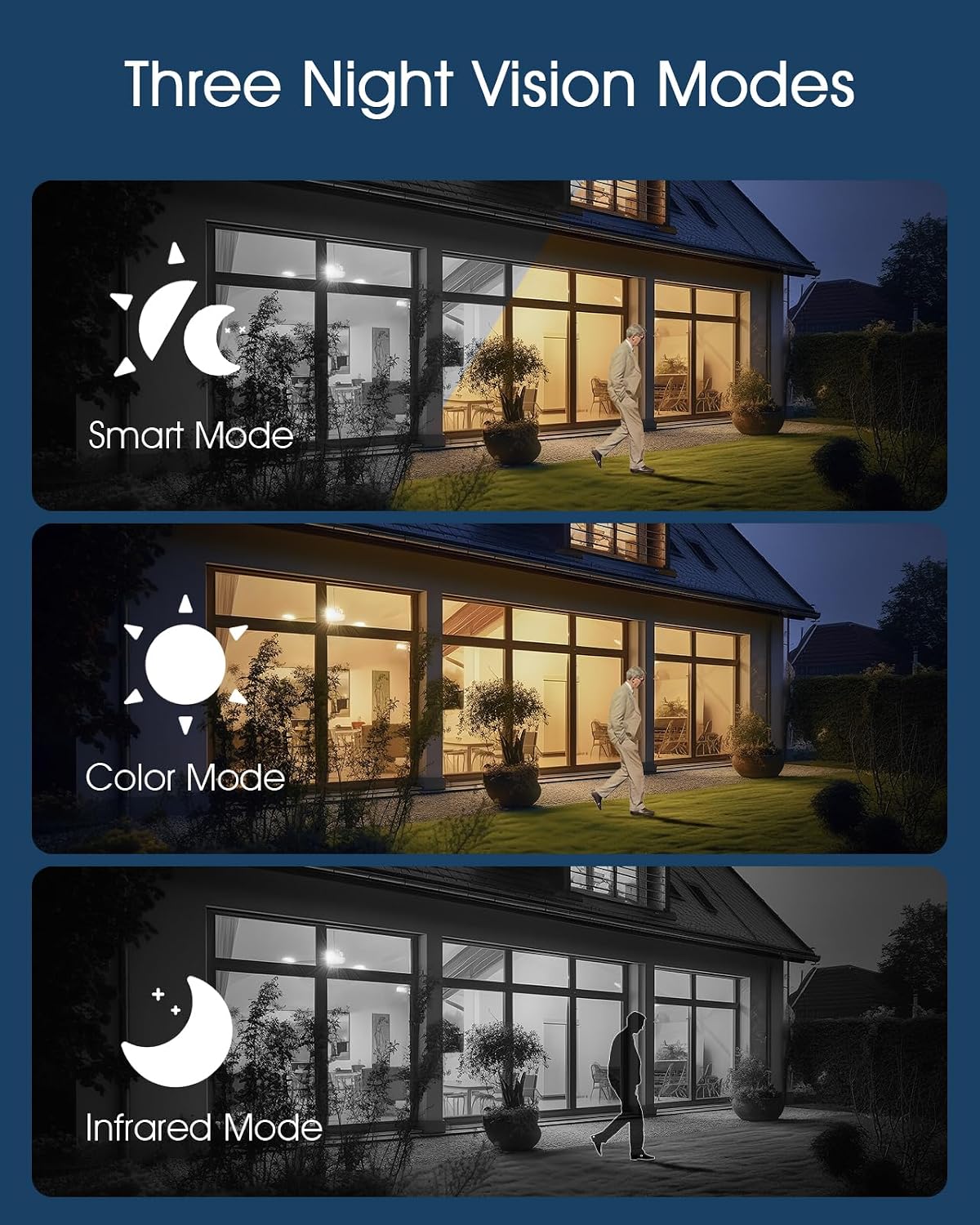
Image: Visual representation of the three night vision modes (Smart, Color, Infrared) available on the ANRAN Q04 camera, showing their distinct appearances.
4. การตั้งค่าการตรวจจับการเคลื่อนไหว
Configure motion detection sensitivity, detection zones, and notification preferences within the ANRAN app. This allows you to receive alerts only for relevant events.
การซ่อมบำรุง
1. การทำความสะอาด
- เช็ดเลนส์กล้องและแผงโซลาร์เซลล์ด้วยผ้านุ่มๆ เป็นประจำamp ผ้าเพื่อขจัดฝุ่น สิ่งสกปรก หรือเศษต่างๆ
- Ensure the solar panel is clean for efficient charging.
- อย่าใช้สารเคมีรุนแรงหรือน้ำยาทำความสะอาดที่มีฤทธิ์กัดกร่อน
2. การดูแลแบตเตอรี่
- The camera is designed for continuous solar charging. Ensure the solar panel receives adequate direct sunlight daily.
- If the camera is installed in a shaded area or during prolonged periods of low sunlight, occasional manual charging via USB may be required.
- หลีกเลี่ยงอุณหภูมิที่สูงหรือต่ำเกินไป เพราะอาจทำให้ประสิทธิภาพของแบตเตอรี่ลดลงได้

Image: ANRAN Q04 black solar security camera with its solar panel, illustrating its capability for 365 days of non-stop solar power due to the 9600mAh battery and IP66 waterproof rating.
การแก้ไขปัญหา
| ปัญหา | วิธีแก้ปัญหาที่เป็นไปได้ |
|---|---|
| กล้องไม่สามารถเปิดได้ | Ensure the battery is charged. Connect to a USB power source for initial charging. Check the power button. |
| ไม่มีสัญญาณ 4G | Verify the SIM card is correctly inserted and activated with a data plan. Check network coverage in the installation area. Try restarting the camera. |
| ไม่สามารถเชื่อมต่อกับแอปได้ | Ensure the camera is powered on and the SIM card has an active data connection. Restart the app and the camera. Follow the pairing steps again. |
| คุณภาพวิดีโอไม่ดีในเวลากลางคืน | Check night vision settings in the app (Smart, Color, Infrared). Ensure the camera lens is clean and not obstructed. |
| Battery not charging via solar. | Ensure the solar panel is clean and receives at least 4-6 hours of direct sunlight daily. Reposition the camera or panel if necessary. |
ข้อมูลจำเพาะ
- แบบอย่าง: คำถามที่ 04
- การเชื่อมต่อ: 4G LTE (SIM card required)
- พลัง: Solar Panel with 9600mAh Rechargeable Battery
- พื้นที่จัดเก็บ: MicroSD Card (up to 128GB, not included), Cloud Storage (subscription optional)
- ความทนทานต่อสภาพอากาศ: IP66 กันน้ำและกันฝุ่น
- อุณหภูมิในการทำงาน: -40°F ถึง 140°F (-40°C ถึง 60°C)
- การมองเห็นตอนกลางคืน: Smart, Color, Infrared Modes
- เสียง: เสียงสองทาง

Image: ANRAN Q04 white solar security camera operating outdoors in the rain, demonstrating its IP66 waterproof and dustproof rating and ability to withstand temperatures from -40°F to 140°F.
การรับประกันและการสนับสนุน
ANRAN products typically come with a limited warranty. Please refer to the warranty card included in your package or visit the official ANRAN webเว็บไซต์สำหรับข้อกำหนดและเงื่อนไขการรับประกันโดยละเอียด
For technical support, troubleshooting assistance, or warranty claims, please contact ANRAN customer service through their official webไซต์หรือข้อมูลการติดต่อที่ให้ไว้ในบรรจุภัณฑ์ผลิตภัณฑ์ของคุณ
Webเว็บไซต์: www.anran-cctv.com (Please verify official webงาน)