
1. บทนำ
This manual provides detailed instructions for the operation and maintenance of your Tiksounds P150 Smart Watch. Please read this manual thoroughly before using the device to ensure proper function and to maximize its capabilities. Keep this manual for future reference.
2. เนื้อหาบรรจุภัณฑ์
ตรวจสอบว่ามีรายการทั้งหมดอยู่ในแพ็คเกจ:
- Tiksounds P150 Smart Watch
- สายชาร์จ
- คู่มือการใช้งาน (เอกสารนี้)

3. สินค้าหมดview
3.1 คุณสมบัติหลัก
- Bluetooth Calling & Message Notifications: Make and answer calls directly from the watch. Receive instant notifications for messages and app alerts.
- หน้าจอสัมผัส HD ขนาด 1.83 นิ้ว: Features a high-definition display with customizable watch faces.
- อายุการใช้งานแบตเตอรี่ที่ยาวนานขึ้น: Equipped with a 1000mAh battery, offering up to 20 days of typical usage and 85 days of standby time on a 3.5-hour charge.
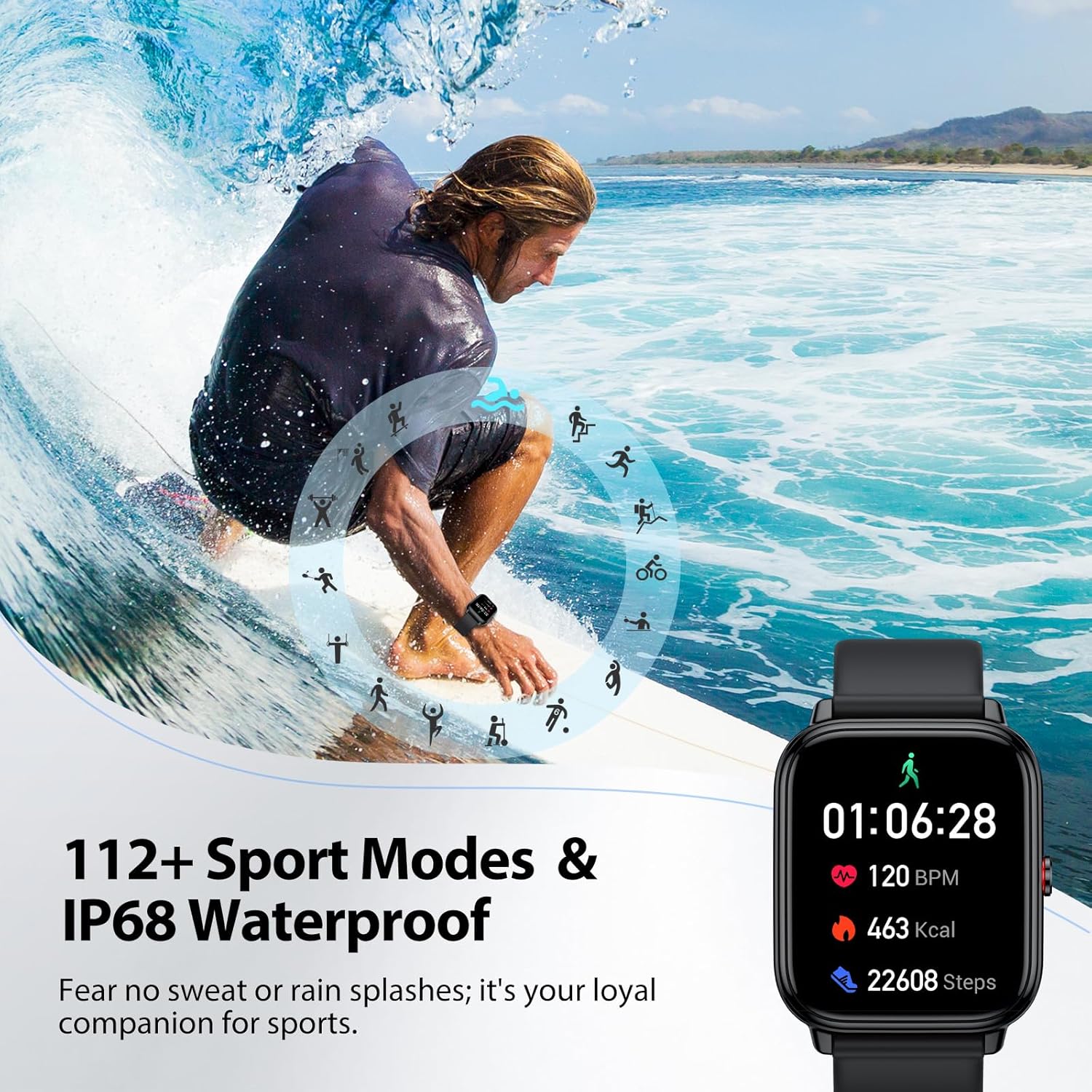
- โหมดกีฬามากกว่า 112 แบบ: Tracks various indoor and outdoor activities including running, cycling, and soccer.
- การติดตามสุขภาพตลอด 24 ชั่วโมง: Monitors stress, heart rate, blood oxygen, and sleep quality.
- กันน้ำ IP68: Resistant to sweat, rain, and handwashing.
- ฟังก์ชันหลากหลาย: Includes alarm, stopwatch, timer, phone locator, camera control, music control, weather display, and more.
3.2 ขนาดอุปกรณ์
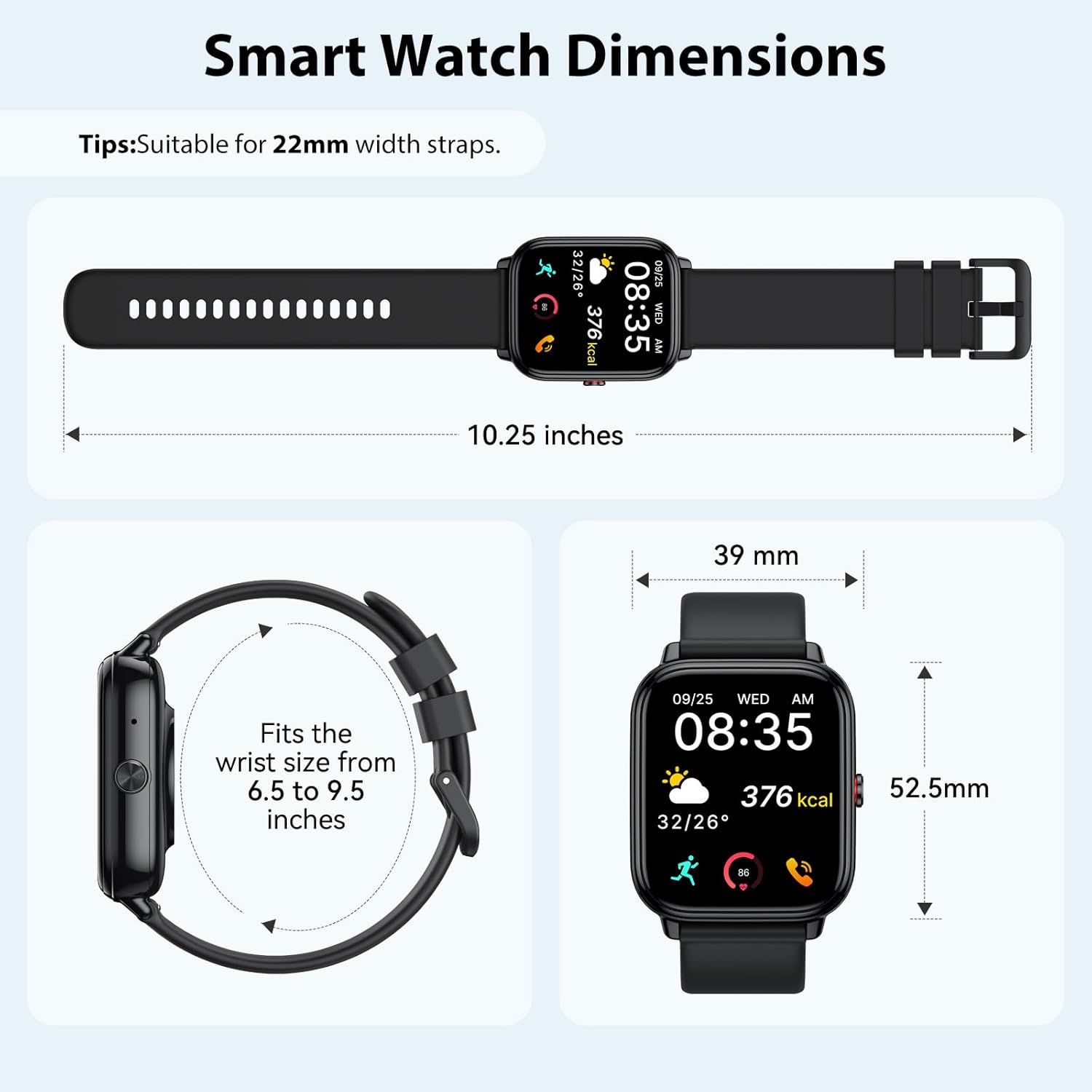
4. การตั้งค่า
4.1 การชาร์จอุปกรณ์
Before initial use, fully charge your smart watch. Connect the magnetic charging cable to the charging contacts on the back of the watch and plug the USB end into a power adapter (not included) or a computer USB port. A full charge takes approximately 3.5 hours.


4.2 การติดตั้งและการจับคู่แอป
The Tiksounds P150 Smart Watch is compatible with smartphones running Bluetooth 4.0, Android 7.0, iOS 9.0, or later versions. To connect your watch to your smartphone, follow these steps:
- ดาวน์โหลดแอป: Scan the QR code below or search for "FitCloudPro" in your smartphone's app store to download and install the application.
- เปิดใช้งานบลูทูธ: ตรวจสอบให้แน่ใจว่าได้เปิดใช้งาน Bluetooth บนสมาร์ทโฟนของคุณแล้ว
- จับคู่อุปกรณ์: Open the "FitCloudPro" app, navigate to the device section, and tap to add a new device. Select "P150" from the list of available devices.
- ยืนยันการจับคู่: The watch will send a Bluetooth request. Confirm the pairing on both your watch and smartphone.
- เปิดใช้งานการแจ้งเตือน: Within the "FitCloudPro" app settings, enable call and message alerts to receive notifications on your smartwatch.

5. คู่มือการใช้งาน
5.1 การโทรและการแจ้งเตือนข้อความผ่านบลูทูธ
Once paired with your smartphone, the P150 Smart Watch allows you to manage calls and receive notifications directly on your wrist.
- โทรออก: ใช้แป้นกดหมายเลขหรือรายชื่อติดต่อของนาฬิกาเพื่อเริ่มการโทร
- การรับสายโทรศัพท์: Incoming calls will display on the watch screen. Tap the green icon to answer.
- การแจ้งเตือนข้อความ: All notifications from enabled apps (e.g., SMS, WhatsApp, Facebook) will be pushed to your watch with customizable vibration alerts.


5.2 การแสดงผลและหน้าปัดนาฬิกา
The 1.83-inch HD touchscreen offers a clear and responsive interface. You can personalize your watch with over 200 pre-installed watch faces or create custom designs using your own photos via the FitCloudPro app.


โหมดกีฬา 5.3 โหมด
The P150 Smart Watch supports over 112 professional sports modes. It accurately tracks key metrics such as steps, distance, calories burned, and workout duration to help analyze performance and optimize training plans.

5.4 การติดตามสุขภาพ
The built-in optical sensor continuously monitors your stress levels, heart rate, blood oxygen, and sleep quality. The dedicated app provides long-term health trends and personalized insights.
- การตรวจสอบอัตราการเต้นของหัวใจ: ให้ข้อมูลอัตราการเต้นของหัวใจแบบเรียลไทม์
- การตรวจวัดออกซิเจนในเลือด: วัดระดับความอิ่มตัวของออกซิเจนในเลือด
- การติดตามการนอนหลับ: Analyzes sleep patterns, including deep sleep and light sleep duration.
- การติดตามความเครียด: Helps track and manage stress levels throughout the day.

5.5 ฟังก์ชั่นอื่น ๆ
The P150 Smart Watch offers a range of additional practical features:
- เตือน
- นาฬิกาจับเวลา
- ตัวจับเวลา
- ที่ตั้งโทรศัพท์
- การควบคุมกล้อง
- การควบคุมเพลง
- จอแสดงสภาพอากาศ
- การฝึกหายใจ
- Women's Health Tracking
- การแจ้งเตือนอยู่ประจำ


วิดีโอ: จบแล้วview of the Tiksounds P150 Smart Watch features, including long battery life, magnetic charging, various app functions, Bluetooth calling, 112+ sports modes, sleep tracking, 24/7 activity tracking, and customizable watch faces.
6. การบำรุงรักษา
- การทำความสะอาด: Regularly clean the watch screen and strap with a soft, dry cloth. For stubborn dirt, use a slightly damp ผ้าและเช็ดให้แห้งสนิท
- ความต้านทานน้ำ: The watch is IP68 waterproof, suitable for handwashing, rain, and daily sweating. Avoid hot water, saunas, or diving, as steam and high temperatures can compromise the seal.
- การชาร์จ: ใช้เฉพาะสายชาร์จที่ให้มาเท่านั้น ตรวจสอบให้แน่ใจว่าขั้วต่อชาร์จสะอาดและแห้งก่อนทำการชาร์จ
- พื้นที่จัดเก็บ: เก็บนาฬิกาไว้ในที่แห้งและเย็นเมื่อไม่ใช้งาน หลีกเลี่ยงอุณหภูมิที่สูงหรือต่ำเกินไป

7 การแก้ไขปัญหา
| ปัญหา | วิธีแก้ปัญหาที่เป็นไปได้ |
|---|---|
| นาฬิกาไม่เปิด | Ensure the watch is fully charged. Connect to the charging cable for at least 30 minutes. |
| ไม่สามารถจับคู่กับสมาร์ทโฟนได้ | 1. โปรดตรวจสอบให้แน่ใจว่าได้เปิดใช้งานบลูทูธบนโทรศัพท์ของคุณแล้ว 2. ตรวจสอบให้แน่ใจว่านาฬิกาอยู่ในระยะการเชื่อมต่อบลูทูธ 3. Restart both the watch and the phone. 4. Check if the "FitCloudPro" app has necessary permissions. |
| ไม่ได้รับการแจ้งเตือน | 1. Verify that notifications are enabled in the "FitCloudPro" app settings. 2. Check phone's notification settings for the app. 3. ตรวจสอบให้แน่ใจว่านาฬิกาเชื่อมต่อผ่านบลูทูธแล้ว |
| ข้อมูลสุขภาพที่ไม่ถูกต้อง | ตรวจสอบให้แน่ใจว่าสวมนาฬิกาให้กระชับพอดีข้อมือ ไม่แน่นหรือหลวมเกินไป ทำความสะอาดเซ็นเซอร์ที่ด้านหลังนาฬิกา |
| อายุการใช้งานแบตเตอรี่สั้น | Reduce screen brightness, disable unnecessary notifications, or use power-saving mode. Ensure the watch is fully charged. |
8. ข้อมูลจำเพาะ
- ขนาดหน้าจอ: 1.83 นิ้ว
- ความจุแบตเตอรี่: 1000 มิลลิวินาทีamp ชั่วโมง
- เทคโนโลยีการเชื่อมต่อ: บลูทูธ
- มาตรฐานการสื่อสารไร้สาย: บลูทูธ
- ระบบปฏิบัติการ: Android Wear 1.0 (compatible with Android 7.0+ / iOS 9.0+)
- ความจุหน่วยความจำ: 1GB
- ความต้านทานน้ำ: IP68
- น้ำหนักสินค้า: 0.09 กรัม
- ผู้ผลิต: ติ๊กซาวด์
9. การรับประกันและการสนับสนุน
For warranty information, technical support, or customer service inquiries, please refer to the official Tiksounds webตรวจสอบเว็บไซต์หรือติดต่อฝ่ายบริการลูกค้าโดยตรง โดยทั่วไปรายละเอียดต่างๆ สามารถพบได้บนบรรจุภัณฑ์ของผลิตภัณฑ์หรือเว็บไซต์ของผู้ผลิต webเว็บไซต์.