
1. บทนำ
Thank you for choosing the New Bee Bluetooth Headset M54. This single-ear headset is designed for clear communication and comfortable wear, featuring advanced ENC environmental noise cancellation and CVC8.0 technology for superior call quality. With its long battery life and multi-device connectivity, it is an ideal companion for commuting, driving, office work, and business chats. Please read this manual carefully before use to ensure proper operation and to maximize your experience.
2. เนื้อหาบรรจุภัณฑ์
กรุณาตรวจสอบเนื้อหาในแพ็คเกจเพื่อให้แน่ใจว่ามีสินค้าครบทั้งหมด:
- Bluetooth Headset x1
- สายชาร์จ Type-C x1
- Eartips (S/M/L sizes) x3 pairs
- กล่องชาร์จ x1
- คู่มือการใช้งาน x1
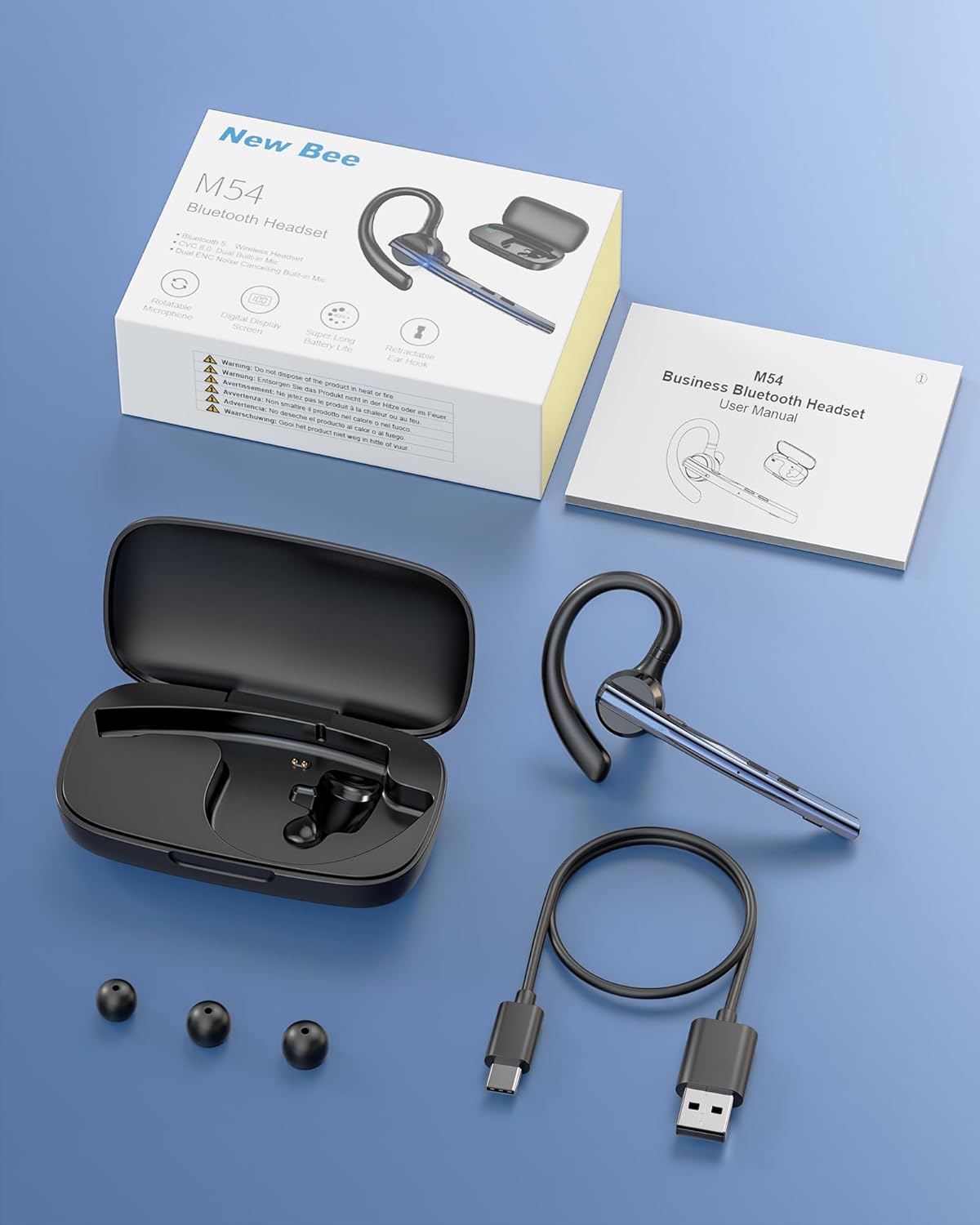
Image: Contents of the New Bee M54 Bluetooth Headset package.
3. คุณสมบัติของผลิตภัณฑ์
ENC Dual Microphone for Clear Calls
The headset features a dual microphone array with ENC (Environmental Noise Cancellation) and CVC8.0 technology. The main microphone accurately captures your voice, while the sub-microphone collects ambient noise. The main control chip processes this information to enhance call effects by effectively canceling environmental noise and echoes. Enjoy HIFI sound quality and 360° surround sound for an immersive audio experience.

Image: Man using the headset in a car, highlighting ENC noise cancellation for clear calls.
Flexible Rotation & Comfortable Fit
An innovative balanced ear hook design prevents the headset from falling off and evenly distributes its weight for comfortable wear. The pivot points use elastic soft rubber material, combined with an in-ear design, ensuring comfort even during prolonged use. The microphone arm can rotate 270°, the ear hook rotates 180°, and the earcup front can move 30° left/right. Three sizes of eartips (S/M/L) are included for a customized fit.

Image: Woman wearing the headset, showcasing its lightweight and adjustable features.
อายุการใช้งานแบตเตอรี่ยาวนานเป็นพิเศษ
Equipped with a large-capacity charging case and a low-power consumption chip, the headset offers extended usage times. Enjoy up to 15 hours of music playback, 12 hours of talk time, and an impressive 6 months of standby time. The charging case provides 2-3 full charges for the headset, extending the total operating time to approximately 60 hours.

Image: Headset charging in its case, illustrating battery life and charging options.
Bluetooth 5.1 & Strong Compatibility
Featuring the latest QCC3020/Bluetooth 5.1 chip, the headset ensures low power consumption, fast transmission speed, and a stable, smooth signal. It offers a reliable connection distance of up to 15 meters, making it compatible with a wide range of devices including smartphones, tablets, laptops, and PCs.

Image: Man using the headset outdoors, showing the 15m Bluetooth range.
Multi-functional & Easy Operation
The headset includes a multi-function button and an independent mute button for convenient control. One-touch mic off protects your privacy. Double-click the mute button to activate your voice assistant. It supports simultaneous connection to two devices, allowing seamless switching between music and call functions. The unique ear hook design is freely extendable to fit various ear shapes, accommodating more users. It is suitable for diverse environments such as office work, driving, phone conferences, and delivery services.

Image: Headset connected to multiple devices, demonstrating dual device connectivity.
4. การตั้งค่า
4.1 Charging the Headset and Charging Case
Before first use, fully charge the headset and charging case.
- การชาร์จชุดหูฟัง: Place the headset into the charging case. Ensure the charging contacts align. The indicator light on the headset will show charging status.
- การชาร์จเคส: Connect the provided Type-C USB cable to the charging port on the case and plug the other end into a USB power adapter (not included). The digital display on the case will show the battery percentage.
- A full charge for the headset takes approximately 1.5 hours. The charging case can fully charge the headset 2-3 times.
4.2 การเปิด/ปิดเครื่อง
- เปิดเครื่อง: Press and hold the Multi-function Button for 3 seconds until the indicator light flashes blue.
- หมดแรง: Press and hold the Multi-function Button for 5 seconds until the indicator light flashes red and then turns off.
4.3 การจับคู่บลูทูธ
- ตรวจสอบว่าชุดหูฟังปิดอยู่
- Press and hold the Multi-function Button for approximately 5-7 seconds until the indicator light flashes red and blue alternately, indicating pairing mode.
- บนอุปกรณ์ของคุณ (สมาร์ทโฟน แท็บเล็ต พีซี) เปิดใช้งานบลูทูธและค้นหาอุปกรณ์ที่มีอยู่
- เลือก "M54" จากรายการอุปกรณ์ที่พบ
- Once connected, the headset indicator light will flash blue slowly.
4.4 การสวมชุดหูฟัง
The M54 headset is designed for comfortable and secure wear on either ear.
- Choose the Right Eartip: Select the S, M, or L eartip that best fits your ear canal for optimal sound and comfort.
- Adjust the Ear Hook: Place the ear hook over your ear. The ear hook can rotate 180° to fit both left and right ears.
- วางตำแหน่งไมโครโฟน: Rotate the microphone arm up to 270° to position it towards your mouth for clear voice pickup. The earcup front can also be adjusted 30° left or right for fine-tuning.
- Ensure a snug fit without discomfort. An improper fit may affect call quality.

Image: Instructions for selecting eartips and wearing the headset.
5. คู่มือการใช้งาน
5.1 ฟังก์ชันปุ่มต่างๆview

Image: Detailed diagram of headset buttons and their functions.
5.2 การจัดการการโทร
- รับ/วางสาย: Single click the Multi-function Button.
- ปฏิเสธสาย: กดปุ่มมัลติฟังก์ชั่นค้างไว้ 2 วินาที
- โทรซ้ำหมายเลขล่าสุด: Double click the Multi-function Button.
- ปิดเสียง/เปิดเสียงไมโครโฟน: Single click the Mute Button.
5.3 การเล่นเพลง
- เล่น/หยุดชั่วคราว: Single click the Multi-function Button.
- เพลงถัดไป: กดปุ่มเพิ่มระดับเสียงค้างไว้ 3 วินาที
- แทร็กก่อนหน้า: กดปุ่มลดระดับเสียงค้างไว้ 3 วินาที
5.4 การควบคุมระดับเสียง
- ปรับระดับเสียงขึ้น: Single click the Volume Up button.
- ลดเสียงลง: Single click the Volume Down button.
5.5 Voice Assistant (SIRI)
- เปิดใช้งาน Voice Assistant: Double click the Mute Button.
5.6 การเชื่อมต่อหลายจุด
The M54 headset can connect to two Bluetooth devices simultaneously.
- Pair the headset with the first device as described in Section 4.3.
- ปิดบลูทูธบนอุปกรณ์เครื่องแรก ชุดหูฟังจะเข้าสู่โหมดจับคู่ใหม่อีกครั้ง
- จับคู่ชุดหูฟังกับอุปกรณ์ที่สอง
- Enable Bluetooth on the first device. The headset should automatically connect to both devices.
- You can now seamlessly switch between audio and calls from either connected device.
6. การบำรุงรักษา
การบำรุงรักษาอย่างถูกต้องจะช่วยให้ชุดหูฟังของคุณมีอายุการใช้งานยาวนานและมีประสิทธิภาพเหมาะสมที่สุด
- การทำความสะอาด: Use a soft, dry cloth to clean the headset and charging case. Do not use harsh chemicals or abrasive materials. Regularly clean the eartips and charging contacts to prevent debris buildup.
- พื้นที่จัดเก็บ: Store the headset in its charging case when not in use to protect it from dust and damage. Avoid storing in extreme temperatures or high humidity.
- การดูแลแบตเตอรี่ To preserve battery life, avoid fully discharging the battery frequently. Charge the headset regularly, even if not used for extended periods.
- การสัมผัสน้ำ: ชุดหูฟังนี้ไม่กันน้ำ โปรดหลีกเลี่ยงการสัมผัสกับน้ำ ฝน หรือความชื้นมากเกินไป
7 การแก้ไขปัญหา
หากพบปัญหาใดๆ โปรดดูปัญหาและวิธีแก้ไขที่พบบ่อยต่อไปนี้:
| ปัญหา | สาเหตุที่เป็นไปได้ | สารละลาย |
|---|---|---|
| ไม่สามารถเปิดเครื่องได้ | แบตเตอรี่ต่ำ | ชาร์จหูฟังและเคสชาร์จให้เต็ม |
| ไม่สามารถจับคู่กับอุปกรณ์ได้ | ชุดหูฟังไม่ได้อยู่ในโหมดจับคู่; บลูทูธปิดอยู่บนอุปกรณ์; อุปกรณ์อยู่ไกลเกินไป | Ensure headset is in pairing mode (flashing red/blue). Turn on Bluetooth on your device. Move device closer to headset (within 15m). Try restarting both devices. |
| ไม่มีเสียงหรือเสียงเบา | Volume too low; Headset not connected; Incorrect audio output selected. | เพิ่มระดับเสียงทั้งในหูฟังและอุปกรณ์ที่เชื่อมต่อ จากนั้นเสียบหูฟังใหม่อีกครั้ง ตรวจสอบการตั้งค่าเอาต์พุตเสียงบนอุปกรณ์ของคุณ |
| คุณภาพการโทรไม่ดี | Weak signal; Microphone obstructed; Improper fit. | Move closer to the connected device. Ensure microphone is clear and positioned correctly. Adjust headset fit and eartip size. |
| Headset disconnects frequently | นอกระยะ; สัญญาณรบกวน; แบตเตอรี่เหลือน้อย | Stay within 15m of the connected device. Avoid strong electromagnetic interference. Charge the headset. |
หากปัญหายังคงมีอยู่หลังจากลองวิธีแก้ไขเหล่านี้แล้ว โปรดติดต่อฝ่ายสนับสนุนลูกค้า
8. ข้อมูลจำเพาะ
| ยี่ห้อ | ใหม่ผึ้ง |
| แบบอย่าง | M54 |
| สี | สีฟ้า |
| เวอร์ชันบลูทูธ | 5.1 (ชิป QCC3020) |
| การควบคุมเสียงรบกวน | ENC Environmental Noise Cancellation, CVC8.0 Echo Cancellation |
| ระยะการส่งข้อมูล | สูงสุด 15 เมตร |
| เวลาเล่นเพลง | ประมาณ 15 ชั่วโมง |
| เวลาสนทนา | ประมาณ 12 ชั่วโมง |
| เวลาสแตนด์บาย | ประมาณ 6 เดือน |
| Total Operating Time (with case) | ประมาณ 60 ชั่วโมง |
| เวลาในการชาร์จ | Approx. 1.5 hours (headset) |
| น้ำหนัก | ประมาณ 14.2กรัม |
| ต้นทาง | จีน |
9. การรับประกันและการสนับสนุน
9.1 ข้อมูลการรับประกัน
The New Bee Bluetooth Headset M54 comes with a การรับประกันจากผู้ผลิต 1 ปี นับจากวันที่ซื้อสินค้า การรับประกันนี้ครอบคลุมถึงข้อบกพร่องจากการผลิตและการทำงานผิดปกติภายใต้การใช้งานปกติ ไม่ครอบคลุมถึงความเสียหายที่เกิดจากการใช้งานผิดวิธี อุบัติเหตุ การดัดแปลงโดยไม่ได้รับอนุญาต หรือการสึกหรอตามปกติ
9.2 การสนับสนุนลูกค้า
If you have any questions, require technical assistance, or need to claim warranty service, please contact New Bee customer support through the retailer where you purchased the product or visit the official New Bee website for contact information. Please have your purchase receipt and product model number (M54) ready when contacting support.