
1. สินค้าหมดview
The MAXDONE Solar Trail Camera PH960W is designed for outdoor monitoring, capturing high-resolution photos and videos of wildlife or for security purposes. It features solar power, a built-in rechargeable battery, WiFi and Bluetooth connectivity for app control, and IP66 waterproofing for reliable performance in various weather conditions.
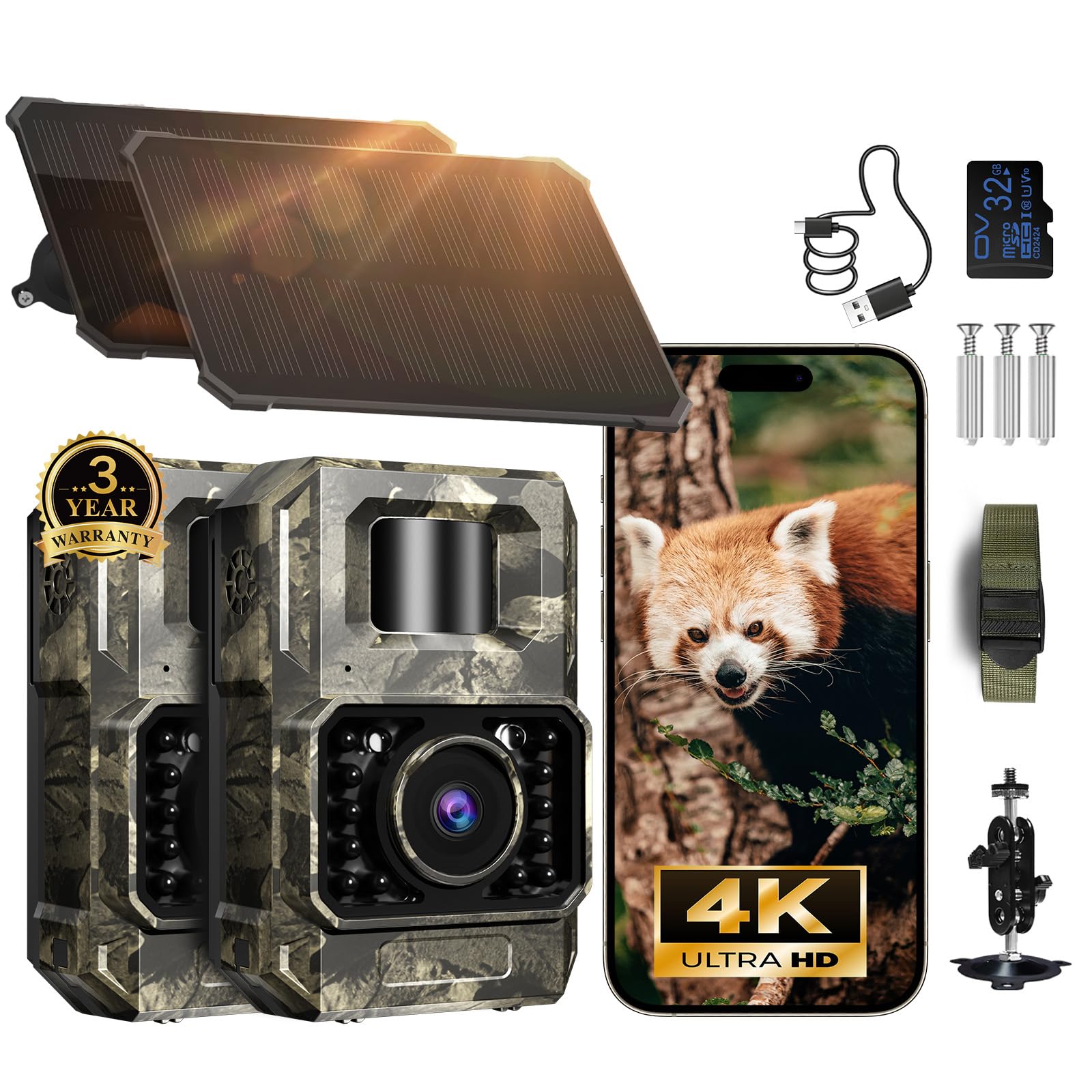
Image 1: The MAXDONE Solar Trail Camera PH960W, showcasing its compact design and camouflage finish.
2. เนื้อหาบรรจุภัณฑ์
ก่อนทำการติดตั้ง โปรดตรวจสอบให้แน่ใจว่ามีอุปกรณ์ครบถ้วนในบรรจุภัณฑ์:
- MAXDONE Solar Trail Camera (PH960W)
- Detachable Solar Panel
- สายรัดยึด
- ตัวยึด
- การ์ด SD 32GB
- สาย USB
- คู่มือการใช้งาน

Image 2: All components included in the MAXDONE Solar Trail Camera PH960W package, including the camera, solar panel, mounting accessories, and SD card.
3. คู่มือการติดตั้ง
3.1 การชาร์จเริ่มต้น
The camera features a built-in rechargeable battery and a detachable solar panel. For optimal performance, ensure the camera is fully charged before initial use. The solar panel will maintain the charge during outdoor deployment.
การติดตั้งการ์ด SD 3.2 ตัว
Insert the included 32GB SD card into the designated slot on the camera. Ensure it is inserted correctly until it clicks into place.

Image 3: The MAXDONE Solar Trail Camera PH960W with an SD card inserted, highlighting the storage solution.
3.3 การดาวน์โหลดแอปและการเชื่อมต่อ
- ดาวน์โหลด TrailCam GO แอปจากร้านแอปของสมาร์ทโฟนของคุณ (ใช้ได้สำหรับ Android และ iOS)
- Switch the camera to the 'ON' position.
- Open the TrailCam GO app on your phone and follow the on-screen instructions to connect to the camera's WiFi signal. Note: The camera creates its own WiFi signal for connection and does not support home WiFi networks. Connection range is up to 55 ft in open areas.

Image 4: Visual guide for connecting the camera to the TrailCam GO app, showing the app interface and camera switch.
3.4 การติดตั้งกล้อง
Use the provided mounting straps and bracket to securely attach the camera to a tree or other stable surface. Position the camera to capture the desired monitoring area.

Image 5: The MAXDONE Solar Trail Camera PH960W mounted on a tree with its solar panel, demonstrating outdoor deployment.
4. คู่มือการใช้งาน
4.1 Basic Operation via App
Once connected to the TrailCam GO app, you can:
- พรีview: View อยู่ footage จากกล้อง
- ดาวน์โหลด: Transfer captured photos and videos to your phone.
- การตั้งค่า: Adjust camera parameters such as resolution, trigger sensitivity, and operating modes.
- แบ่งปัน: Easily share media directly from the app.

Image 6: Illustration of the TrailCam GO app interface controlling the camera, showing options for previewดาวน์โหลด และการตั้งค่า
4.2 การจับภาพและวิดีโอ
The camera captures crisp 64MP images and smooth 4K/30fps videos. The 100° wide-angle lens ensures a broad field of view. Advanced H.264 compression optimizes storage space and speeds up file การโอนย้าย

Image 7: Depiction of the camera's 4K 64MP image and video quality, with a deer captured in sharp detail.
4.3 การมองเห็นตอนกลางคืน
Equipped with enhanced 850nm infrared LEDs, the camera provides low-glow night vision up to 65 feet. Adaptive lighting balances brightness to prevent overexposure or dark spots, ensuring clear images even in total darkness.

Image 8: Comparison of night vision quality, showing how adaptive lighting prevents overexposure and dark spots for clear images.
4.4 Motion Activation
The camera features fast motion-activation technology with a 0.1-second trigger speed, capturing 1-5 photos per trigger to ensure no moment is missed.

Image 9: Illustration demonstrating the camera's 0.1-second trigger time, capturing fast-moving subjects.
คุณสมบัติขั้นสูง 4.5 ประการ
- เวลาamps: Automatically adds date, time, and temperature to recordings.
- Custom Monitoring Periods: ตั้งเวลาเฉพาะสำหรับการเปิดใช้งานกล้อง
- โหมด Time-Lapse: Capture images at set intervals to observe long-term changes.
- การบันทึกแบบวนซ้ำ: Overwrites the oldest fileเมื่อการ์ด SD เต็ม
- การป้องกันด้วยรหัสผ่าน: Secure your camera settings and data.
- Custom Detecting Area: Define specific zones for motion detection to avoid irrelevant recordings and save power/storage.
- การติดตามตำแหน่ง: Use the app to mark camera locations on a map for easy navigation and security.

Image 10: The TrailCam GO app interface showing how to set a custom detection area to optimize recordings.

Image 11: The TrailCam GO app displaying a map with marked camera locations for easy tracking and management.
5. การบำรุงรักษา
5.1 การจัดการพลังงาน
The camera's built-in rechargeable battery is complemented by a detachable solar panel for continuous power. For extended hunting trips or prolonged use in low-light conditions, the camera can be connected to an external power bank.

Image 12: Various charging options for the camera, including adapter, power bank, solar panel, and computer connection.
5.2 ความต้านทานต่อสภาพอากาศ
The camera features an IP66 waterproof rating, ensuring reliable operation in rain, snow, and other tough outdoor conditions. Regularly check the seals and ports for any debris or damage to maintain its waterproof integrity.

Image 13: The MAXDONE Solar Trail Camera PH960W demonstrating its IP66 waterproof capability in a water splash scenario.
5.3 การทำความสะอาด
Wipe the camera lens and solar panel periodically with a soft, clean cloth to ensure clear image capture and efficient solar charging. Avoid using abrasive cleaners.
6 การแก้ไขปัญหา
If you encounter issues with your MAXDONE Solar Trail Camera PH960W, consider the following:
- กล้องไม่เปิด: Ensure the battery is charged and the power switch is in the 'ON' position. Check the solar panel connection.
- คุณภาพของภาพ/วิดีโอไม่ดี: Clean the camera lens. Ensure the camera is securely mounted and not vibrating. Check night vision settings if issues occur in low light.
- ปัญหาการเชื่อมต่อแอป: Ensure the camera's WiFi is enabled and your phone is within the 55 ft connection range. Remember, the camera creates its own WiFi network and does not connect to home WiFi.
- การตรวจจับการเคลื่อนไหวไม่ทำงาน: Verify motion detection settings in the app. Ensure the detection area is clear of obstructions that might trigger false alarms or block detection.
- SD card errors: Ensure the SD card is properly inserted and not full. Try formatting the SD card via the app (this will erase all data).
7. ข้อมูลจำเพาะ
| ยี่ห้อ | แม็กซ์โดน |
| ชื่อรุ่น | TRAIL CAMERA (PH960W) |
| การใช้ที่แนะนำ | การรักษาความปลอดภัยภายนอกอาคาร |
| เทคโนโลยีการเชื่อมต่อ | ไร้สาย (Wi-Fi, Bluetooth) |
| คุณสมบัติพิเศษ | ปรับได้ |
| การใช้งานภายใน/ภายนอกอาคาร | กลางแจ้ง |
| อุปกรณ์ที่รองรับ | สมาร์ทโฟน |
| ประเภทตัวควบคุม | ปุ่มกด |
| ประเภทการติดตั้ง | ติดผนัง |
| สี | ลายพราง |
| แหล่งพลังงาน | Battery Powered (Rechargeable, Solar) |
| รูปแบบการจับภาพวิดีโอ | เอ็มพี 4 |
| ความละเอียดในการจับภาพวิดีโอ | 4K (30fps) |
| ความละเอียดของภาพ | 64MP |
| ขนาดรายการ | 2.8 x 1.5 x 4.3 นิ้ว |
| ระดับการกันน้ำ | IP66 |
8. การรับประกันและการสนับสนุน
8.1 ข้อมูลการรับประกัน
The MAXDONE Solar Trail Camera PH960W is backed by a รับประกัน 2 ปี และก 24-Months Care Planเพื่อความอุ่นใจในเรื่องคุณภาพและประสิทธิภาพของผลิตภัณฑ์
8.2 การสนับสนุนลูกค้า
For any questions, technical assistance, or support needs, MAXDONE offers บริการลูกค้าที่เป็นมิตรตลอด 24 ชั่วโมง และ one-on-one support. You can also visit the official MAXDONE store for more information and resources: MAXDONE Store.