
xTool IF2 2.0
xTool SafetyPro IF2 2.0 Hyper Flow Inline Duct Fan User Manual
Model: MXA-K013-001
1. ข้อมูลด้านความปลอดภัย
Please read all safety instructions carefully before operating the xTool SafetyPro IF2 2.0. Failure to follow these instructions may result in electric shock, fire, or serious injury.
- ความปลอดภัยทางไฟฟ้า: Ensure the power supply matches the fan's requirements. Do not operate with damaged cords or plugs.
- การระบายอากาศ : Always ensure proper ventilation when using the fan, especially when connected to a laser engraver. Exhaust fumes must be directed outdoors or into an appropriate filtration system.
- การสัมผัสน้ำ: The main unit is not waterproof. While the fan components are washable, ensure the main electrical connections and motor housing remain dry.
- เด็กและสัตว์เลี้ยง: เก็บอุปกรณ์ให้ห่างจากมือเด็กและสัตว์เลี้ยง
- การซ่อมบำรุง: ตัดการเชื่อมต่อไฟฟ้าก่อนดำเนินการบำรุงรักษาหรือทำความสะอาดใดๆ
2. สินค้าหมดview
The xTool SafetyPro IF2 2.0 is a high-performance inline duct fan designed for efficient smoke and fume extraction, particularly for laser cutting and engraving applications. It features dual high-speed fans and intelligent control for optimal performance.
2.1 คุณสมบัติหลัก
- Unmatched Smoke Extraction Efficiency: Two ultra-speed 14,000 RPM fans generate 135 CFM airflow with up to 1300 Pa pressure.
- การออกแบบที่กะทัดรัด: Integrated smart EC motor design in a compact 5-inch body.
- Auto-Sync Control: Wirelessly connects with xTool laser engravers for hands-free operation and intelligent power/airflow adjustment.
- การบำรุงรักษาที่ง่ายดาย: IP55 rated for easy disassembly and cleaning of fan components.
- การทำงานที่เงียบ: Built-in sound-absorbing cotton reduces operating noise.
- การติดตั้งแบบยืดหยุ่น: Retractable 2.3-meter durable PP tube.
2.2 ส่วนประกอบ
- SafetyPro IF2 2.0 Unit
- ดองเกิลบลูทูธ
- เลขฐานสิบหก
- ข้อต่อท่อ 1
- ข้อต่อท่อ 2
- ท่อ clamp
- Ribbed plastic anchors (8x)
- สกรู (8x)
- โคมไฟแบบติดผนัง
- Smoke exhaust pipe (2.3m)
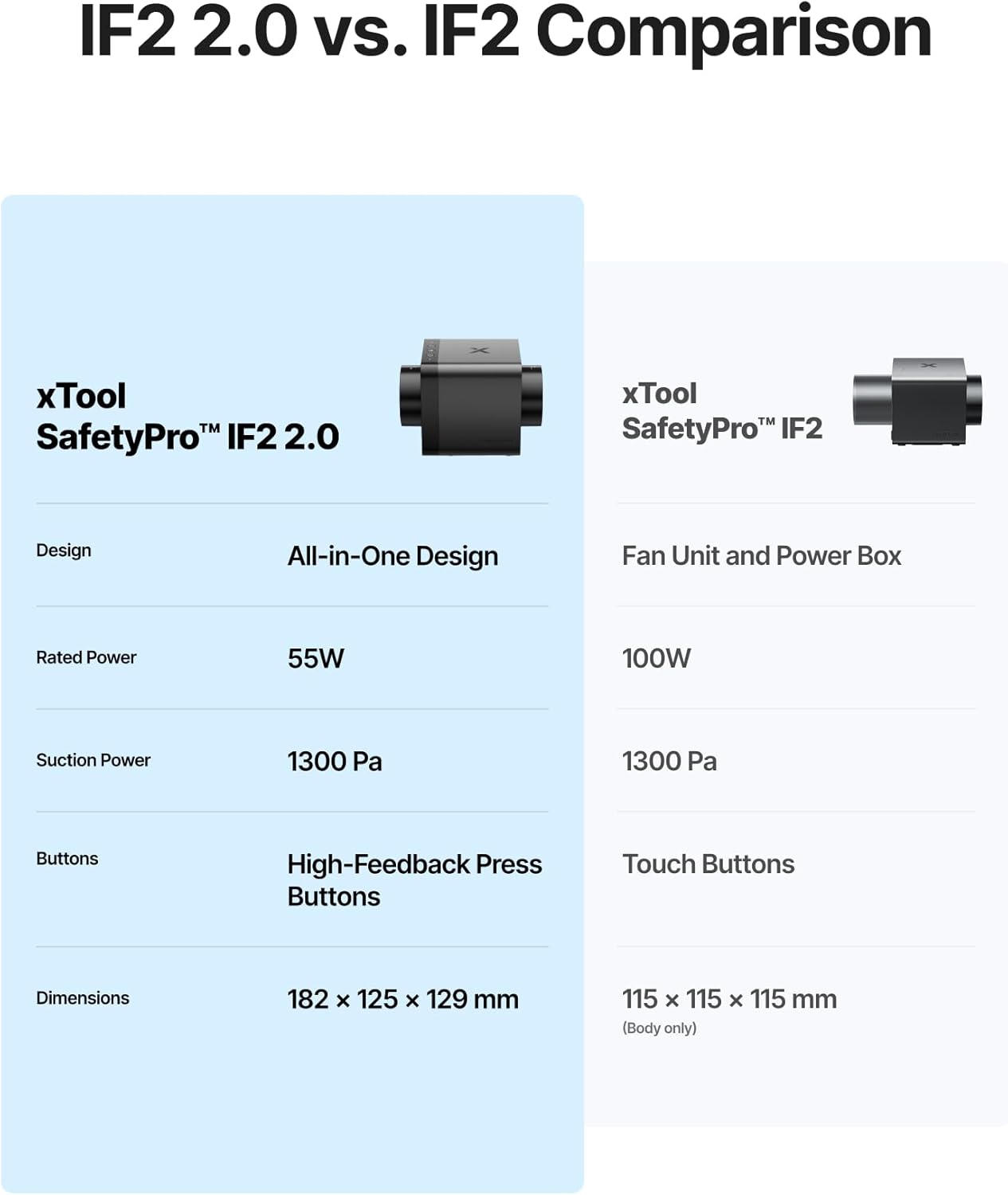
Image: The xTool SafetyPro IF2 2.0 main unit, showcasing การออกแบบที่กะทัดรัด

Image: The xTool SafetyPro IF2 2.0 connected to its flexible smoke exhaust pipe.
3. การตั้งค่าและการติดตั้ง
Follow these steps to properly set up your xTool SafetyPro IF2 2.0.
3.1 การติดตั้งพัดลม
- Choose a suitable location near your laser engraver, ensuring access to an exhaust point (window, vent, or filtration system).
- Use the provided wall-mounting fixture, screws, and ribbed plastic anchors to securely attach the fan to a wall. Alternatively, the compact design allows for placement on a stable surface.
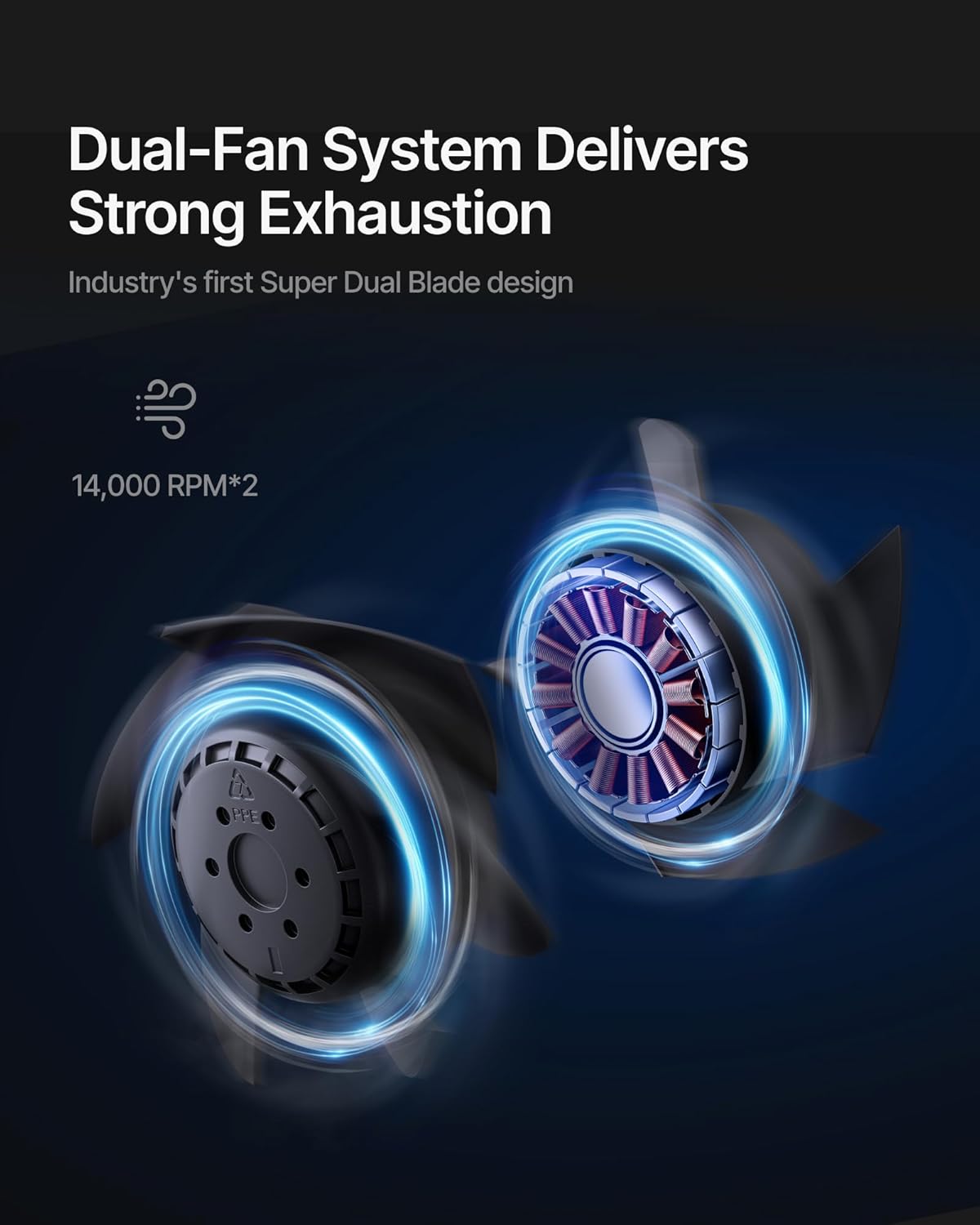
Image: The xTool SafetyPro IF2 2.0 installed using the wall-mounting fixture, with the exhaust pipe connected.
3.2 Connecting the Exhaust Pipe
- Attach one end of the smoke exhaust pipe to the fan unit using the appropriate pipe connector and pipe clamp.
- Connect the other end of the smoke exhaust pipe to your laser engraver's exhaust port or direct it to a safe outdoor venting location. Ensure all connections are secure to prevent smoke leakage.

Image: Illustration of the easy detachable pipe connection for simplified maintenance and the washable fan components.
3.3 พลังงานและการเชื่อมต่อ
- Plug the power adapter into the fan unit and then into a suitable power outlet.
- Insert the Bluetooth dongle into your xTool laser engraver (if applicable) to enable auto-sync functionality.
4. การดำเนินการ
The xTool SafetyPro IF2 2.0 is designed for seamless integration and efficient operation.
4.1 Auto-Sync Control
- When connected to a compatible xTool laser engraver via Bluetooth, the IF2 2.0 will automatically turn on/off with the laser engraver.
- The fan intelligently adjusts its power and airflow based on the material being processed, optimizing smoke extraction.
4.2 Manual Control and Quiet Mode
- The fan features high-feedback press buttons for manual control of power and fan speed.
- Activate Quiet Mode for operations that produce less smoke or when a lower noise level is desired.
4.3 Smart Connect via xTool Creative Space
- For enhanced control and monitoring, connect the IF2 2.0 through the xTool Creative Space software. This allows for fine-tuning settings and provides a comprehensive user experience.

Image: The xTool SafetyPro IF2 2.0 demonstrating intelligent control, connected to an xTool laser engraver and a laptop running xTool Creative Space software.
5. การบำรุงรักษา
Regular maintenance ensures optimal performance and longevity of your SafetyPro IF2 2.0.
5.1 Cleaning the Fan Components
- The fan components are designed for easy disassembly and are washable.
- Before cleaning, always disconnect the power supply.
- Carefully disassemble the fan unit as per the instructions in the full manual (not provided here).
- Rinse the fan blades and housing components with water. Ensure they are completely dry before reassembly.
- สำคัญ: The exposed wires and main electrical unit are not waterproof. Do not submerge or expose these parts to water.
5.2 Exhaust Pipe Maintenance
- Periodically inspect the smoke exhaust pipe for any blockages, kinks, or damage.
- Clean the interior of the pipe if excessive residue builds up, which can reduce airflow efficiency.
6 การแก้ไขปัญหา
If you encounter issues with your xTool SafetyPro IF2 2.0, refer to the following common solutions:
- พัดลมไม่เปิด: Check power connection, ensure the power outlet is functional, and verify the fan is properly connected to the laser engraver if using auto-sync.
- การดูดที่อ่อนแอ: Inspect the exhaust pipe for blockages or kinks. Ensure all pipe connections are sealed. Clean fan components if they are dirty.
- เสียงดังเกินไป: Check for any foreign objects in the fan blades. Ensure the fan is securely mounted and not vibrating against other surfaces.
- Auto-Sync Not Working: Ensure the Bluetooth dongle is correctly inserted and your xTool laser engraver is compatible and properly configured in xTool Creative Space.
- Smoke Leakage: Verify all pipe connections are tight and sealed. Check the exhaust pipe for any tears or holes.
For persistent issues, please contact xTool customer support.
7. ข้อมูลจำเพาะ
| คุณสมบัติ | รายละเอียด |
|---|---|
| หมายเลขรุ่น | MXA-K013-001 |
| ยี่ห้อ | xเครื่องมือ |
| ผู้ผลิต | เมคบล็อค บจก. |
| น้ำหนักสินค้า | 6.29 ปอนด์ |
| ขนาดสินค้า | 7.19 x 4.92 x 4.92 นิ้ว |
| สี | สีดำ |
| วัสดุ | Acrylonitrile Butadiene Styrene, PC |
| ความเร็วพัดลม | Up to 14,000 RPM (Dual Fans) |
| การไหลเวียนของอากาศ | 135 ลูกบาศก์ฟุตต่อนาที |
| แรงดันสถิต | สูงถึง 1300 Pa |
| Exhaust Pipe Length | 2.3 meters (retractable) |
| ระดับการต้านทานน้ำ | IP55 (for fan components, not main unit) |
| แบตเตอรี่ที่จำเป็น | เลขที่ |
8. การรับประกันและการสนับสนุน
8.1 ข้อมูลการรับประกัน
For detailed warranty information, please refer to the official xTool webหรือบัตรรับประกันที่ให้มาพร้อมกับผลิตภัณฑ์ของคุณ โปรดเก็บหลักฐานการซื้อไว้เพื่อใช้ในการเรียกร้องการรับประกัน
8.2 การสนับสนุนลูกค้า
If you require assistance, have questions, or need technical support, please contact xTool through the following channels:
- การสนับสนุนทางอีเมล์: For general inquiries and technical assistance.
- แชทสด: สามารถดาวน์โหลดได้จากเว็บไซต์ xTool อย่างเป็นทางการ website for real-time support.
- การสนับสนุนทางโทรศัพท์: Contact numbers may be available on the xTool webเว็บไซต์.
- กลุ่ม Facebook: เข้าร่วมชุมชน xTool อย่างเป็นทางการเพื่อรับการสนับสนุนจากผู้ใช้งานและรับข้อมูลอัปเดต

ภาพ: เหนือview of xTool's multi-channel customer service options.
เอกสารที่เกี่ยวข้อง - ไอเอฟ2 2.0
 |
คู่มือเริ่มต้นใช้งาน XTOOL P3 ฉบับย่อ: การติดตั้ง การใช้งาน และคุณสมบัติ คู่มือเริ่มต้นใช้งานฉบับย่อที่ครอบคลุมสำหรับเครื่องแกะสลักและตัดด้วยเลเซอร์ XTOOL P3 โดยอธิบายรายละเอียดขั้นตอนการตั้งค่า การระบุชิ้นส่วน ขั้นตอนการเตรียมการ การเชื่อมต่อซอฟต์แวร์ และคำอธิบายตัวบ่งชี้และปุ่มควบคุมต่างๆ |
 |
XTOOL SafetyPro™ IF2 MXA-K012-001 Quick Start Guide A quick start guide for the XTOOL SafetyPro™ IF2 (MXA-K012-001), detailing setup, connection, wall mounting, usage, indicator descriptions, and maintenance for enhanced smoke and fume extraction with XTOOL laser machines. |
 |
คู่มือเริ่มต้นใช้งานอย่างรวดเร็วสำหรับ xTool SafetyPro™ IF2 คู่มือนี้ให้คำแนะนำเกี่ยวกับการติดตั้ง การเชื่อมต่อ และการใช้งานเครื่องดูดควัน xTool SafetyPro™ IF2 รวมถึงวิธีการติดตั้ง การกำหนดค่าแบบไร้สาย การติดตั้งบนผนัง และการบำรุงรักษา |
 |
XTOOL OS1 Automatic Shaker Oven Machine - Krótka instrukcja obsługi Przewodnik szybkiego startu dla maszyny XTOOL OS1 Automatic Shaker Oven Machine, zawierający instrukcje instalacji, konfiguracji i użytkowania, a także listę przedmiotów, często zadawane pytania i opis wskaźników. |
 |
ACiQ Mixed Flow Inline Duct Fan User Manual - Installation & Specifications Comprehensive user manual for the ACiQ Mixed Flow Inline Duct Fan. Includes product overview, detailed specifications, installation guide, maintenance instructions, and safety precautions for models AIMF-100 through AIMF-315. |
 |
xTool SafetyPro™ AP2 Max Air Purifier Quick Start Guide This guide provides instructions for assembling, using, and maintaining the xTool SafetyPro™ AP2 Max Air Purifier, designed to work with xTool laser machines. |
Ask a question about this manual
Ask about setup, troubleshooting, compatibility, parts, safety, or missing instructions. Manuals+ will review the question and use this page’s manual context to help answer it.