
hygger Aquarium LED Light HG160-18W Instruction Manual
รุ่น: HG160-18W
สินค้าเกินview
This manual provides detailed instructions for the hygger Aquarium LED Light, model HG160-18W. This full-spectrum LED light is designed for aquariums, offering various lighting modes, adjustable colors, and brightness levels to create an optimal environment for aquatic plants and fish. It features an external controller for easy customization and a durable, waterproof design.

Image: hygger Aquarium LED Light with external controller.
คำแนะนำเพื่อความปลอดภัย
Please read and understand all safety instructions before installing or operating this product. Failure to follow these instructions may result in injury or damage to the product.
- อย่าแช่: This light is rated IP65 for splash protection, but it is ไม่สามารถจุ่มลงในน้ำได้. Do not immerse the light fixture or controller in water.
- การตัดการเชื่อมต่อไฟฟ้า: ควรตัดการเชื่อมต่อแหล่งจ่ายไฟทุกครั้งก่อนดำเนินการติดตั้ง บำรุงรักษา หรือทำความสะอาดใดๆ
- เด็กและสัตว์เลี้ยง: Keep the product and its components out of reach of children and pets.
- การตรวจสอบความเสียหาย: Do not operate the light if any part of the fixture, power cord, or adapter is damaged. Contact customer support for assistance.
- อะแดปเตอร์ที่ถูกต้อง: Use only the power adapter supplied with this product. Using an incorrect adapter may cause damage or fire.
- สำหรับใช้ภายในอาคารเท่านั้น: This product is designed for indoor aquarium use only. Do not use outdoors.
- การระบายอากาศ : Ensure adequate ventilation around the light fixture to prevent overheating.
เนื้อหาแพ็คเกจ
ตรวจสอบว่ามีรายการทั้งหมดอยู่ในแพ็คเกจ:
- hygger Aquarium LED Light (HG160-18W)
- อะแดปเตอร์ไฟฟ้า (DC 12V/1.5A)
- โครงยึดโลหะแบบยืดหดได้
คุณสมบัติผลิตภัณฑ์
- Adjustable Color and Brightness: Offers 8 customizable colors (Red, Green, Orange, Yellow, Cyan, Purple, Blue, Full Spectrum White) and 10 adjustable brightness levels (10% to 100%).
- โหมดการทำงานหลายแบบ: Features 5 functional modes: Day Mode, Night Mode, Day + Night Mode, 24/7 Natural Mode, and DIY Mode to suit various aquarium needs.
- โหมดธรรมชาติ 24/7: Automatically simulates natural sunrise, daylight, sunset, and moonlight cycles, creating a realistic environment for aquatic life.
- โหมด DIY: Allows users to program custom lighting schedules with adjustable time, color, and brightness across 5 distinct stagใช่
- แสงสเปกตรัมเต็ม: Equipped with high-quality 5050 and 2835 LED chips, providing a high PAR value and optimal wavelengths (blue and red light) to promote photosynthesis in aquatic plants.
- ดีไซน์ทนทานและกันน้ำ: Constructed with an aluminum shell for efficient heat dissipation and an IP65 waterproof rating, protecting against splashes and moisture. Each LED bead is individually sealed.

Image: Full spectrum light details with LED types and spectral distribution.
- Extendable and Detachable Brackets: Stable and robust metal brackets allow for easy installation and adjustment on various aquarium sizes (30-45 cm for the 18W model), including rimmed and rimless tanks.
คำแนะนำการตั้งค่า
- แกะส่วนประกอบ: Carefully remove the LED light fixture, power adapter, and extendable metal brackets from the packaging.
- ติดวงเล็บ: Slide the extendable metal brackets onto both ends of the LED light fixture. Ensure they are securely inserted into the designated slots.

Image: Illustration of the extendable and detachable brackets for tank mounting.
- Position Light on Aquarium: Place the light fixture on top of your aquarium. Adjust the extendable brackets to fit the length of your tank (e.g., 30-45 cm for the 18W model). Ensure the light is centered and stable on the tank edges.
- เชื่อมต่อพลังงาน: Connect the power adapter's DC plug to the input port on the light fixture's controller cable. Then, plug the power adapter into a standard electrical outlet.
- ตำแหน่งการวางตัวควบคุม: Position the external controller in a dry, easily accessible location, away from direct water splashes.
คำแนะนำการใช้งาน
คอนโทรลเลอร์โอเวอร์view
The external smart LCD display controller allows for easy management of all light functions. Familiarize yourself with the buttons and display:

ภาพ: รายละเอียด view of the external controller, showing the LCD screen and control buttons.
- จอแสดงผล LCD: Shows current mode, local time, start/end times, brightness level, and color.
- ปุ่มเลือกสี: Cycles through 8 available colors.
- ปุ่ม ตลท.: Used to confirm settings or move to the next parameter during programming.
- ปุ่มขึ้น / ลง: Adjust values (time, brightness, color options).
- ปุ่ม 24/7: Activates the 24/7 Natural Mode. Long press for 3 seconds to set local time.
- DIY/OK Button: Enters DIY Mode. Also acts as an 'OK' button to confirm and save settings in DIY mode.
- ปุ่มเปิด/ปิด: Short press to turn the light on after plugging in. Long press to turn off.
การตั้งเวลาท้องถิ่น
- กดค้างไว้ 24/7 button for 3 seconds until the time display flashes.
- ใช้ UP และ ลง ปุ่มเพื่อปรับชั่วโมง
- กดปุ่ม ชุด ปุ่มสำหรับเปลี่ยนไปใช้การตั้งค่านาที
- ใช้ UP และ ลง ปุ่มปรับนาที
- กด DIY/OK เพื่อยืนยันและออกจากการตั้งค่าเวลา
โหมดการทำงาน
The light offers 5 distinct operating modes:

Image: Visual representation of Day Mode, Night Mode, and Day + Night Mode.
- โหมดกลางวัน: Provides a bright, full-spectrum white light. In this mode, the color is not adjustable, but the brightness can be set to one of 10 levels. Timer settings are optional.
- โหมดกลางคืน: Offers adjustable color (8 options) and brightness (10 levels). This mode is ideal for creating a calming nighttime ambiance. Timer settings are optional.
- Day + Night Mode: Features fixed full-spectrum white light during the day and fixed blue light during the moon time. Brightness is adjustable.
- โหมดธรรมชาติ 24/7: This mode automatically simulates a natural light cycle:
- Sunrise (soft orange glow)
- Daylight (full spectrum white glow)
- Sunset (soft orange glow)
- Moonlight (blue light)

Image: Diagram of the 24/7 Natural Mode light cycle and examples of DIY mode stagใช่
- โหมด DIY: This mode allows for complete customization of your lighting schedule. You can set 5 different stages (L1-L5) with specific times, colors (8 options), and brightness levels (10 options).
- กดปุ่ม DIY/OK button to enter DIY mode.
- ใช้ ชุด button to cycle through the parameters for each stage (time, color, brightness).
- ใช้ UP และ ลง buttons to adjust the desired values for each parameter.
- After setting all 5 stages, press DIY/OK to confirm and save your custom program.
การปรับสีและความสว่าง
In modes where color and brightness are adjustable (e.g., Night Mode, DIY Mode):

Image: Visual guide to adjustable colors and brightness levels.
- Adjusting Color: กดปุ่ม สี button repeatedly to cycle through the 8 available color options.
- การปรับความสว่าง: ใช้ UP และ ลง buttons to increase or decrease the light intensity across 10 levels (10% to 100%).
การตั้งเวลา
The light offers options for timed operation:
- No Timed Setting: To disable the timer, press the `MODE` button for 1 second, then press the `SET` button for 3 seconds.
- Timed Setting: To enable and set a timer, press the `MODE` button for 3 seconds, then press the `SET` button for 3 seconds. You can then set the desired start and end times for the light to operate.
- DIY Mode Timer: In DIY mode, the timer is integrated into each of the 5 stages, allowing for precise scheduling of light changes.
การซ่อมบำรุง
Regular maintenance ensures the longevity and optimal performance of your hygger Aquarium LED Light.
- การทำความสะอาดอุปกรณ์: With the power disconnected, gently wipe the light fixture with a soft, damp cloth to remove dust, water spots, and algae buildup. Do not use harsh chemicals or abrasive materials, as these can damage the light's surface or waterproof seal.
- การดูแลคอนโทรลเลอร์: Keep the external controller dry and clean. Avoid exposing it to water or high humidity.
- สายไฟและอะแดปเตอร์: Periodically inspect the power cord and adapter for any signs of wear, cuts, or damage. If damage is found, discontinue use immediately and contact customer support.
- การระบายอากาศ : Ensure that the aluminum housing remains clear of obstructions to allow for proper heat dissipation.
การแก้ไขปัญหา
If you encounter issues with your hygger Aquarium LED Light, refer to the following table for common problems and solutions.
| ปัญหา | สาเหตุที่เป็นไปได้ | สารละลาย |
|---|---|---|
| ไฟไม่เปิด |
|
|
| ไฟกระพริบหรือหรี่ลงโดยไม่คาดคิด |
|
|
| Controller display is blank or unresponsive. |
|
|
| ไม่สามารถเปลี่ยนสีหรือความสว่างได้ |
|
|
| 24/7 mode not working as expected. |
|
|
Specifications (Model HG160-18W)
Detailed technical specifications for the hygger Aquarium LED Light 18W model:

Image: Product size and specification chart for various wattagรุ่นอี
| ข้อมูลจำเพาะ | ค่า |
|---|---|
| แบบอย่าง | HG160 |
| วัดtage | 18 วัตต์ |
| อินพุต Voltage | ไฟ AC100-240V |
| ปริมาณการส่งออกtage | กระแสตรง 12V/1.5A |
| ขนาดไฟ (ไม่รวมขายึด) | 27.5 x 11 x 1.3 ซม. (10.8 x 4.3 x 0.5 นิ้ว) |
| Application Tank Length | 30-45ซม. |
| ปริมาณ LED | 60 PCS (40 White, 2 Red, 4 Blue, 2 Green, 12 RGB) |
| ลูเมน | 591 ลูเมน |
| ดัชนีการเรนเดอร์ | > 90 |
| อุณหภูมิสี | 16568K |
| ความยาวสายไฟ | 150ซม.+60ซม. |
| วัสดุ | อลูมิเนียม |
| ระดับการกันน้ำ | IP65 (กันน้ำกระเซ็น) |
| น้ำหนักสินค้า | 630 กรัม |
| ระดับประสิทธิภาพการใช้พลังงาน | E |
For more detailed product information and energy label, please refer to the official EPREL database:
ข้อมูลผลิตภัณฑ์ EPREL (รหัส QR: 2369463)

Image: Product Information Sheet with EPREL data.
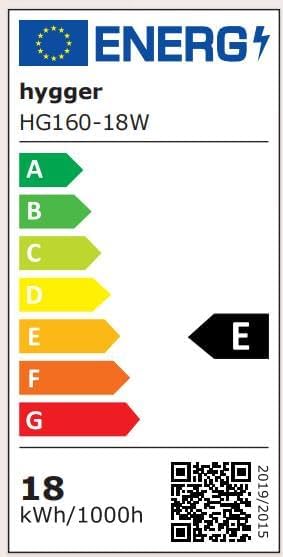
Image: Energy Label for hygger HG160-18W.
การรับประกันและการสนับสนุน
This hygger product comes with a standard manufacturer's warranty. For specific warranty terms, duration, and conditions, please refer to the warranty card included with your purchase or contact hygger customer support directly.
If you require technical assistance, have questions about product operation, or need to report a defect, please contact hygger customer service through their official webไซต์หรือข้อมูลการติดต่อที่ให้ไว้ในบรรจุภัณฑ์ผลิตภัณฑ์ของคุณ