
1. บทนำและผลิตภัณฑ์view
Thank you for choosing the Qidoe 83W PD USB C Car Charger. This device is designed to provide efficient and versatile charging solutions for your electronic devices in a vehicle environment. Featuring a 65W Power Delivery (PD) USB-C port and an 18W Quick Charge 3.0 (QC3.0) USB-A port, it offers a combined output of up to 83W. The charger is compatible with 12V/24V vehicle power systems and includes an intuitive LED digital display for monitoring voltage and current, along with a physical on/off switch and a dustproof flip cover for enhanced durability.
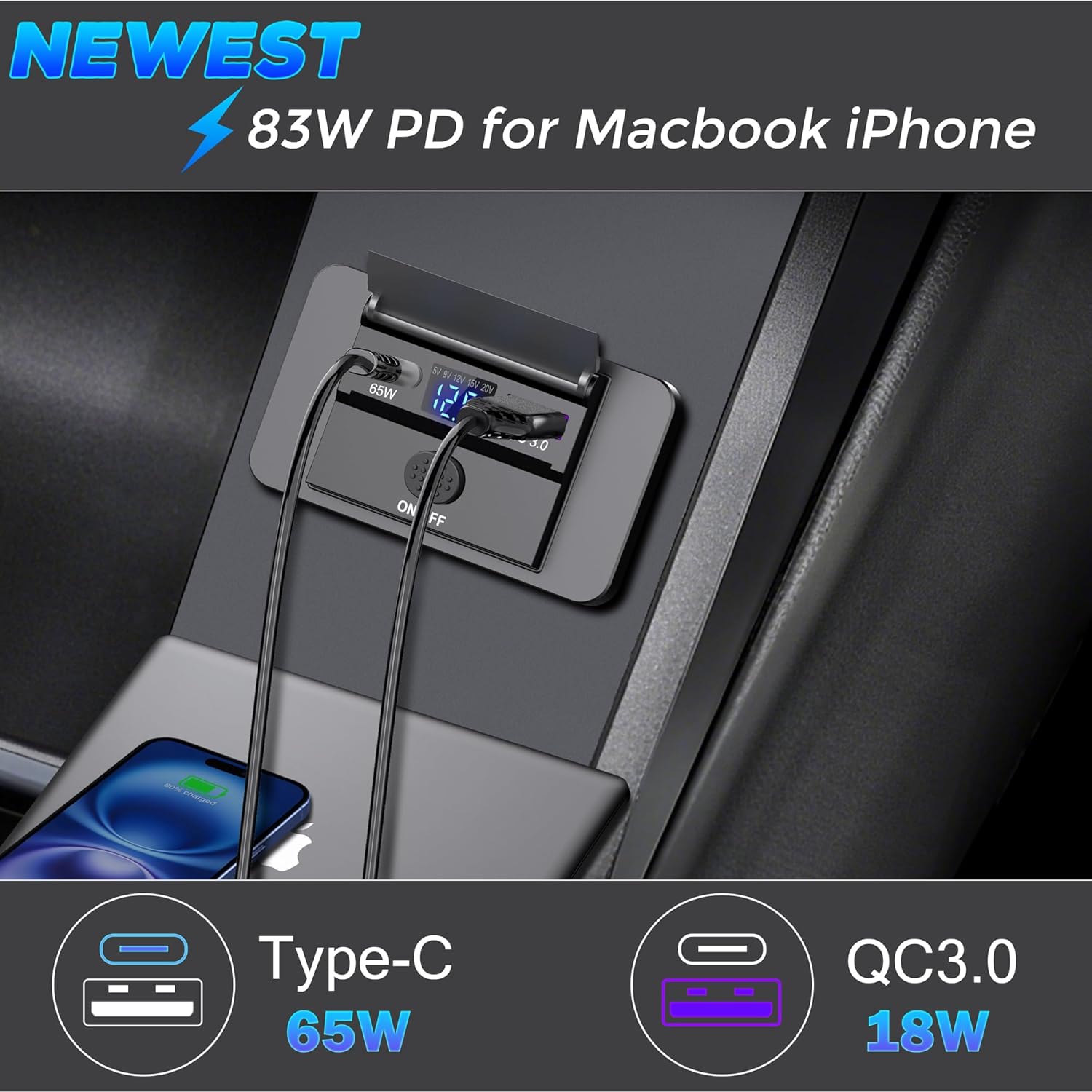
ภาพที่ 1.1: The Qidoe 83W PD USB C Car Charger in use, demonstrating its dual charging capabilities for a MacBook and an iPhone.
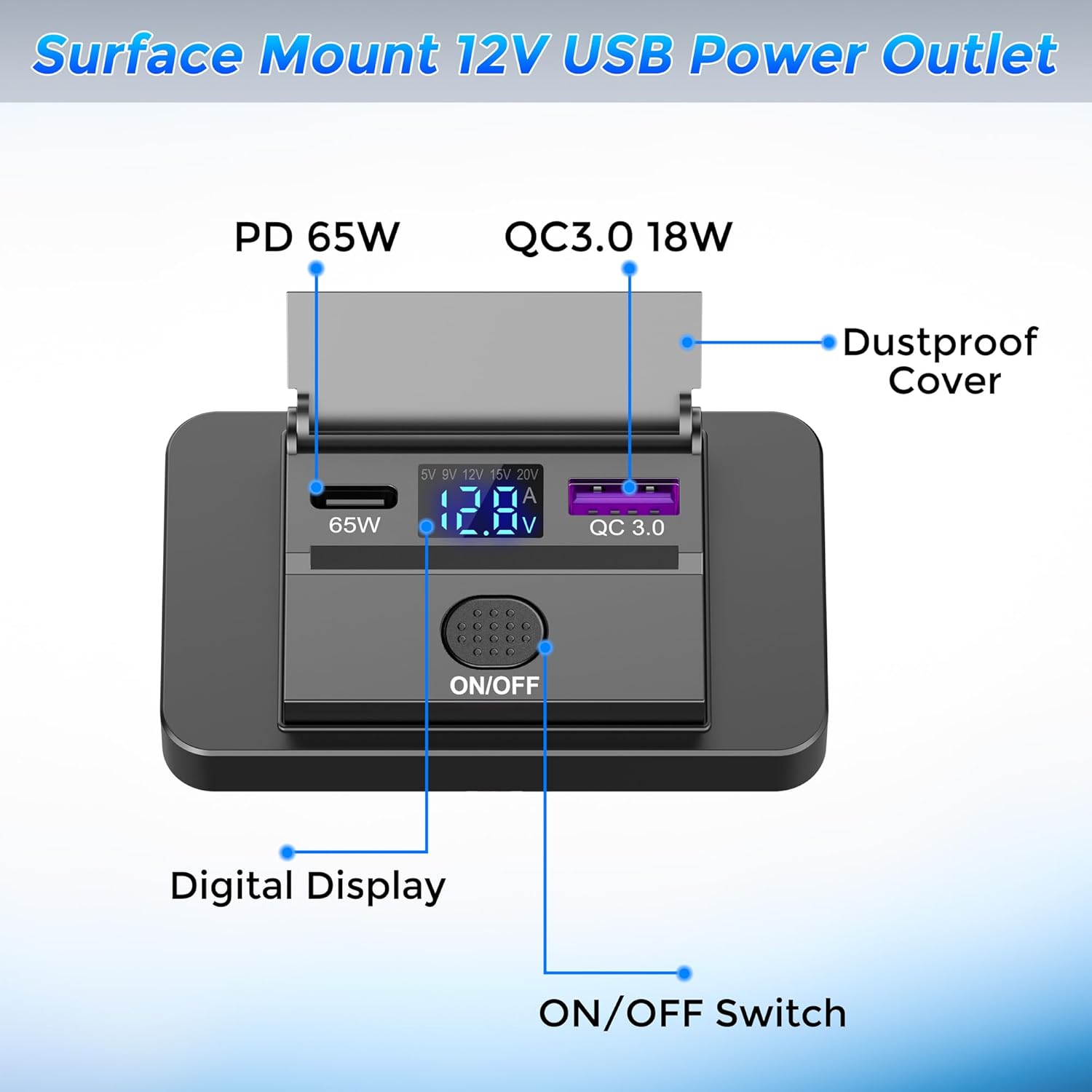
ภาพที่ 1.2: รายละเอียด view of the charger's components, including the ports, digital display, and control switch.
2. การตั้งค่าและการติดตั้ง
This charger is designed for surface mounting, requiring minimal modification to your vehicle's interior. Follow these steps for proper installation:
- เตรียมพื้นผิวการติดตั้ง: Choose a flat, stable surface in your vehicle for installation.
- เปิดฝาครอบ: Carefully open the outer frame/cover of the charger unit.
- Drill Wiring Holes: Drill a small hole (approximately 1.8 cm in diameter, refer to dimensions in Section 5) through the chosen mounting surface to pass the power cables. Ensure the hole is only large enough for the wires, not the entire unit.
- การเชื่อมต่อสายไฟ:
- เชื่อมต่อ สายสีแดง to the positive (+) terminal of your vehicle's 12V/24V power source.
- เชื่อมต่อ สายสีดำ ต่อกับขั้วลบ (-) หรือจุดต่อลงดินที่เหมาะสม
สำคัญ: Ensure correct polarity to prevent damage to the charger and your vehicle's electrical system. It is recommended to connect through a fuse (not included) for safety.
- การรักษาความปลอดภัยหน่วย: Place the main body of the charger onto the mounting surface, aligning the wiring through the drilled hole. Use the provided screws to firmly fix the unit to the surface.
- ปิดฝาครอบ: Reattach the outer frame/cover to the main unit. Ensure it snaps securely into place.

ภาพที่ 2.1: Step-by-step guide for surface mount installation.
3. คู่มือการใช้งาน
3.1 การเปิด/ปิดเครื่อง
- The charger features a physical ON/OFF pressure switch. Press the switch to toggle the power to the USB ports and the digital display.
- When the charger is powered on, the LED digital display will illuminate.

ภาพที่ 3.1: Demonstrating the ON/OFF function of the charger.
3.2 Using the Charging Ports
- USB-C (PD 65W) Port: Connect your USB-C compatible laptops, tablets, or smartphones to this port for fast charging. The 65W PD3.0 port can boost voltage to 15V and 20V for optimal charging of larger devices.
- USB-A (QC3.0 18W) Port: Connect your Quick Charge 3.0 compatible devices or standard USB devices to this port for efficient charging.
- คุณสามารถชาร์จอุปกรณ์สองเครื่องพร้อมกันได้โดยใช้พอร์ตทั้งสองพอร์ต
3.3 ฟังก์ชันการทำงานของจอแสดงผลดิจิทัล
- ปริมาณแบตเตอรี่tagการตรวจสอบอี: In standby mode or when only the USB-A port is in use, the display shows the vehicle's battery voltage (V), allowing you to monitor its health.
- Real-time Charging Data: When a device is connected to the 65W USB-C port, the display automatically switches to show the real-time output voltage (V) and current (A) for the PD interface, providing immediate feedback on charging performance.

ภาพที่ 3.2: The digital display showing vehicle battery voltage and real-time charging output for various devices.
4. การบำรุงรักษา
- การทำความสะอาด: Use a soft, dry cloth to clean the surface of the charger. Avoid using abrasive cleaners or solvents.
- ฝาครอบกันฝุ่น: Keep the flip cover closed when the ports are not in use to protect them from dust and moisture.
- สภาพแวดล้อม : While designed for automotive use, avoid exposing the charger to extreme water or harsh weather conditions.
- การตรวจสอบสายเคเบิล: Periodically check charging cables for any signs of wear or damage. Replace damaged cables immediately.
5 การแก้ไขปัญหา
- ที่ชาร์จไม่เปิดใช้งาน:
- Ensure the vehicle's ignition is on (if required by your vehicle's wiring).
- Check the ON/OFF switch to ensure it is pressed to the 'ON' position.
- Verify that the red and black wires are correctly connected to the positive and negative terminals, respectively.
- Check the vehicle's fuse for the circuit the charger is connected to. Replace if blown.
- อุปกรณ์ไม่ชาร์จ / ชาร์จช้า:
- ตรวจสอบให้แน่ใจว่าสายชาร์จเชื่อมต่อกับที่ชาร์จและอุปกรณ์ของคุณอย่างแน่นหนาแล้ว
- ลองใช้สายชาร์จเส้นอื่นเพื่อตัดปัญหาเรื่องสายเคเบิล
- Confirm your device supports PD (for USB-C) or QC3.0 (for USB-A) for fast charging.
- If charging multiple devices, note that total power output is shared.
- Check the digital display for output voltage and current. If values are unexpectedly low, there might be an issue with the power source or the device being charged.
- เล่มที่ไม่ถูกต้องtagอี แสดงผล:
- Ensure the charger is properly connected to a stable 12V/24V power source.
- Fluctuations in vehicle battery voltage are normal, especially during engine start-up or heavy electrical load.
6. ข้อมูลจำเพาะ
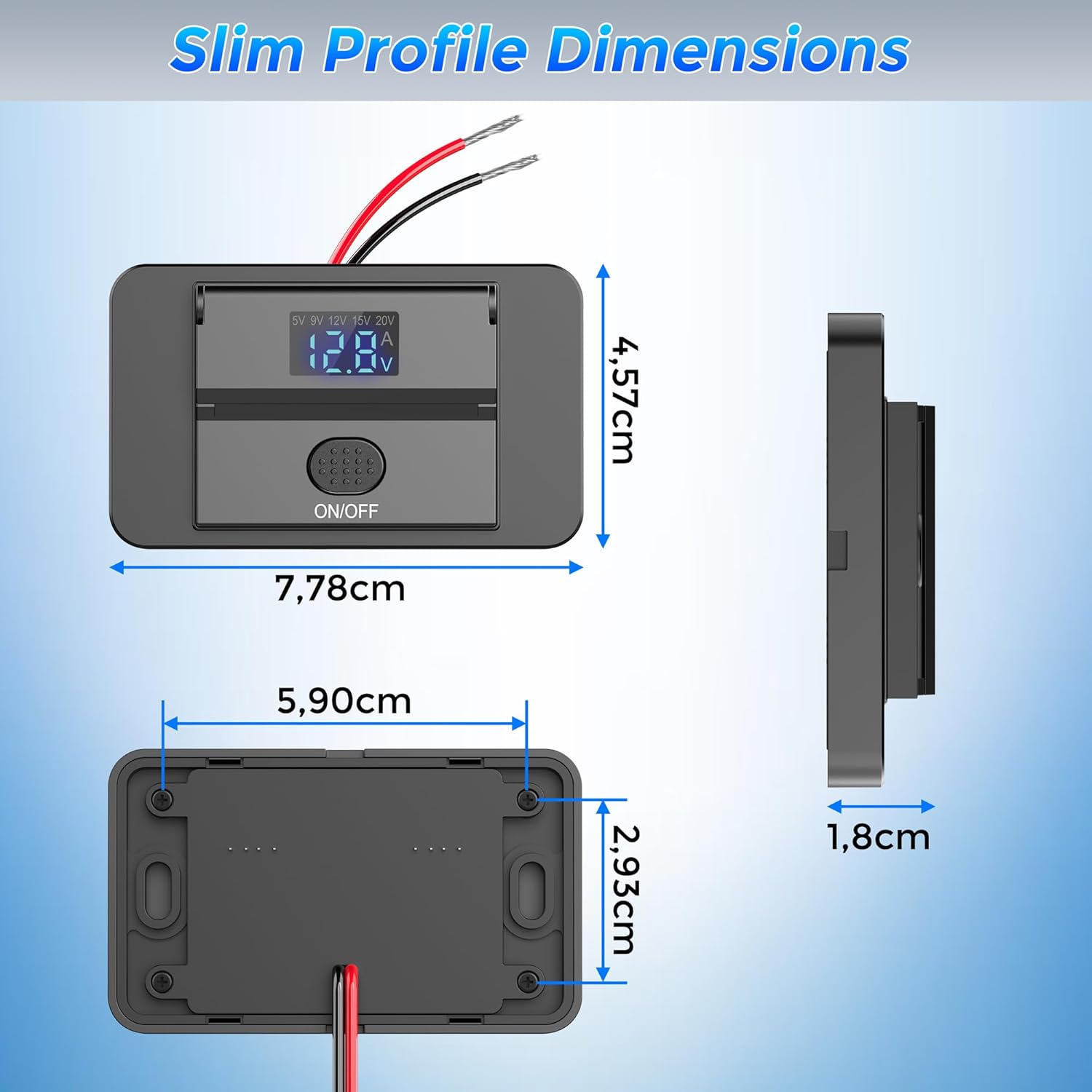
ภาพที่ 6.1: Physical dimensions of the Qidoe 83W PD USB C Car Charger.
| คุณสมบัติ | ข้อมูลจำเพาะ |
|---|---|
| ชื่อรุ่น | QD1009 |
| ยี่ห้อ | กิโด |
| กำลังขับทั้งหมด | 83 Watts (Max Combined) |
| เอาต์พุตพอร์ต USB-C | 65W Power Delivery (PD3.0) |
| พอร์ต USB-A | 18W Quick Charge (QC3.0) |
| อินพุต Voltage | DC 12 โวลต์ / 24 โวลต์ |
| ปริมาณการส่งออกtagอี (USB-C) | Up to 20 Volts DC |
| กระแสไฟขาออก (สูงสุด) | 4.15 ก |
| พอร์ต USB รวม | 2 (1x USB-C, 1x USB-A) |
| ประเภทขั้วต่อ | USB ประเภท C, USB ประเภท A |
| ประเภทการติดตั้ง | Surface Mount (Dashboard Mount) |
| คุณสมบัติพิเศษ | Fast Charging, Digital Voltage/Current Display, ON/OFF Switch, Dustproof Cover |
| อุปกรณ์ที่รองรับ | Laptops, Tablets, Smartphones |
| ส่วนประกอบที่รวมอยู่ | 1 x 65W Surface Mount USB-C Outlet |
| การรับรอง | ซีอี, เอฟซีซี |
| วัสดุภายใน | พลาสติก |
| ขนาดสินค้า (โดยประมาณ) | 7.78 ซม. (L) x 5.90 ซม. (W) x 4.57 ซม. (H) |
| ขนาดแพ็คเกจ | 9.5 x 8.8 x 2.2 ซม. |
| น้ำหนักสินค้า | 51 กรัม |
7. การรับประกันและการสนับสนุน
The Qidoe 83W PD USB C Car Charger comes with a การรับประกันจากผู้ผลิต 1 ปี.
For any questions, technical assistance, or warranty claims, please contact Qidoe customer service directly via email. Our support team is committed to providing a satisfactory resolution as quickly as possible.
ข้อมูลติดต่อ: Please refer to the contact details provided on the product packaging or the official Qidoe webเว็บไซต์สำหรับข้อมูลสนับสนุนล่าสุด
8. ความเข้ากันได้ของยานพาหนะ
This charger is designed to be compatible with a wide range of 12V-24V vehicles, including:
- รถยนต์
- รถตู้
- รถบ้าน
- รถบรรทุก
- รถโดยสารประจำทาง
- เรือ
- รถจักรยานยนต์

ภาพที่ 8.1: Examples of compatible vehicles for the Qidoe car charger.