
1. บทนำ
ขอบคุณสำหรับการซื้อasing the EasySMX X05PRO Wireless PC Game Controller. This manual provides detailed instructions on how to set up, operate, and maintain your controller. Please read this manual carefully before use to ensure optimal performance and a satisfying gaming experience.
สินค้าหมดview วิดีโอโชว์asing the EasySMX X05PRO controller's design and key features.
2. สินค้าหมดview
The EasySMX X05PRO is a versatile wireless game controller designed for a wide range of platforms including PC, Nintendo Switch, iOS, and Android devices. It features advanced technologies such as Hall effect joysticks and triggers, a 1000Hz polling rate, and customizable RGB lighting to enhance your gaming sessions.
เนื้อหาแพ็คเกจ:
- EasySMX X05PRO Wireless Game Controller
- สายชาร์จ USB-C
- ตัวรับสัญญาณไร้สาย 2.4G (ดองเกิล USB)
- คู่มือการใช้งาน

An image displaying the EasySMX X05PRO controller with its main features such as wireless/wired connection, silent buttons, RGB lighting, 1000Hz polling rate, TURBO function, vibration adjustment, and 1000mAh battery.
3. การตั้งค่าและการเชื่อมต่อ
The X05PRO controller supports multiple connection methods for various devices.
3.1. 2.4G Wireless Connection (for PC Windows)
- เสียบตัวรับสัญญาณไร้สาย 2.4G เข้ากับพอร์ต USB ที่ว่างอยู่บนคอมพิวเตอร์ของคุณ
- กดปุ่มค้างไว้ บ้าน button on the controller until the indicator light flashes rapidly, indicating pairing mode.
- Once connected, the indicator light will become solid. The controller is now ready for use.
3.2. Bluetooth Connection (for Switch, iOS, Android)
- On your device (Switch, iOS, or Android), navigate to the Bluetooth settings and enable Bluetooth.
- On the EasySMX X05PRO controller, press and hold the จับคู่บลูทู ธ button (refer to the diagram in Section 2 for button layout) until the indicator light flashes rapidly.
- Select "EasySMX X05PRO" from the list of available devices on your screen.
- Once paired, the indicator light on the controller will become solid.
3.3. Wired Connection (for PC, Switch, and charging)
- Connect one end of the USB-C cable to the controller and the other end to your device (PC or Switch).
- The controller will automatically switch to wired mode. This mode also charges the controller.

An image illustrating the wireless connection capabilities of the EasySMX X05PRO controller, highlighting its compatibility with PC and other devices.
4. คุณสมบัติหลัก
4.1. ปุ่มไร้เสียง
The X05PRO features a redesigned full button structure with silicone dampers, ensuring ultra-quiet operation. This design is optimized for late-night gaming sessions, preventing disturbance to family, roommates, or neighbors.

รายละเอียด view of the controller's buttons, illustrating the silicone damper mechanism for reduced noise during gameplay.
4.2. Dual-Stagทริกเกอร์เอฟเฟกต์ฮอลล์
Experience precise control with adjustable trigger locks, allowing for short (3mm) or long (9mm) stroke distances. The 2+2 built-in rumble motors provide realistic haptic feedback for immersive racing and FPS experiences.
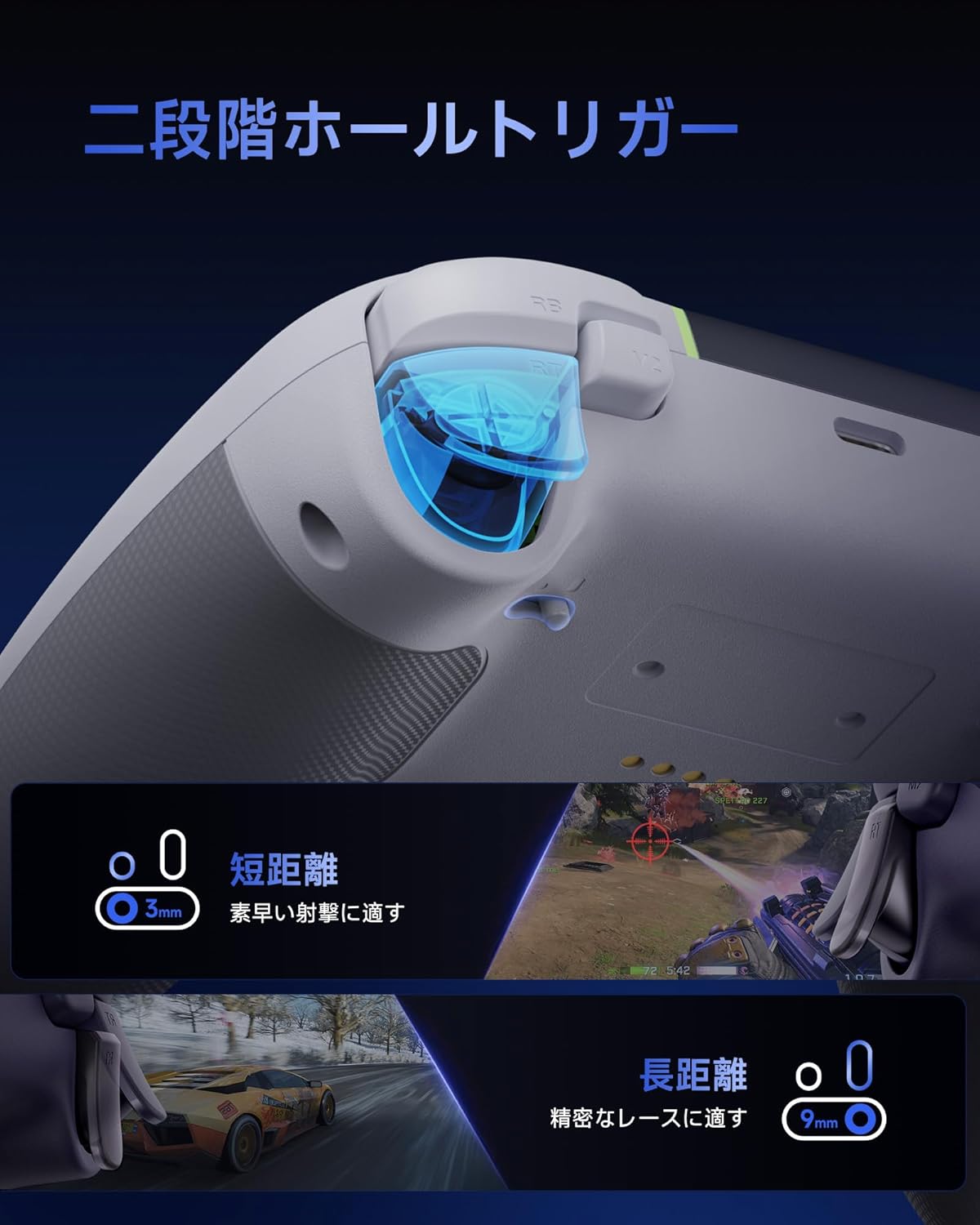
An image demonstrating the dual-stage Hall effect triggers, highlighting the short travel distance for quick shots and long travel for precise racing control.
4.3. Upgraded 8-Way D-Pad
The D-pad incorporates a dome switch and concave pivot structure, enabling smooth diagonal inputs and precise 8-way control. This design is particularly beneficial for fighting games and retro titles requiring accurate directional commands.

An exploded diagram showing the internal components of the upgraded 8-way D-pad, emphasizing its improved design for seamless and precise operation.
4.4. 4-Zone Vibration Feedback
The controller features a 2+2 motor structure that provides immersive 4-zone vibration feedback, enhancing tactile immersion during gameplay. Note: Trigger vibration requires in-game support and may only be available in certain titles.

An illustration of the controller's 4-zone vibration feedback system, depicting the internal motors and their effect on tactile immersion.
4.5. Dynamic RGB Backlight
Personalize your gaming experience with customizable RGB lighting effects. Choose from 7 color combinations and 5 diverse lighting modes (Brightness, Breathing, Colorful, Fade, Off) to match your style or mood.

ภาพแสดงasing two controllers with different dynamic RGB lighting effects, illustrating the customizable illumination options.
4.6. Two Programmable Buttons
The controller includes two additional programmable buttons located on the top, designed to prevent accidental presses during intense gameplay, a common issue with traditional back paddles.

A view of the controller's top side, highlighting the two programmable buttons (M1 and M2) and their programming settings.
4.7. 1000Hz Polling Rate & Hall Effect Joysticks
Achieve virtually no input lag with a 1000Hz polling rate in both wired and 2.4G wireless modes. The high-precision 11-bit Hall effect sensors in the joysticks ensure drift-free accuracy and a long operational lifespan.

A diagram illustrating the 1000Hz polling rate and the internal mechanism of the Hall effect joystick, emphasizing drift-free high precision.
4.8. Ergonomic Grip & Long-Life Battery
The controller features a soft-touch silicone coating for a sweat-resistant, non-slip grip, ensuring comfort during extended gaming sessions. A built-in 1000mAh rechargeable battery provides prolonged playtime.

An image highlighting the ergonomic, skin-friendly grip texture and the 1000mAh battery capacity of the controller.
5. การดำเนินการ
5.1. Changing RGB Lighting Modes
To cycle through the 5 RGB lighting modes (Brightness, Breathing, Colorful, Fade, Off) and 7 color combinations, refer to the detailed instructions in the full product manual or the manufacturer's website. Typically, a dedicated button or a combination of buttons is used for this function.
5.2. Programming Buttons (M1/M2)
The M1 and M2 buttons can be programmed to replicate other button inputs. To program:
- กดปุ่มค้างไว้ M button (usually located near the D-pad) and the desired programmable button (M1 or M2) simultaneously.
- The indicator light will flash, indicating programming mode.
- Press the button you wish to map (e.g., A, B, X, Y, LB, RB, LT, RT, L3, R3).
- Press the M button again to save the mapping. The indicator light will return to solid.
5.3. Adjusting Trigger Modes
คู่-stage triggers can be adjusted for different travel distances. Consult the full product manual for specific button combinations or switches to toggle between short (3mm) and long (9mm) trigger strokes, optimizing for quick actions or precise control.
6. การชาร์จคอนโทรลเลอร์
The EasySMX X05PRO controller is equipped with a built-in 1000mAh rechargeable Lithium-ion battery.
ขั้นตอนการชาร์จ:
- Connect the USB-C charging cable to the controller's charging port.
- Connect the other end of the USB-C cable to a USB power source (e.g., PC, USB wall adapter, power bank).
- The indicator light on the controller will show the charging status (e.g., breathing light, solid light when fully charged). Refer to the controller's LED indicators for specific charging status details.
- โดยทั่วไปการชาร์จเต็มจะใช้เวลาประมาณ 2-3 ชั่วโมง
7. ข้อมูลจำเพาะ
| คุณสมบัติ | รายละเอียด |
|---|---|
| หมายเลขรุ่น | เอ็กซ์ทูโปร |
| ประเภทแบตเตอรี่ | แบตเตอรี่ลิเธียมไอออน 1 ก้อน (รวมอยู่ด้วย) |
| ความจุของแบตเตอรี่ | 1000mAh |
| การเชื่อมต่อ | 2.4G ไร้สาย, บลูทูธ, แบบมีสาย (USB-C) |
| อัตราการสำรวจความคิดเห็น | 1000Hz (Wired & 2.4G Wireless), 125Hz (Bluetooth) |
| ประเภททริกเกอร์ | ดูอัล-เอสtagทริกเกอร์เอฟเฟกต์ฮอลล์ |
| ประเภทจอยสติ๊ก | Hall Effect Joysticks (11-bit precision) |
| ดีแพด | Upgraded 8-Way D-Pad (Dome switch, concave pivot) |
| การสั่นสะเทือน | 4-Zone Vibration Feedback (2+2 motors) |
| แสงสว่าง | Dynamic RGB Backlight (7 colors, 5 modes) |
| ปุ่มที่สามารถตั้งโปรแกรมได้ | 2 (M1, M2) |
| ขนาด | 17.9 x 14.7 x 7.4 ซม. |
| น้ำหนัก | 400 กรัม |
| ประเทศต้นกำเนิด | จีน |

Image showing the EasySMX X05PRO controller and its technical compliance certifications for the Japanese market.
8 การแก้ไขปัญหา
8.1. ตัวควบคุมไม่เชื่อมต่อ
- ตรวจสอบแบตเตอรี่: ตรวจสอบให้แน่ใจว่าคอนโทรลเลอร์มีแบตเตอรี่เพียงพอแล้ว เชื่อมต่อผ่านสาย USB-C เพื่อชาร์จ
- ซ่อมแซม: For wireless connections, try re-pairing the controller with your device. Follow the steps in Section 3.
- Check Receiver (2.4G): Ensure the 2.4G wireless receiver is securely plugged into a working USB port on your PC. Try a different USB port.
- การรบกวนบลูทูธ: If using Bluetooth, ensure no other devices are causing interference. Try disconnecting other Bluetooth devices.
- การเชื่อมต่อแบบมีสาย: If wireless connection fails, try connecting the controller directly via USB-C cable to confirm functionality.
8.2. Input Lag or Unresponsive Buttons/Joysticks
- อัตราการสำรวจความคิดเห็น: Ensure you are using 2.4G wireless or wired mode for the optimal 1000Hz polling rate. Bluetooth mode operates at 125Hz, which may feel less responsive in competitive gaming.
- การรบกวน: For 2.4G wireless, ensure the receiver is not obstructed and is close to the controller. Avoid areas with high electromagnetic interference.
- อัพเดตเฟิร์มแวร์: ตรวจสอบข้อมูลอย่างเป็นทางการของ EasySMX webเข้าชมเว็บไซต์เพื่อตรวจสอบการอัปเดตเฟิร์มแวร์ที่มีให้สำหรับคอนโทรลเลอร์ของคุณ
- การปรับเทียบใหม่: Some operating systems or game platforms allow for controller calibration. Refer to your device's settings for this option.
8.3. ระบบสั่นไม่ทำงาน
- In-Game Support: ตรวจสอบว่าเกมที่คุณกำลังเล่นรองรับการตอบสนองการสั่นสะเทือนหรือไม่
- การตั้งค่าเกม: ตรวจสอบการตั้งค่าในเกมเพื่อให้แน่ใจว่าได้เปิดใช้งานการสั่นสะเทือนแล้ว
- การติดตั้งไดร์เวอร์: For PC, ensure the correct drivers are installed.
9. การบำรุงรักษา
- การทำความสะอาด: ใช้ผ้านุ่มและแห้งทำความสะอาดคอนโทรลเลอร์ ห้ามใช้สารเคมีรุนแรงหรือวัสดุที่มีฤทธิ์กัดกร่อน
- พื้นที่จัดเก็บ: เก็บตัวควบคุมไว้ในที่แห้งและเย็น ห่างจากแสงแดดโดยตรงและอุณหภูมิที่สูงหรือต่ำมาก
- การดูแลแบตเตอรี่ ควรหลีกเลี่ยงการปล่อยให้แบตเตอรี่หมดเกลี้ยงบ่อยๆ ควรชาร์จตัวควบคุมเป็นประจำ แม้ว่าจะไม่ได้ใช้งานเป็นเวลานาน เพื่อรักษาอายุการใช้งานของแบตเตอรี่
- หลีกเลี่ยงการหยด: ปกป้องตัวควบคุมจากการตกหล่นและแรงกระแทกซึ่งอาจทำให้ส่วนประกอบภายในเสียหายได้
10. ข้อมูลด้านความปลอดภัย
- Do not attempt to disassemble or modify the controller. This may void your warranty and cause damage.
- Keep the controller away from water, moisture, and high temperatures.
- อย่าให้แบตเตอรี่โดนไฟหรือความร้อนจัด
- กำจัดผลิตภัณฑ์และแบตเตอรี่อย่างมีความรับผิดชอบตามกฎระเบียบท้องถิ่น
- สินค้านี้ไม่ใช่ของเล่น ควรเก็บให้พ้นมือเด็กเล็ก
11. การรับประกันและการสนับสนุน
EasySMX products come with a standard warranty. For specific warranty terms, duration, and to register your product, please visit the official EasySMX webไซต์หรือติดต่อฝ่ายสนับสนุนลูกค้า
If you encounter any issues not covered in this manual or require further assistance, please contact EasySMX customer support through their official webเว็บไซต์หรือข้อมูลการติดต่อที่ให้มาพร้อมกับการซื้อของคุณ
EasySMX อย่างเป็นทางการ Webเว็บไซต์: www.easysmx.com