
1. บทนำ
This manual provides comprehensive instructions for the MZ S666 Retro Radio Speaker. Please read this manual thoroughly before operating the device to ensure proper use, optimal performance, and longevity. Keep this manual for future reference.
2. สินค้าหมดview
2.1 คุณสมบัติหลัก
- ระบบเสียงกำลังสูง: Integrated 5W speaker for clear and loud sound.
- แบตเตอรี่ใช้งานได้ยาวนาน: 1500mAh rechargeable battery providing up to 4 hours of continuous playback.
- วิทยุหลายย่านความถี่: Supports FM, AM, and SW frequencies.
- การเล่นที่หลากหลาย: Compatible with TF (MicroSD) cards, USB drives, and Bluetooth connectivity.
- ฟังก์ชัน TWS: Allows for True Wireless Stereo pairing with another MZ S666 speaker.
- การชาร์จแบบสมัยใหม่: Equipped with a Type-C charging port.
2.2 การควบคุมและพอร์ต

ภาพที่ 1: ด้านหน้า view of the MZ S666 speaker, highlighting the main controls. On the left is the ปุ่มปรับระดับเสียง, which also serves as the power switch. On the right is the ปุ่มปรับเสียง for radio frequency selection. Below the main grille are buttons for การเลือกโหมด (SW AM FM MP3) and การควบคุมการเล่น (Previous, Play/Pause, Next).
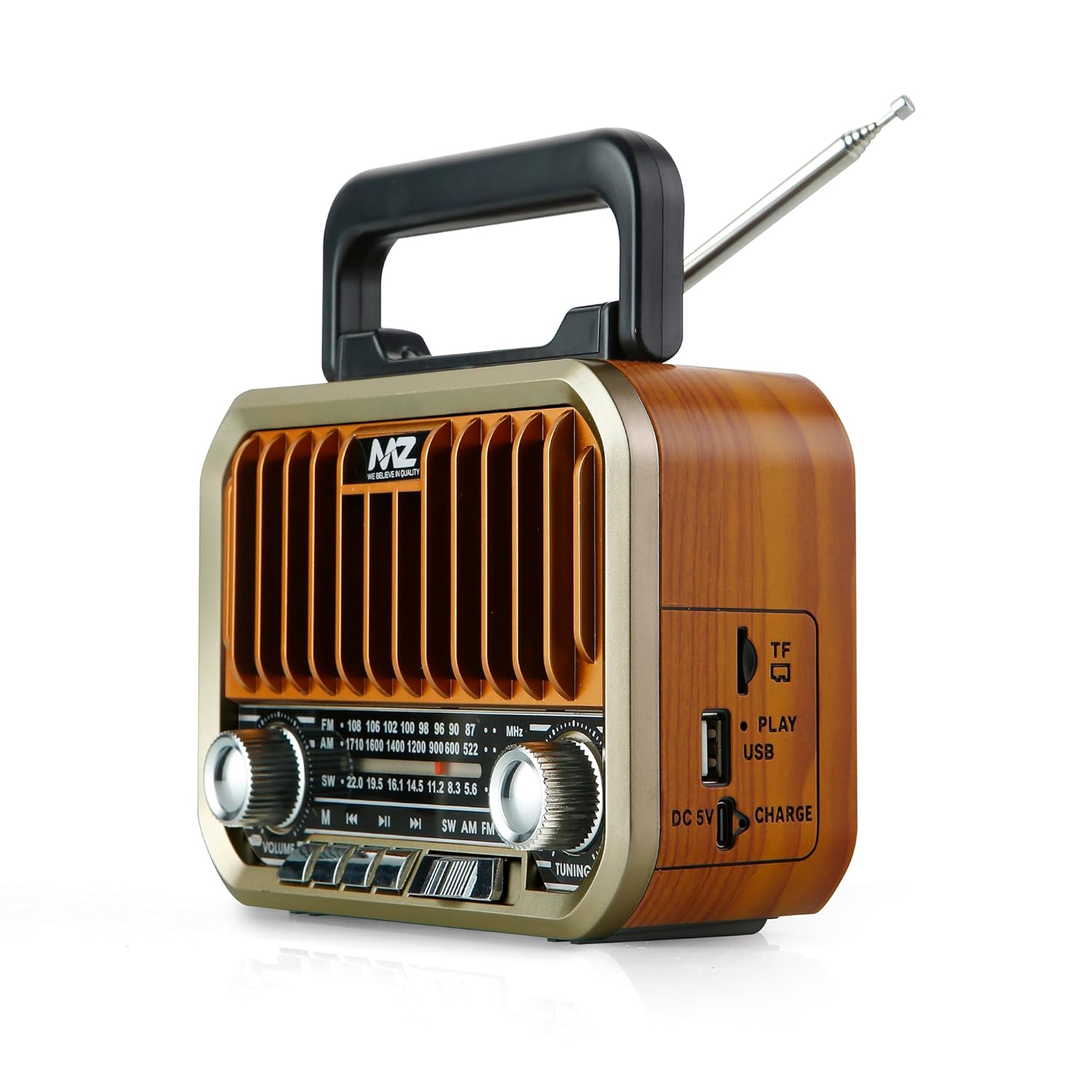
ภาพที่ 2: ด้านข้าง view of the MZ S666 speaker, illustrating the connectivity ports. From top to bottom, these include the ช่องเสียบการ์ด TF, พอร์ต USBและ DC 5V Type-C charging port. A 'Charge' indicator light is also visible.

ภาพที่ 3: กลับ view of the MZ S666 speaker, showing the removable cover for the ช่องใส่แบตเตอรี่. The telescopic antenna is also visible at the top.
3. การตั้งค่า
3.1 การติดตั้งแบตเตอรี่
- Locate the battery compartment on the back of the speaker (refer to Image 3).
- เลื่อนฝาปิดช่องใส่แบตเตอรี่ลงด้านล่างเพื่อเปิด
- Insert the provided 1500mAh Lithium-Ion battery, ensuring correct polarity (+/-).
- ปิดฝาช่องใส่แบตเตอรี่ให้แน่น
3.2 การชาร์จเริ่มต้น
ก่อนใช้งานครั้งแรก โปรดชาร์จลำโพงให้เต็มประมาณ 3-4 ชั่วโมง
- Connect the provided Type-C charging cable to the DC 5V port on the side of the speaker (refer to Image 2).
- เชื่อมต่อปลายสายอีกด้านหนึ่งเข้ากับอะแดปเตอร์ไฟ USB มาตรฐาน (ไม่รวมอยู่ด้วย) หรือพอร์ต USB ของคอมพิวเตอร์
- The 'Charge' indicator light will illuminate during charging and turn off when fully charged.
4. คู่มือการใช้งาน
4.1 เปิด/ปิดเครื่อง
- ในการเปิดเครื่อง ให้หมุน ปุ่มปรับระดับเสียง clockwise until you hear a click and the speaker powers on.
- หากต้องการปิดเครื่อง ให้หมุน... ปุ่มปรับระดับเสียง counter-clockwise until you hear a click and the speaker powers off.
การเลือกโหมด 4.2
กดปุ่ม ปุ่มโหมด (labeled SW AM FM MP3) repeatedly to cycle through available modes: FM Radio, AM Radio, SW Radio, Bluetooth, USB, and TF Card.
4.3 Radio Operation (FM/AM/SW)
- ขยายเสาอากาศแบบยืดหดเพื่อการรับสัญญาณที่ดีขึ้น
- Select the desired radio band (FM, AM, or SW) using the ปุ่มโหมด.
- หมุน ปุ่มปรับเสียง เพื่อค้นหาสถานีวิทยุ
- ปรับระดับเสียงโดยใช้ปุ่ม ปุ่มปรับระดับเสียง.
4.4 โหมดบลูทู ธ
- Switch the speaker to Bluetooth mode using the ปุ่มโหมด. The speaker will indicate it is ready for pairing (e.g., a voice prompt or flashing indicator).
- บนอุปกรณ์มือถือของคุณ เปิดใช้งาน Bluetooth และค้นหาอุปกรณ์ที่มีอยู่
- Select "MZ S666" from the list of devices to pair.
- เมื่อจับคู่เสร็จแล้ว คุณสามารถเล่นเสียงจากอุปกรณ์ของคุณผ่านลำโพงได้
- Use the playback control buttons on the speaker (Previous, Play/Pause, Next) to manage your music.
การเล่นการ์ด USB/TF ขนาด 4.5 นิ้ว
- เสียบไดรฟ์ USB เข้าไป พอร์ต USB or a TF (MicroSD) card into the ช่องเสียบการ์ด TF (refer to Image 2).
- ลำโพงจะสลับไปใช้โหมด USB หรือการ์ด TF โดยอัตโนมัติและเริ่มเล่นเสียง files. If not, use the ปุ่มโหมด เพื่อเลือกโหมดที่ถูกต้อง
- Use the playback control buttons (Previous, Play/Pause, Next) to navigate tracks.
การจับคู่ 4.6 TWS (True Wireless Stereo)
To achieve stereo sound, you can pair two MZ S666 speakers together:
- Ensure both MZ S666 speakers are powered on and in Bluetooth mode, but not yet connected to any device.
- บนลำโพงตัวใดตัวหนึ่ง (ซึ่งจะเป็นลำโพงหลัก) ให้กดปุ่มค้างไว้ ปุ่มเล่น/หยุดชั่วคราว for a few seconds until you hear an indication that TWS pairing has begun.
- ลำโพงทั้งสองตัวจะค้นหาและเชื่อมต่อกันโดยอัตโนมัติ เมื่อเชื่อมต่อแล้ว คุณจะได้ยินเสียงยืนยัน
- ทีนี้ ให้เชื่อมต่ออุปกรณ์มือถือของคุณกับลำโพงหลักผ่านบลูทูธ ตามที่อธิบายไว้ในหัวข้อที่ 4.4
- ขณะนี้เสียงจะเล่นในระบบสเตอริโอผ่านลำโพงทั้งสองข้าง
5. การชาร์จไฟ
- When the battery is low, the speaker may emit an audible warning or the indicator light may change.
- Connect the Type-C charging cable to the speaker's DC 5V port and a power source.
- The 'Charge' indicator light will show charging status.
- A full charge typically takes 3-4 hours. Avoid overcharging to prolong battery life.
6. การบำรุงรักษา
- การทำความสะอาด: ใช้ผ้าแห้งนุ่มเช็ดทำความสะอาดภายนอกลำโพง ห้ามใช้สารทำความสะอาดที่มีฤทธิ์กัดกร่อนหรือตัวทำละลาย
- พื้นที่จัดเก็บ: เก็บลำโพงไว้ในที่แห้งและเย็น หลีกเลี่ยงแสงแดดโดยตรงและอุณหภูมิที่สูงหรือต่ำเกินไป
- การดูแลแบตเตอรี่ หากไม่ได้ใช้งานเป็นเวลานาน ควรชาร์จแบตเตอรี่อย่างน้อยทุกสามเดือนเพื่อรักษาประสิทธิภาพของแบตเตอรี่
- การสัมผัสน้ำ: ลำโพงนี้ไม่กันน้ำ หลีกเลี่ยงการสัมผัสกับน้ำหรือความชื้นสูง
7 การแก้ไขปัญหา
| ปัญหา | สาเหตุที่เป็นไปได้ | สารละลาย |
|---|---|---|
| ลำโพงไม่เปิดเครื่อง | แบตเตอรี่หมดหรือติดตั้งไม่ถูกต้อง | Charge the speaker. Ensure the battery is correctly inserted with proper polarity. |
| ไม่มีเสียงจากลำโพง | Volume is too low, incorrect mode selected, or device not connected. | Increase volume. Verify correct mode (Bluetooth, Radio, USB/TF). Re-pair Bluetooth device. |
| การรับสัญญาณวิทยุไม่ดี | เสาอากาศไม่ยืดออก สัญญาณอ่อน หรือมีสัญญาณรบกวน | Fully extend the telescopic antenna. Try repositioning the speaker. |
| ไม่สามารถจับคู่บลูทูธได้ | Speaker not in pairing mode, device too far, or already connected to another device. | Ensure speaker is in Bluetooth pairing mode. Move device closer. Disconnect from other devices. |
| การ์ด USB/TF ไม่สามารถเล่นได้ | Card/drive not inserted correctly, unsupported file format, or corrupted media. | Reinsert media. Ensure files are in a supported format (e.g., MP3). Try another USB/TF card. |
8. ข้อมูลจำเพาะ
| คุณสมบัติ | ข้อมูลจำเพาะ |
|---|---|
| แบบอย่าง | MZ S666 |
| กำลังขับของลำโพง | 5 วัตต์ |
| ความจุของแบตเตอรี่ | 1500mAh (ลิเธียมไอออน) |
| เวลาการเล่น | ใช้งานได้นานสูงสุด 4 ชั่วโมง (ที่ระดับเสียงปานกลาง) |
| แบนด์วิทยุ | เอฟเอ็ม, เอเอ็ม, เอสดับบลิว |
| การเชื่อมต่อ | Bluetooth, USB, TF Card, TWS |
| พอร์ตชาร์จ | ขั้วต่อ Type-C (DC 5V) |
| วัสดุ | พลาสติก ABS |
| ขนาด (D x W x H) | 6D x 16.5W x 12H เซนติเมตร |
| น้ำหนักสินค้า | 502 กรัม |
| ส่วนประกอบที่รวมอยู่ | 1 Speaker, 1 Charging Cable |
9. การรับประกันและการสนับสนุน
สำหรับข้อมูลการรับประกันหรือการสนับสนุนทางเทคนิค โปรดดูเอกสารประกอบที่ให้มา ณ เวลาที่ซื้อ หรือติดต่อตัวแทนจำหน่ายของคุณ โปรดเก็บหลักฐานการซื้อไว้เพื่อใช้ในกรณีที่ต้องการเคลมประกัน