
1. บทนำ
The WOYO CTB007 PRO is a professional diagnostic tool designed for automotive technicians and enthusiasts. It functions as an OBD2 breakout box, CAN tester, and ECU testing tool, supporting both 12V and 24V vehicle systems. This manual provides detailed instructions for its setup, operation, and maintenance to ensure safe and effective use.
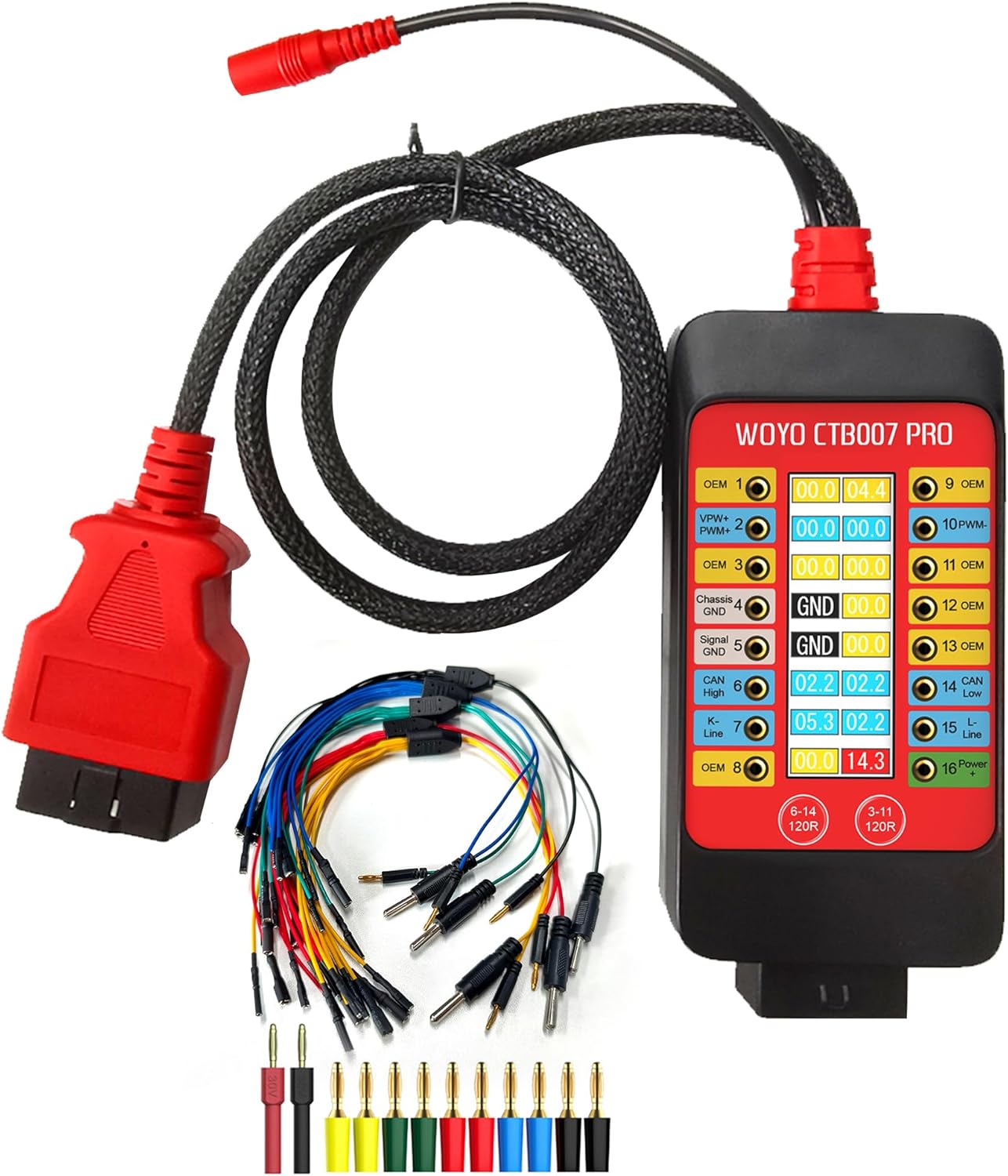
Figure 1: WOYO CTB007 PRO OBD2 Breakout Box and included accessories.
2. สินค้าหมดview
2.1 คุณสมบัติหลัก
- เข้ากันได้สากล: Supports 12V-24V OBD systems for passenger cars and commercial vehicles.
- Real-time OBD-II Pin Voltagการตรวจสอบอี: Features a digital LCD display showing true RMS voltage (Vrms) for all 16 OBD-II pins.
- ตัวบ่งชี้ทางภาพ: Green background for dynamic signals and status alerts for PIN 4&5 ground (GND) connectivity.
- Built-in 120Ω Resistance Switches: For HS-CAN (PIN6&14) and OEM/MS-CAN (PIN3&11) to improve signal integrity during bench testing.
- เล่มที่tagการป้องกันอี: Audible alarms for high and low voltage conditions on PIN16 (12V and 24V systems) and reverse polarity protection. Maximum load current is 2.0A.
- ECU Testing Capability: Provides convenient connectivity for IGN/START activation or external wake-up tools for bench testing ECUs.
- Battery Replacement Memory Saver: Maintains vehicle power during battery changes to preserve vehicle settings.
- Durable Extension Cable: Includes a 27.5-inch/59-inch OBD2 extension cable made of robust PET braided tube material.
2.2 เนื้อหาบรรจุภัณฑ์
- WOYO CTB007 PRO Main Device
- กระเป๋าพกพา
- 5x ECU Breakout Leads
- Banana Pin Connectors
3. การตั้งค่า
Before using the WOYO CTB007 PRO, ensure all connections are secure and correct.
- เชื่อมต่อกับยานพาหนะ: Plug the OBD2 connector of the CTB007 PRO into the vehicle's OBD2 port. The device will power on automatically.
- แหล่งจ่ายไฟภายนอก (ทางเลือก): For extended bench testing or specific scenarios, connect an external 9-32V DC power supply (DC 12V 5.5*2.1mm) to the designated input port on the device.
- Connect Diagnostic Tools: Connect your diagnostic scanner, oscilloscope, or multimeter to the appropriate banana pin sockets on the CTB007 PRO for signal monitoring or ECU communication.
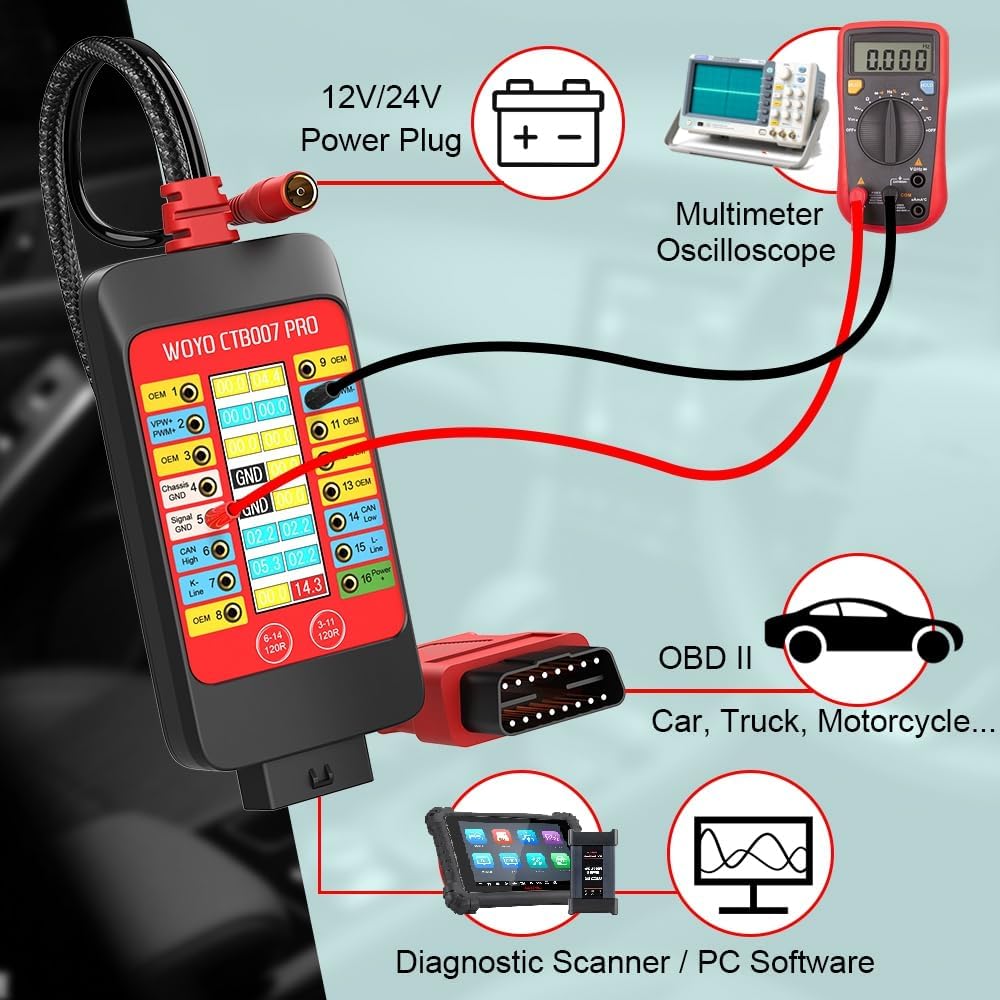
Figure 2: Typical setup for vehicle diagnostics using the CTB007 PRO.
4. คู่มือการใช้งาน
4.1 Real-time OBD-II Pin Voltage การตรวจสอบ
The integrated LCD display shows the real-time Vrms (Root Mean Square voltage) of all 16 OBD-II pins. This allows for quick identification of active signals and power supply status.
- การตรวจจับสัญญาณ: If the device detects a pulse or waveform signal on a pin, the corresponding number background color will flash green.
- Ground (GND) Detection: The display will show "GND" for pins 4 (Chassis Ground) and 5 (Signal Ground) if they are properly connected. If not normal, it will display "OPEN".

Figure 3: Digital LCD Display showing PIN Vrms and ground detection.
4.2 120Ω CAN Termination Switches
The CTB007 PRO includes built-in 120Ω resistor switches for CAN bus lines. These resistors are crucial for compensating for missing termination in single-ECU or small bench networks, which helps improve signal integrity and reduce reflections.
- HS-CAN: Activate the 120Ω resistor for pins 6 and 14 (standard CAN High and CAN Low).
- OEM/MS-CAN: Activate the 120Ω resistor for pins 3 and 11 (vehicle-dependent).
Press the corresponding button (6-14 120R or 3-11 120R) on the device to toggle the 120Ω resistance on or off.

Figure 4: 120Ω CAN Termination Switches.
4.3 ECU Testing on Bench
The CTB007 PRO facilitates convenient ECU testing outside of the vehicle. It provides necessary connections for IGN/START activation or external wake-up tools, allowing ECUs to be powered and exercised on a workbench.
- Connect the CTB007 PRO to a 9-32V power supply.
- Use the provided ECU breakout leads to connect the ECU to the CTB007 PRO.
- Connect your scanner or code reader programmer to the CTB007 PRO to communicate with the ECU.

Figure 5: Bench testing an ECU with the CTB007 PRO.
4.4 Battery Replacement Memory Saver
The CTB007 PRO can be used to maintain vehicle power during battery changes, preventing the loss of vehicle settings such as radio presets, clock, and ECU learned values.
- Ensure the car is closed and the ignition key is off.
- Connect the CTB007 PRO to a 12V/24V power supply (either external DC 12V 5.5*2.1mm or a separate 12V/24V battery connected to PIN 5 & PIN 16).
- Connect the CTB007 PRO to the vehicle's OBDII plug. This will power the car's systems, saving ECU data.
- Proceed to safely remove and replace the old battery with a new one.

Figure 6: Battery replacement procedure using CTB007 PRO.
4.5 ฉบับtage Protection and Alarms
The device provides audible alarms for voltage conditions on PIN 16 (Battery positive +) to alert the user of potential issues:
- ปริมาณต่ำtage Alarm (slow beep):
- 12V systems: < 11.8 V
- 24V systems: < 23.6 V
- ปริมาณสูงtage Alarm (fast beep):
- 12V systems: > 15.5 V
- 24V systems: > 31 V
The CTB007 PRO also features reverse polarity protection to prevent damage from incorrect power connections.
4.6 16-Pin Definition
Understanding the OBD-II 16-pin definitions is essential for proper diagnosis and connection of external tools.

Figure 7: OBD-II 16-Pin Definition.
5. ข้อมูลจำเพาะ

Figure 8: WOYO CTB007 PRO Specifications.
| คุณสมบัติ | ข้อมูลจำเพาะ |
|---|---|
| อินพุต Voltage | 9.0-32.0VDC |
| โหลดสูงสุด | 2.0เอ |
| ปณิธาน | 0.1โวลต์ |
| Probes Socket | 16P*2.0mm |
| ระบบป้องกันการโอเวอร์โหลด | Yes, PTC Fuse (Self-Healing) |
| การป้องกันขั้วข้อมูลย้อนกลับ | ใช่ |
| มาตรฐานโปรโตคอล | PWM(J1850), VPW(J1850), ISO 9141-2, DIS/ISO 14230-4, CAN(J-2284) |
| อุณหภูมิในการทำงาน | -20°C-85°C, Humidity <70% |
| OBD Cable Length | 70cm (27.5inch) / 150cm (59inch) |
| น้ำหนักสินค้า | 1.54 ปอนด์ |
| ขนาดสินค้า | 5.9 x 2.7 x 0.98 นิ้ว |
6. การบำรุงรักษา
- การทำความสะอาด: ใช้ผ้านุ่มและแห้งทำความสะอาดอุปกรณ์ หลีกเลี่ยงการใช้น้ำยาทำความสะอาดหรือตัวทำละลายที่มีฤทธิ์กัดกร่อน
- พื้นที่จัดเก็บ: Store the CTB007 PRO in its portable bag in a cool, dry place away from direct sunlight and extreme temperatures.
- การดูแลสายเคเบิล: Avoid sharp bends or kinks in the OBD2 extension cable to prevent internal wire damage.
- การตรวจสอบ: Periodically inspect the device and cables for any signs of damage or wear. Do not use if damaged.
7 การแก้ไขปัญหา
- อุปกรณ์ไม่ได้เปิดเครื่อง: Ensure the OBD2 connector is securely plugged into the vehicle's port. Verify the vehicle's battery has sufficient charge. If using external power, check the power supply connection and voltage.
- No Signal Readings: Confirm the vehicle's ignition is on (if required for communication). Check all connections to diagnostic tools. Ensure the correct pins are selected for monitoring.
- Vol .ไม่ถูกต้องtage การอ่าน: Verify the device is correctly set for 12V or 24V systems if applicable (though the CTB007 PRO automatically detects). Ensure good contact with the pins.
- CAN Communication Issues: If experiencing problems with CAN bus communication, ensure the 120Ω termination switches are correctly set for your specific application (on or off as needed).
- เสียงเตือน: If an alarm sounds, check the voltage on PIN 16 as indicated on the display. Address any low or high voltage conditions in the vehicle's electrical system.
8. การรับประกันและการสนับสนุน
For warranty information, technical support, or service inquiries, please refer to the contact information provided with your purchase or visit the official WOYO webไซต์ โปรดเก็บใบเสร็จรับเงินไว้เป็นหลักฐานการซื้อ