
การแนะนำ
This manual provides comprehensive instructions for the ALLIMITY RC933A FMB1 Voice Remote Control. Designed for ease of use, this remote offers full functionality for compatible TCL Mini LED Smart TV models without requiring complex programming or setup. Its ergonomic design ensures comfortable handling and reliable performance.
รุ่นทีวีที่รองรับ:
- TCL Q8CX7
- TCL 85Q8CX7
- TCL 98Q8CX7
- TCL 75Q8CX7
- ทีซีแอล 65ซี8เค
- ทีซีแอล 75ซี89เค
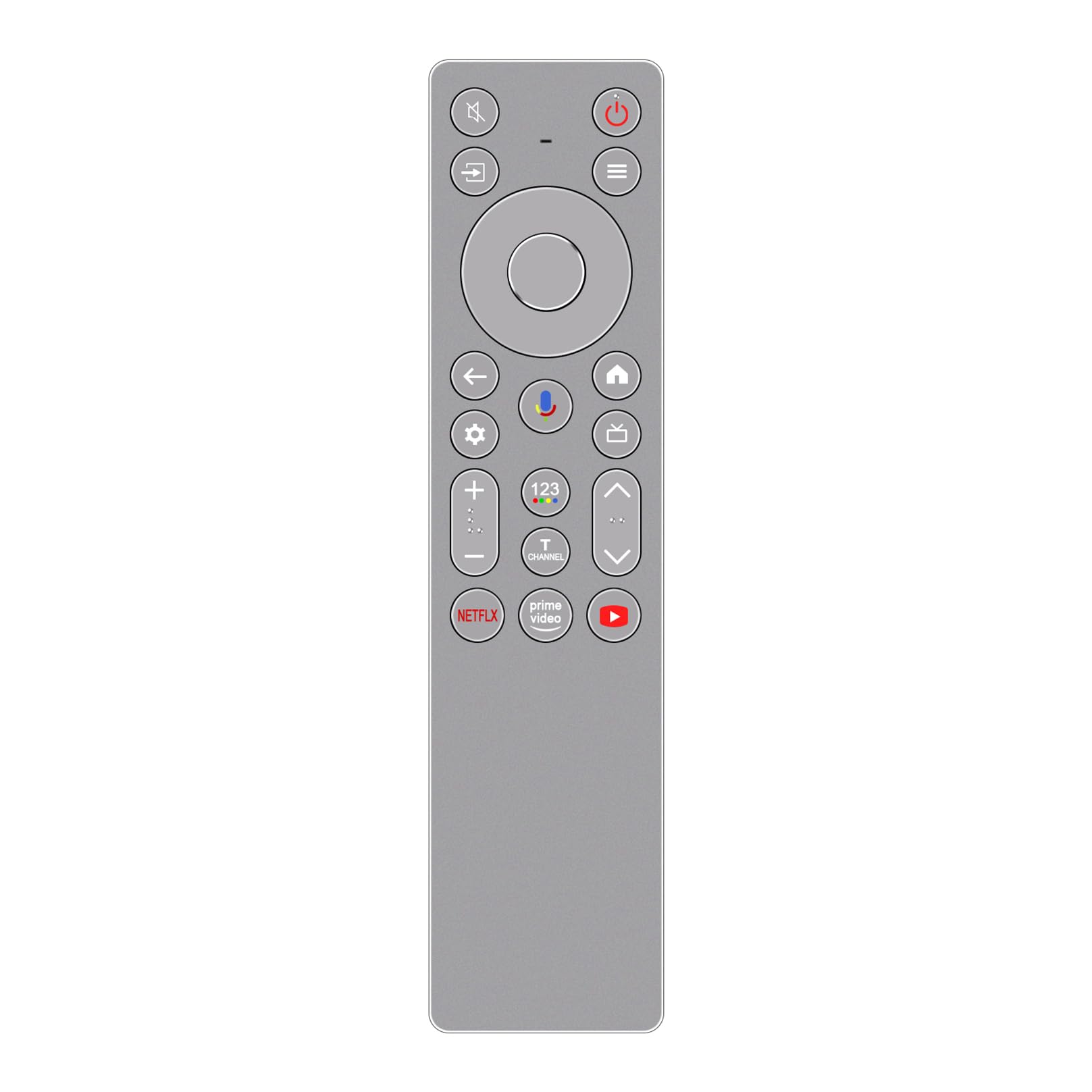
ภาพ: ด้านหน้า view of the ALLIMITY RC933A FMB1 Voice Remote Control, showcasing its button layout and sleek silver-grey finish.
การตั้งค่า
The ALLIMITY RC933A FMB1 remote control is designed for immediate use with compatible TCL Smart TVs. No programming or complex setup is required. Simply install the batteries to begin operation.
การติดตั้งแบตเตอรี่
- ค้นหาช่องใส่แบตเตอรี่ที่ด้านหลังของรีโมทคอนโทรล
- เลื่อนเปิดฝาครอบช่องใส่แบตเตอรี่
- ใส่แบตเตอรี่ AA สองก้อน โดยตรวจสอบให้แน่ใจว่าขั้วบวก (+) และขั้วลบ (-) ตรงกับเครื่องหมายภายในช่องใส่แบตเตอรี่อย่างถูกต้อง
- ปิดฝาช่องใส่แบตเตอรี่ให้แน่น
The remote is now ready for use. Point it towards your TCL Smart TV and press any button to confirm functionality.
คำแนะนำการใช้งาน
The ALLIMITY RC933A FMB1 remote control provides intuitive access to your TV's functions, including voice commands and dedicated app buttons.
ฟังก์ชั่นปุ่มโอเวอร์view
- ปุ่มเปิด/ปิด: เปิดหรือปิดทีวี
- Directional Pad (D-Pad) and OK Button: นำทางเมนูและยืนยันการเลือก
- ปุ่มย้อนกลับ: กลับไปที่หน้าจอหรือเมนูก่อนหน้า
- ปุ่มโฮม: เข้าสู่หน้าจอหลักของทีวี
- ปุ่มการตั้งค่า: เปิดเมนูการตั้งค่าทีวี
- เพิ่ม/ลดระดับเสียง: ปรับระดับเสียงทีวี
- ช่องขึ้น/ลง: เปลี่ยนช่องทีวี
- ปุ่มปิดเสียง: ปิดหรือเปิดเสียงทีวี
- ปุ่มอินพุต/แหล่งที่มา: เลือกแหล่งสัญญาณอินพุต (HDMI, AV ฯลฯ)
- ปุ่มแอปเฉพาะ: เข้าถึง Netflix, Prime Video และ YouTube ได้อย่างรวดเร็ว
ฟังก์ชันควบคุมด้วยเสียง
The remote features a voice command button for convenient control of your TV. This allows you to search for content, change settings, or launch apps using your voice.
- กดปุ่ม ปุ่มควบคุมด้วยเสียง (typically indicated by a microphone icon).
- Hold the remote approximately 10-30 cm (4-12 inches) from your mouth.
- พูดคำสั่งของคุณอย่างชัดเจนในไมโครโฟนของรีโมท
- ปล่อยปุ่มเมื่อคุณพูดจบแล้ว

ภาพ: รายละเอียด view of the ALLIMITY RC933A FMB1 remote control, with a magnified inset showing the multi-colored microphone icon for voice control.
การซ่อมบำรุง
การดูแลรักษาอย่างถูกวิธีจะช่วยให้รีโมทคอนโทรลของคุณใช้งานได้ยาวนานและทำงานได้อย่างมีประสิทธิภาพสูงสุด
การทำความสะอาด
- เช็ดรีโมทคอนโทรลด้วยผ้าแห้งและนุ่ม
- สำหรับสิ่งสกปรกฝังแน่น ให้เช็ดออกเล็กน้อยampชุบผ้าด้วยน้ำหรือน้ำยาทำความสะอาดอ่อนๆ ที่ไม่กัดกร่อน หลีกเลี่ยงความชื้นที่มากเกินไป
- ห้ามใช้สารเคมีรุนแรง ตัวทำละลาย หรือแผ่นขัดถู เพราะอาจทำให้พื้นผิวหรือชิ้นส่วนภายในของรีโมทเสียหายได้
การเปลี่ยนแบตเตอรี่
- เปลี่ยนแบตเตอรี่เมื่อการตอบสนองของรีโมทช้าลงหรือหยุดทำงาน
- Always replace both batteries at the same time with new AA batteries.
- อย่าใช้แบตเตอรี่เก่าและใหม่ผสมกัน หรือแบตเตอรี่ประเภทต่างๆ
- ถอดแบตเตอรี่ออกหากจะไม่ได้ใช้รีโมทเป็นเวลานาน เพื่อป้องกันการรั่วไหล
พื้นที่จัดเก็บ
Store the remote control in a cool, dry place away from direct sunlight, extreme temperatures, and high humidity.
การแก้ไขปัญหา
If you encounter issues with your ALLIMITY RC933A FMB1 remote control, refer to the following common solutions:
- รีโมตไม่ตอบสนอง:
- ตรวจสอบว่าใส่แบตเตอรี่ถูกต้องและขั้วถูกต้องหรือไม่
- เปลี่ยนแบตเตอรี่ด้วยแบตเตอรี่ AA ใหม่
- ตรวจสอบให้แน่ใจว่าไม่มีสิ่งกีดขวางระหว่างรีโมทคอนโทรลและเครื่องรับอินฟราเรดของทีวี
- ตรวจสอบให้แน่ใจว่าคุณอยู่ในระยะการทำงานที่มีประสิทธิภาพ (สูงสุด 10 เมตร)
- การควบคุมด้วยเสียงไม่ทำงาน:
- ตรวจสอบให้แน่ใจว่ารีโมทมีแบตเตอรี่ใหม่
- Press and hold the voice control button while speaking.
- พูดอย่างชัดเจนและตรงเข้าไปในไมโครโฟน
- Check your TV's settings to ensure voice control is enabled and properly configured.
- ระยะการส่งข้อมูลสั้น:
- Replace batteries with new ones. Low battery power can reduce range.
- ตรวจสอบให้แน่ใจว่าไม่มีแหล่งกำเนิดแสงที่สว่างจ้า (เช่น แสงแดดโดยตรงหรือแสงไฟฟลูออเรสเซนต์ที่สว่างจ้า) รบกวนสัญญาณอินฟราเรด
- Remove any physical obstructions between the remote and the TV.
ข้อมูลจำเพาะ
| ยี่ห้อ | ความเสมอภาค |
| ชื่อรุ่น | MM-RC933A-FMB1 |
| สี | Silver/Grey (as pictured) |
| เทคโนโลยีการเชื่อมต่อ | อินฟาเรด (IR) |
| ประเภทการควบคุม | คำสั่งเสียง |
| ระยะสูงสุด | 10 เมตร (33 ฟุต) |
| จำนวนปุ่ม | 25 |
| คำอธิบายแบตเตอรี่ | AA (ต้องมี 2) |
| น้ำหนักผลิตภัณฑ์ | 59 กรัม |
| ขนาด (ความยาว x ความกว้าง) | 18.5 ซม. (7.28 นิ้ว) x 4.8 ซม. (1.89 นิ้ว) |
| จำนวนอุปกรณ์ที่รองรับสูงสุด | 1 (for direct control, though it can be compatible with multiple models) |

ภาพ: วางเคียงข้างกัน view of the ALLIMITY RC933A FMB1 remote control, illustrating its length (18.5 cm / 7.28 in) and width (4.8 cm / 1.89 in).
การรับประกันและการสนับสนุน
For specific warranty information or technical support regarding your ALLIMITY RC933A FMB1 Voice Remote Control, please refer to the documentation provided with your purchase or contact the retailer/manufacturer directly. Keep your purchase receipt as proof of purchase for any warranty claims.