
1. สินค้าหมดview
The TOMLOV TM3K-3D Max is a versatile 3D digital microscope designed for detailed inspection and repair tasks. It features a 10.1-inch IPS screen with 3K UHD resolution, magnetic dual lenses for easy switching between wide-angle (W) and long-distance (L) viewing, and a flexible arm stand for stable and adjustable positioning. This microscope supports 3D side-viewing, allowing for comprehensive inspection of electronic components, coins, and other intricate objects. Connectivity options include HDMI for large-screen viewing and USB for computer analysis, making it suitable for professionals and hobbyists alike.
1.1 วิดีโอ: โอเวอร์view of the TOMLOV 3D HDMI Digital Microscope with Magnetic Dual Lens, showcasing คุณสมบัติและการใช้งานของมัน
2. อะไรอยู่ในกล่อง
โปรดตรวจสอบว่าสินค้าทั้งหมดมีอยู่ในแพ็คเกจ:
- 1x TM3K-3D Max Digital Microscope
- 1x Flex Arm Stand
- 1x 4-inch Stand
- 1x Lens W (Wide-Angle)
- 1x Lens L (Long-Distance)
- แผ่นรองบัดกรี 1 แผ่น
- อะแดปเตอร์ไฟฟ้า 1x
- สาย HDMI 1x
- สาย USB 1x
3. คำแนะนำในการตั้งค่า
Follow these steps to assemble and set up your TOMLOV TM3K-3D Max microscope:
- ประกอบขาตั้งแขนยืดหยุ่น:
ติด C-clamp to your desktop. Secure the monitor arm to the base, then attach the bracket to the arm. Ensure all connections are tightened for stability. - ติดตั้งชุดกล้องจุลทรรศน์:
Slide the microscope monitor unit onto the arm bracket and secure it using the provided knob. - ติดตั้งเลนส์:
Gently grip the desired lens (L or W) and align it with the interface at the bottom of the microscope unit. The magnetic attachment will secure it in place. - เชื่อมต่อสายไฟและสายเคเบิล:
Connect the power adapter to the microscope and a power outlet. If using external displays, connect the HDMI or USB cable to the respective ports on the microscope and your monitor/computer. Organize cables using the integrated cable management on the arm. - Position the Microscope:
Adjust the flexible arm to position the microscope over your working area. Ensure the object is within the focal range of the selected lens.
3.1 วิดีโอ: Demonstrates how to install the flexible arm stand for the LCD microscope, including attaching the C-clamp and securing the arm.

ภาพที่ 3.1: The magnetic dual lens system allows for quick and easy switching between the L (long-distance) and W (wide-angle) lenses.

ภาพที่ 3.2: The microscope supports triple screen display via its built-in IPS screen, HDMI output, and USB connection to a computer.

ภาพที่ 3.3: The 360° articulating arm stand provides stability and full adjustability for optimal viewมุมการเอียง
4. คู่มือการใช้งาน
4.1 การเปิดเครื่องและการควบคุมพื้นฐาน
Press the 'POWER' button to turn on the microscope. Use the 'OK' button to confirm selections and the arrow buttons to navigate menus or adjust settings on the 10.1-inch IPS screen.

ภาพที่ 4.1: The 10.1-inch IPS screen provides a clear 3K UHD display for detailed observation.
4.2 Using 3D Side-Viewกำลังทำ
The TM3K-3D Max offers a unique 3D side-viewing capability. To activate this, rotate the lens adjustment ring from 2D to 3D. This allows you to inspect objects from multiple angles, providing a 360° rotating view for tasks like PCB repair or jewelry inspection.
4.2 วิดีโอ: Demonstrates how to use the 360-degree 3D view feature of the soldering microscope, showing the rotation of the lens for angled inspection.

ภาพที่ 4.2: The microscope allows users to switch between 2D and 3D viewing modes for versatile inspection.
4.3 Switching Lenses (W and L)
The microscope comes with two magnetic lenses: the W (Wide-Angle) lens and the L (Long-Distance) lens. To switch lenses, gently pull the currently attached lens downward to detach it, then align and attach the desired lens. No tools are required.
- W Wide-Angle Lens: Ideal for full-frame views of larger objects like coins, jewelry, or specimens, capturing fine details across a broader area.
- L Long-Distance Lens: Provides an expanded working space, making it perfect for tasks requiring tools, such as PCB soldering or micro soldering. It offers clear, high-magnification imaging for precise work.

ภาพที่ 4.3: The W Wide-Angle Lens is suitable for viewing larger objects like coins and jewelry.
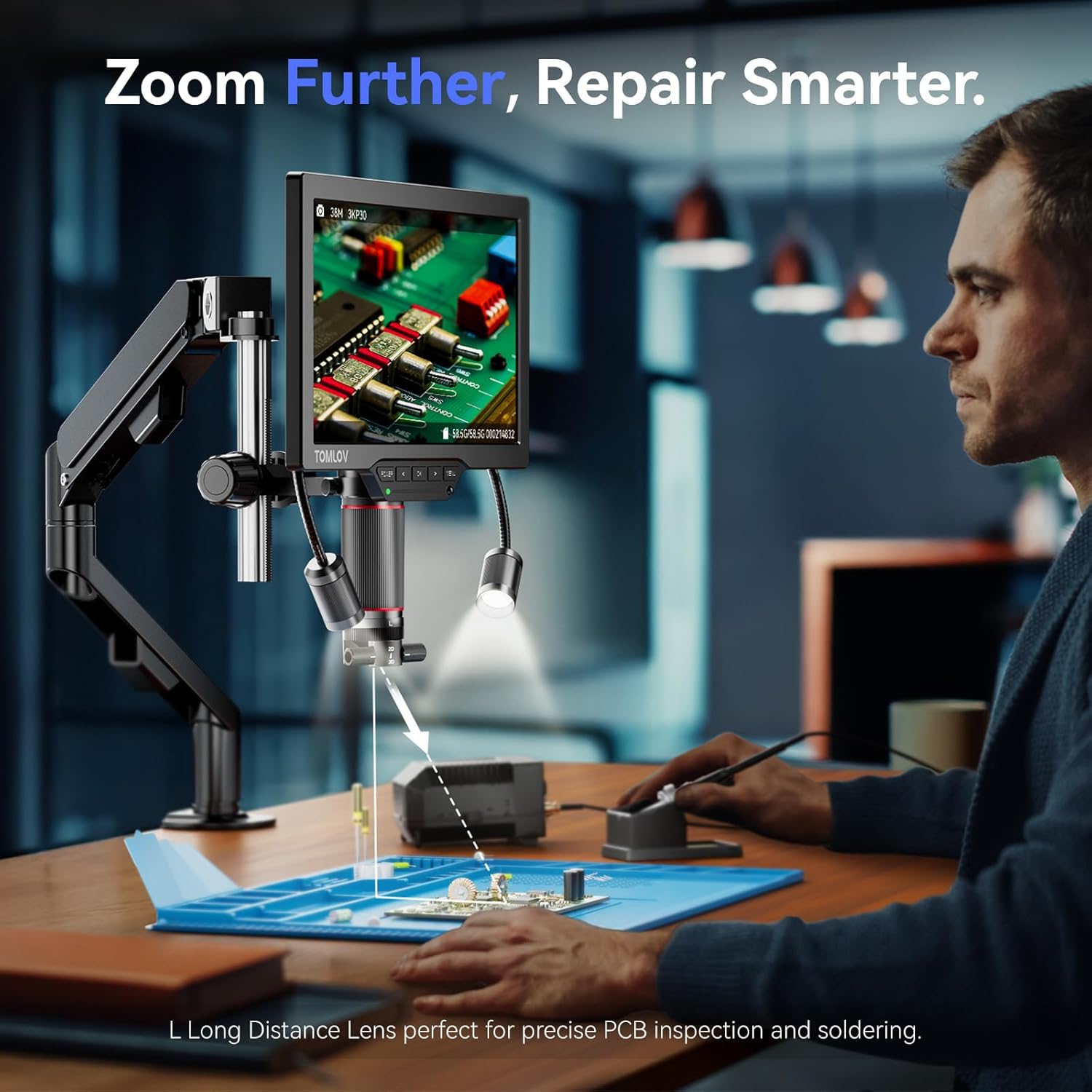
ภาพที่ 4.4: The L Long-Distance Lens provides ample working space for soldering and intricate repairs.
4.3 วิดีโอ: A brief demonstration of how to change the objective lens on the 3D coin microscope.
4.4 การปรับระดับแสงสว่าง
The microscope features an LED gooseneck spotlight for targeted illumination. Adjust the position and angle of the lights to eliminate shadows and achieve optimal brightness for your inspection area. The brightness can be controlled via the microscope's interface.
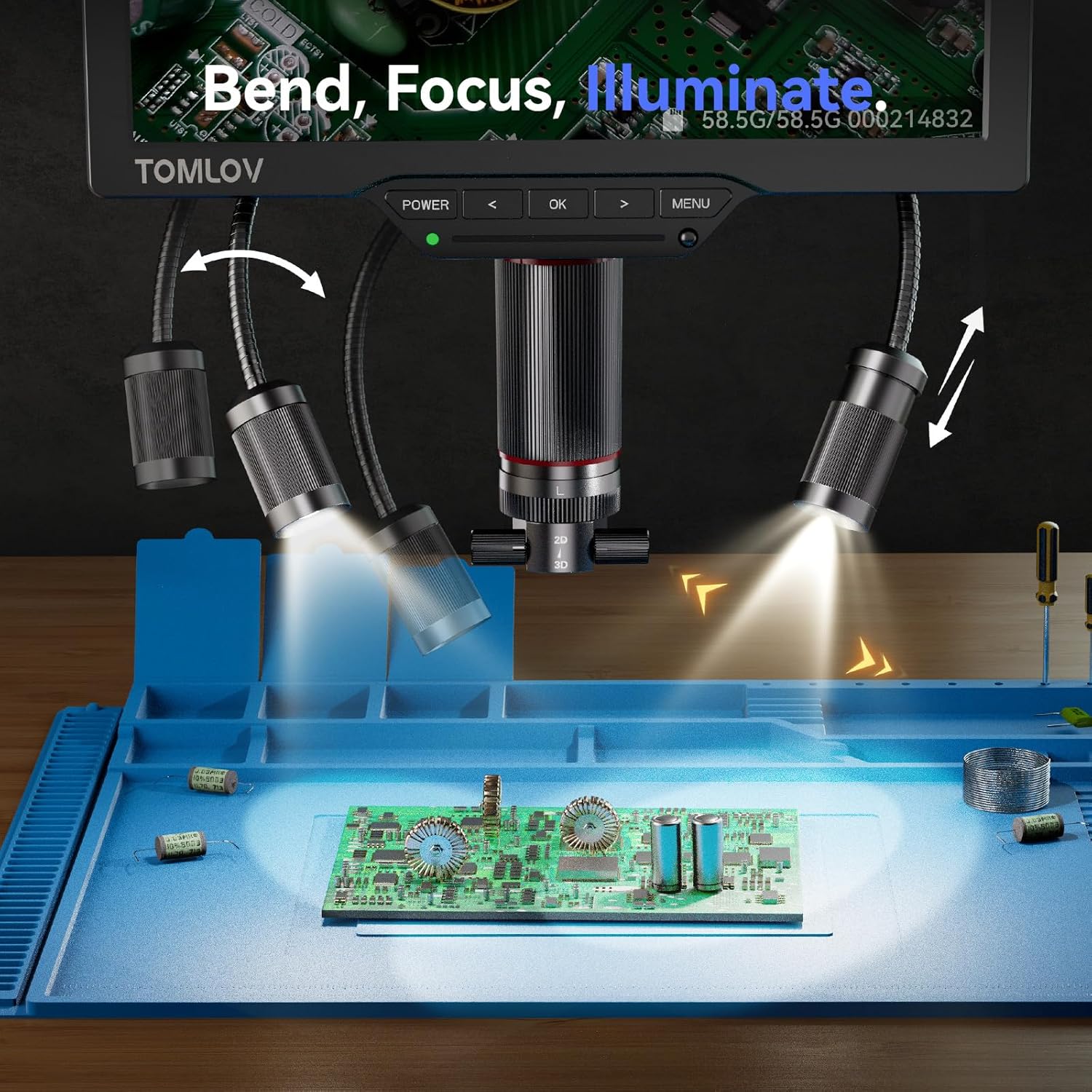
ภาพที่ 4.5: The LED gooseneck spotlights provide customizable brightness and beam direction to reduce glare and shadows.
4.4 วิดีโอ: A short video demonstrating how to use the DualWing LED lights of the 3D digital microscope to adjust illumination.
4.5 Recording and Capturing Images
The microscope supports recording videos and capturing still images directly to a microSD card (64GB included). Use the menu options to access these functions. Ensure the microSD card is properly inserted and formatted if you encounter issues saving files.
5. การบำรุงรักษา
- การทำความสะอาด: Use a soft, dry cloth to clean the microscope body and screen. For lenses, use a specialized lens cleaning cloth and solution to avoid scratches.
- พื้นที่จัดเก็บ: Store the microscope in a clean, dry environment away from direct sunlight and extreme temperatures.
- การดูแลเลนส์: Handle lenses carefully. Avoid touching the optical surfaces with bare hands.
6 การแก้ไขปัญหา
- ไม่มีภาพบนหน้าจอ:
- Ensure the microscope is powered on and all cables are securely connected. Check the focus and zoom settings. If using an external display, verify the HDMI/USB connection and input source on the display.
- Images appear blurry or out of focus:
- Adjust the focus knob on the microscope. Ensure the object is within the optimal working distance for the currently attached lens (L or W). Clean the lens if smudges are visible.
- Cannot save images/videos to microSD card:
- Verify that the microSD card is correctly inserted. Try reformatting the card through the microscope's menu (this will erase all data). If the issue persists, try a different microSD card.
- ไฟไม่ทำงาน:
- Check the power connection. Ensure the light control knob is rotated to increase brightness. Verify that the gooseneck lights are securely connected to the microscope unit.
7. ข้อมูลจำเพาะ
| คุณสมบัติ | รายละเอียด |
|---|---|
| ชื่อรุ่น | TM3K-3D Max |
| ขนาดหน้าจอ | จอ IPS ขนาด 10.1 นิ้ว |
| ปณิธาน | 3K ยูเอชดี |
| กำลังขยายสูงสุด | 2000 เท่า |
| เลนส์ | Magnetic Dual Lenses (W Wide-Angle, L Long-Distance) |
| การเชื่อมต่อ | HDMI, ยูเอสบี |
| ประเภทแหล่งกำเนิดแสง | LED Gooseneck Spotlight |
| ขนาดสินค้า | 11 x 3 x 12 นิ้ว |
| น้ำหนักสินค้า | 3 ปอนด์ |
| วัสดุ | โลหะ |
| เล่มที่tage | 5 โวลต์ |
8. การรับประกันและการสนับสนุน
For warranty information, technical support, or service inquiries, please contact TOMLOV customer service. Refer to the product packaging or the official TOMLOV webเว็บไซต์สำหรับรายละเอียดการติดต่อล่าสุด