
1. สินค้าหมดview
The blafili 6dot35 is a versatile 1/4" Jack TRS Bluetooth v5.1 Music Receiver designed to integrate wireless audio streaming into professional and home audio setups. It supports high-quality audio codecs including aptX HD, aptX Low Latency, AAC, and SBC, ensuring superior sound. With a built-in rechargeable battery offering over 10 hours of playtime and USB-C DAC functionality, it provides flexible connectivity for mixing consoles, PA systems, DJ equipment, and computers. Its True Wireless Stereo (TWS) feature allows two units to be paired for immersive stereo sound.

Image: The blafili 6dot35 Bluetooth Receiver shown with its 1/4 inch TRS plug, connecting wirelessly to a laptop, smartphone, and tablet, and wired to a live sound mixer and active loudspeaker.
2. อะไรอยู่ในกล่อง
- blafili 6dot35 Bluetooth Music Receiver
- คู่มือเริ่มต้นอย่างรวดเร็ว
- Power Cable (USB-C to USB-A)

Image: The blafili 6dot35 receiver, a USB-C charging cable, and the quick start guide are displayed as the package contents.
3. คุณสมบัติหลัก
- คุณภาพเสียงที่เหนือกว่า: Utilizes Qualcomm QCC3034 Bluetooth chipset with aptX HD, aptX Low Latency, aptX, AAC, and SBC codecs.
- การเชื่อมต่อที่ง่ายดาย: 1/4" TRS output for direct connection to audio mixing consoles, PA systems, and active DJ speakers.
- Mono and Stereo Modes: Supports mono audio with one unit, or True Wireless Stereo (TWS) playback by connecting two blafili 6dot35 receivers.
- ฟังก์ชันการทำงานของ USB DAC: Plug-and-play USB DAC supports up to 16bit / 48kHz audio input from a computer via USB-C.
- อายุการใช้งานแบตเตอรี่ยาวนาน: Built-in rechargeable battery provides 10+ hours of runtime. USB Type-C port for charging or continuous DC power.
- การทำงานเงียบ: No beeps produced during pairing or unpairing.
- Customizable Bluetooth Name: Option to customize the Bluetooth broadcast name.
- ความเข้ากันได้: Compatible with mixers, PA systems, and active speakers. Not compatible with Bluetooth headphones, speakers, or microphones.
4. การควบคุมและตัวชี้วัด
The blafili 6dot35 features intuitive controls and clear LED indicators for easy operation.
- ปุ่มจับคู่: Power ON/OFF, Play/Pause, Reconnect.
- ปุ่ม TWS: True Wireless Stereo pairing mode.
- CHG (Charge) Button: ไฟแสดงสถานะแบตเตอรี่
- พอร์ต USB-C: For charging and USB DAC audio input.
- 1/4" TRS Plug: ขั้วต่อเอาต์พุตเสียง

Image: A detailed diagram of the blafili 6dot35 highlighting its 1/4 inch TRS output, USB-C charging port/audio input, PAIR button, TWS button, and CHG button with corresponding LED indicators.
5. คู่มือการติดตั้ง
5.1 การชาร์จเริ่มต้น
- Connect the provided USB-C cable to the blafili 6dot35's USB-C port.
- Plug the other end of the USB-C cable into a compatible USB power source (e.g., computer USB port, wall adapter).
- The CHG LED will illuminate solid red during charging. It will turn off when fully charged.
- A full charge takes approximately 2 hours and provides over 10 hours of runtime.
5.2 Powering On/Off & Bluetooth Pairing
- เปิดเครื่อง: กดปุ่มค้างไว้ คู่ button for approximately 3 seconds until the PAIR LED flashes blue and red alternately, indicating pairing mode.
- การจับคู่: On your Bluetooth-enabled device (smartphone, tablet, laptop), search for available Bluetooth devices and select "blafili 6dot35".
- การยืนยันการเชื่อมต่อ: Once successfully paired, the PAIR LED will become a solid color (blue for SBC, cyan for aptX, pink for AAC, green for aptX HD, white for aptX LL).
- หมดแรง: กดปุ่มค้างไว้ คู่ กดปุ่มนี้ประมาณ 3 วินาที
5.3 การเชื่อมต่อกับอุปกรณ์เครื่องเสียง
- Insert the 1/4" TRS plug of the blafili 6dot35 directly into an available 1/4" input on your audio mixer, PA system, or active DJ speaker.
- Ensure the input level on your audio equipment is set appropriately to avoid distortion.
- หมายเหตุสำคัญ: The blafili 6dot35 is not designed to operate with 48V phantom power. Use with standard line-level or non-phantom-powered 1/4" TRS inputs for optimal performance.
5.4 True Wireless Stereo (TWS) Pairing (Requires two blafili 6dot35 units)
- Ensure both blafili 6dot35 units are powered on and not connected to any Bluetooth device.
- สำหรับเครื่องแรก ให้กดปุ่มค้างไว้ ทไวซ์ button for approximately 3 seconds to enter TWS pairing mode. The TWS LED will flash blue.
- Repeat the previous step for the second unit.
- Once successfully paired in TWS mode, the TWS LEDs on both units will illuminate solid blue. One unit will act as the primary (left channel) and the other as the secondary (right channel).
- Connect your Bluetooth device to the primary blafili 6dot35 unit as described in section 5.2.
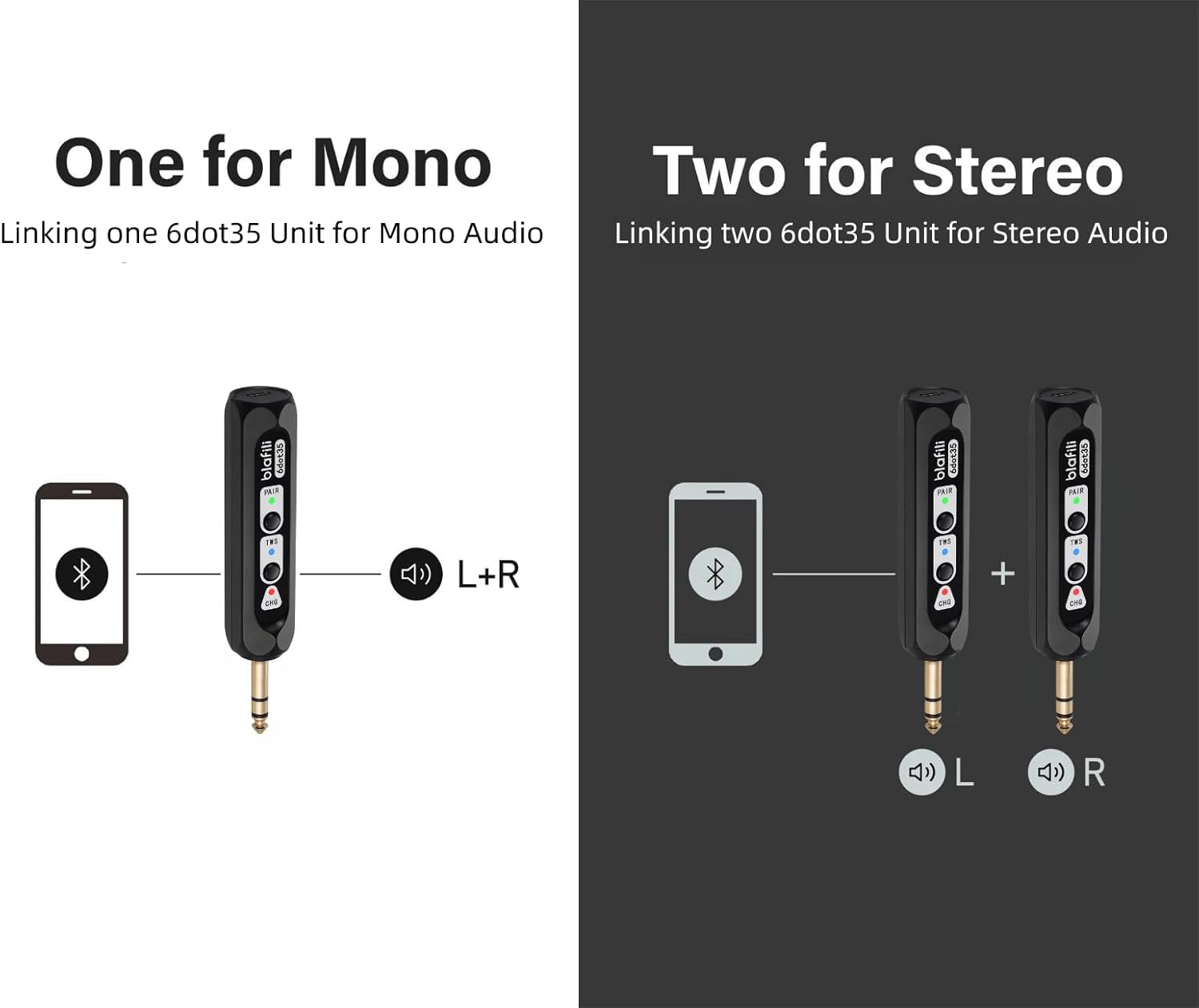
Image: Illustration of single blafili 6dot35 for mono output (L+R) and two blafili 6dot35 units paired for True Wireless Stereo (L and R channels).
5.5 USB DAC Audio Input
- Connect a computer to the blafili 6dot35 using a USB-C to USB-A cable.
- The blafili 6dot35 will be recognized as an audio output device by your computer.
- Select the blafili 6dot35 as your audio output device in your computer's sound settings to stream audio.
6. คู่มือการใช้งาน
6.1 การควบคุมการเล่นขั้นพื้นฐาน
- เล่น/หยุดชั่วคราว: กดสั้น ๆ คู่ button when music is playing.
- เชื่อมต่อใหม่: กดสั้น ๆ คู่ button when out of connection to re-establish the last paired device.
6.2 Customizing Bluetooth Broadcast Name
The blafili 6dot35 allows you to customize its Bluetooth broadcast name. Refer to the detailed instructions in the full user manual or contact blafili support for guidance on this advanced feature.
7. การบำรุงรักษา
7.1 การชาร์จ
- Charge the device using the provided USB-C cable and a 5V USB power source.
- The CHG LED indicates charging status (solid red for charging, off for fully charged).
- The CHG LED will flash 5 times every minute when the battery is low and needs recharging.
- For continuous use, the device can remain plugged into a USB power source.
7.2 การดูแลและการจัดการ
- เก็บอุปกรณ์ให้แห้งและห่างจากอุณหภูมิที่สูงหรือต่ำเกินไป
- Clean with a soft, dry cloth. Do not use harsh chemicals.
- หลีกเลี่ยงการทำอุปกรณ์หล่นหรือกระแทกอย่างรุนแรง
8 การแก้ไขปัญหา
- ระดับความยากในการจับคู่:
Ensure the blafili 6dot35 is in pairing mode (PAIR LED flashing blue/red). Turn off Bluetooth on other devices to prevent interference. The blafili 6dot35 is a receiver, not a transmitter, so it cannot pair with Bluetooth headphones, speakers, or microphones. - ไม่มีเอาต์พุตเสียง:
Check if the blafili 6dot35 is correctly plugged into a line-level or non-phantom-powered 1/4" TRS input on your audio equipment. Verify that the volume levels on both the receiver and your audio equipment are adjusted correctly. Ensure your Bluetooth device is successfully connected to the blafili 6dot35. - ปัญหาการเชื่อมต่อ TWS:
Ensure both blafili 6dot35 units are powered on and not connected to any other Bluetooth device before initiating TWS pairing. Follow the TWS pairing steps carefully. - USB DAC Not Working:
Confirm the USB-C cable is securely connected to both the blafili 6dot35 and your computer. Ensure the blafili 6dot35 is selected as the audio output device in your computer's sound settings. The blafili 6dot35 supports USB-C audio input from a computer, not USB-C output. - Unexpected Beeps/Tones:
The blafili 6dot35 is designed for silent operation during pairing and unpairing. If you hear unexpected tones, check for external interference or consult the full manual.
9. ข้อมูลจำเพาะ
| ขนาดสินค้า | 1 x 1 x 1 นิ้ว (2.54 x 2.54 x 2.54 ซม.) |
| น้ำหนักสินค้า | 2.39 ออนซ์ (67.75 กรัม) |
| หมายเลขรุ่นสินค้า | blafili 6dot35 |
| แบตเตอรี่ | ต้องใช้แบตเตอรี่ลิเธียมไอออน 1 ก้อน (รวมอยู่ด้วย) |
| ยี่ห้อ | บลาฟิลี |
| เทคโนโลยีการเชื่อมต่อ | 1/4" TRS plug, Bluetooth v5.1, USB-C |
| ประเภทตัวควบคุม | ปุ่มกด |
| คุณสมบัติพิเศษ | Hi-Res Audio, LED Light, Portable, Stereo Pairing (TWS), USB Port |
| อุปกรณ์ที่รองรับ | Home Theater, Karaoke Machine, Smartphone, Streaming Device, Tablet |
| ประเภทขั้วต่อ | 1/4" TRS |
| โหมดเอาต์พุตเสียง | สเตอริโอ |
| การกำหนดค่าช่องเสียงรอบทิศทาง | 2.0 |
| สี | สีดำ |
10. การรับประกันและการสนับสนุน
10.1 นโยบายการคืนสินค้า
ผลิตภัณฑ์นี้สามารถขอคืนเงิน/เปลี่ยนสินค้าได้ภายใน 30 วัน เมื่อซื้อจาก Amazon
10.2 แผนคุ้มครองเพิ่มเติม
สามารถซื้อแผนคุ้มครองเพิ่มเติมได้ (เป็นทางเลือกเสริม):
- แผนคุ้มครอง 2 ปี
- แผนคุ้มครอง 3 ปี
- Complete Protect (เรียกเก็บเงินรายเดือน)
Please refer to the product listing or contact your retailer for details on purchasinก. แผนเหล่านี้
10.3 การสนับสนุนจากผู้ผลิต
For further assistance, technical support, or warranty claims, please contact blafili inc. directly. Contact information can typically be found in the full user manual or on the manufacturer's official webเว็บไซต์.
11. วิดีโอผลิตภัณฑ์อย่างเป็นทางการ
Video: An official product video from BLAFILI demonstrating the blafili 1/4" Bluetooth Audio Receiver for Mixers, showcasing คุณสมบัติและการเชื่อมต่อต่างๆ