
1. บทนำ
This manual provides detailed instructions for the safe and efficient operation of your Blukar Mini Rechargeable LED Flashlight, Model K9183. Please read this manual thoroughly before using the product and retain it for future reference.
The Blukar K9183 is a compact, durable, and versatile LED flashlight designed for everyday carry (EDC). Its small size, multiple lighting modes, and USB-C rechargeable battery make it ideal for various situations, from outdoor activities to emergency lighting.
2. เนื้อหาบรรจุภัณฑ์
กรุณาตรวจสอบแพ็คเกจสำหรับรายการต่อไปนี้:
- 1 x Blukar Mini Rechargeable LED Flashlight (Model K9183)
- สายชาร์จ 1 x USB-C
- 1 x คู่มือผู้ใช้
3. คุณสมบัติของผลิตภัณฑ์
- Ultra-Compact EDC Design: Super compact and lightweight, equipped with a keychain for easy attachment to keys, backpacks, or pockets.
- สามโหมดแสงสว่าง: Offers High, Medium, and Low brightness levels to suit different illumination needs.
- USB-C ชาร์จใหม่ได้: Features a built-in battery that recharges conveniently via the included USB-C cable.
- ฟังก์ชั่นหน่วยความจำ: Automatically remembers the last used lighting mode when turned off and on again.
- ระดับการกันน้ำ IPX6: Ensures safe operation in wet conditions and rain, making it suitable for outdoor use.
- โครงสร้างทนทาน: Made from high-quality aluminum alloy, providing a lightweight, durable, and corrosion-resistant housing.
- ไฟแสดงสถานะแบตเตอรี่: The power switch illuminates red during charging or when the battery is low, and green when fully charged or in use.
4. การตั้งค่า
Before initial use, it is recommended to fully charge the flashlight. Refer to the "Charging Instructions" section for details.

Image: The Blukar Mini Rechargeable LED Flashlight K9183, showcasing its compact design and illuminated power button.
Attaching to a Keychain
The flashlight comes with an integrated keychain ring. You can easily attach it to your existing key ring, backpack, or other personal items for convenient access.

Image: Demonstrates various carrying options for the Blukar Mini Flashlight, including with a necklace, keychain, and in a pocket.
5. คู่มือการใช้งาน
The Blukar K9183 flashlight features a single button for all operations.

Image: Illustrates the three lighting modes (High, Medium, Low) and the single-button control for switching modes and turning off.
- Turning On/Changing Modes: Press the power button briefly to turn on the flashlight. Each subsequent brief press will cycle through the brightness modes: High > Medium > Low.
- การปิด:
- If the flashlight has been on for more than 8 seconds in any mode, a single brief press of the power button will turn it off.
- To turn off the flashlight quickly at any time (within 8 seconds of turning on or changing modes), press and hold the power button for approximately 3 seconds.
- ฟังก์ชั่นหน่วยความจำ: The flashlight will remember the last used brightness mode. When you turn it on again, it will activate in that mode.
6. คำแนะนำในการชาร์จ
The Blukar K9183 flashlight is equipped with a built-in rechargeable battery.
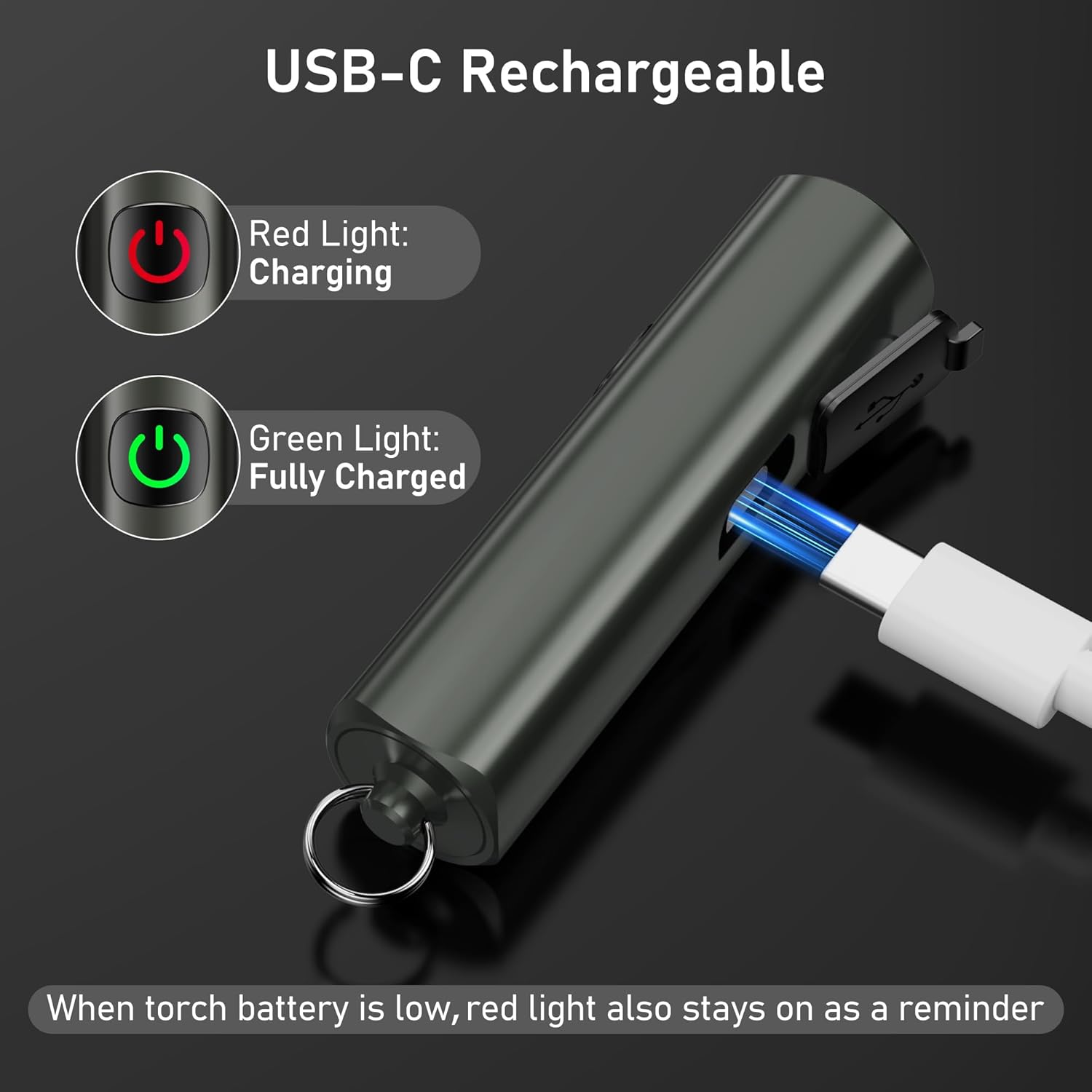
Image: Shows the USB-C charging port and the red/green indicator lights for charging status.
- หาพอร์ตชาร์จ USB-C ที่ด้านข้างของไฟฉาย ซึ่งโดยปกติจะมีฝาปิดยางอยู่
- Gently open the rubber flap to expose the port.
- Connect the included USB-C charging cable to the flashlight's port and the other end to a standard USB power source (e.g., computer, wall adapter, power bank).
- ปุ่มเปิดปิดจะสว่างขึ้น สีแดง to indicate that the flashlight is charging.
- Once fully charged, the power button will turn สีเขียว.
- โดยทั่วไปการชาร์จเต็มจะใช้เวลาประมาณ 2 ชั่วโมง
- When the battery is low during operation, the power button will also illuminate สีแดง as a reminder to recharge.
A full charge provides up to 5.5 hours of continuous illumination on the low brightness setting.
7. การบำรุงรักษา
การทำความสะอาด
- เช็ดไฟฉายด้วยผ้านุ่มๆamp ผ้าเพื่อขจัดสิ่งสกปรกหรือเศษขยะ
- ห้ามใช้น้ำยาทำความสะอาดที่มีฤทธิ์กัดกร่อนหรือตัวทำละลาย เนื่องจากอาจทำให้พื้นผิวหรือชิ้นส่วนภายในเสียหายได้
- Ensure the USB-C port cover is securely closed after charging to maintain its IPX6 waterproof rating.
พื้นที่จัดเก็บ
- เก็บไฟฉายไว้ในที่แห้งและเย็น ห่างจากแสงแดดโดยตรงและอุณหภูมิที่สูงหรือต่ำเกินไป
- If storing for an extended period, recharge the battery every 3 months to prevent battery degradation and prolong its lifespan.
8 การแก้ไขปัญหา
| ปัญหา | สาเหตุที่เป็นไปได้ | สารละลาย |
|---|---|---|
| ไฟฉายไม่ติด | แบตเตอรี่หมด | ชาร์จไฟฉายโดยใช้สาย USB-C ที่ให้มา |
| แสงสลัวหรือกระพริบ | แบตเตอรี่อ่อน | ชาร์จไฟฉาย |
| ไฟฉายไม่ชาร์จ | Charging cable or adapter faulty; port not connected properly. | ตรวจสอบให้แน่ใจว่าเสียบสาย USB-C แน่นดีแล้ว ลองใช้สาย USB-C หรืออะแดปเตอร์แปลงไฟตัวอื่นดู |
| Cannot change brightness modes. | การดำเนินการไม่ถูกต้อง | Ensure you are pressing the button briefly to cycle modes. |
9. ข้อมูลจำเพาะ

Image: Visual representation of key specifications including beam distance, drop test, weight, waterproof rating, and length.
| คุณสมบัติ | รายละเอียด |
|---|---|
| หมายเลขรุ่น | เค9183 |
| ยี่ห้อ | บลูการ์ |
| ขนาด (กว้าง x ยาว x สูง) | 6.64 x 1.58 x 1.58 ซม. (2.61 x 0.62 x 0.62 นิ้ว) |
| น้ำหนัก | 27 กรัม (0.95 ออนซ์) |
| ประเภทแบตเตอรี่ | แบตเตอรี่ลิเธียมไอออน 1 ก้อน (รวมอยู่ด้วย) |
| แหล่งพลังงาน | ใช้แบตเตอรี่ |
| ระดับการกันน้ำ | IPX6 (Resistant to powerful water jets) |
| พอร์ตชาร์จ | ยูเอสบี-ซี |
| เวลาในการชาร์จ | ประมาณ 2 ชั่วโมง |
| ระยะเวลาใช้งานสูงสุด (โหมดประหยัดพลังงาน) | นานถึง 5.5 ชั่วโมง |
| ระยะลำแสง | สูงถึง 48 เมตร (157 ฟุต) |
| ความต้านทานการตก | 1.5 เมตร (5 ฟุต) |
| วัสดุ | โลหะผสมอลูมิเนียมคุณภาพสูง |
10. ข้อมูลด้านความปลอดภัย
- Do not shine the flashlight directly into eyes, as the bright light can cause temporary vision impairment.
- เก็บให้พ้นมือเด็ก นี่ไม่ใช่ของเล่น
- Do not disassemble, modify, or attempt to repair the flashlight yourself. This may void the warranty and pose safety risks.
- Avoid exposing the flashlight to extreme temperatures, open flames, or corrosive liquids.
- While the flashlight is IPX6 waterproof, it is not designed for submersion in water.
- ใช้เฉพาะสาย USB-C ที่ให้มาหรือสายที่ได้รับการรับรองเทียบเท่าสำหรับการชาร์จ
11. การรับประกันและการสนับสนุน
For warranty information, please refer to the documentation included with your purchase or visit the official Blukar website. If you encounter any issues or require technical assistance, please contact Blukar customer support through their official channels.