
1. บทนำ
This instruction manual provides essential information for the safe and efficient operation of your VEVOR 2.2 kW Variable Frequency Drive (VFD). This VFD is designed to convert single-phase AC 220-240V input into three-phase AC 220-240V output, enabling precise speed control for various industrial motors. Please read this manual thoroughly before installation and operation to ensure proper use and to prevent damage or injury.

ภาพ: นายพล view of the VEVOR 2.2 kW Variable Frequency Drive (VFD), showcasinด้วยการออกแบบที่กะทัดรัดและแผงควบคุม
2. คำแนะนำด้านความปลอดภัย
คำเตือน: Improper installation or operation can lead to serious injury or property damage. Always follow these safety guidelines.
- โปรดตรวจสอบให้แน่ใจว่าได้ตัดกระแสไฟแล้วก่อนทำการเดินสายไฟหรือบำรุงรักษาใดๆ
- The VFD must be properly grounded to prevent electrical shock.
- Do not connect U/V/W output directly to AC power supply; this will damage the inverter.
- Install the inverter in a non-flammable, dry environment, free from explosive gases.
- Only qualified professionals should perform wiring and installation.
- ห้ามเปิด VFD casing; internal components are under high pressure and can cause injury.
- The VFD features a 10-layer protection system, including overcurrent, overload, overvoltage, phase loss, and short circuit protection. However, these are supplementary and do not replace safe operating practices.

Image: Diagram illustrating the VEVOR VFD's comprehensive safety protections, including overcurrent, overload, overvoltage, short circuit, and phase loss protection.
3. สินค้าหมดview
The VEVOR 2.2 kW VFD is a robust and efficient solution for controlling the speed of three-phase motors. It offers stable performance, energy efficiency, and a user-friendly interface.
คุณสมบัติหลัก:
- กำลังขับ: 2.2 kW (3 HP), 10 A.
- ป้อนข้อมูล: Single-phase AC 220-240 V, 50/60 Hz.
- เอาท์พุต: Three-phase AC 220-240 V, 0-400 Hz.
- ควบคุม: Soft start and stop for smooth motor operation.
- การป้องกัน: 10-layer system including overcurrent, overload, overvoltage, phase loss, and short circuit protection.
- การระบายความร้อน: Powerful fan and multi-hole design for efficient heat dissipation and quiet operation.
- อินเทอร์เฟซผู้ใช้: Intuitive control panel with a 5-digit LED display, speed adjustment knob, and removable panel for remote operation (20 cm cable).
- ความทนทาน: High-quality circuit control board and high-temperature resistant plastic casing.
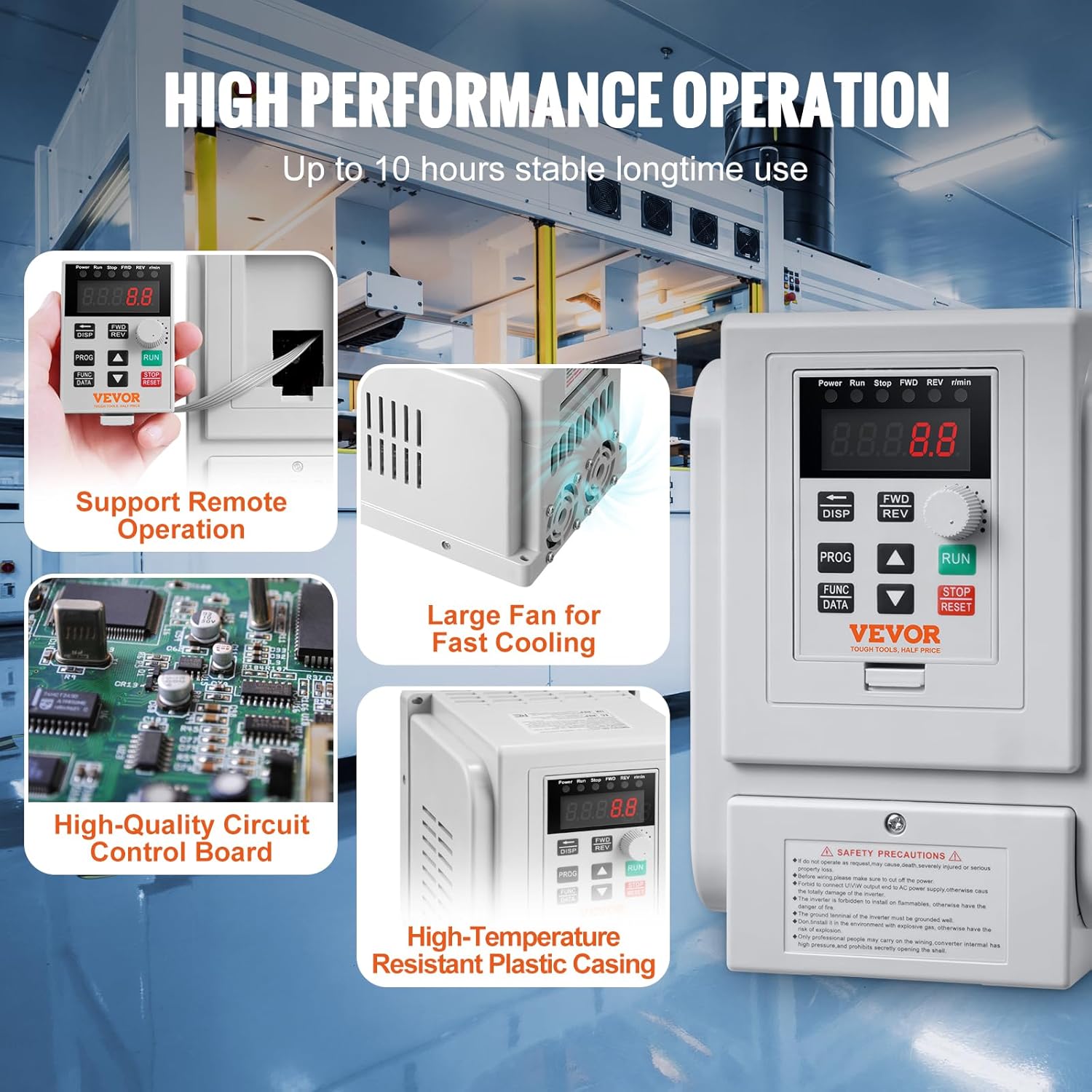
ภาพ: รายละเอียด view of the VEVOR VFD highlighting its high-performance features, including support for remote operation, a large cooling fan for rapid heat dissipation, a high-quality circuit control board, and a high-temperature resistant plastic casing.
4. การตั้งค่าและการติดตั้ง
4.1 แผนผังการเดินสายไฟ
Refer to the following diagram for correct wiring. Ensure all connections are secure and comply with local electrical codes.

Image: Wiring diagram showing single-phase AC 220-240V input connected to terminals L and N, and three-phase AC 220-240V output connected to motor terminals U, V, W. Grounding terminal (GND) is also indicated.
4.2 การเชื่อมต่อเทอร์มินัล
| ป้ายเทอร์มินัล | คำอธิบายฟังก์ชั่น |
|---|---|
| L, นู๋ | ขั้วอินพุต AC 220V เฟสเดียว |
| ยู, วี, ดับบลิว | ขั้วเอาต์พุตเชื่อมต่อกับมอเตอร์สามเฟส |
| ก.ย.ด. | ขั้วต่อสายดิน |
สำคัญ: Ensure the motor's wiring configuration is set for 220V three-phase operation if it is a dual-voltage motor (e.g., 220V/380V).
5. คู่มือการใช้งาน
5.1 แผงควบคุมโอเวอร์view
VFD มีแผงควบคุมที่ใช้งานง่าย ช่วยให้ใช้งานและปรับค่าพารามิเตอร์ได้สะดวก

ภาพ: รายละเอียด view of the VEVOR VFD control panel, showing the 5-digit LED display, status indicators, speed adjustment knob, and function keys (DISP, FWD/REV, PROG, FUNC/DATA, RUN, STOP/RESET).
- ตัวบ่งชี้สถานะ: Displays current operating status (Power, Run, Stop, FWD, REV, r/min).
- หน้าจอแสดงผล LED 5 หลัก: Shows frequency, speed, and parameter values.
- ปุ่มปรับความเร็ว: Used to adjust the output frequency/motor speed.
- ปุ่ม RUN: เริ่มการทำงานของเอาท์พุตอินเวอร์เตอร์
- ปุ่มหยุด/รีเซ็ต: หยุดเอาต์พุตอินเวอร์เตอร์หรือรีเซ็ตเงื่อนไขความผิดพลาด
- กุญแจ FWD/REV: Toggles between forward and reverse rotation.
- ปุ่ม DISP: Shifts between programming modes or jog mode in normal operation.
- ปุ่ม PROG: Used for selecting programming mode or programming.
- FUNC/DATA Button: Used for setting function data.
- ลูกศรขึ้น/ลง: สำหรับใช้ในการนำทางเมนูและปรับค่าต่างๆ
5.2 การทำงานพื้นฐาน
- เปิดเครื่อง: เชื่อมต่อ VFD เข้ากับแหล่งจ่ายไฟ หน้าจอ LED จะสว่างขึ้น
- ตั้งความถี่: หมุน ปุ่มปรับความเร็ว to set the desired output frequency (0-400 Hz).
- สตาร์ทมอเตอร์: กดปุ่ม วิ่ง กดปุ่มเพื่อสตาร์ทมอเตอร์ มอเตอร์จะเร่งความเร็วไปจนถึงความถี่ที่ตั้งไว้
- เปลี่ยนทิศทาง: กดปุ่ม เอฟดับบลิวดี/REV ปุ่มสำหรับสลับระหว่างการหมุนไปข้างหน้าและถอยหลัง
- หยุดมอเตอร์: กดปุ่ม หยุด/รีเซ็ต ปุ่มหยุดมอเตอร์
- รีเซ็ตข้อผิดพลาด: If a fault occurs, the VFD will display an error code. Press หยุด/รีเซ็ต to clear the fault after addressing the issue.
5.3 การตั้งค่าพารามิเตอร์
Detailed parameter settings are crucial for optimizing VFD performance for specific applications. Refer to the comprehensive user guide (if provided separately) for advanced parameter configurations. Basic parameters typically include:
- ความถี่เอาต์พุตสูงสุด
- เวลาเร่งความเร็ว/ลดความเร็ว
- มอเตอร์จัดอันดับความถี่
- มอเตอร์จัดอันดับVoltage
- มอเตอร์จัดอันดับปัจจุบัน
ใช้ โปรเจกต์ และ ฟังก์ชัน/ข้อมูล buttons along with the Up/Down arrows to navigate and modify parameters.
6. การบำรุงรักษา
การบำรุงรักษาอย่างสม่ำเสมอจะช่วยให้ VFD ของคุณมีอายุการใช้งานยาวนานและทำงานได้อย่างน่าเชื่อถือ
- การทำความสะอาด: Keep the VFD clean and free from dust and debris. Use a soft, dry cloth. Do not use liquid cleaners.
- การระบายอากาศ : Ensure the cooling fan and ventilation holes are unobstructed for proper heat dissipation.
- การเชื่อมต่อ: ตรวจสอบความแน่นหนาของการเชื่อมต่อสายไฟทั้งหมดและร่องรอยการกัดกร่อนเป็นระยะๆ
- สิ่งแวดล้อม: Maintain the operating environment within specified temperature and humidity ranges.
- การตรวจสอบ: Inspect the VFD for any physical damage or unusual noises during operation.
7 การแก้ไขปัญหา
If you encounter issues with your VFD, refer to the following common problems and solutions. For persistent issues, contact VEVOR customer support.
| ปัญหา | สาเหตุที่เป็นไปได้ | สารละลาย |
|---|---|---|
| VFD ไม่ทำงาน | No power supply; loose connections; internal fault | Check power input; verify wiring; contact support |
| มอเตอร์ไม่สตาร์ท | Incorrect wiring; VFD in stop mode; fault condition; incorrect parameters | Verify motor and VFD wiring; press RUN; check for error codes and reset; review การตั้งค่าพารามิเตอร์ |
| Motor runs erratically or at wrong speed | Incorrect frequency setting; motor parameters mismatch; unstable power supply | Adjust speed knob; verify motor parameters (rated frequency, voltage); ensure stable input power |
| VFD displays error code | กระแสเกิน, กระแสเกินtage, overload, phase loss, etc. | Refer to the VFD's specific error code list (if available in full manual); address the underlying cause (e.g., reduce load, check wiring); press STOP/RESET to clear |
| ความร้อนสูงเกินไป | Blocked ventilation; excessive ambient temperature; continuous heavy load | Clear obstructions from fan/vents; ensure adequate airflow; reduce load or operating time; consider a VFD with higher capacity if consistently overloaded |
8. ข้อมูลจำเพาะ
Detailed technical specifications for the VEVOR 2.2 kW Variable Frequency Drive.

Image: VEVOR VFD showing physical dimensions and key technical specifications such as model number, horsepower, power, current, input/output voltage, input/output frequency, operating temperature, and net weight.
| พารามิเตอร์ | ค่า |
|---|---|
| หมายเลขรุ่น | AT1-2200X |
| แรงม้า | 3 แรงม้า |
| พลัง | 2.2 กิโลวัตต์ |
| ปัจจุบัน | 10 ก |
| อินพุต Voltage | AC 220-240 V Single Phase |
| ปริมาณการส่งออกtage | AC 220-240 V Three Phase |
| ความถี่อินพุต | 50/60 เฮิรตซ์ |
| ความถี่เอาต์พุต | 0-400 เฮิรตซ์ |
| อุณหภูมิในการทำงาน | 10°C - 40°C (50°F - 104°F) |
| น้ำหนักสุทธิ | 1.2 กก. (2.6 ปอนด์) ± 3% |
| ขนาด (กว้าง x ยาว x สูง) | 126 x 125 x 186 มม. (4.9 x 5 x 7.3 นิ้ว) |
| วัสดุ | Aluminium (internal components), High-temperature resistant plastic (casing) |
| ประเภทจอภาพ | นำ |
9. การรับประกันและการสนับสนุน
For warranty information, technical support, or service inquiries, please contact VEVOR customer service. Keep your purchase receipt and product model number handy when contacting support.
You can typically find support contact details on the official VEVOR webเว็บไซต์หรือผ่านแพลตฟอร์มการซื้อของคุณ