
1. บทนำ
This manual provides detailed instructions for the installation, operation, and maintenance of your UNITOPSCI 8 Core 4G+64G Android 15 Car Stereo. Please read this manual thoroughly before using the product to ensure proper function and safety. Keep this manual for future reference.
2. ข้อมูลด้านความปลอดภัย
- แนะนำการติดตั้งอย่างมืออาชีพ: Installation of this car stereo requires technical knowledge and experience. It is highly recommended to have it installed by a qualified professional.
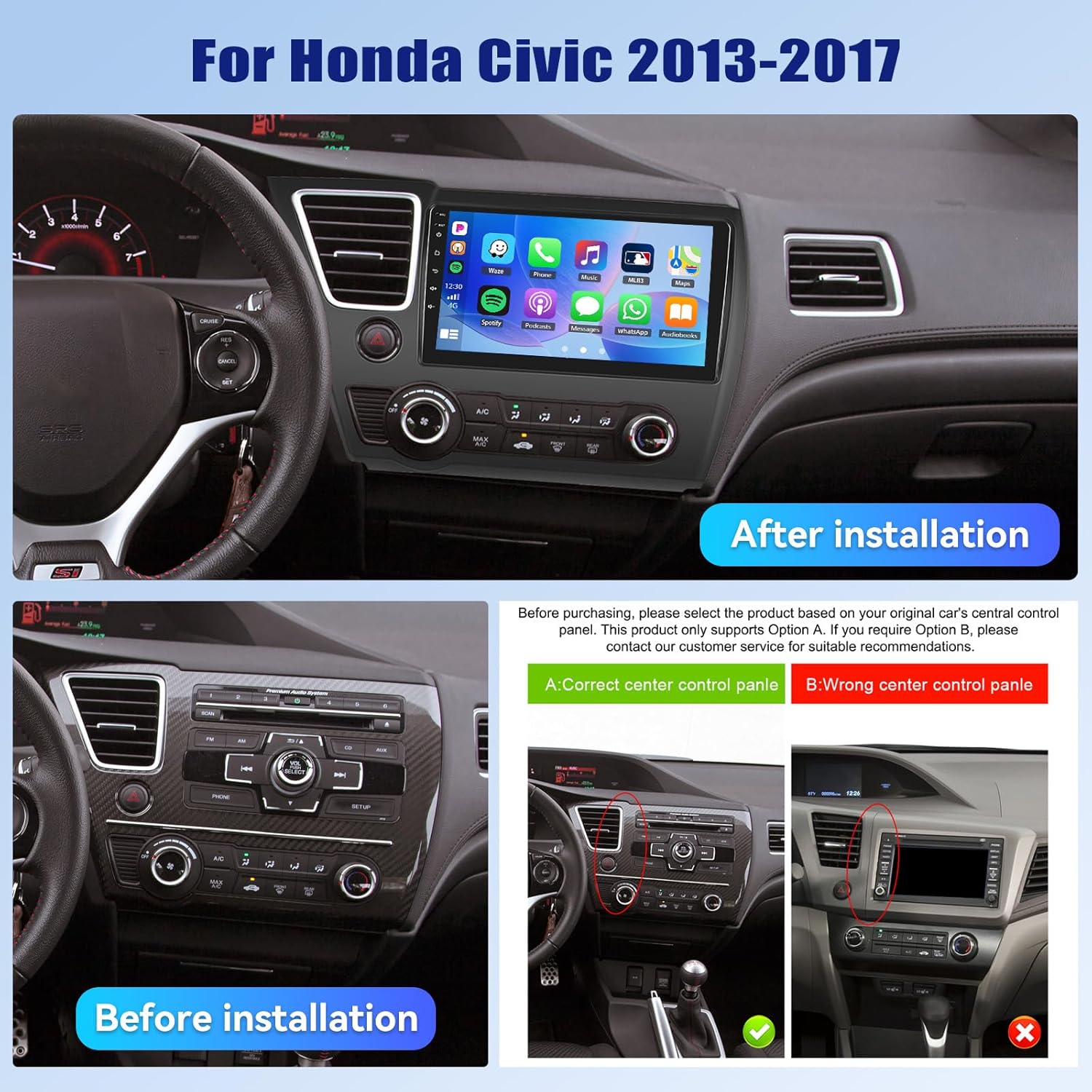
- ความเข้ากันได้ของยานพาหนะ: This unit is designed specifically for Honda Civic models from 2013 to 2017. Verify compatibility with your vehicle's center console before installation.
- แหล่งจ่ายไฟ: Ensure the vehicle's power supply is disconnected before beginning installation to prevent electrical shock or damage.
- การเดินสายไฟ: Follow the provided wiring diagram carefully. Incorrect wiring can cause damage to the unit or vehicle.
- การใช้งานขณะขับรถ: อย่าใช้งานอุปกรณ์ในลักษณะที่รบกวนสมาธิในการขับขี่ ให้ความสำคัญกับความปลอดภัยบนท้องถนนเสมอ
- อุณหภูมิ: หลีกเลี่ยงการวางเครื่องไว้ในที่ที่มีอุณหภูมิสูงหรือแสงแดดโดยตรงเป็นเวลานาน
3. เนื้อหาบรรจุภัณฑ์
ตรวจสอบว่ามีรายการทั้งหมดอยู่ในแพ็คเกจ:
- วิทยุรถยนต์ 1 เครื่อง
- สายไฟ 1 เส้น
- 1 x รถ ด้านหลัง View กล้อง
- 1 x ชุดเครื่องมือติดตั้ง
- เสาอากาศ GPS 1 เส้น
- 1 x สายอินพุตกล้องด้านหลัง
- สาย 1 x RCA
- สาย USB 2 เส้น
- 1 x คู่มือผู้ใช้
- ไมโครโฟน 1 ตัว
- 1 x Original Car USB & Radio Adapter Cable
- ตัวถอดรหัส Canbus 1 ตัว

4. สินค้าหมดview
4.1 คุณสมบัติหลัก
- ระบบปฏิบัติการ: แอนดรอยด์ 15
- โปรเซสเซอร์: Qualcomm 8-Core Chip
- หน่วยความจำ: แรม 4GB + รอม 64GB
- แสดง: 9-inch 1280x720P IPS Capacitive Touchscreen
- การเชื่อมต่อ: Bluetooth 5.1, Dual-Band WiFi (2.4GHz & 5GHz)
- การรวมสมาร์ทโฟน: Wireless/Wired Apple CarPlay, Wireless/Wired Android Auto, Mirror Link
- เสียง: DSP (Digital Sound Processor) ในตัว
- การนำทาง: GPS Navigation (supports online and offline maps)
- วิทยุ: วิทยุ FM/RDS
- การสนับสนุนกล้อง: AHD Backup Camera (included)
- คุณสมบัติเพิ่มเติม: Steering Wheel Control (SWC), Built-in Cooling Fan, Picture-in-Picture, Customizable UI.


5. คู่มือการติดตั้ง
5.1 การตรวจสอบก่อนการติดตั้ง
Before proceeding with installation, ensure your Honda Civic's center console matches the compatible design. Refer to the image below for guidance.
5.2 แผนผังการเดินสายไฟ
A detailed wiring diagram is typically included with your product. Connect the power cable, speaker wires, GPS antenna, USB cables, rear camera input, and other accessories according to the diagram. Ensure all connections are secure to prevent malfunctions.
5.3 การติดตั้งทางกายภาพ
- Carefully remove the original car stereo and trim panels.
- Connect the new car stereo's wiring harness to the vehicle's existing harness, matching colors and connectors.
- ติดตั้งเสาอากาศ GPS ในตำแหน่งที่มีสัญญาณชัดเจน view ของท้องฟ้า
- Route the rear camera cable and install the camera (if applicable).
- ติดตั้งเครื่องเสียงรถยนต์ใหม่เข้ากับช่องบนแผงหน้าปัดอย่างแน่นหนา
- ติดตั้งแผงตกแต่งทั้งหมดกลับเข้าที่
- Reconnect the vehicle's power supply.
6. การตั้งค่าเริ่มต้น
เมื่อเปิดเครื่องครั้งแรก ระบบอาจแนะนำคุณผ่านกระบวนการตั้งค่าเริ่มต้น ซึ่งโดยทั่วไปจะประกอบด้วย:
- เลือกภาษา: เลือกภาษาที่คุณต้องการ
- เวลาและวันที่: ตั้งค่าเขตเวลา วันที่ และเวลาให้ถูกต้อง
- การเชื่อมต่อ WiFi: Connect to a stable Wi-Fi network to enable online features and app downloads.
- การปรับเทียบ GPS: Allow the GPS system to acquire satellite signals for accurate positioning.
7. คู่มือการใช้งาน
7.1 การปรับแต่งอินเทอร์เฟซผู้ใช้
The car stereo offers various customization options for its user interface.
- Shaderlab Topics: Adjust the UI color and font color to your preference.
- การออกแบบหน้าต่าง: Select from different themes (Card, SplitView, Wallpaper) and layouts for easy operation.
- 3D Car Dynamic Effects: Customize the displayed 3D car model, including its color and type (Car, MPV, SUV).


7.2 บลูทู ธ 5.1
Connect your smartphone via Bluetooth for hands-free calling, music playback, and access to your phone's contacts and call history. Bluetooth 5.1 offers improved range and stability.

วิทยุ FM/RDS 7.3
Tune into your favorite radio stations. The RDS (Radio Data System) feature provides additional information such as station name, song title, and traffic updates where available.

7.4 CarPlay ไร้สายและ Android Auto
Connect your iPhone or Android smartphone wirelessly or via USB to access CarPlay or Android Auto. This allows for hands-free calls, navigation, music streaming, and voice commands (Siri or Google Assistant).

Video 7.1: Wireless CarPlay Radio Operation Guide with Qualcomm Chips. This video demonstrates the setup and usage of the Wireless CarPlay feature on the UNITOPSCI car stereo, highlighting its responsiveness and ease of use.
7.5 การเชื่อมโยงมิเรอร์
Mirror Link allows you to display your smartphone screen directly onto the car stereo. Android users can also control their phone applications directly from the car's touchscreen.
7.6 ระบบนำทาง GPS
The unit supports both online and offline navigation. Connect to Wi-Fi for real-time traffic updates and precise route guidance. Pre-installed maps or downloadable map applications can be used.

7.7 DSP Audio Processing
The built-in Digital Sound Processor (DSP) allows for advanced audio tuning. Adjust equalization, sound field modes, and speaker settings to achieve strong bass, soft midrange, and clear treble for a personalized audio experience.

7.8 Cooling Fan Settings
The integrated cooling fan system helps maintain optimal operating temperature for the radio. You can monitor the temperature and adjust fan settings (e.g., Auto/On) to ensure stable performance.
7.9 ภาพซ้อนภาพ (PIP)
The Picture-in-Picture feature allows you to view video content simultaneously while performing other operations, such as navigation or music playback.
กล้องมองหลัง AHD 7.10 นิ้ว
The included AHD wide-angle backup camera provides clear night vision and is waterproof. It assists with parking by displaying a real-time view of the area behind your vehicle with parking guidelines. Note: Does not support original car camera.

7.11 ระบบควบคุมพวงมาลัย (SWC)
Utilize your vehicle's existing steering wheel buttons to control various functions of the car stereo, such as adjusting volume, changing tracks, and answering calls. This enhances convenience and safety while driving.

7.12 แยกหน้าจอ
The split-screen function allows for simultaneous display of two applications, such as navigation and music, for convenient multitasking.
8 การแก้ไขปัญหา
| ปัญหา | สาเหตุที่เป็นไปได้ | สารละลาย |
|---|---|---|
| เครื่องไม่เปิด | เดินสายไฟไม่ถูกต้อง ฟิวส์ขาด แหล่งจ่ายไฟฟ้าไม่เพียงพอ | Check power connections and fuses. Ensure proper voltage. Consult a professional if unsure. |
| ไม่มีเสียง | สายลำโพงหลุดออก ระดับเสียงเบาเกินไป ฟังก์ชันปิดเสียงทำงานอยู่ | Verify speaker connections. Increase volume. Deactivate mute. Check DSP settings. |
| บลูทูธไม่เชื่อมต่อ | Bluetooth off on phone/unit; Device not in pairing mode; Interference. | Ensure Bluetooth is enabled on both devices. Put unit in pairing mode. Try pairing in a different location. |
| สัญญาณ GPS ขาดหาย/ไม่แม่นยำ | GPS antenna obstructed; Antenna faulty; Software issue. | Relocate GPS antenna to a clear area. Check antenna connection. Update navigation software. |
| หน้าจอสัมผัสไม่ตอบสนอง | System frozen; Screen calibration needed. | Restart the unit. If issue persists, perform a factory reset (refer to settings menu). |
| กล้องหลังไม่แสดงผล | Camera cable disconnected; Camera faulty; Incorrect settings. | Check camera input cable connection. Verify camera power. Ensure reverse gear signal is connected. |
9. ข้อมูลจำเพาะ
- น้ำหนักสินค้า: 4.36 ปอนด์
- ขนาดแพ็คเกจ: 15.35 x 9.65 x 3.35 นิ้ว
- ขนาดจอแสดงผล: 9 นิ้ว
- ขนาดหน้าจอ: 9 นิ้ว
- ระบบปฏิบัติการ: แอนดรอยด์
- ความจุหน่วยความจำ: 64GB
- ประเภทหน้าจอสัมผัส: ความจุ
- เทคโนโลยีการเชื่อมต่อ: บลูทู ธ Wi-Fi
- ประเภทแผนที่: North America, Worldwide
- โหมดเอาต์พุตเสียง: สเตอริโอ
10. การรับประกันและการสนับสนุน
UNITOPSCI offers the following support for this product:
- การรับประกัน: 1-Year Manufacturer's Warranty.
- การรับประกันคืนเงิน: 30-day money-back service.
- บริการทดแทน: 12-month replacement service.
- การสนับสนุนหลังการขาย: Dedicated 24/7 professional after-sales team available to assist with installation or usage inquiries.
หากต้องการความช่วยเหลือทางออนไลน์ โปรดติดต่อ: UNITOPSCI@126.com