
1. บทนำ
Welcome to the user manual for your RebotAi A9 8.7-inch Android 15 Tablet. This guide provides essential information on setting up, operating, maintaining, and troubleshooting your device to ensure a smooth and enjoyable user experience. Please read this manual carefully before using your tablet.
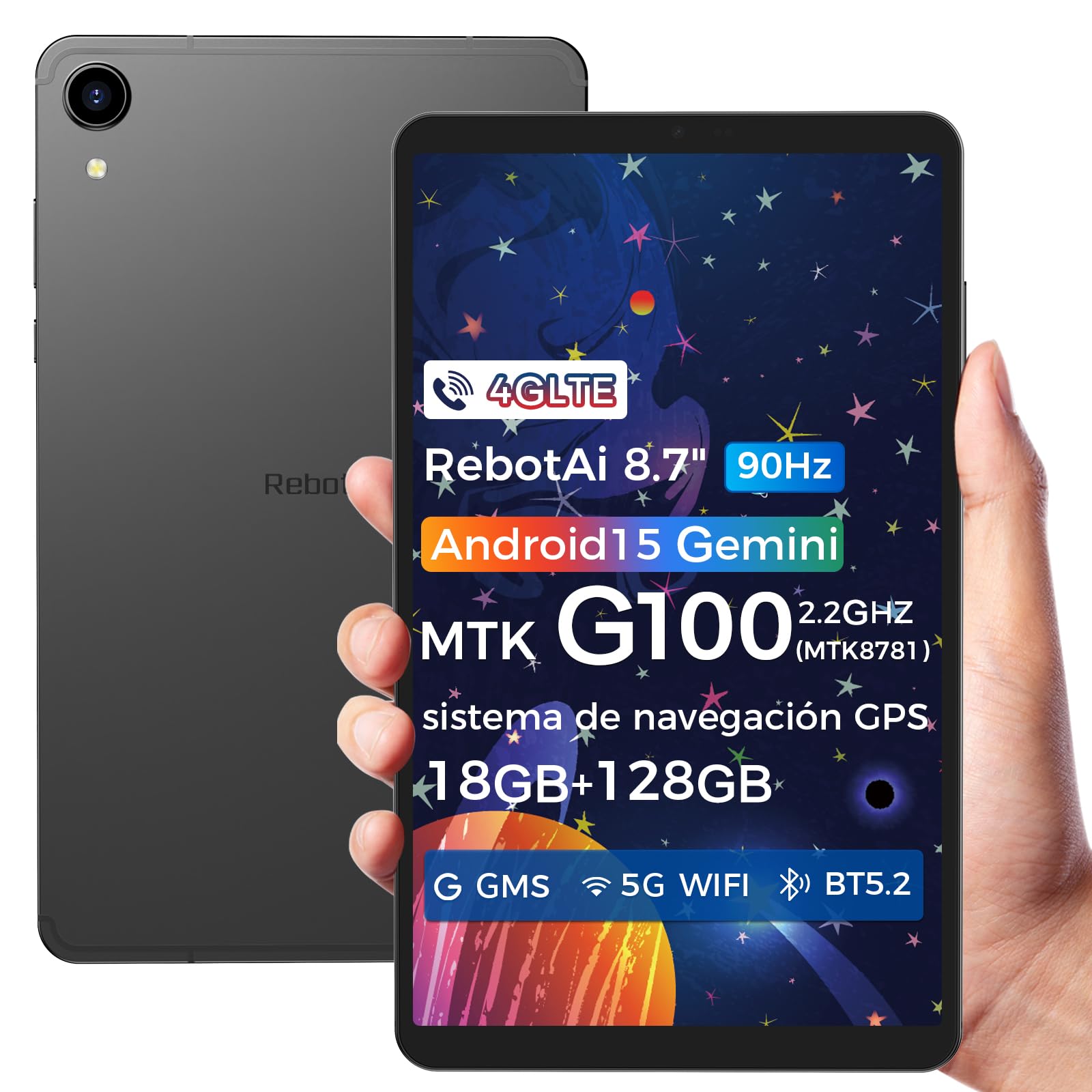
Image: General view of the RebotAi A9 tablet, showcasing การออกแบบที่เพรียวบาง
2. เนื้อหาบรรจุภัณฑ์
เมื่อแกะกล่องโปรดตรวจสอบว่ามีสินค้าครบทั้งหมด:
- แท็บเล็ต RebotAi A9
- สายชาร์จ USB-C
- เครื่องมือถอดซิม
- คู่มือเริ่มต้นอย่างรวดเร็ว
- บัตรรับประกัน
บันทึก: In accordance with global environmental guidelines, the RebotAi A9 tablet does not include a power adapter. Please use a compatible USB-C power adapter (not included) for charging.
3. อุปกรณ์โอเวอร์view
Familiarize yourself with the physical components of your RebotAi A9 tablet.

ภาพ: โอเวอร์view of the RebotAi A9 tablet's key features, including its 8.68-inch display, Android 15 OS, 1340x800 IPS resolution with 90Hz refresh rate, MediaTek Helio G100 processor, slim design, 6GB RAM, 5000mAh battery, 128GB ROM, dual-band Wi-Fi, GPS, Bluetooth 5.2, and Widevine L1 support.
การออกแบบทางกายภาพ
- แสดง: 8.7-inch IPS screen with 1340 x 800 resolution and 90Hz refresh rate for vibrant colors and smooth visuals.
- Casing: โลหะ casing with nano-coating process, offering a smooth feel and elegant appearance, designed for water and impact resistance.
- ขนาด : Approximately 7.8 mm thin.
- น้ำหนัก: น้ำหนักประมาณ 360 กรัม.

Image: This image highlights the tablet's durable construction, featuring nano-injection molding technology for advanced water and impact resistance. It shows details of the impermeability specifications and antenna slots designed with nanotechnology.
เสียงและเซ็นเซอร์
- วิทยากร: Dual-BOX speakers for enhanced audio experience.
- แจ็คหูฟัง: ช่องเสียบหูฟังขนาดมาตรฐาน 3.5 มม.
- เซ็นเซอร์: High-precision gyroscope, light sensor, and gravity sensor for accurate orientation, automatic screen rotation, and improved navigation.

Image: This image details the tablet's advanced features, including dual-band Wi-Fi (2.4GHz/5GHz), Bluetooth 5.2, dual-box speakers, and a 3.5mm headphone jack. It also highlights fast connectivity and precise positioning with A-GPS and 4-mode GPS, along with a 450 nits bright display.
4. การตั้งค่า
4.1 การเปิดเครื่องครั้งแรก
- Press and hold the Power button located on the side of the tablet until the RebotAi logo appears.
- ทำตามคำแนะนำบนหน้าจอเพื่อเลือกภาษา เชื่อมต่อกับเครือข่าย Wi-Fi และตั้งค่าบัญชี Google ของคุณ
4.2 การติดตั้งซิมการ์ดและการ์ด MicroSD
The tablet supports two nano-SIM cards for 4G LTE connectivity and a microSD card for storage expansion.
- ค้นหาถาดใส่การ์ด SIM/MicroSD ที่ด้านข้างของแท็บเล็ต
- เสียบเครื่องมือถอดซิมเข้าไปในรูเล็กๆ ข้างถาดเพื่อเปิดออก
- Carefully place your nano-SIM card(s) and/or microSD card into the designated slots on the tray. Ensure the gold contacts are facing down.
- ค่อยๆ ดันถาดกลับเข้าไปในแท็บเล็ตจนกระทั่งล็อคเข้าที่

Image: This image illustrates the tablet's connectivity options, highlighting 4G LTE support, Bluetooth 5.2, dual-band Wi-Fi (2.4GHz and 5GHz), and multi-system GPS (GPS/Galileo/Glonass). A close-up of the dual SIM card slot is also visible, indicating support for mobile data and calls.
5. ปฏิบัติการ
5.1 การแสดงผลและภาพ
The 8.7-inch IPS display with 1340 x 800 resolution and 90Hz refresh rate provides a clear and fluid visual experience. With 450 nits brightness, content remains visible even in bright environments. Widevine L1 support ensures high-definition video streaming from compatible services.

Image: An image showing the tablet being used for gaming, emphasizing its smooth performance for games and videos. It highlights the 8.68-inch screen, G100 chip, and 90Hz refresh rate for an uninterrupted and comfortable visual experience.
5.2 การปฏิบัติงาน
Powered by the MediaTek Helio G100 octa-core processor (MT8781), the RebotAi A9 delivers enhanced performance for multitasking, gaming, and media consumption. It features two high-performance Cortex-A76 cores and six low-power Cortex-A55 cores, along with a Mali-G57 MC2 GPU.

Image: An image detailing the MediaTek Helio G100 processor, showing its octa-core CPU architecture (Cortex-A76 and Cortex-A55 cores), Mali-G57 MC2 GPU, and 2.2 GHz frequency. A benchmark comparison chart is included, demonstrating its performance relative to other chipsets.
5.3 กล้องถ่ายรูป
The tablet is equipped with a 13MP rear camera and a 5MP front camera, suitable for online meetings, video calls, and capturing daily moments with clear and natural images.

Image: This image focuses on the tablet's camera system, showing the 5MP front camera and 13MP rear camera. The accompanying text indicates these cameras provide clear and natural images suitable for online meetings and daily recordings.
5.4 Android 15 and AI Features
Running on Android 15 and GMS certified, the RebotAi A9 provides access to a wide range of Google services and applications. Its high-performance hardware and A9 chip are optimized for comfortable use of various AI tools, enhancing user interaction and productivity.

Image: An image depicting the tablet's interface with various app icons, emphasizing its Android 15 operating system and GMS certification. It highlights the high-performance hardware and A9 chip, enabling comfortable use of various AI tools.
6. การเชื่อมต่อ
The RebotAi A9 tablet offers comprehensive connectivity options:
- 4G แอลทีอี: Dual nano-SIM support for mobile data and calls, ensuring connectivity on the go.
- อินเตอร์เน็ตไร้สาย 5G: Dual-band Wi-Fi (2.4GHz and 5GHz) for fast and stable internet connections, ideal for streaming and downloads.
- Bluetooth 5.2: For connecting wireless accessories such as headphones, speakers, and keyboards with lower power consumption.
- จีพีเอส: Multi-system GPS (GPS/Galileo/Glonass) for precise positioning and navigation.
7. การจัดเก็บและประสิทธิภาพ
- แรม : 6GB of installed RAM, expandable virtually by an additional 12GB for a total of 18GB, ensuring smooth multitasking.
- พื้นที่เก็บข้อมูลภายใน: 128GB of internal storage for your apps, photos, and files.
- พื้นที่เก็บข้อมูลที่ขยายได้: Supports microSD card expansion up to 1TB, providing ample space for large media fileและเอกสารต่างๆ
8. แบตเตอรี่และการชาร์จ
The RebotAi A9 is equipped with a 5000mAh high-capacity battery, offering extended usage times.
- อายุการใช้งานแบตเตอรี่: Up to 12 hours of general use on a single charge.
- ชาร์จเร็ว: Supports 20W PD fast charging, allowing the tablet to be fully charged quickly.
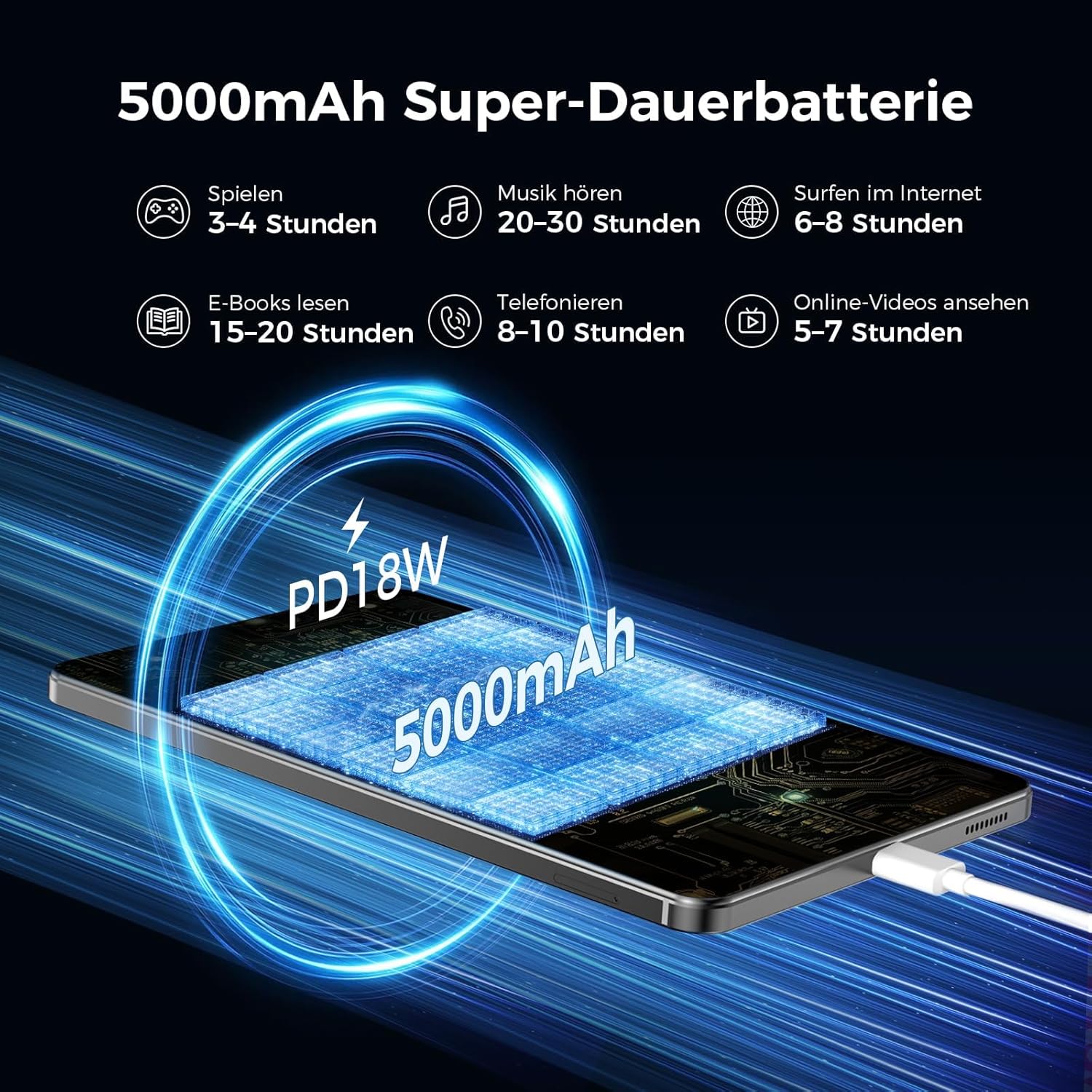
Image: An image illustrating the 5000mAh battery capacity and its estimated usage times for various activities: 3-4 hours gaming, 20-30 hours music, 6-8 hours internet browsing, 15-20 hours e-reading, 8-10 hours calls, and 5-7 hours online videos. It also shows the tablet being charged via PD18W fast charging.
9. การบำรุงรักษา
To ensure the longevity and optimal performance of your RebotAi A9 tablet, follow these maintenance guidelines:
- การทำความสะอาด: ใช้ผ้านุ่มไม่เป็นขุยทำความสะอาดหน้าจอและตัวเครื่อง หลีกเลี่ยงวัสดุที่มีฤทธิ์กัดกร่อนหรือสารเคมีรุนแรง
- การดูแลแบตเตอรี่ Avoid extreme temperatures. Do not let the battery fully discharge frequently. For long-term storage, charge the battery to about 50%.
- การอัปเดตซอฟต์แวร์: ตรวจสอบและติดตั้งการอัปเดตระบบเป็นประจำ เพื่อให้มั่นใจได้ถึงความปลอดภัยและประสิทธิภาพที่ดีขึ้น
- การจัดการพื้นที่เก็บข้อมูล: ล้างสิ่งที่ไม่จำเป็นออกเป็นระยะๆ fileและแอปต่างๆ เพื่อเพิ่มพื้นที่ว่างและรักษาประสิทธิภาพการทำงาน
10 การแก้ไขปัญหา
หากคุณพบปัญหาเกี่ยวกับแท็บเล็ตของคุณ ให้ลองทำตามขั้นตอนการแก้ไขปัญหาทั่วไปต่อไปนี้:
- แท็บเล็ตไม่เปิด: ตรวจสอบให้แน่ใจว่าแบตเตอรี่ชาร์จเต็มแล้ว เสียบแท็บเล็ตเข้ากับแหล่งจ่ายไฟแล้วลองใหม่อีกครั้ง
- หน้าจอไม่ตอบสนอง: Restart the tablet by holding the power button. If unresponsive, force restart by holding the power button for an extended period (usually 10-15 seconds).
- ปัญหาการเชื่อมต่อ Wi-Fi/4G: Toggle Wi-Fi/Mobile Data off and on. Restart your router or contact your service provider.
- แอปขัดข้อง: Clear the cache of the problematic app or reinstall it. Ensure your tablet's software is up to date.
- ประสิทธิภาพช้า: ปิดแอปที่ไม่ได้ใช้ ล้างแคช และตรวจสอบให้แน่ใจว่ามีพื้นที่เก็บข้อมูลเพียงพอ พิจารณารีเซ็ตเป็นค่าโรงงานเป็นทางเลือกสุดท้าย (สำรองข้อมูลของคุณก่อน)
11. ข้อมูลจำเพาะ
| คุณสมบัติ | รายละเอียด |
|---|---|
| ยี่ห้อ | รีบอทเอไอ |
| ชื่อรุ่น | A9 |
| ระบบปฏิบัติการ | แอนดรอยด์ 15 |
| โปรเซสเซอร์ | MediaTek Helio G100 (MT8781) Octa-Core |
| แรม | 6 GB (ขยายได้ถึง 18 GB) |
| ความจุของหน่วยความจำ | 128GB |
| พื้นที่เก็บข้อมูลแบบขยายได้ | รองรับพื้นที่จัดเก็บข้อมูลสูงสุด 1 TB ผ่านการ์ด microSD |
| ขนาดหน้าจอ | 8.7 Inches (8.68 Inches) |
| ความละเอียดหน้าจอ | 1340 x 800 IPS, 90Hz Refresh Rate |
| ความละเอียดสูงสุดที่รองรับ | 2560 Pixels (for content playback) |
| ความสว่าง | 450 นิต |
| กล้องหลัง | 13 MP |
| กล้องหน้า | 5 MP |
| ความจุของแบตเตอรี่ | 5000 มิลลิแอมป์ |
| อายุการใช้งานแบตเตอรี่ | นานถึง 12 ชั่วโมง |
| การชาร์จไฟ | 20W PD Fast Charging (cable included, adapter not included) |
| การเชื่อมต่อ | 4G LTE (Dual Nano-SIM), 5G WiFi (2.4GHz/5GHz), Bluetooth 5.2, GPS (GPS/Galileo/Glonass) |
| สี | สีเทา |
12. การรับประกันและการสนับสนุน
RebotAi offers a รับประกัน 2 ปี for your A9 tablet. For any technical issues or support inquiries, please contact RebotAi customer service. We guarantee a quick response within 24 hours.
โปรดดูรายละเอียดข้อกำหนดและเงื่อนไขได้จากบัตรรับประกันที่แนบมาในกล่องสินค้า