
1. ข้อมูลด้านความปลอดภัยที่สำคัญ
โปรดอ่านคำแนะนำด้านความปลอดภัยทั้งหมดก่อนใช้ผลิตภัณฑ์นี้ การไม่ปฏิบัติตามคำแนะนำเหล่านี้อาจทำให้เกิดไฟฟ้าช็อต ไฟไหม้ หรือการบาดเจ็บได้
- Do not expose the power bank to extreme temperatures (above 45°C or below 0°C) or direct sunlight.
- Do not disassemble, modify, or repair any part of the power bank.
- เก็บพาวเวอร์แบงค์ให้ห่างจากน้ำหรือของเหลวอื่นๆ
- ห้ามทำพาวเวอร์แบงค์ตกกระแทก เจาะ หรือออกแรงมากเกินไป
- ตรวจสอบให้แน่ใจว่ามีการระบายอากาศที่เหมาะสมในระหว่างการใช้งานและการชาร์จ
- This power bank is CCC Certified and includes 9 safety mechanisms: overcharge, overcurrent, short circuit, overvoltage, over-discharge, overheat, recovery, overpower, and flame-retardant casinการป้องกัน g

Image: Advanced safety protection features of the VENTION Power Bank.
2. สินค้าหมดview
The VENTION 45W 20000mAh Power Bank is a portable charging solution designed for various electronic devices. It features a high-capacity battery, fast charging capabilities, and a compact design for travel convenience.
- การชาร์จความเร็วสูง 45W: Supports Power Delivery (PD) and PPS protocols for rapid charging of compatible devices.
- ความจุ 20000mAh: Provides multiple charges for smartphones and tablets, and can partially charge laptops.
- สาย USB-C ในตัว: Integrated USB-C cable for convenient charging without needing an extra cable. This cable also functions as a lanyard.
- จอแสดงผลดิจิตอล LED: แสดงให้เห็นว่าส่วนที่เหลืออีก percen แบตเตอรี่tage.
- พอร์ตเอาต์พุตหลายพอร์ต: Includes an additional USB-C port (45W output) and a USB-A port (22.5W output) for charging up to three devices simultaneously.
- การออกแบบกะทัดรัดและพกพาสะดวก: Smaller than many smartphones, making it easy to carry in pockets or bags.

Image: The VENTION 45W 20000mAh Power Bank.

Image: The compact size of the VENTION Power Bank compared to a smartphone.

Image: The built-in USB-C cable also serves as a convenient lanyard.
3. เนื้อหาบรรจุภัณฑ์
แพ็คเกจประกอบด้วยรายการต่อไปนี้:
- 1 x VENTION 45W 20000mAh Power Bank
- ถุงผ้าหูรูด 1 ใบ
- 1 x คู่มือผู้ใช้
4. ข้อมูลจำเพาะ
| คุณสมบัติ | ข้อมูลจำเพาะ |
|---|---|
| ยี่ห้อ | เวนชั่น |
| ชื่อรุ่น | FHGH0 |
| หมายเลขรุ่น | เอฟเอชจี |
| ความจุของแบตเตอรี่ | 20000 มิลลิวินาทีamp ชั่วโมง (77 ชั่วโมง) |
| ประเภทเซลล์แบตเตอรี่ | ลิเธียมโพลีเมอร์ |
| น้ำหนักแบตเตอรี่ | 254 กรัม |
| ช่องต่อเข้า (สาย USB-C ในตัว) | 5V=3A, 9V=3A, 12V=2.5A, 15V=2A, 20V=1.5A (สูงสุด 30W) |
| อินพุต (พอร์ต USB-C) | 5V=3A, 9V=3A, 12V=2.5A, 15V=2A, 20V=1.5A (สูงสุด 30W) |
| ช่องต่อออก (สาย USB-C ในตัว) | 5V=3A, 9V=3A, 12V=3A, 15V=3A, 20V=2.25A (สูงสุด 45W) |
| เอาต์พุต (พอร์ต USB-C) | 5V=3A, 9V=3A, 12V=3A, 15V=3A, 20V=2.25A (สูงสุด 45W) |
| เอาต์พุต (พอร์ต USB-A) | 5V=3A, 9V=2.5A, 12V=1.87A (สูงสุด 22.5W) |
| ผลผลิตรวม | 5V=3A |
| ขนาด (ยาว x กว้าง x หนา) | 6.1"L x 4.3"W x 1.4"Th (10.35 x 7.14 cm) |
| คุณสมบัติพิเศษ | Slim, LED Digital Display, Built-in USB-C Cable |
| สี | สีเทา |
5. การตั้งค่า
5.1 การชาร์จ Power Bank ครั้งแรก
Before first use, fully charge the power bank to ensure optimal performance. The LED digital display will show the battery percentage. A full charge is indicated by 100% on the display.
- เชื่อมต่อสาย USB-C ในตัวหรือสาย USB-C แยกต่างหากเข้ากับพอร์ตอินพุตของพาวเวอร์แบงค์
- Connect the other end of the cable to a compatible USB wall charger (not included). For fastest charging, use a 30W or higher PD-compatible charger.
- จอแสดงผล LED จะแสดงความคืบหน้าในการชาร์จ
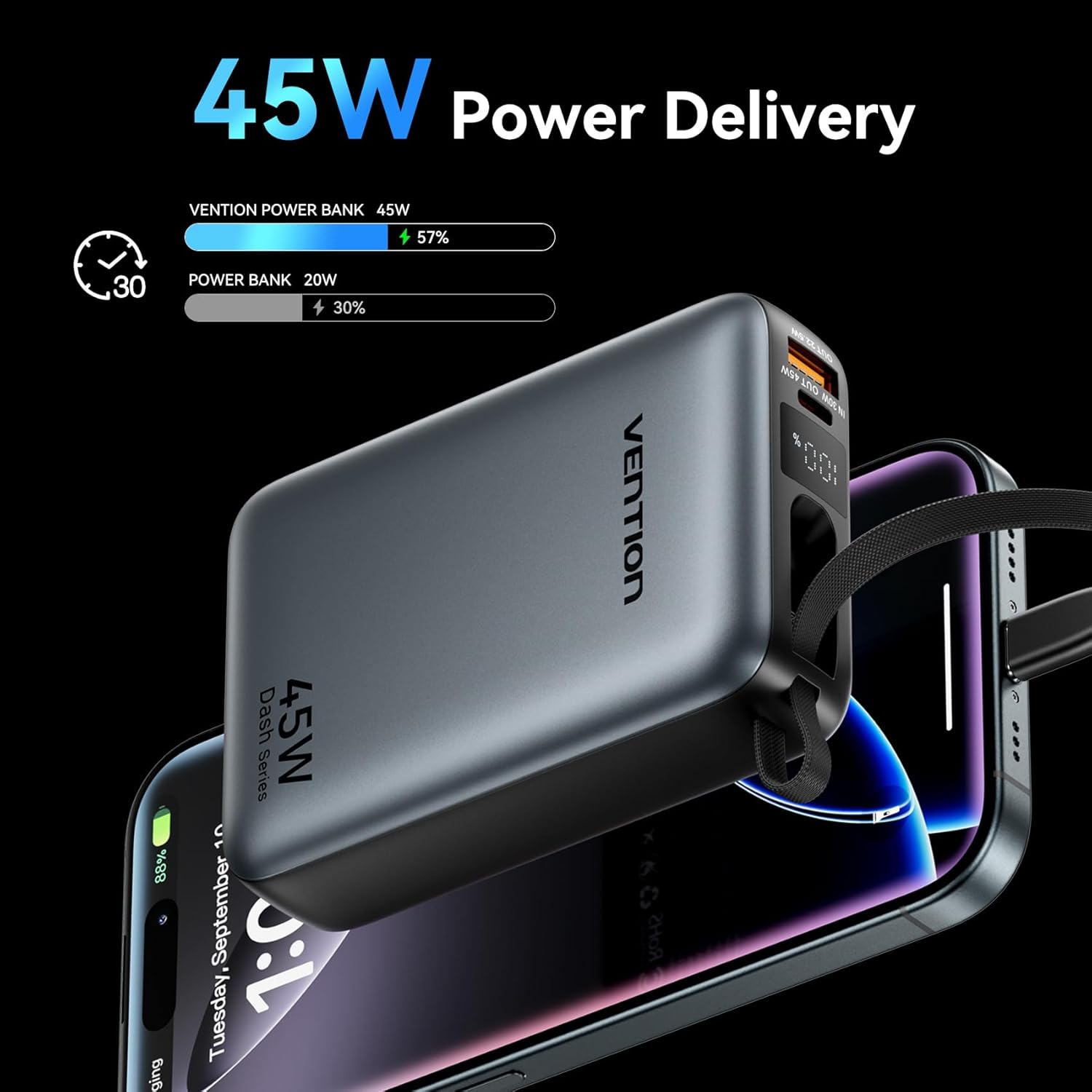
Image: The power bank's LED display showing charging status.
6. คู่มือการใช้งาน
6.1 อุปกรณ์ชาร์จ
The power bank can charge various devices using its built-in USB-C cable, dedicated USB-C port, or USB-A port.
- การใช้สาย USB-C ในตัว: Pull out the integrated USB-C cable from its storage slot and connect it directly to your device's USB-C charging port.
- การใช้พอร์ต USB-C: Connect a compatible USB-C to USB-C cable (not included) to the power bank's USB-C output port and then to your device.
- การใช้พอร์ต USB-A: Connect a compatible USB-A to your device's charging cable (not included) to the power bank's USB-A output port and then to your device.
พาวเวอร์แบงค์จะเริ่มชาร์จอุปกรณ์ของคุณโดยอัตโนมัติ จอแสดงผล LED จะแสดงเปอร์เซ็นต์แบตเตอรี่ที่เหลืออยู่tage.
6.2 การชาร์จพร้อมกัน
The VENTION Power Bank supports charging up to three devices concurrently using its built-in USB-C cable, USB-C port, and USB-A port. Note that the total output will be shared among the devices, and charging speed may vary depending on the number of devices and their power requirements.

Image: Charging three devices simultaneously with the power bank.

Image: The built-in USB-C cable ready for use.
7. การบำรุงรักษาและการดูแล
การบำรุงรักษาอย่างถูกวิธีจะช่วยให้พาวเวอร์แบงค์ของคุณมีอายุการใช้งานยาวนานและรักษาประสิทธิภาพการทำงานได้ดี
- การทำความสะอาด: เช็ดพาวเวอร์แบงค์ด้วยผ้านุ่มและแห้ง ห้ามใช้สารเคมีรุนแรงหรือวัสดุที่มีฤทธิ์กัดกร่อน
- พื้นที่จัดเก็บ: เก็บพาวเวอร์แบงค์ไว้ในที่แห้งและเย็น หลีกเลี่ยงแสงแดดโดยตรงและอุณหภูมิที่สูงหรือต่ำเกินไป
- สุขภาพแบตเตอรี่: To maintain optimal battery health, fully charge the power bank at least once every 3-6 months, even if not in use. Avoid completely discharging the battery frequently.
- การควบคุมอุณหภูมิ: The power bank features smart temperature control to prevent overheating during operation and charging.

Image: Smart temperature control system for safe operation.
8 การแก้ไขปัญหา
หากคุณพบปัญหาใดๆ กับพาวเวอร์แบงค์ VENTION โปรดดูปัญหาและวิธีแก้ไขที่พบบ่อยต่อไปนี้:
- พาวเวอร์แบงค์ไม่ชาร์จ:
- ตรวจสอบให้แน่ใจว่าสายชาร์จเชื่อมต่อกับพาวเวอร์แบงค์และเครื่องชาร์จติดผนังอย่างแน่นหนา
- Verify that the wall charger is functioning correctly and provides sufficient power (e.g., 30W PD charger).
- ลองใช้สายชาร์จหรืออะแดปเตอร์ติดผนังแบบอื่น
- อุปกรณ์ไม่ชาร์จจากพาวเวอร์แบงค์:
- ตรวจสอบว่าพาวเวอร์แบงค์มีประจุเพียงพอหรือไม่
- Ensure the cable connecting the power bank to your device is securely connected and compatible.
- ลองเสียบเข้ากับพอร์ตอื่นของพาวเวอร์แบงค์ หรือใช้สายชาร์จอื่นดู
- Some devices may require specific charging protocols; ensure your device is compatible with the power bank's output.
- การชาร์จช้า:
- Ensure your device supports fast charging protocols (PD/PPS) and that you are using a compatible cable.
- Charging speed may decrease as the power bank's battery level increases to protect the device.
- Charging multiple devices simultaneously can reduce the charging speed for each individual device.
9. การรับประกันและการสนับสนุน
VENTION products are designed and manufactured to the highest quality standards. For warranty service or support, please contact VENTION directly.
- Webเว็บไซต์: www.ventiontech.com
- อีเมล: vention@ventiontech.com